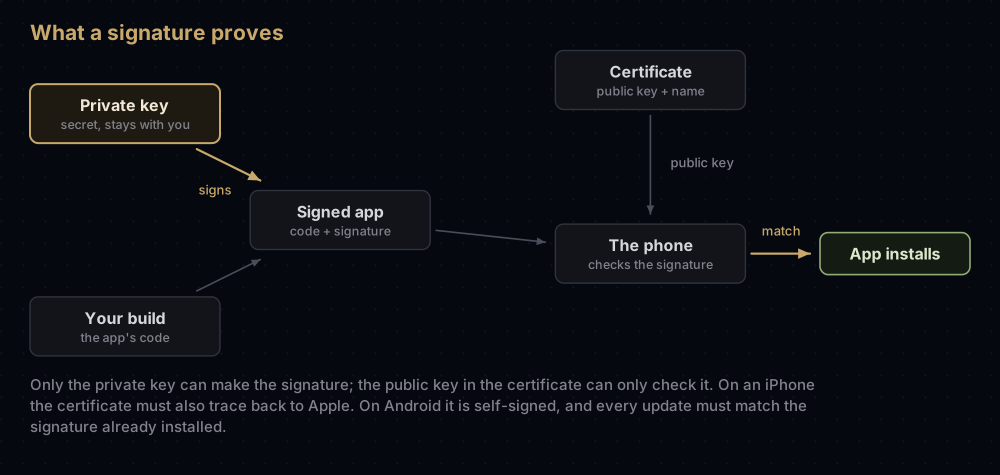
App signing is how a phone knows an app really comes from its developer and has not been changed since. The developer signs every build with a private key that only they hold, and the phone checks that signature before it installs or updates the app.
iPhones and Android phones build on that same idea in different ways. Apple vouches for developers by issuing their certificates, and six separate pieces must agree before an iPhone installs a build. Android has no authority in the middle: developers make their own certificates, and the phone insists that every update carries the same signature as the version already installed.
This page is the map for a series of 45 posts about those keys, certificates and profiles, and the push notification services that rely on them. Start with the mental model below, then jump to the post that matches your problem.
Who this series is for
- Developers on iOS, Android, Flutter or React Native, including anyone who pasted an error message into a search box and wants the fix.
- People who are not developers and met a signing message on their own phone. Two posts are written for you, and the others explain things in plain words before the technical detail.
The four building blocks
Every certificate, key file and profile in this series is built from four pieces. Think of signing an official document with a personal stamp.
| Piece | Everyday version | What it really is | Keep it secret? |
|---|---|---|---|
| Private key | Your personal stamp | A secret number that creates signatures | Yes, always |
| Public key | A sample imprint that others compare against | The matching half, which checks signatures but cannot make them | No |
| Certificate | An ID card saying whose stamp this is | A public key plus a name and an expiry date, signed by an authority (Apple) or, on Android, by yourself | No |
| CSR (certificate signing request) | The application form for that ID card | Your public key and details, sent to Apple so it can issue a certificate | No |
One rule explains a surprising number of errors: a certificate cannot sign anything on its own. Signing also needs the matching private key, and that key exists only on the machine that created the CSR. Download the certificate on a second Mac and Xcode reports a missing private key for exactly this reason.
Why iOS checks six things and Android checks two
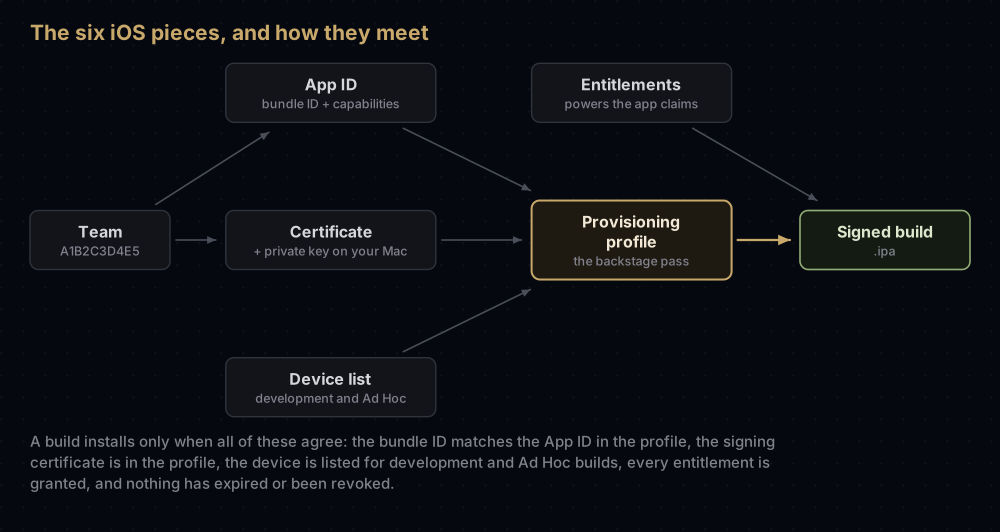
Android asks two questions of an app: what is its package name, and which key signed it? iOS asks six, and all six must agree before a build will install:
| Piece | The question it answers | Example |
|---|---|---|
| Team ID | Who owns this app? | A1B2C3D4E5 |
| Bundle ID | What is the app called internally? | com.example.app |
| App ID | Has Apple registered that name, and which capabilities may it use? | A1B2C3D4E5.com.example.app, with Push Notifications on |
| Certificate and private key | Who signed this build? | An Apple Distribution certificate for your team |
| Provisioning profile | May this signed app run here, with these powers? | An App Store profile for the app |
| Entitlements | Which special powers does the app claim? | Push notifications, App Groups, Sign in with Apple |
A build installs only when all of these hold:
- The app's bundle ID matches the App ID inside the profile.
- The signing certificate is listed in the profile.
- For development and Ad Hoc builds, the device is listed in the profile.
- The profile allows every special power (entitlement) the app asks for.
- The certificate and the profile are both still valid: not expired, not revoked.
Most iOS "code signing" errors are one of those five links breaking.
The bundle ID is a string you choose and write into the app. The App ID is Apple's record of that string, with your Team ID in front and a list of the capabilities the app may use. Once you upload the first build to App Store Connect, the bundle ID can no longer be changed. Widgets and other extensions are separate bundles, each with its own bundle ID, App ID and profile.
Android's equivalent of the bundle ID is the package name (applicationId in Gradle), which Google Play also treats as permanent. The other half is the signing key, and on Google Play there are usually three of them:
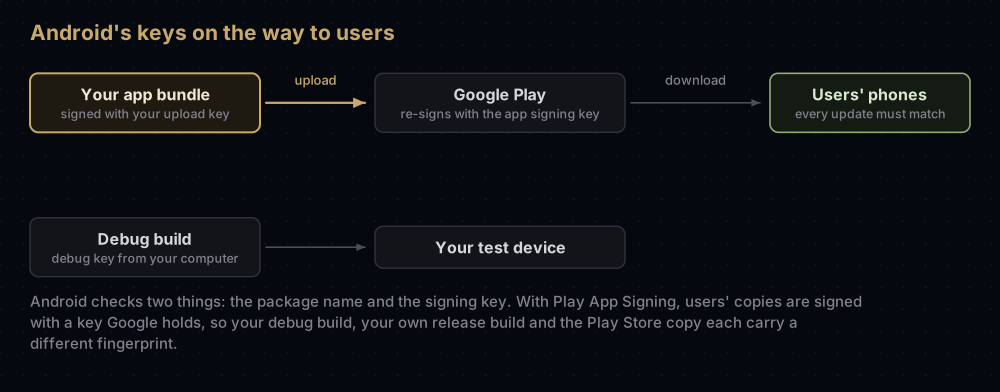
That is why a debug build, your own release build and the Play Store copy all have different fingerprints, and why a feature tied to one fingerprint can work in testing and fail for real users.
iOS and Android side by side
| Job | iOS | Android |
|---|---|---|
| The app's permanent identity | Bundle ID | Package name (applicationId) |
| Who vouches for the developer | Apple issues the certificate | Nobody. Certificates are self-signed; the Play account is the identity, and developer verification adds a registered identity from 2026 |
| Debug signing | Apple Development certificate and a development profile | debug.keystore |
| Store signing | Apple Distribution certificate and an App Store Connect profile | Upload key; Google re-signs with the app signing key |
| Certificate lifetime | Typically one year | 25 years or more, chosen by you |
| Limiting which devices can install | The profile's device list | No device list |
| Special powers | Entitlements, granted by the profile | Manifest permissions, with no signing involved |
| Push credential | APNs .p8 key | Service account JSON for FCM |
| Deep link verification | apple-app-site-association (Team ID and bundle ID) | assetlinks.json (package name and SHA-256 fingerprint) |
| Losing the signing credential | Revoke it and create a new certificate. App Store apps keep working while the membership is active | Upload key: Google can reset it. A self-managed app signing key: the app can never be updated again |
Every post in the series
Apple files and API keys
- p8 vs p12: what each file holds, and which one a job needs.
- Converting signing files: P12 to PEM, P8 to PEM, JKS to P12.
- App Store Connect API key: Issuer ID, Key ID and the
.p8for CI. - Sign in with Apple on Android and the web: the Services ID and its private key.
Push notifications
- APNs explained: how Apple delivers a push to a device.
- APNs auth key: creating the
.p8and adding it to Firebase. - APNs certificate expired: renewing it, or moving to a key.
- How push notifications work: FCM and APNs from server to screen.
- VoIP push on iOS: the VoIP Services certificate or an APNs key.
Apple certificates
- Every certificate in Apple's portal: what each type signs.
- Apple Development vs Apple Distribution: personal and team certificates.
- Certificate signing request on a Mac: making the CSR in Keychain Access.
- Export a .p12 from Keychain: moving a certificate to another Mac or to CI.
- Missing private key in Xcode: why a downloaded certificate is not enough.
- Certificate "is not trusted": the missing WWDR intermediate.
- When a certificate expires or is revoked: what breaks and what keeps working.
- Developer ID certificates: signing Mac apps you distribute yourself.
Identifiers and profiles
- Bundle ID vs App ID: the name in your app and Apple's record of it.
- Changing a bundle ID: what Apple allows, and how to do it in Flutter.
- Every identifier in Apple's portal: the ten types besides App IDs.
- Provisioning profiles explained: what is inside, and why builds fail.
- iOS entitlements: what the app claims and the profile grants.
- Ad Hoc distribution: test builds for registered devices, and when TestFlight is better.
- App Groups: sharing data with widgets and extensions.
- Pass Type ID certificate: signing Apple Wallet passes.
- Apple Pay Merchant ID: the merchant identifier and its two certificates.
Team tooling
- fastlane match: one set of iOS certificates for the whole team.
- Flutter iOS code signing: from the first run to TestFlight.
Android signing
- Play App Signing: the upload key and the app signing key.
- Lost upload key: asking Play Console for a reset.
- Inside a .jks keystore: aliases, passwords and formats.
- Flutter release signing: the keystore,
key.propertiesand Gradle. - The Android debug keystore: location, password and alias.
- keytool commands: the ones Android developers actually use.
- APK signature schemes: v1, v2, v3 and v4.
- Play's hybrid signing: quantum-ready keys and your fingerprints.
- Android developer verification: what changes from 30 September 2026.
Fingerprints and links
- SHA-1 and SHA-256 fingerprints: finding them for all three Android keys.
- Google Sign-In error 10: the fingerprint that is missing.
- assetlinks.json: the file behind Android App Links, and its usual faults.
Firebase
- Where the FCM server key went: sending push with the HTTP v1 API.
- google-services.json and GoogleService-Info.plist: what they hold, and whether they are secret.
For people who are not developers
- "App not installed as package conflicts": the Android message, and fixing it safely.
- "Untrusted Enterprise Developer": the iPhone alert, and when to trust the app.
Where to start
- iOS developers: Bundle ID vs App ID, then Apple Development vs Apple Distribution, provisioning profiles, entitlements and the APNs auth key. Keep missing private key for the day you change Macs.
- Android developers: Play App Signing, then SHA-1 and SHA-256 fingerprints, Google Sign-In error 10, assetlinks.json and developer verification.
- Flutter developers: Flutter release signing and Flutter iOS code signing first, then Play App Signing, how push notifications work and google-services.json.
- Not a developer: the first half of how push notifications work, then whichever phone message brought you here: the Android one or the iPhone one.
Questions people ask
What is app signing?
A signature made with the developer's private key and attached to the app. The phone checks it before installing, so it can tell whether anyone changed the app and whether an update comes from the same publisher as the installed version.
Is a certificate the same as a private key?
No. A certificate holds the public half plus a name and an expiry date, and it is safe to share. The private key makes the signatures and must stay secret. You need both to sign.
Why does iOS need a provisioning profile when Android does not?
The profile is how Apple limits where an app can run and which special powers it gets: specific devices for test builds, and entitlements such as push. Android has no device list, and its app permissions are declared in the manifest without any signing step.
What is the difference between an upload key and an app signing key?
You sign the file you send to Google Play with the upload key. Google checks it, then signs the copies users download with the app signing key, which Google keeps. A lost upload key can be reset; the app signing key stays with Google.
Do Apple certificates expire?
Yes. In practice, both Apple Development and Apple Distribution certificates are valid for one year. When one expires, apps already on the App Store keep working as long as the membership is active; you create a new certificate to keep shipping.
Is it safe to share my SHA-1 fingerprint?
Yes. A fingerprint is a short hash of a public certificate. Team IDs, Key IDs and bundle IDs are also safe to share.
Which signing files must I keep secret?
.p8 keys, .p12 files and their passwords, .jks and .keystore files, key.properties, and service account JSON files. Never commit them to a repository.
Keep reading
- How push notifications work: what all these keys make possible.
- Provisioning profiles explained: the iOS piece that ties the others together.
- Play App Signing: the arrangement required for new Play apps since August 2021.
- p8 vs p12: two Apple key files that are easy to confuse.
- Every certificate in Apple's portal: the full list, explained.