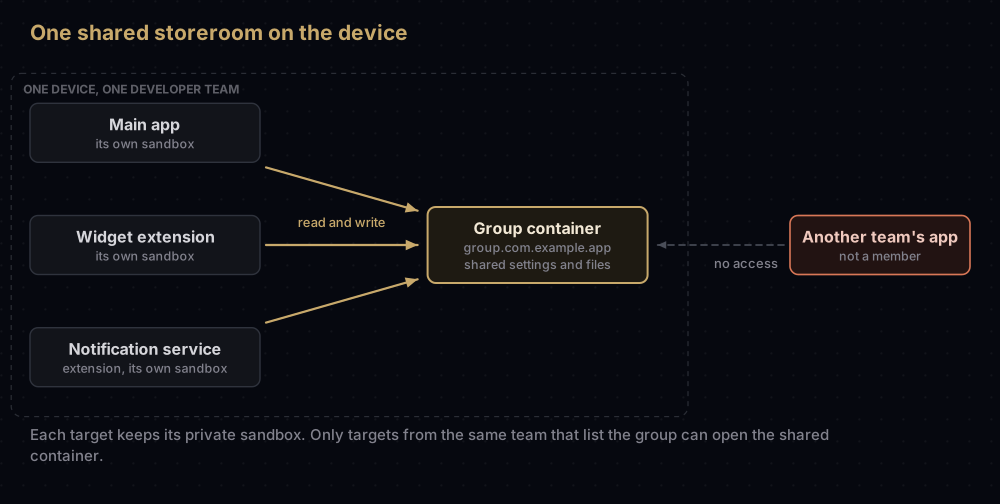
An App Group is a shared storage area that several of your own apps and app extensions can all read and write on the same device. A home screen widget cannot see its main app's data by itself, so you put the app and the widget in the same group, such as group.com.example.app, and both use its shared settings and files.
Setting one up takes three things: register the group identifier with Apple, add the App Groups capability to the app and to every extension that needs the data, and read and write through the group's UserDefaults suite or its container folder. Forget the extension, and its code quietly gets nothing.
The first part of this guide is the plain-language picture. The developer steps, a Swift example, Flutter widgets and the Mac's different history come after.
Why a widget cannot just read the app's data
On an iPhone every app lives in its own sandbox: a private set of folders that nothing else may open. That is a large part of why one app cannot snoop on another.
A widget, a share extension or a notification service extension looks like part of your app, but to iOS it is a separate program with its own bundle ID and its own sandbox. So when the app saves "you are on a 12-day streak", the widget cannot see it.
Think of an apartment building. Each flat (app or extension) has its own locked door. An App Group is a storeroom in the basement, with keys handed only to flats rented by the same owner, your developer team. Anything put in the storeroom can be picked up by any key holder.
The picture holds with two limits. The storeroom exists only on this one device; it is not a sync service. And on iOS, when every flat that holds a key is emptied (all the group's apps are deleted), the system clears the storeroom too.
What an App Group gives you
Membership opens more than a folder. Apple's documentation lists these:
| Feature | What you use it for | API or detail |
|---|---|---|
| Shared container | Files: JSON snapshots, a database, images | FileManager.containerURL(forSecurityApplicationGroupIdentifier:) |
| Shared settings | Small values: a counter, a flag, the user's name | UserDefaults(suiteName:) with the group ID |
| Background downloads into the group | Files downloaded straight into the shared container | URLSessionConfiguration.sharedContainerIdentifier |
| Keychain sharing | Tokens that several of your apps need | Registered group. IDs also act as keychain access groups |
| Communication between processes | Advanced cases | Mach IPC, XPC, POSIX semaphores and shared memory, UNIX domain sockets |
Apple also notes that an app can belong to more than one group, and that App Groups for App Clips may only share data between the parent iOS app and its App Clip.
The identifier
An App Group identifier is a reverse-domain string that starts with group., for example group.com.example.app. Apple makes sure the name is unique when you register it. Each developer account can register up to 1,000 groups.
Two ways to create one:
- In Xcode. In the target's App Groups capability, click the add button and type the ID. Xcode creates the group if it does not exist, adds it to the App ID, and adds it to the target's entitlements.
- In the portal. In Certificates, Identifiers & Profiles, open Identifiers, click the add button, choose App Groups, and enter a description and the identifier. This needs the Account Holder or Admin role.
Basing it on the app's bundle ID, as in that example, makes the group easy to recognise. Apple does not require it. The other identifier types in the portal are covered in every identifier in Apple's developer portal.
Adding the capability to every target
Membership is set per target, and that is easy to miss. The main app and each extension must list the group.
In Xcode, for each target that needs the data:
- Select the target and open Signing & Capabilities.
- Click the add button (+ Capability) and choose App Groups, if it is not there already.
- Tick the group in the list. Use the Refresh button under the list if a group you registered on the web does not appear.
Behind the scenes that writes the entitlement into the target's .entitlements file:
<key>com.apple.security.application-groups</key>
<array>
    <string>group.com.example.app</string>
</array>
With Automatically manage signing on, Xcode also enables App Groups on each target's App ID and fetches new profiles. With manual signing you do that yourself: open the App ID in the portal, click Edit, enable App Groups, click Configure, select the group, click Continue, then Assign and Done. Apple warns that profiles containing a modified App ID become invalid, so regenerate and download them afterwards.
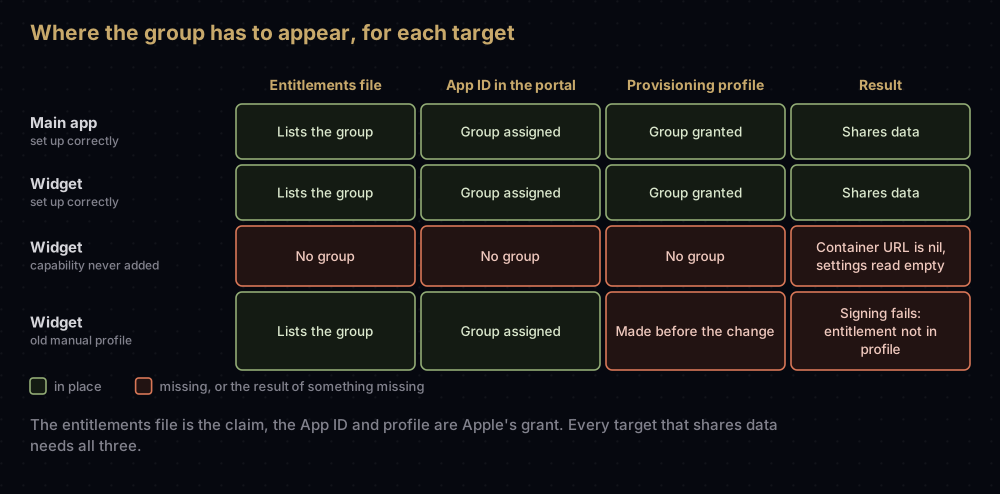
Why three places? The entitlements file is what the app claims. The profile is what Apple granted. Signing fails when the two disagree, which iOS entitlements explained covers in detail. Extensions have their own App ID and their own profile, as provisioning profiles explained describes, so each one needs the group granted separately.
Reading and writing shared data in Swift
Use the same group ID string everywhere. A small shared helper keeps it in one place:
import Foundation
import WidgetKit

enum SharedStore {
    static let groupID = "group.com.example.app"

    // Small values: a shared UserDefaults suite.
    static var defaults: UserDefaults? {
        UserDefaults(suiteName: groupID)
    }

    // Larger data: files in the shared container.
    static var containerURL: URL? {
        FileManager.default.containerURL(
            forSecurityApplicationGroupIdentifier: groupID)
    }

    static func saveStreak(_ days: Int) {
        defaults?.set(days, forKey: "streakDays")
        // Ask WidgetKit to refresh widgets whose kind is "StreakWidget".
        WidgetCenter.shared.reloadTimelines(ofKind: "StreakWidget")
    }

    static func loadStreak() -> Int {
        defaults?.integer(forKey: "streakDays") ?? 0
    }

    static func writeSnapshot(_ data: Data) throws {
        guard let folder = containerURL else {
            // nil on iOS means this target is not in the group.
            throw CocoaError(.fileNoSuchFile)
        }
        try data.write(to: folder.appendingPathComponent("snapshot.json"),
                       options: .atomic)
    }
}
Add the file to both the app target and the widget target, and both can call it.
Facts from Apple's reference pages worth building around:
- On iOS,
containerURL(forSecurityApplicationGroupIdentifier:)returns nil when the ID is not one of the target's groups. So a nil points to a missing capability on that target, or an ID that does not match. - Apple makes no guarantee about the folder's name or location, so always ask for the URL; never build the path yourself.
- The system creates only a
Library/Cachesfolder inside it. Create any other folders you need, and agree on the layout across all the group's apps. - When all apps in the group are removed from the device, iOS deletes the container.
- For
UserDefaults(suiteName:), pass the group ID. Apple says not to pass your app's bundle ID or the global domain.
How the widget picks up a change
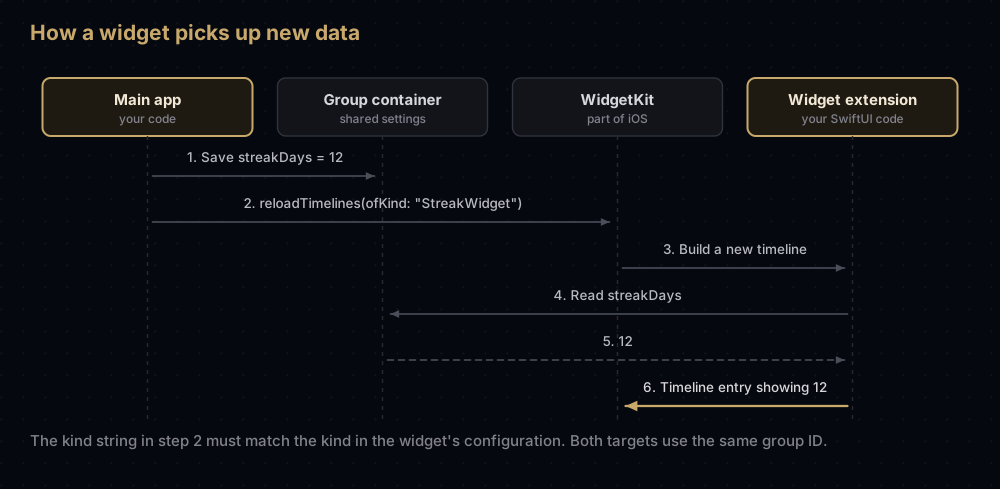
reloadTimelines(ofKind:) takes the same kind string the widget used in its configuration. The App Group carries the data; the reload call is what tells the widget to build a new timeline from it.
Flutter: home screen widgets with home_widget
An iOS home screen widget is a native WidgetKit extension with a SwiftUI view, so Flutter code cannot be the widget itself. What Flutter code needs is a way to put data in the App Group and ask for a refresh, and the home_widget package on pub.dev does that (version 0.10.0 at the time of checking, from the verified publisher antonborri.es). Its README says it does not let you write the widget itself in Flutter; it gives you one way to send data, read it back and trigger updates. It can also render a Flutter widget to an image, saved in the group container, for the native widget to display.
Setup, following the package's iOS guide:
- Open
ios/Runner.xcworkspaceand add a widget: File → New → Target → Widget Extension. - Register an App Group (a paid developer account is needed) and add it to both the Runner target and the widget extension target under Signing & Capabilities.
- In the widget's configuration, note the
kind. It must match the name you pass from Dart. - In the widget's Swift code, read values with
UserDefaults(suiteName: "group.com.example.app"). - In Dart, set the group before saving anything.
import 'package:home_widget/home_widget.dart';

Future<void> saveStreak(int days) async {
  // The full App Group ID, including "group."
  await HomeWidget.setAppGroupId('group.com.example.app');
  await HomeWidget.saveWidgetData<int>('streakDays', days);
  // Must match the widget's `kind` in the Swift extension.
  await HomeWidget.updateWidget(iOSName: 'StreakWidget');
}
Two details from the plugin's source code. setAppGroupId passes your string unchanged to UserDefaults(suiteName:), so give it the whole identifier, group. included, exactly as the entitlement lists it. And updateWidget calls WidgetCenter.shared.reloadTimelines(ofKind:) with iOSName, falling back to name. The package's guide warns that without setAppGroupId, saveWidgetData and getWidgetData return an error on iOS.
The package's troubleshooting section also describes a build error that appears after adding the extension: a "Cycle" error mentioning the Thin Binary script phase. Its fix is to move the Thin Binary phase to the bottom of the Runner target's Build Phases, so it runs after the widget is embedded.
The widget extension also needs its own signing team, bundle ID and profile; Flutter iOS code signing walks through that.
On the Mac: two naming styles
The Mac took a different road, and older articles reflect it.
group. style | Team ID style | |
|---|---|---|
| Example | group.com.example.app | A1B2C3D4E5.shared |
| Platforms | iOS, iPadOS, tvOS, visionOS, watchOS, and macOS | macOS only |
| Registered in the portal | Yes | No |
| Needs to be in the provisioning profile | Yes | No; macOS checks that the prefix matches the Team ID that signed the app |
| Works as a keychain access group | Yes | No |
| Apple's current advice for the Mac | Recommended | Supported, with limits |
Mac apps historically used the Team ID style. With it, macOS checks that the code signature of the process carries the same Team ID as the group name, so no registration or profile is involved. Apple's Developer Technical Support explains that on 21 February 2025 the developer website began letting Mac provisioning profiles authorise group. IDs, and Xcode 16.3 made them the default for macOS projects too. For older projects, the Register App Groups build setting (REGISTER_APP_GROUPS) turns that behaviour on.
It matters more since macOS 15, which protects app group containers: when an app outside the group tries to open one, the user sees a prompt. Apple's guide on accessing group containers asks Mac apps to make sure their group entitlements are listed and authorised, and recommends the group. style.
Common mistakes
- Adding the capability to the app but not the extension. The extension's container URL comes back nil and its settings read as empty.
- A typo in one target.
group.com.example.appandgroup.com.example.Appare different groups. Keep the ID in one shared constant. - Using
UserDefaults.standard. That is each target's private store. Only the suite named after the group is shared. - Hard-coding the container path. Apple does not guarantee it. Ask
FileManagereach time. - Stale manual profiles. After enabling App Groups on an App ID, older profiles are invalid. Regenerate them.
- Expecting data to survive deleting every app in the group. iOS removes the container once all members are gone.
- Two teams, one group. Apps from different developer teams cannot share an App Group.
- Passing the short name to home_widget. The plugin needs the full
group.identifier. - Using the group as a sync service. It is local to one device. Use iCloud or your own server to move data between devices.
Questions people ask
What is an App Group identifier in iOS?
A registered name, starting with group., for a storage area that your apps and extensions share on a device. You add it to each target's App Groups capability, and those targets can then read and write the same settings and files.
How do I share data between an iOS app and its widget?
Put both targets in the same App Group, then write with UserDefaults(suiteName:) or into the folder from containerURL(forSecurityApplicationGroupIdentifier:), and read the same key or file in the widget. Call WidgetCenter.shared.reloadTimelines(ofKind:) after saving.
Why does containerURL return nil?
On iOS it returns nil when the ID you pass is not one of the target's App Groups. Check the capability on that exact target, the spelling of the ID, and that the target's provisioning profile includes the group.
How many App Groups can I create?
Apple allows up to 1,000 App Groups per developer account.
Do App Groups need a paid developer account?
Registering groups happens in Certificates, Identifiers & Profiles, which the free tier cannot use. The home_widget package's guide also states that a paid account is needed to add App Groups.
Can apps from different developers share an App Group?
No. Apple's guide states that different developer teams cannot use the same App Group.
Is App Group data deleted when the app is uninstalled?
On iOS the shared container is removed when every app in the group has been removed from the device. If another member app is still installed, the data stays.
Should Mac apps still use the Team ID prefix?
Apple now recommends group. identifiers on macOS too. Team ID style groups still work on the Mac without registration, but they cannot be keychain access groups and do not exist on iOS.
Sources
- Configuring app groups and the App Groups entitlement, Apple
- containerURL(forSecurityApplicationGroupIdentifier:) and UserDefaults init(suiteName:), Apple
- Accessing app group containers in your existing macOS app, Apple
- Register an app group and Enable app capabilities, Apple Developer Account Help
- home_widget on pub.dev
Keep reading
- iOS entitlements explained: what an app claims and what the profile grants.
- Provisioning profiles explained: why each extension needs its own profile.
- Bundle ID vs App ID: the names your extensions must build on.
- Every identifier in Apple's developer portal: App Groups among the rest.
- Flutter iOS code signing: signing the Runner and its extensions.


