A bundle ID is the name you give your app, and it is written inside the app itself: com.example.app. An App ID is Apple's record of that name in your developer account: your Team ID in front of it (A1B2C3D4E5.com.example.app), plus the list of Apple services the app is allowed to use.
So the bundle ID answers "which app is this?", and the App ID answers "which team owns that name, and what may the app do?" You choose the first. Apple stores the second. Xcode usually registers the App ID for you, which is why plenty of developers ship apps for years without noticing there are two.
Below: where each one lives, the two kinds of App ID, how widgets and other extensions fit in, and how Android's applicationId compares.
The two side by side
| Bundle ID | App ID | |
|---|---|---|
| What it is | A text name for one app | Apple's registration of that name |
| Who creates it | You, in Xcode | The developer portal, or Xcode on your behalf |
| Where it lives | Inside the app, as CFBundleIdentifier in Info.plist | Certificates, Identifiers & Profiles, under Identifiers |
| Example | com.example.app | A1B2C3D4E5.com.example.app |
| What else it carries | Nothing | The capabilities the app may use, such as Push Notifications |
| Can it cover many apps? | No | Yes, if it is a wildcard |
| Can it change? | Only until the first build is uploaded | Its capabilities can change at any time, but an explicit App ID for an uploaded app cannot be deleted |
A comparison from everyday life: the bundle ID is the name painted on a shop's sign. The App ID is the shop's entry in the local business register, which records who owns it and which licences it holds. The sign alone proves nothing; an inspector checks the register. The comparison fails in one place. Two shops in different towns can share a name, but Apple requires every bundle ID to be unique.
How the name turns into a signed app
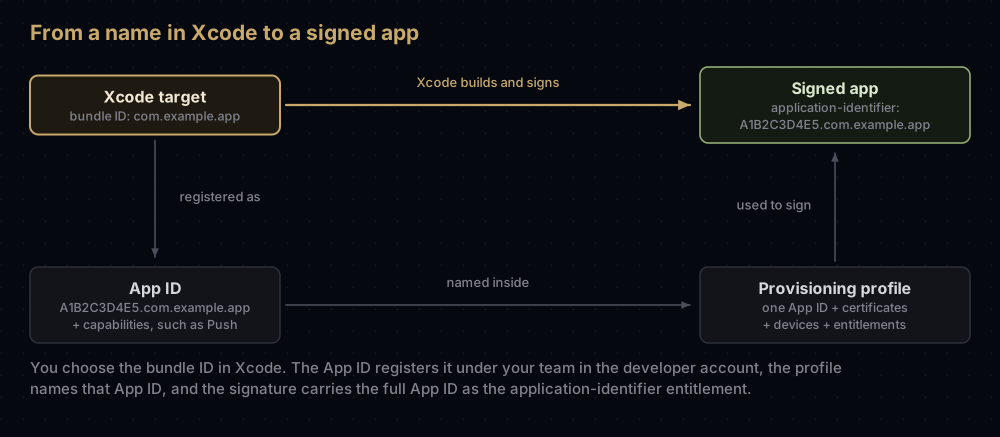
- You set the bundle ID on the app target in Xcode. It is stored in the build setting
PRODUCT_BUNDLE_IDENTIFIER, and Info.plist picks it up asCFBundleIdentifier. - The App ID registers that bundle ID under your team and records which capabilities are switched on.
- A provisioning profile names one App ID, along with the certificates allowed to sign and, for test builds, the devices allowed to run it.
- When Xcode signs the app, it writes the full App ID into the signature as the
application-identifierentitlement. - When the app runs on a device, the device checks that the profile is genuine and that the app meets its terms.
If the bundle ID in step 1 and the App ID in step 3 disagree, the build will not install. That is the first of the five checks covered in provisioning profiles explained.
The bundle ID in detail
What it may contain
Apple's rules are short:
- Only letters (A to Z, a to z), digits, hyphens and full stops. No spaces and no underscores.
- By convention it is written as a reversed domain name:
com.yourcompany.appname. - It must be unique. Xcode's default is your organisation identifier joined to the product name you typed when creating the project.
Apple's documentation says bundle IDs are case-insensitive. Firebase, on the other hand, treats the bundle ID you register there as case-sensitive. The safe habit is to pick one spelling and copy it exactly everywhere.
Flutter builds its default from the --org option of flutter create, which is com.example unless you pass something else. That default is fine for learning, but choose your own before you register anything with Apple.
Where to find it
- In Xcode: select the app target. The General tab shows it under Identity as Bundle Identifier, and the Signing & Capabilities tab shows it under Signing.
- Per build configuration: the target's Build Settings tab, in the Packaging section, under Product Bundle Identifier. Expand the row to see Debug, Release and any others.
- In a built app: read it straight from the app's Info.plist.
plutil -extract CFBundleIdentifier raw -o - Runner.app/Info.plist- For an app already on the App Store: App Store Connect calls the number in an app's App Store web address its Apple ID. Apple's public lookup service takes that number, and its answer includes a
bundleIdfield.
curl -s "https://itunes.apple.com/lookup?id=YOUR_APP_STORE_ID"Everywhere the bundle ID is remembered
The bundle ID is copied into more places than most people expect, which is why changing it later is so disruptive:
| Place | How it uses the bundle ID |
|---|---|
| App Store Connect | The app record must match the Xcode project, and the bundle ID is fixed once a build is uploaded |
| App ID and profiles | The App ID registers it; every profile for the app names that App ID |
| Push notifications | The APNs topic is normally the bundle ID |
| Firebase | Each Apple app in a Firebase project is registered by bundle ID, which cannot be edited afterwards |
| Keychain | The app's private keychain group is the Team ID plus the bundle ID |
| Universal links | The apple-app-site-association file on your website lists the Team ID and bundle ID |
What the App ID adds
An App ID is what Apple calls "a two-part string": a prefix and a bundle ID.
The prefix is your Team ID for any account opened since mid-2011. Apple's older technote on the subject explains that accounts from before then may also have older-style ten-character prefixes. Either way, the prefix is what groups your apps so they can share keychain data.
The capabilities are an allow list. Push Notifications, Sign in with Apple, App Groups, iCloud, Apple Pay and the rest are switched on per App ID. An app can only use the ones switched on here. In-App Purchase is on by default for an explicit App ID. Some capabilities are managed: Apple has to approve your team first, and you ask from the App ID's Capability Requests tab.
One App ID can cover every platform. Since Xcode 11.4, a single App ID can build the iOS, macOS, tvOS and watchOS versions of the same app.
Xcode makes its own. With automatic signing, Xcode registers App IDs for you. Their names in the portal begin with XC, and there is one called "XC Wildcard".
Changing an App ID's capabilities invalidates every provisioning profile that contains it, so profiles must be regenerated afterwards. Xcode does that for you with automatic signing; with manual signing it is your job.
You can see the full App ID inside any provisioning profile, after unwrapping it (the provisioning profile post explains the first command):
security cms -D -i profile.mobileprovision -o profile.plist
plutil -extract Entitlements.application-identifier raw -o - profile.plist
It prints the prefix and the bundle ID joined together:
A1B2C3D4E5.com.example.appExplicit and wildcard App IDs
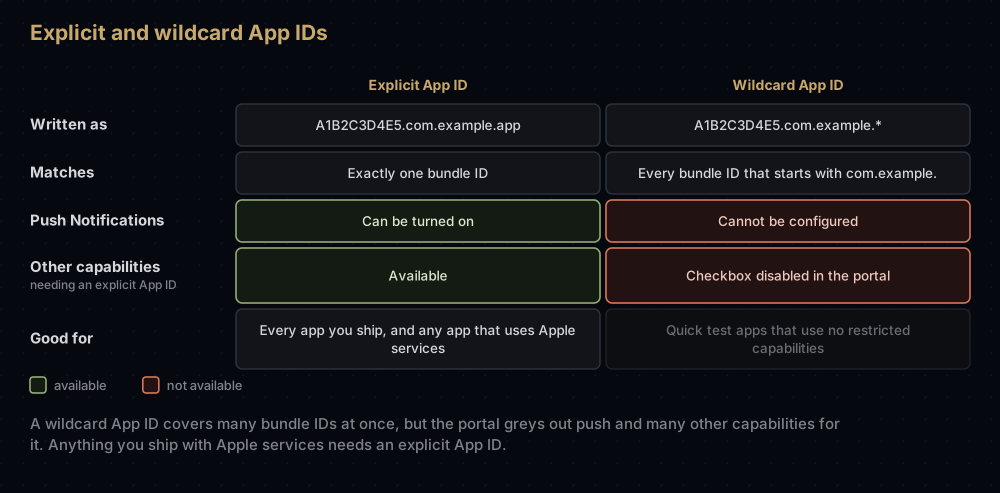
When you register an App ID you pick one of two types:
- An explicit App ID names exactly one bundle ID.
- A wildcard App ID ends in an asterisk and matches every bundle ID that starts with what comes before it. In the portal you type only the part before the asterisk.
The portal disables any capability checkbox that needs an explicit App ID while you are creating a wildcard one. Push Notifications is the one most people run into: it cannot be configured on a wildcard. Apple's managed-capability notes add that many capabilities and entitlements require an explicit App ID.
Apple's own pages are not perfectly consistent about shipping with a wildcard. The help page on App Store profiles says an upload needs an app record registered with an explicit App ID, yet the same page lists Xcode's "XC Wildcard" as a valid choice when it is the only one offered. And when an app is transferred to another team, Apple converts a wildcard App ID into an explicit one. The practical rule is simple: give every app you intend to ship its own explicit App ID from the start.
Extensions, widgets and App Clips
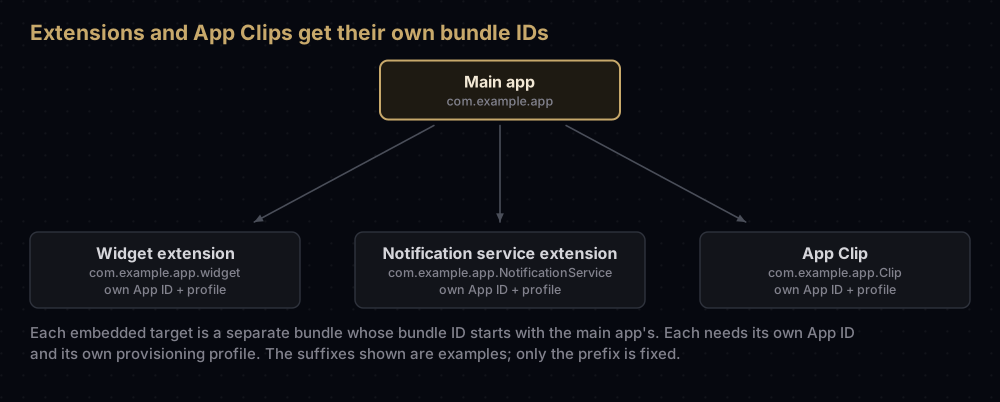
An app extension is a separate bundle inside your app, so it has its own bundle ID. That ID must start with the main app's bundle ID, and the extension needs its own App ID and its own provisioning profile.
- Widgets and notification extensions add a suffix of your choice:
com.example.app.widget. - App Clips follow the same pattern. When you register one, the portal appends a product name to the parent's App ID, and Xcode's default for that name is
Clip. - Watch apps built in the same project as their iOS app use fixed suffixes:
.watchkitappfor the WatchKit app and.watchkitextensionfor its extension.
Each of these App IDs has its own capabilities. If the widget needs to read the main app's data, both App IDs need the same App Group, which App Groups on iOS covers step by step.
Android's applicationId, and what it is not
Android has one direct equivalent and one near-miss.
| iOS bundle ID | Android applicationId | Android namespace | |
|---|---|---|---|
| What it identifies | The app, on the device and in the App Store | The app, on the device and in Google Play | The Kotlin or Java package of the generated R and BuildConfig classes |
| Where you set it | Xcode target, PRODUCT_BUNDLE_IDENTIFIER | defaultConfig in the app module's Gradle file | The android block of the same file |
| Allowed characters | Letters, digits, hyphens, full stops | Letters, digits, underscores; at least two segments, each starting with a letter | A normal package name |
| Change after release? | No, once a build is uploaded | No. Google Play treats a new one as a different app | Yes, if applicationId is set explicitly |
| Variants | A different bundle ID per build configuration | applicationIdSuffix per build type or flavour | Stays the same |
The namespace is where people get caught. It used to be the same thing as the app's identity, and Android's documentation still recommends keeping the two equal. But they are separate settings, and if applicationId is missing, it silently takes the namespace's value. Renaming the namespace would then rename the app. Setting both explicitly avoids that:
android {
    namespace = "com.example.app"

    defaultConfig {
        applicationId = "com.example.app"
    }

    buildTypes {
        getByName("debug") {
            // Lets a debug build sit next to the release build on one phone.
            applicationIdSuffix = ".debug"
        }
    }
}
Look closely at the character rules in the table. A hyphen is legal in a bundle ID but not in an applicationId, and an underscore is the reverse. Flutter handles this for you: a project created as my_app gets com.example.myApp on iOS and com.example.my_app on Android. The two IDs do not have to match; they are independent settings that often happen to hold the same string.
To see an Android app's applicationId from outside, look at its Play Store address. The id= value in play.google.com/store/apps/details?id=... is the package name.
Common mistakes
- Treating the bundle ID as the app's name. People see the display name on the Home screen (
CFBundleDisplayName) and the name set in App Store Connect. Both can change later; the bundle ID cannot once a build is uploaded. - Keeping
com.exampleinto production. It is a placeholder. Choose a name based on a domain you control before registering anything. - Turning on a capability in Xcode but not on the App ID. With manual signing, the App ID and the profile must both allow it, or the build fails.
- Expecting push to work with a wildcard App ID. It cannot be configured there. Register an explicit App ID.
- Giving an extension an unrelated bundle ID. It must start with the main app's bundle ID.
- Spelling the bundle ID differently in Xcode and Firebase. Firebase compares it exactly, and you cannot edit it there afterwards.
- Changing the Android namespace without an explicit
applicationId. The app's identity changes with it, and Google Play sees a new app. - Changing the bundle ID after the first upload. Apple does not allow it. See changing a bundle ID for what you can do instead.
Questions people ask
Is a bundle ID the same as an App ID?
No. The bundle ID is the name inside your app. The App ID is Apple's registration of that name, with your Team ID in front and a list of allowed capabilities attached.
Where do I find the bundle ID in Xcode?
Select your app target and open the General tab: it is the Bundle Identifier field under Identity. In a Flutter project, open ios/Runner.xcworkspace and select the Runner target.
What is the App ID prefix?
The part before the first full stop in an App ID. For accounts created since mid-2011 it is the Team ID, a ten-character code shown in your membership details.
Is a bundle ID case-sensitive?
Apple documents bundle IDs as case-insensitive, but other systems, Firebase among them, compare them exactly. Use one spelling everywhere.
Should the iOS bundle ID and the Android package name be the same?
They can be, and many teams keep them equal for tidiness, but nothing requires it. Their character rules differ, so a name with a hyphen or an underscore cannot be used on both.
What is the XC Wildcard App ID?
A wildcard App ID that Xcode creates and manages for automatic signing. Like any wildcard, it cannot carry capabilities such as push. Xcode also registers explicit App IDs whose names begin with XC and contain your bundle ID.
Does a widget need its own App ID?
Yes. A widget is an extension with its own bundle ID, which starts with the main app's, and it needs its own App ID and provisioning profile. Automatic signing creates them for you.
Can I change my bundle ID?
Only before the first build is uploaded to App Store Connect. After that it is fixed, and a different bundle ID means a different app. The details are in changing a bundle ID.
Where this comes from
Checked against the platform owners' documentation in September 2026:
- CFBundleIdentifier and Register an App ID from Apple
- Sharing access to keychain items among a collection of apps from Apple
- TN3125: Inside Code Signing: Provisioning Profiles from Apple
- Configure the app module and Configure build variants from Android Developers
Keep reading
- Changing a bundle ID: what Apple allows, and the Flutter steps for iOS and Android.
- Every identifier in Apple's developer portal: the ten other identifier types and when you need them.
- Provisioning profiles explained: where the App ID meets certificates and devices.
- iOS entitlements explained: how App ID capabilities become entitlements in your app.
- App signing explained: the whole picture on iOS and Android.


