An entitlement is a key-value pair sealed into your app's code signature that claims a special power, such as receiving push notifications or sharing files with a widget. Your app claims it, the provisioning profile must grant it, and the profile only grants what your App ID's capabilities allow.
When those three disagree, you get errors like "provisioning profile doesn't include the aps-environment entitlement", or a feature that fails without saying why. This post explains each layer, lists the keys you will meet most often, and shows how to read the entitlements of any app with codesign.
Entitlements, capabilities and permissions
Three words get mixed up constantly. They are different things, decided by different people.
| Term | What it is | Who decides | Where you see it |
|---|---|---|---|
| Capability | An Apple service your app uses, such as Push Notifications or iCloud | You, in Xcode and on the App ID | Xcode's Signing & Capabilities tab; the App ID in the developer portal |
| Entitlement | The key-value pair that claims that service inside the app's signature | Claimed by the app, granted by the profile | The .entitlements file, then the signed app |
| Privacy permission | A person's yes or no when the app asks for the camera, location or notifications | The person holding the phone | A system prompt, with the explanation text taken from Info.plist, such as NSCameraUsageDescription |
A handy way to hold the difference: an entitlement is like a staff badge that lets someone through a door marked "staff only". The permission is the customer saying "yes, you may take my photo". Apple's own example needs both: to reach someone's home automation, an app needs the HomeKit entitlement and the person's explicit consent. The badge comparison has a limit, though. A badge can be lent out; an entitlement cannot, because it is part of the app's signature and changing it breaks the seal.
Android has no equivalent step in signing. Special access there is declared as permissions in the app's manifest.
Where an entitlement comes from
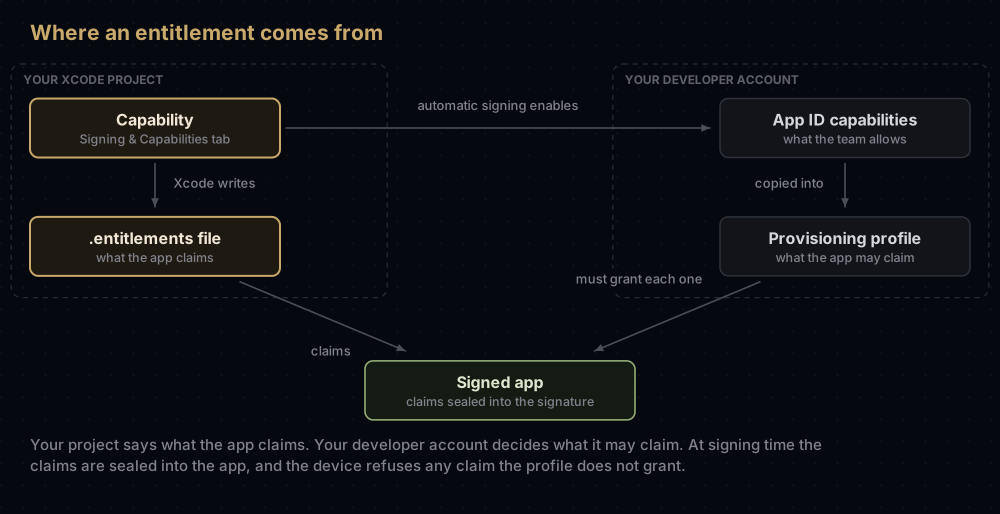
- You add a capability in Xcode. Select the target, open Signing & Capabilities, and click the Capability button, marked with a plus sign (or choose Editor, Add Capability). Xcode records it in a property list with the
.entitlementsextension, and for some capabilities it also edits Info.plist. - The App ID must allow it. Each capability also has to be switched on for the App ID in the developer portal. With automatic signing, Xcode does this for you and fetches a new profile. With manual signing, you turn it on yourself and regenerate the profile, because changing an App ID's capabilities invalidates its existing profiles.
- The profile carries the grant. A provisioning profile contains an
Entitlementsdictionary built from the App ID and its capabilities. - Signing seals the claims in. When Xcode signs the app, it combines the entitlements file, information from your developer account and other project settings into the final set, and stores them in the code signature.
- The device checks. Every entitlement the app claims must appear in its profile's list, or the app will not install.
The .entitlements file
The file is an ordinary property list. Each target can have its own, and the Code Signing Entitlements build setting (CODE_SIGN_ENTITLEMENTS) holds its path. A small one looks like this:
<?xml version="1.0" encoding="UTF-8"?>
<!DOCTYPE plist PUBLIC "-//Apple//DTD PLIST 1.0//EN" "http://www.apple.com/DTDs/PropertyList-1.0.dtd">
<plist version="1.0">
<dict>
    <key>aps-environment</key>
    <string>development</string>
    <key>com.apple.developer.applesignin</key>
    <array>
        <string>Default</string>
    </array>
    <key>com.apple.developer.associated-domains</key>
    <array>
        <string>applinks:example.com</string>
    </array>
    <key>com.apple.security.application-groups</key>
    <array>
        <string>group.com.example.app</string>
    </array>
</dict>
</plist>
In a Flutter project, the iOS template does not include one. Xcode creates it (typically Runner.entitlements) the first time you add a capability to the Runner target. The macOS template, by contrast, ships with two: DebugProfile.entitlements and Release.entitlements.
A few things about the file that Apple's documentation points out:
- Let Xcode manage it where you can. Turning capabilities on and off is safer than editing keys by hand.
- Turning a capability off may leave its key behind. If Xcode cannot remove the entry, delete it from the file yourself.
- Two keys do not belong there.
application-identifierandget-task-alloware defined by the provisioning profile. Older projects sometimes carry them in the file, and Apple suggests removing them if they cause install errors. - A capability can be limited to one build configuration. When adding it, choose Debug or Release instead of All.
At signing time Xcode adds application-identifier, which is your Team ID joined to the bundle ID, so every signed app carries it even though your file does not mention it.
Common capabilities and their keys
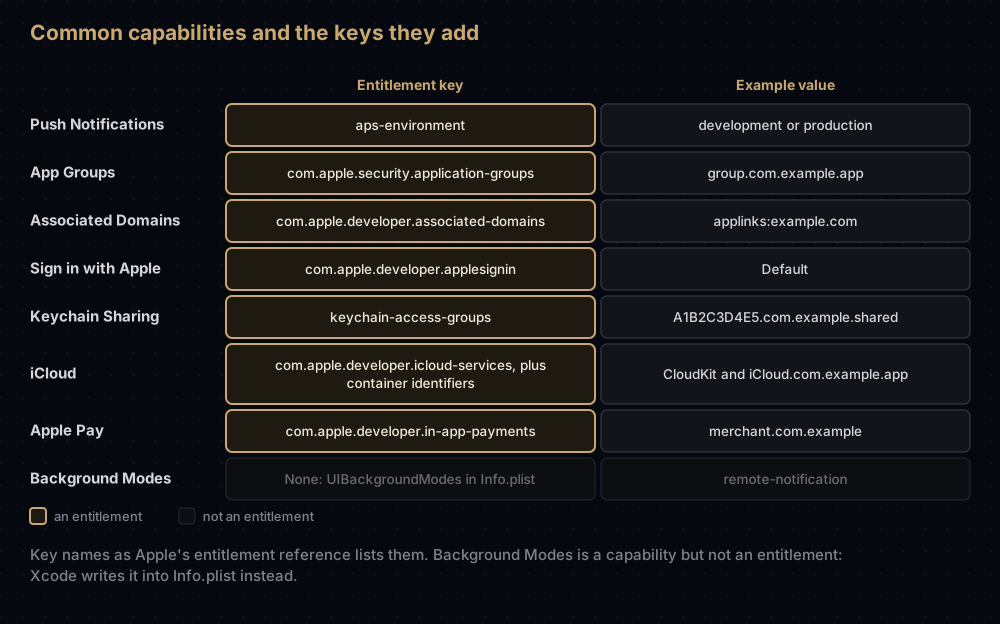
aps-environment (Push Notifications)
A string with two possible values: development or production. It tells the app which APNs environment to register with; Apple also calls the development one the sandbox. It is used both for ordinary notifications and for PushKit. Mac apps use a different key, com.apple.developer.aps-environment.
Xcode sets the value from the profile in use: a development profile gives development, while production profiles and TestFlight builds get production. That is why your entitlements file can say development while the App Store build says production. Apple says these defaults can be changed, but leaving them alone keeps each kind of build pointed at the matching environment.
The environment matters on your server too. A device token only works with the environment its build registered in, so a TestFlight token sent to the sandbox fails. If the entitlement is missing altogether, Apple notes that registering for remote notifications can fail. APNs explained covers the environments in depth.
One source of confusion: silent background pushes also need the Background Modes capability with its remote notifications option ticked. That setting is not an entitlement; Xcode writes remote-notification into the UIBackgroundModes array in Info.plist.
com.apple.security.application-groups (App Groups)
An array of group identifiers, each written as group. followed by a name: group.com.example.app. Apps and extensions that list the same group share a container, a shared UserDefaults suite, and some ways of messaging each other.
- Every target that uses the group needs it, including widgets and other extensions.
- A registered App Group also works as a keychain access group.
- On macOS, groups named with your Team ID in front, such as
A1B2C3D4E5.shared, are allowed without registering them.
The full walkthrough is in App Groups on iOS.
com.apple.developer.associated-domains (Associated Domains)
An array of entries written as service:domain. The services are:
| Service | Used for |
|---|---|
applinks | Universal links |
webcredentials | Shared web credentials |
activitycontinuation | Handoff |
appclips | App Clips |
Since iOS 14 and macOS 11, devices fetch your website's apple-app-site-association file through an Apple-managed content delivery network rather than from your server directly. While developing against a server that is not reachable from the internet, add ?mode=developer to the entry (for example applinks:example.com?mode=developer). Apple allows that mode only for apps signed with a development profile, on devices where the person has opted in.
Profiles grant this key with a single wildcard, *, so the list of domains is entirely up to your file and your website.
com.apple.developer.applesignin (Sign in with Apple)
An array with one value, Default. Enabling the Sign in with Apple capability adds it with the right value. The server-side pieces, a Services ID and a private key, are covered in Sign in with Apple on Android and the web.
keychain-access-groups (Keychain Sharing)
An array of keychain group names, added by the Keychain Sharing capability. Xcode puts your Team ID in front of each group you type, so com.example.shared becomes A1B2C3D4E5.com.example.shared, which keeps your groups separate from every other team's.
Every app is also, automatically, in one private group named after its App ID (A1B2C3D4E5.com.example.app), and in any App Groups it belongs to. Profiles grant this key with a wildcard, your Team ID followed by *, plus com.apple.token.
Other keys you may meet
- iCloud:
com.apple.developer.icloud-services(valuesCloudKit,CloudDocuments, orCloudKit-Anonymousfor App Clips) pluscom.apple.developer.icloud-container-identifiers, listing containers namediCloud.followed by a reverse-DNS string. - Apple Pay:
com.apple.developer.in-app-payments, an array of Merchant IDs, which by convention start withmerchant. - Wallet:
com.apple.developer.pass-type-identifiers, the pass types the app may read. Apple documents$(TeamIdentifierPrefix)*as the way to allow all of your team's passes. - Debugging:
get-task-allow, set totrueby development profiles so a debugger can attach, and tofalseby distribution profiles.
Some capabilities are managed: Apple must approve your team before you can enable them. The Account Holder asks from the App ID's Capability Requests tab in the portal. Once approved, the capability appears in Xcode (from Xcode 15), and new profiles include its entitlement automatically. Apple's full list of keys is its Entitlements reference.
What the profile grants and what the app claims
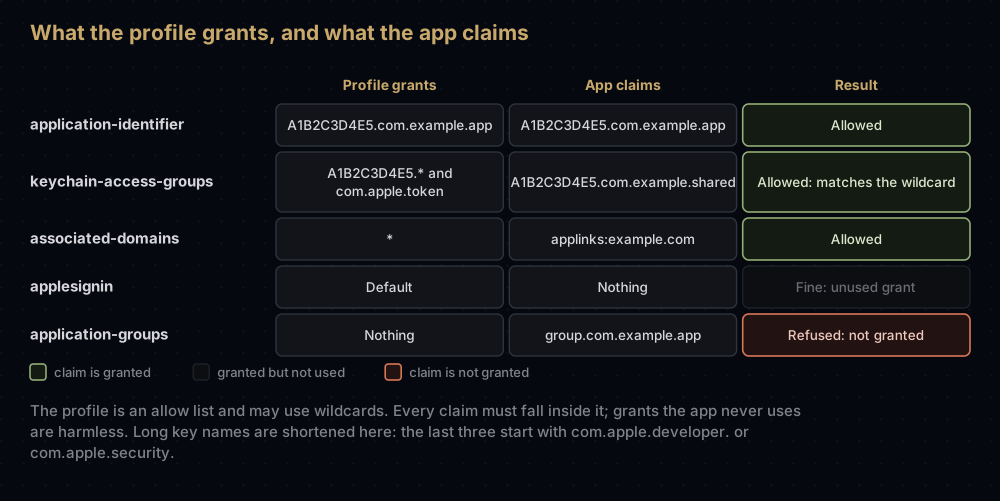
Apple's technote on profiles puts the rule simply: the entitlements in a profile are an allow list, not the entitlements the app has. The app only has what it claims in its own signature.
- Every claim must be on the list.
- The list may contain things the app never claims. That is normal.
- The list may use wildcards. The app's claims may not; they are always exact values.
So the last row in the chart is the classic failure. The app's entitlements file lists an App Group, but the App ID (and therefore the profile) was never given it. Xcode reports that the profile does not include the com.apple.security.application-groups entitlement, and the fix is on the App ID, not in your code.
Reading the entitlements of a real app
From your project. The file is readable as it is, or through plutil:
plutil -p Runner.entitlementsFrom a provisioning profile. Unwrap it and pull out the Entitlements dictionary. Provisioning profiles explained covers the rest of the file.
security cms -D -i profile.mobileprovision | plutil -extract Entitlements xml1 -o - -From a built app. This is the one that matters when something fails, because it shows what was actually signed:
codesign -d --entitlements - --xml Runner.app | plutil -convert xml1 -o - -Without --xml, codesign prints a readable summary instead, after a line naming the executable:
Executable=/path/to/Runner.app/Runner
[Dict]
	[Key] aps-environment
	[Value]
		[String] production
	[Key] com.apple.security.application-groups
	[Value]
		[Array]
			[String] group.com.example.app
From an .ipa. Unzip it and point codesign at the app inside:
unzip -q Runner.ipa -d ipa
codesign -d --entitlements - --xml ipa/Payload/Runner.app | plutil -convert xml1 -o - -
Apple's troubleshooting page still shows an older form, codesign --display --entitlements :- YourApp.app. On a current Mac that form prints a warning that specifying : in the path is deprecated and will stop working, so prefer the --xml form from Apple's newer technote.
When you upload a build, Xcode also lists the app's entitlements in the confirmation step, which is a last chance to spot a leftover key.
When entitlements cause trouble
| What you see | Cause | Fix |
|---|---|---|
| Provisioning profile "…" doesn't include the … entitlement | The App ID lacks that capability, or the profile predates it | Turn the capability on for the App ID and regenerate the profile |
| Push registration fails; no device token arrives | aps-environment is missing from the signed app | Add the Push Notifications capability, then confirm with codesign |
An install error mentions application-identifier or get-task-allow | Those keys are in your entitlements file from an older project | Remove them; the profile supplies both |
| A capability you removed still shows in the signed app | Xcode left its key in the file | Delete the key from the .entitlements file |
| iCloud still enabled on the App ID after removing it in Xcode | Xcode does not switch it off in the portal | Disable iCloud on the App ID yourself |
| Upgrade's application-identifier entitlement string … does not match installed application's application-identifier string … | The app's App ID changed between versions | Apple says the profile then needs a previous-application-identifiers entitlement, which you request from Apple Developer Program Support |
| A managed capability is missing from Xcode's list | Apple has not approved it for your team | Request it from the App ID's Capability Requests tab |
Common mistakes
- Forcing
aps-environmentby hand. Xcode sets it from the profile. A forced value can point a build at the wrong APNs environment, and its device tokens then fail on your server. - Enabling a capability in Xcode but not on the App ID when signing manually. The claim exists, the grant does not.
- Keeping an old profile after adding a capability. It became invalid the moment the App ID changed.
- Adding App Groups to the app but not to the widget. Each target claims its own entitlements.
- Treating Background Modes as an entitlement. It lives in Info.plist.
- Confusing entitlements with privacy prompts. An entitlement lets the app ask; the person still decides.
- Checking the source file instead of the signed app.
codesignshows what was really sealed in.
Questions people ask
What are entitlements in iOS?
Key-value pairs stored in an app's code signature that give it access to services such as push notifications, App Groups or iCloud. The provisioning profile must grant each one.
Where is the entitlements file in a Flutter project?
A new Flutter project has none for iOS. Xcode adds one to the Runner target the first time you add a capability, and the Code Signing Entitlements build setting shows its path.
What is aps-environment?
The push notification entitlement. Its value, development or production, tells the app which APNs environment to register with.
Should aps-environment be development or production?
Let Xcode decide. It uses development with a development profile and production for App Store and TestFlight builds, and the server must send each token to the matching environment.
Are entitlements the same as permissions?
No. An entitlement is granted to the app by Apple through its profile. A permission is granted by the person using the phone, when the app asks.
How do I check the entitlements of an IPA?
Unzip the .ipa, then run codesign -d --entitlements - --xml on the .app inside the Payload folder, and pipe the result through plutil -convert xml1 -o - - to make it readable.
Why does Xcode say the provisioning profile doesn't include an entitlement?
The app claims something the profile does not grant. Usually the capability was added in Xcode but not on the App ID, or the profile was created before the capability was added. Enable it on the App ID and regenerate the profile.
What is get-task-allow?
The entitlement that allows a debugger to attach to the app. Development profiles set it to true; it is defined by the profile, so it should not be in your entitlements file.
Where this comes from
Checked in September 2026:
- Entitlements and Diagnosing issues with entitlements from Apple
- TN3125: Inside Code Signing: Provisioning Profiles from Apple
- The Apple reference pages for aps-environment, App Groups, Associated Domains, Sign in with Apple and Keychain Access Groups
- Adding capabilities to your app and Sharing access to keychain items from Apple
Keep reading
- Provisioning profiles explained: the file that grants every entitlement.
- Bundle ID vs App ID: where capabilities are switched on.
- App Groups on iOS: the entitlement most widget projects need.
- APNs explained: what
aps-environmentconnects to. - Flutter iOS code signing: capabilities and signing in a Flutter project.


