
Every signing file is one of three things in a wrapper: a private key, a certificate, or a key and certificate together. Converting between wrappers takes one or two commands. openssl handles .p12, .p8, .pem and .cer, and keytool handles .jks. Most failures come from using a different openssl than the guide you are following.
Every command below was run for this post on a Mac, against throwaway keys, with both OpenSSL 3 and the LibreSSL that macOS ships as /usr/bin/openssl, and with keytool from JDK 21. Where the two OpenSSL builds behave differently, the recipe says so.
If you are not sure what the file formats are, p8 vs p12 explains the Apple files and what's inside a .jks keystore covers the Android one. This post is the practical reference.
Which command gets you where
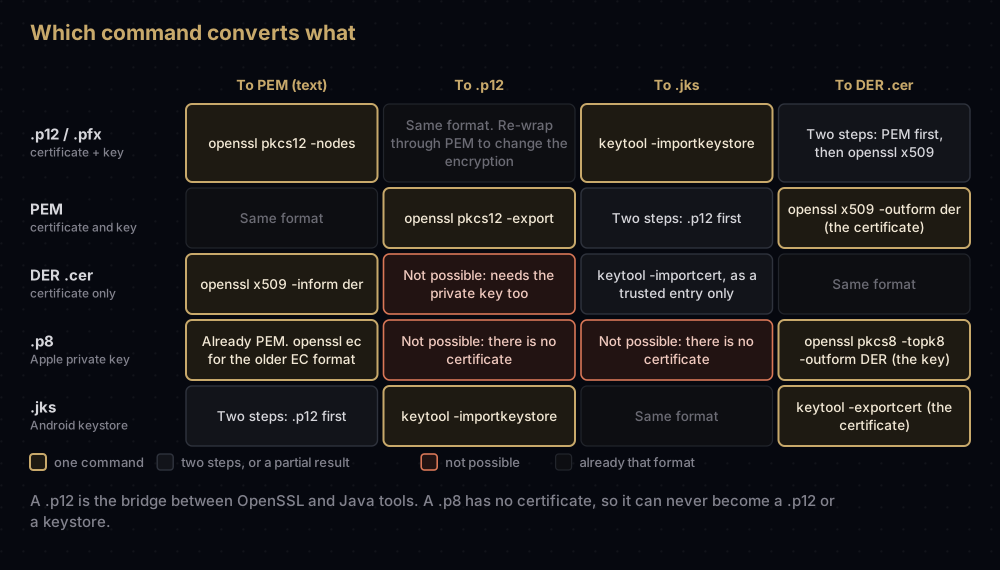
The pattern to notice: a .p12 is the bridge. OpenSSL and Java both read and write it, so anything moving between the Apple world and the Android world passes through one.
First, find out what you have
File extensions lie. A .pem can hold a key, a certificate or both, a .cer can be text or binary, and a file named .jks may be PKCS#12 inside. Look before you convert.
For text files, the first line tells you:
| First line | What the file holds |
|---|---|
-----BEGIN PRIVATE KEY----- | A private key in PKCS#8 form. Every Apple .p8 looks like this |
-----BEGIN ENCRYPTED PRIVATE KEY----- | The same, locked with a pass phrase |
-----BEGIN EC PRIVATE KEY----- or -----BEGIN RSA PRIVATE KEY----- | A private key in the older, algorithm-specific format |
-----BEGIN CERTIFICATE----- | A certificate in PEM form |
Bag Attributes | PEM that OpenSSL extracted from a .p12, with the original labels kept above each block |
For binary files, ask the tools:
head -1 somefile                       # text files: shows the BEGIN line
file somefile                          # macOS: "Certificate, Version=3", "Java KeyStore", or just "data"
keytool -list -keystore somefile       # keystores: prints "Keystore type: PKCS12" or "JKS"
openssl pkcs12 -info -noout -in somefile   # .p12: shows how it is encrypted
On a Mac, file recognised a binary certificate as Certificate, Version=3 and a real JKS as Java KeyStore, but reported every .p12 as plain data. The keytool -list line is the reliable test for keystores, and it will happily open a .p12 too.
Before any OpenSSL command: which openssl is this?
A Mac can have two different programs called openssl, and they disagree about options.
which openssl
openssl version
/usr/bin/openssl version
On the machine used for this post, /usr/bin/openssl printed LibreSSL 3.3.6, while the openssl found first on the path was Homebrew's OpenSSL 3.6.2. Run the same check on a server or CI image before trusting a recipe there. What matters is how each one treats .p12 files:
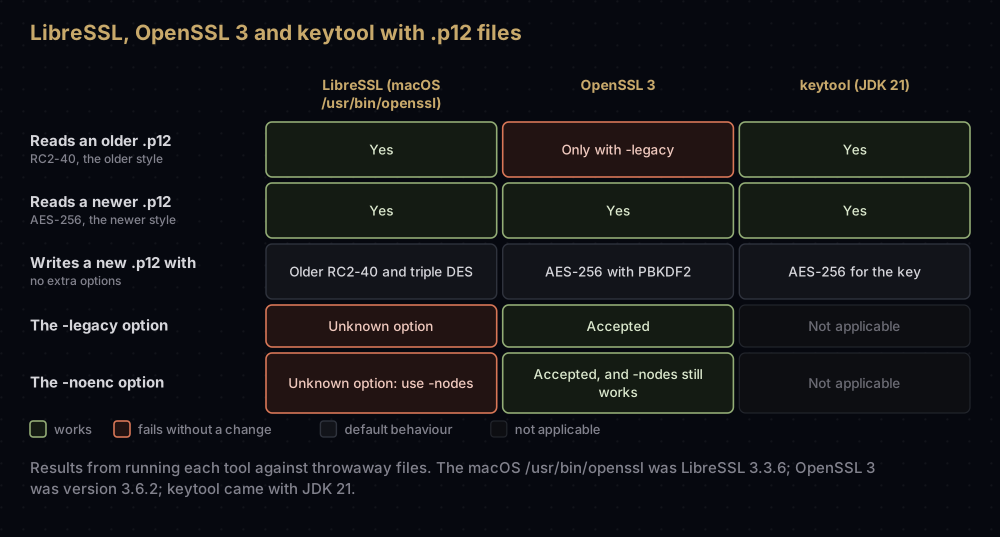
The two options behind most confusion:
-
-legacyexists only in OpenSSL 3. Its manual says that without the option the legacy provider is not loaded, and recommends the option for older files that use algorithms such as RC2-40. Keychain exports are in that older style. Without the option, OpenSSL 3 stops with an error that names the missing algorithm:Error outputting keys and certificates error:0308010C:digital envelope routines:inner_evp_generic_fetch:unsupported:...Algorithm (RC2-40-CBC : 0) -
-noencis OpenSSL 3's new name for-nodes, which means: do not encrypt the extracted key. OpenSSL 3 still accepts-nodesand only marks it deprecated. LibreSSL rejects-noencas an unknown option. So use-nodesin scripts that might run on either, which is what the recipes below do.
If a command here fails with unsupported, add -legacy. If it fails with unknown option '-legacy', you are on LibreSSL, which reads the old files without it: just remove the option.
What a .p12 holds, and how to take it apart
A .p12 is a small container. Inside are "bags": one for your certificate, sometimes more for the certificates above it in the chain, and one for the private key. The whole thing is sealed with a password, and the same password (usually) decrypts the key.
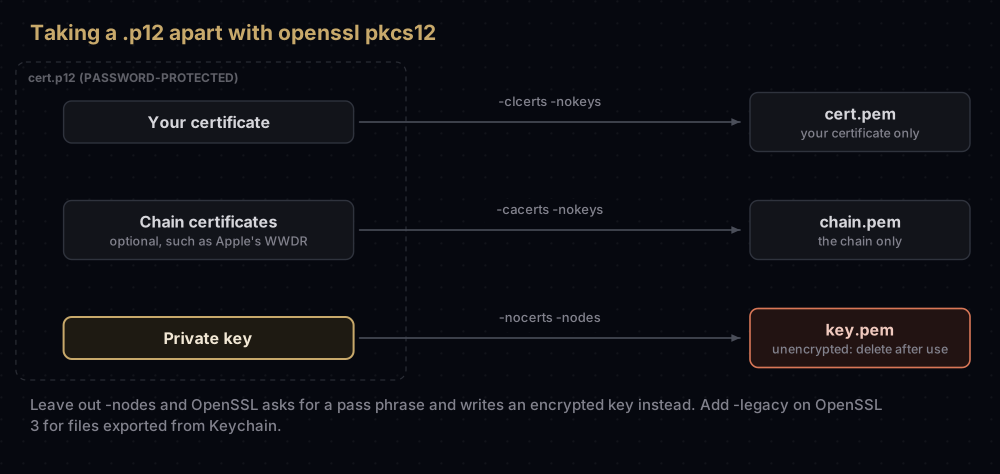
Three flags choose what comes out: -nokeys leaves the key behind, -nocerts leaves the certificates behind, and -clcerts or -cacerts choose between your own certificate and the chain.
.p12 to PEM, certificate and key in one file
openssl pkcs12 -in cert.p12 -out cert-and-key.pem -nodesIt asks for the .p12 password. Add -legacy on OpenSSL 3 if the file came from Keychain. The result has a -----BEGIN CERTIFICATE----- block and a -----BEGIN PRIVATE KEY----- block, each with a few Bag Attributes lines above it. Most tools ignore those lines.
This is the format older push libraries asked for. Because of -nodes, the private key in that file is not encrypted, so guard the file as carefully as the .p12 and its password put together.
Leave out -nodes and OpenSSL 3 asks for a new PEM pass phrase and writes -----BEGIN ENCRYPTED PRIVATE KEY----- instead. For scripts, both passwords can come from environment variables rather than prompts, which keeps them out of your shell history:
openssl pkcs12 -in cert.p12 -out cert-and-key.pem -nodes -passin env:P12_PASSWORDJust the certificate
openssl pkcs12 -in cert.p12 -clcerts -nokeys | openssl x509 -out cert.pem-clcerts keeps only your own certificate, and piping it through openssl x509 drops the Bag Attributes lines, leaving a clean PEM file. For the chain certificates instead, if the .p12 carries any, swap -clcerts for -cacerts and write them with -out chain.pem rather than piping, because openssl x509 keeps only the first certificate it reads.
To check what you extracted:
openssl x509 -in cert.pem -noout -subject -enddateJust the private key
openssl pkcs12 -in cert.p12 -nocerts -nodes | openssl pkey -out key.pemThe result starts -----BEGIN PRIVATE KEY-----. It is the most sensitive file you can produce from a .p12: no certificate, no password. Delete it when you are done.
To confirm that a key and a certificate belong together, compare their public keys. The two hashes must match:
openssl x509 -in cert.pem -noout -pubkey | shasum
openssl pkey -in key.pem -pubout | shasum
PEM to .p12
openssl pkcs12 -export -in cert.pem -inkey key.pem -name "Apple Distribution" -out cert.p12It asks for a new export password. -name sets the label that Keychain and keytool -list show; without it the entry has no friendly name. To include the chain (Apple's WWDR intermediate, for example), add -certfile with a PEM file of those certificates:
openssl pkcs12 -export -in cert.pem -inkey key.pem -certfile AppleWWDRCAG3.pem \
  -name "Apple Distribution" -out cert.p12
The encryption depends on which openssl ran the command. OpenSSL 3 writes AES-256 with PBKDF2, according to its manual, and the test file confirmed it. LibreSSL wrote the older RC2-40 and triple DES. If the tool that has to read the .p12 rejects the password or the file, make it again on OpenSSL 3 with -legacy added, which switches to the older algorithms.
Re-wrapping an old .p12 as a new one, or the reverse
Sometimes you need the same contents with different encryption: a Keychain export for a Linux tool built on OpenSSL 3, or an OpenSSL 3 file for an older reader. Do it in two steps with an intermediate file.
Old style in, modern style out, on OpenSSL 3:
openssl pkcs12 -legacy -in old.p12 -nodes -out tmp.pem
openssl pkcs12 -export -in tmp.pem -name "Apple Distribution" -out modern.p12
rm tmp.pem
Modern style in, old style out, also on OpenSSL 3:
openssl pkcs12 -in modern.p12 -nodes -out tmp.pem
openssl pkcs12 -export -legacy -in tmp.pem -name "Apple Distribution" -out old-style.p12
rm tmp.pem
Two things went wrong in testing that are worth avoiding. Piping the first command straight into the second failed with Could not find certificates from -in file from <stdin>, so keep the temporary file. And the rebuilt .p12 lost its friendly name until -name was added back.
DER .cer to PEM, and back
Apple's .cer downloads, such as the WWDR intermediate used for this post, are binary DER. Servers and OpenSSL usually want PEM.
openssl x509 -inform der -in distribution.cer -out distribution.pem
openssl x509 -in distribution.pem -outform der -out distribution.cer
Both builds gave byte-identical results. A certificate alone never becomes a working .p12: the export needs the private key too, and that lives on the Mac that made the signing request.
The .p8: inspecting it and "converting" it
An Apple .p8 is already a PEM file. It is a PKCS#8 private key, as its first line says, and for most purposes "p8 to pem" means renaming it. What people usually need is one of the commands in this table:
| You want | Command |
|---|---|
| To see what kind of key it is | openssl pkey -in AuthKey_ABC123DEFG.p8 -noout -text |
| The public half, for a library that verifies tokens | openssl pkey -in AuthKey_ABC123DEFG.p8 -pubout -out AuthKey_ABC123DEFG.pub.pem |
The older -----BEGIN EC PRIVATE KEY----- format | openssl ec -in AuthKey_ABC123DEFG.p8 -out AuthKey_ABC123DEFG.ec.pem |
| PKCS#8 again, from that older format | openssl pkcs8 -topk8 -nocrypt -in AuthKey_ABC123DEFG.ec.pem -out AuthKey_ABC123DEFG.p8 |
| Binary DER, still PKCS#8 | openssl pkcs8 -topk8 -nocrypt -in AuthKey_ABC123DEFG.p8 -outform DER -out AuthKey_ABC123DEFG.der |
Apple's documentation says these keys sign with ES256, which is ECDSA on the P-256 curve, so the first command should report ASN1 OID: prime256v1 and NIST CURVE: P-256. It did on both OpenSSL builds for the P-256 stand-in key used here, and all five commands worked the same way on LibreSSL and OpenSSL 3. One near-miss is worth knowing: openssl pkey -outform DER looks like an easier DER command, but LibreSSL answered it with the older EC structure while OpenSSL 3 wrote PKCS#8, which is why the pkcs8 -topk8 form is used above.
Two conversions people search for do not exist:
- A
.p8cannot become a.p12. A.p12needs a certificate, and Apple never issues one for a key made in the Keys section. - A key taken out of a
.p12cannot stand in for a.p8. It will look similar afteropenssl pkey, but Apple checks tokens against the public half of a key it generated, looked up by Key ID. A key from anywhere else has no Key ID.
A .p8 is short enough to paste into a CI secret as it is. If your CI system mangles multi-line values, Base64-encode it first; fastlane's app_store_connect_api_key action, for example, has an option for Base64 key content. See the App Store Connect API key post for how each CI tool takes it.
JKS to .p12
keytool converts between keystore formats with -importkeystore. It comes with the Java Development Kit. Flutter's docs note that it may not be on your path, because it came with the Java bundled with Android Studio; flutter doctor -v prints where that Java lives.
keytool -importkeystore \
  -srckeystore upload-keystore.jks -srcstoretype JKS -srcalias upload \
  -destkeystore upload-keystore.p12 -deststoretype PKCS12
It asks for the JKS store password, the key password if it differs, and a password for the new file. Leave out -srcalias to copy every entry.
PKCS#12 keystores have one password. When the test gave the new file a different key password, keytool 21 printed Different store and key passwords not supported for PKCS12 KeyStores and ignored it. The converted key opened with the store password. So if a Flutter project's key.properties has a separate keyPassword, set it to the store password after converting. Oracle's keytool manual gives the same advice from the other side: most tools need the two to match in a PKCS#12 keystore.
When keytool opens a JKS file, it prints a warning suggesting a migration to PKCS#12, together with a command that converts the file in place:
keytool -importkeystore -srckeystore upload-keystore.jks \
  -destkeystore upload-keystore.jks -deststoretype pkcs12
That command worked, kept the original as upload-keystore.jks.old, and left a PKCS#12 file behind the .jks name, which keytool -list then reported as PKCS12. Keep the .old copy until you have built and checked a signed release with the converted file.
.p12 to JKS
keytool -importkeystore \
  -srckeystore cert.p12 -srcstoretype PKCS12 \
  -destkeystore keystore.jks -deststoretype JKS
keytool warns that JKS is a proprietary format, and the import still succeeds. The entry keeps the alias it had in the .p12 (OpenSSL's -name), unless you pass -srcalias and -destalias. keytool listed a .p12 entry named "Apple Distribution" as apple distribution, and accepted either spelling in -srcalias.
Watch the key password. Oracle's manual says the new entry is protected with the source entry's password unless you give -destkeypass, and the test agreed: the key in the new JKS still opened with the old .p12 password, not the new store password. Pass -destkeypass to choose it:
keytool -importkeystore \
  -srckeystore cert.p12 -srcstoretype PKCS12 -srcalias "Apple Distribution" \
  -destkeystore keystore.jks -deststoretype JKS -destalias upload -destkeypass NEW_KEY_PASSWORD
JKS to PEM
There is no single command. Convert the keystore to .p12 as above, then:
openssl pkcs12 -in upload-keystore.p12 -nodes -out upload-keystore.pemThe same .p12 recipes work from there, so the certificate or the key can come out on its own.
Just the certificate from a keystore
keytool -exportcert -rfc -keystore upload-keystore.jks -alias upload -file upload_certificate.pem-rfc writes PEM; without it, keytool writes binary DER. Older guides spell the command keytool -export, and in testing it produced an identical file. A PEM certificate from an upload keystore is what Play Console asks for when you reset an upload key.
To read fingerprints straight from that file:
keytool -printcert -file upload_certificate.pemGoing the other way, keytool -importcert adds a certificate on its own to a keystore as a trusted entry. That is useful for trust stores, but it is not a signing identity, because there is no private key.
Quick reference
| From | To | Command |
|---|---|---|
.p12 | PEM (both) | openssl pkcs12 -in cert.p12 -nodes -out both.pem |
.p12 | certificate PEM | openssl pkcs12 -in cert.p12 -clcerts -nokeys piped to openssl x509 -out cert.pem |
.p12 | key PEM | openssl pkcs12 -in cert.p12 -nocerts -nodes piped to openssl pkey -out key.pem |
| PEM | .p12 | openssl pkcs12 -export -in cert.pem -inkey key.pem -name NAME -out cert.p12 |
DER .cer | PEM | openssl x509 -inform der -in cert.cer -out cert.pem |
.p8 | EC PEM | openssl ec -in key.p8 -out key.ec.pem |
.p8 | public key | openssl pkey -in key.p8 -pubout |
.jks | .p12 | keytool -importkeystore -srckeystore k.jks -destkeystore k.p12 -deststoretype PKCS12 |
.p12 | .jks | keytool -importkeystore -srckeystore k.p12 -srcstoretype PKCS12 -destkeystore k.jks -deststoretype JKS |
.jks | certificate PEM | keytool -exportcert -rfc -keystore k.jks -alias ALIAS -file cert.pem |
Add -legacy to the openssl pkcs12 lines on OpenSSL 3 when the .p12 came from Keychain or LibreSSL.
Why it fails
| Message | What it means | Fix |
|---|---|---|
unsupported ... RC2-40-CBC | OpenSSL 3 without the legacy provider, reading an older .p12 | Add -legacy |
unknown option '-legacy' or unknown option '-noenc' | You are running LibreSSL | Remove -legacy; use -nodes |
Mac verify error: invalid password? | Wrong .p12 password (both builds print this) | Check the password, and whether it was empty |
keystore password was incorrect | keytool, wrong password for a .p12 | Same |
Keystore was tampered with, or password was incorrect | keytool, wrong store password for a JKS | Check storePassword |
Alias <name> does not exist | keytool cannot find that entry | Run keytool -list and copy the alias exactly |
Could not find certificates from -in file | openssl pkcs12 -export got nothing to read, for example from a pipe | Write an intermediate file and pass it with -in |
Cannot recover key | The key password differs from the one you gave | Use the source key password, or re-import with -destkeypass |
A few mistakes do not produce an error at all:
- Leaving unencrypted keys on disk. Every
-nodesoutput and every extractedkey.pemis a live secret. Delete them after use. - Committing converted files. A
.pemwith a key in it is as sensitive as the.p12it came from. - Losing the friendly name when rebuilding a
.p12, which makes it hard to pick out in Keychain orkeytool -list. Pass-name. - Assuming the extension. Check with
keytool -listorhead -1before choosing a command.
Questions people ask
How do I convert a .p12 to .pem?
Run openssl pkcs12 -in cert.p12 -out cert.pem -nodes and enter the .p12 password. On OpenSSL 3, add -legacy if the file was exported from Keychain. The output holds both the certificate and the unencrypted private key.
How do I convert a .p8 to .pem?
You usually do not need to: a .p8 is already PEM text in PKCS#8 form. If a tool wants the older -----BEGIN EC PRIVATE KEY----- format, run openssl ec -in key.p8 -out key.pem.
How do I convert a .jks to a .p12?
Use keytool -importkeystore with -srckeystore pointing at the .jks, -destkeystore at the new file and -deststoretype PKCS12. The new file has a single password for the store and the key.
Why does OpenSSL say "unsupported" when I open my .p12?
OpenSSL 3 does not load older .p12 encryption, such as RC2-40, unless you add -legacy, and Keychain exports use the older style. LibreSSL reads those files without the option.
Can I convert a .p8 to a .p12?
No. A .p12 needs a certificate, and Apple does not issue certificates for keys made in the Keys section. Use the .p8 directly, with its Key ID.
How do I get the certificate out of a keystore?
keytool -exportcert -rfc -keystore upload-keystore.jks -alias upload -file cert.pem writes it as PEM. Leave out -rfc for binary DER.
Is it safe to convert a keystore in place?
keytool keeps the original as a .old file, so it can be undone. Keep that backup until you have built and checked a signed release with the converted file.
Keep reading
- p8 vs p12: what each Apple file holds and which one a service wants.
- What's inside a .jks keystore: aliases, the two passwords and the JKS and PKCS#12 formats.
- keytool commands Android developers actually use: the rest of keytool, beyond conversion.
- Export a .p12 from Keychain: making the file in the first place, and importing it on another Mac.
- Lost your upload key?: where the exported PEM certificate goes.