
An App Store Connect API key lets a script or a CI service work in your App Store Connect account without signing in as a person. It comes as three values: the Issuer ID, which identifies your team to the API, the Key ID, which says which key is in use, and a .p8 file holding the private key, which you can download only once.
Only the .p8 is secret. Your build tool combines all three into a short-lived signed token and sends it with each request. Apple checks the token against the public half of the key, which it kept, and then allows whatever the key's role allows.
For CI, the usual choice is a team key with the App Manager or Admin role, created by an Admin or the Account Holder under Users and Access. The rest of this post covers why, how CI tools want the values, and what the common errors mean.
What the key is for
App Store Connect is where an app's builds, TestFlight testers, store listing and certificates are managed. Doing that by hand means a browser and your Apple Account. Doing it from a build server needs something a machine can hold, and that is the API key.
With one, an automated job can upload a build, hand it to TestFlight, update metadata, create signing certificates and provisioning profiles, or notarize a Mac app. fastlane's documentation lists what this gains over signing in with an Apple ID: no two-factor prompts, better performance, a documented API and more reliability.
Two limits are worth knowing from the start. Apple says these keys work only for the App Store Connect API and cannot be used for other Apple services, so an App Store Connect key cannot send push notifications or check purchases. Those need an APNs key and an In-App Purchase key. And a key acts with the permissions of a role, so a key with the Admin role can do almost anything an Admin can, including adding and removing users.
The three values, and which one is secret
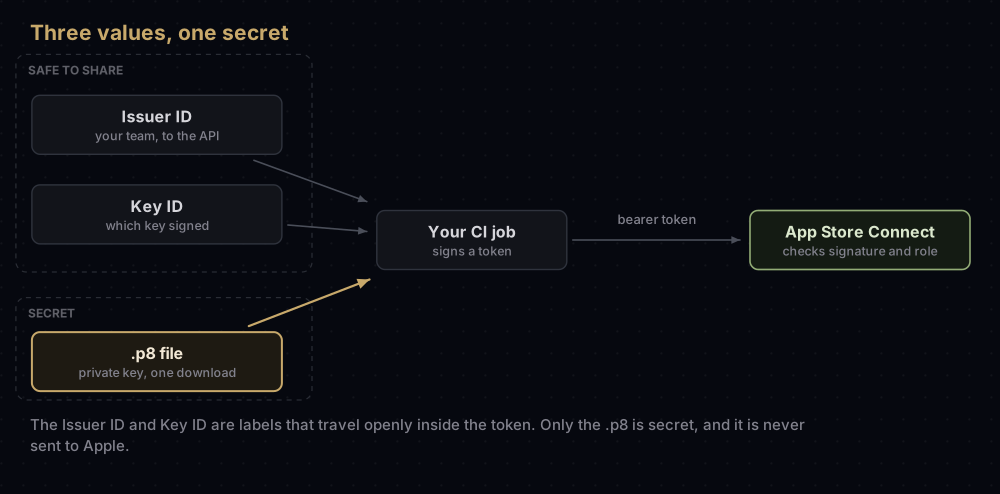
| Value | Looks like | Where you find it | Secret? |
|---|---|---|---|
| Issuer ID | A UUID, for example 00000000-0000-0000-0000-000000000000 | Near the top of the App Store Connect API page, with a Copy button | No |
| Key ID | 10 characters, for example ABC123DEFG | In the list of active keys, with a Copy Key ID link | No |
.p8 file | Text starting -----BEGIN PRIVATE KEY----- | Your downloads folder, once | Yes |
| Team ID | 10 characters, for example A1B2C3D4E5 | Membership details in your developer account | No |
The Team ID is in the table because people mix it up with the Issuer ID. The App Store Connect API never uses the Team ID in its tokens. Some tools still ask for it separately (Expo does, for example), but they use it for other work.
Team keys and individual keys
Apple offers two kinds of App Store Connect API key, and they behave differently enough that the choice matters.
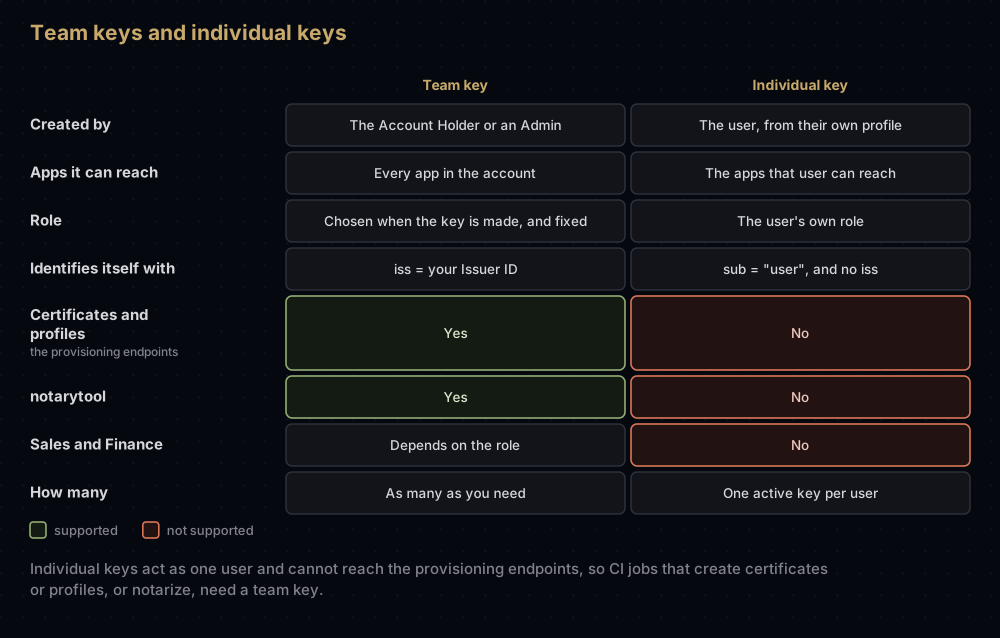
A team key belongs to the organisation. It reaches every app in the account; App Store Connect Help says app access cannot be limited for a team key. You choose its role when you create it and cannot change it later.
An individual key belongs to one user and carries exactly that user's access, including any per-app restrictions. Apple's documentation is explicit about what it cannot do: individual keys cannot use the provisioning endpoints (certificates, identifiers and profiles), cannot reach Sales and Finance, and cannot be used with notarytool. That rules them out for most signing work in CI, and it is why fastlane's guide recommends a team key.
Apple's two documentation sets disagree about who may make individual keys. App Store Connect Help says every user can generate one by default unless an Admin or the Account Holder removes the Generate Individual API Keys permission. The developer documentation says the Generate button only appears if you already have that permission, which an Admin can grant. If the button is missing on your profile, ask an Admin to check that setting.
Creating a team key
Before anyone can make a key, the Account Holder has to request API access once. It is done on the Integrations tab of Users and Access, by agreeing to the terms, and Apple says requests are reviewed case by case.
After that, the Account Holder or an Admin can create team keys:
- In App Store Connect, open Users and Access, then the Integrations tab. The App Store Connect API page opens.
- Choose Team Keys, then Generate API Key (or the add button if keys already exist).
- Enter a name. It is only a label for you; it is not part of the key.
- Under Access, choose the role.
- Click Generate. The key appears in the Active list with its Key ID and a download link.
- Download the
.p8now and store it somewhere safe. Apple keeps no copy, and the link disappears after one download. - Copy the Issuer ID from the top of the page, and the Key ID from the list.
App Store Connect's menus move from time to time. If the Integrations tab is not where these steps say, search App Store Connect Help for "App Store Connect API". Individual keys are made elsewhere: from your own profile, under Individual API Key.
Members of the Apple Developer Enterprise Program have a separate Enterprise Program API, and App Store Connect Help notes that team keys are not available for it.
Choosing a role
Apple says the roles that apply to keys are the same ones that apply to users. Its descriptions of them:
| Role | What Apple says the role covers |
|---|---|
| Admin | Broad permissions, including creating and deleting users. Admins in an organisation also get access to Certificates, Identifiers & Profiles |
| App Manager | All aspects of an app, such as pricing, App Store information, and development and delivery |
| Developer | Development and delivery of an app |
| Marketing | Marketing materials and promotional artwork |
| Sales | Sales, downloads and other analytics |
| Finance | Financial information, reports and tax forms |
| Customer Support | Customer reviews on the App Store |
Some practical anchors from the docs:
- Uploading builds needs the Account Holder, Admin, App Manager or Developer role, according to App Store Connect Help. A Marketing or Sales key will not do it.
- Codemagic recommends App Manager for its key, and says App Store Connect publishing needs that permission.
- Expo says a key with Admin access lets
eas buildcheck and update your Apple credentials from CI. - fastlane simply asks you to give the key "an appropriate role for the task at hand".
Pick the least powerful role that does the job. A leaked Admin key is a leaked Admin.
From key to token
The .p8 is never sent to Apple. Your tool uses it to sign a JSON Web Token (JWT), a short text with a header, a payload and a signature, and sends that token in the Authorization header of each request.
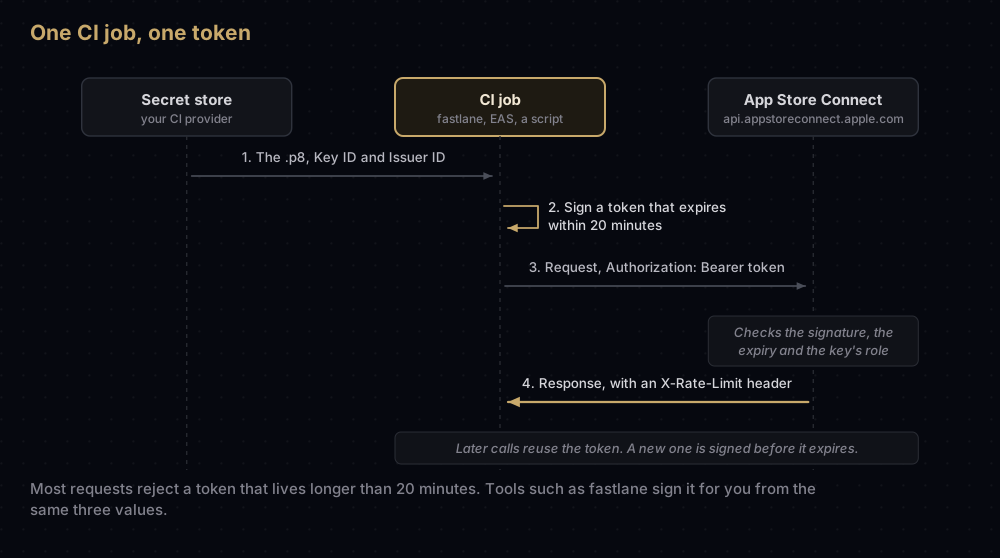
The fields Apple asks for:
| Part | Field | Value |
|---|---|---|
| Header | alg | ES256 |
| Header | kid | Your Key ID |
| Header | typ | JWT |
| Payload | iss | Your Issuer ID (team keys only) |
| Payload | sub | user (individual keys only, in place of iss) |
| Payload | iat | The time you made the token, in Unix seconds |
| Payload | exp | When it expires, in Unix seconds |
| Payload | aud | appstoreconnect-v1 |
| Payload | scope | Optional list of allowed requests, such as GET /v1/apps |
For most requests, Apple rejects a token whose lifetime (exp minus iat) is over 20 minutes. There is one exception: a token that has a scope, lists only GET requests, and covers only certain resources (mostly Xcode Cloud ones, plus power and performance metrics) may live up to six months. Apple also suggests reusing a token for many requests rather than signing one per call, and keeping lifetimes as short as the job allows.
Tools like fastlane build the token for you. If you are writing your own client, this is the whole job in Node.js with no extra packages. It ran for this post on Node 24 with a throwaway key:
import { readFileSync } from "node:fs";
import { createPrivateKey, sign } from "node:crypto";

const keyId = "ABC123DEFG";
const issuerId = "00000000-0000-0000-0000-000000000000";
const privateKey = createPrivateKey(readFileSync(`AuthKey_${keyId}.p8`));

const now = Math.floor(Date.now() / 1000);
const header = { alg: "ES256", kid: keyId, typ: "JWT" };
const payload = { iss: issuerId, iat: now, exp: now + 20 * 60, aud: "appstoreconnect-v1" };

const encode = (part) => Buffer.from(JSON.stringify(part)).toString("base64url");
const unsigned = `${encode(header)}.${encode(payload)}`;
// A JWT needs the raw 64-byte signature, not the DER form OpenSSL produces.
const signature = sign("sha256", Buffer.from(unsigned), {
  key: privateKey,
  dsaEncoding: "ieee-p1363",
}).toString("base64url");

console.log(`${unsigned}.${signature}`);
Then call the API with it:
curl -H "Authorization: Bearer $(node make-token.mjs)" \
  "https://api.appstoreconnect.apple.com/v1/apps"
With a key Apple does not know, that request came back as HTTP 401 with the code NOT_AUTHORIZED and the title "Authentication credentials are missing or invalid." With a real key, it lists your apps.
Every response also carries an X-Rate-Limit header showing the hourly allowance for that key and how much is left. Going over it returns HTTP 429 with RATE_LIMIT_EXCEEDED.
Where CI tools want the three values
| Tool | Key ID | Issuer ID | The .p8 |
|---|---|---|---|
| fastlane | key_id or APP_STORE_CONNECT_API_KEY_KEY_ID | issuer_id or APP_STORE_CONNECT_API_KEY_ISSUER_ID | key_filepath, or the text in key_content / APP_STORE_CONNECT_API_KEY_KEY |
| Codemagic | Key ID field, or APP_STORE_CONNECT_KEY_IDENTIFIER | Issuer ID field, or APP_STORE_CONNECT_ISSUER_ID | Uploaded file, or APP_STORE_CONNECT_PRIVATE_KEY |
| Expo EAS (eas.json) | ascApiKeyId | ascApiKeyIssuerId | ascApiKeyPath |
| Expo EAS (CI variables) | EXPO_ASC_KEY_ID | EXPO_ASC_ISSUER_ID | EXPO_ASC_API_KEY_PATH |
xcodebuild | -authenticationKeyID | -authenticationKeyIssuerID | -authenticationKeyPath |
xcrun altool | --api-key | --api-issuer | A file named AuthKey_ plus the Key ID, in one of its search folders |
xcrun notarytool | --key-id | --issuer (team keys only) | --key |
fastlane
The app_store_connect_api_key action turns the three values into credentials, and later actions in the same lane pick them up without being told: upload_to_testflight, upload_to_app_store, sync_code_signing (match), get_certificates and get_provisioning_profile among them. Each option can come from an environment variable, so a lane can be as short as this:
lane :beta do
  app_store_connect_api_key # reads the APP_STORE_CONNECT_API_KEY_* variables
  build_app(scheme: "App")
  upload_to_testflight
end
With APP_STORE_CONNECT_API_KEY_KEY_ID, APP_STORE_CONNECT_API_KEY_ISSUER_ID and APP_STORE_CONNECT_API_KEY_KEY (the text of the .p8) set, the action picked up all three in a test with fastlane 2.238.0. If your CI stores the key Base64-encoded, set APP_STORE_CONNECT_API_KEY_IS_KEY_CONTENT_BASE64 as well. For an individual key, leave the issuer out.
fastlane also reads a JSON file passed as api_key_path, with key_id, issuer_id and key (the .p8 text) inside, and optionally duration (at most 1,200 seconds) and in_house for Enterprise teams. Two tools, produce and pem, do not support API keys yet, according to fastlane's table.
Codemagic
Add the key once under Team integrations → Developer Portal (a team admin can do this), with a name, the Issuer ID, the Key ID and the .p8. Then refer to it by name:
workflows:
  ios-workflow:
    integrations:
      app_store_connect: YOUR_KEY_NAME
    publishing:
      app_store_connect:
        auth: integration
The alternative is environment variables: Codemagic's docs name them APP_STORE_CONNECT_PRIVATE_KEY, APP_STORE_CONNECT_KEY_IDENTIFIER and APP_STORE_CONNECT_ISSUER_ID.
Expo EAS
Running eas credentials --platform ios offers App Store Connect: Manage your API Key, which sets a key up for EAS Submit; Expo stores it encrypted on its servers. To bring your own, point eas.json at it:
{
  "submit": {
    "production": {
      "ios": {
        "ascApiKeyPath": "./AuthKey_ABC123DEFG.p8",
        "ascApiKeyIssuerId": "00000000-0000-0000-0000-000000000000",
        "ascApiKeyId": "ABC123DEFG"
      }
    }
  }
}
For builds in your own CI that may need to repair credentials, Expo documents EXPO_ASC_API_KEY_PATH, EXPO_ASC_KEY_ID and EXPO_ASC_ISSUER_ID, together with EXPO_APPLE_TEAM_ID and EXPO_APPLE_TEAM_TYPE. That is where the Team ID comes in.
Xcode's own command-line tools
xcodebuildcan create and update certificates and profiles during a build when you pass-allowProvisioningUpdates. On a machine with no Apple Account signed in to Xcode, give it the key with-authenticationKeyPath,-authenticationKeyIDand-authenticationKeyIssuerID. Its help says the ID and issuer are required whenever the path is given.altooltakes--api-keyand--api-issuer, and looks for a file namedAuthKey_ABC123DEFG.p8(for that Key ID) in./private_keys,~/private_keys,~/.private_keys,~/.appstoreconnect/private_keys, or the folder inAPI_PRIVATE_KEYS_DIR.notarytooltakes--key(the file path),--key-idand--issuer. Its help says to give the issuer for team keys and leave it out for individual keys, although Apple's API docs say individual keys cannot be used withnotarytoolat all. Use a team key.
These flags were checked against the tools in Xcode 26.6.
GitHub Actions
GitHub's own guide to signing Xcode apps covers certificates and profiles but not API keys. A common pattern is to keep the three values as repository secrets and hand them to fastlane or xcodebuild in a step:
- name: Upload to TestFlight
  env:
    APP_STORE_CONNECT_API_KEY_KEY_ID: ${{ secrets.ASC_KEY_ID }}
    APP_STORE_CONNECT_API_KEY_ISSUER_ID: ${{ secrets.ASC_ISSUER_ID }}
    APP_STORE_CONNECT_API_KEY_KEY: ${{ secrets.ASC_KEY_P8 }}
  run: bundle exec fastlane beta
Paste the whole .p8, header and footer lines included, into the ASC_KEY_P8 secret. GitHub's documentation also allows storing binary files as Base64 and decoding them in the workflow. If a tool needs a file rather than text, write the secret into $RUNNER_TEMP, a directory GitHub empties at the start and end of each job, and pass that path.
Keeping the key safe
- Never commit the
.p8or put it in an app. Apple's own instructions say not to keep keys in a code repository or in client-side code. - One key per system. A separate key for each CI service or server means a leak can be cut off without breaking everything else.
- Revoke at once if it leaks. Admins and the Account Holder can revoke team keys and anyone's individual key; a user can revoke their own. A revoked key cannot be brought back, and revoked keys stay listed for 30 days.
- Rotate by overlap. Create the new key, update every CI secret, check a build, then revoke the old one.
- Changing the role means a new key. A key's name and access level cannot be edited after it is made.
Why it fails
| What you see | Likely cause |
|---|---|
HTTP 401, NOT_AUTHORIZED, "Authentication credentials are missing or invalid" | Apple did not accept the token. Check that it is signed with the right .p8, that the Key ID and Issuer ID match that key, that it has not expired, and that exp is no more than 20 minutes after iat |
| HTTP 403 Forbidden | Apple lists three causes: the key was revoked, the token is incorrectly formatted, or the key's role does not allow the operation |
HTTP 429, RATE_LIMIT_EXCEEDED | The key has used its hourly allowance; wait, and spread the calls out |
| Signing steps fail with an individual key | Individual keys cannot use the provisioning endpoints. Use a team key |
notarytool fails with an individual key | Not supported. Use a team key |
| altool: "Failed to load AuthKey file" | The .p8 is not named AuthKey_ plus the Key ID, or is not in one of altool's search folders |
| No Download link next to the key | Someone already downloaded it. Find that file, or make a new key |
| No App Store Connect API page, or no Generate button | API access has not been requested by the Account Holder, or your role cannot create keys |
| An individual key's token is refused | Its payload must carry sub: "user" and no iss |
Questions people ask
What is the Issuer ID in App Store Connect?
A UUID that identifies your team to the App Store Connect API. It goes in the iss claim of tokens made with a team key. You find it at the top of the App Store Connect API page under Users and Access → Integrations. Individual keys do not use it.
Is the Issuer ID the same as the Team ID?
No. The Team ID is the 10-character identifier of your developer team, used by code signing, APNs and Sign in with Apple. The Issuer ID is a UUID used only by the App Store Connect API.
Can I download my App Store Connect API key again?
No. Apple offers the .p8 download once and does not keep a copy. If the file is lost, generate a new key and revoke the old one.
Should I use a team key or an individual key?
A team key for CI and anything that touches certificates, profiles or notarization, because individual keys cannot use those. An individual key suits personal scripts that only need what your own account can do.
Which role should my CI key have?
The least powerful one that works. Uploading builds needs App Manager, Developer or Admin. Codemagic recommends App Manager. Expo suggests Admin so EAS can manage credentials for you.
How long does an App Store Connect API token last?
You decide, up to 20 minutes for most requests. A few read-only, scoped requests accept tokens that last up to six months. The key itself does not expire.
Can I change the role of an existing API key?
No. Revoke it and generate a new key with the role you want.
Can an App Store Connect API key send push notifications?
No. Apple says these keys work only with the App Store Connect API. Push needs an APNs key made in Certificates, Identifiers & Profiles.
Keep reading
- p8 vs p12: why Apple's server APIs use keys and app signing uses certificates.
- fastlane match: sharing one set of signing certificates across a team and CI.
- Flutter iOS code signing: from the first run on a device to a TestFlight upload.
- Converting signing files: tested commands for
.p8,.p12, PEM and keystores. - Sign in with Apple on Android and the web: a different Apple key, and the six-month secret it signs.


