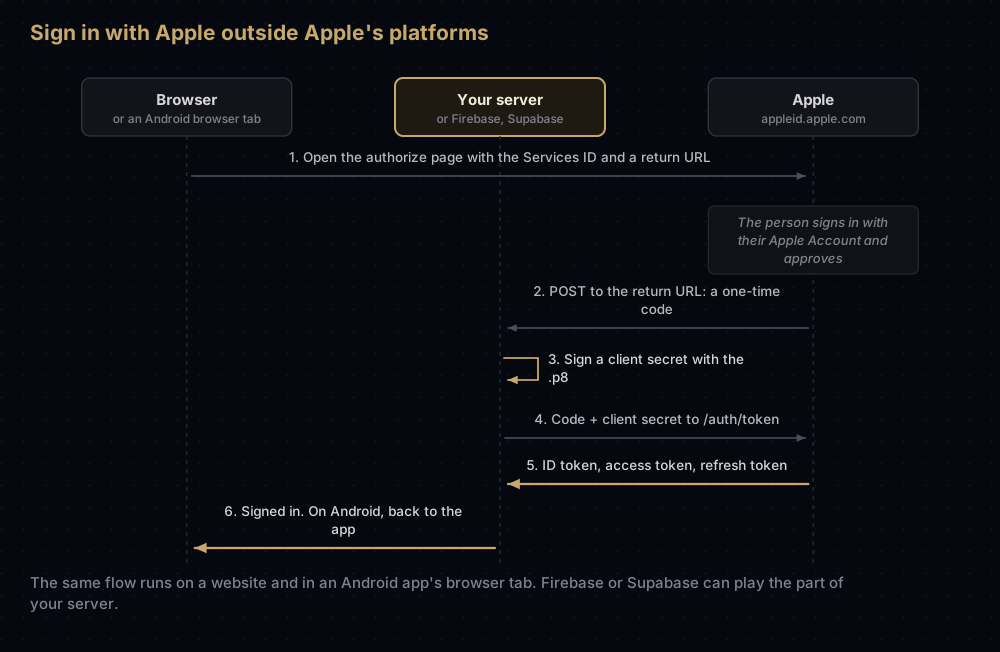
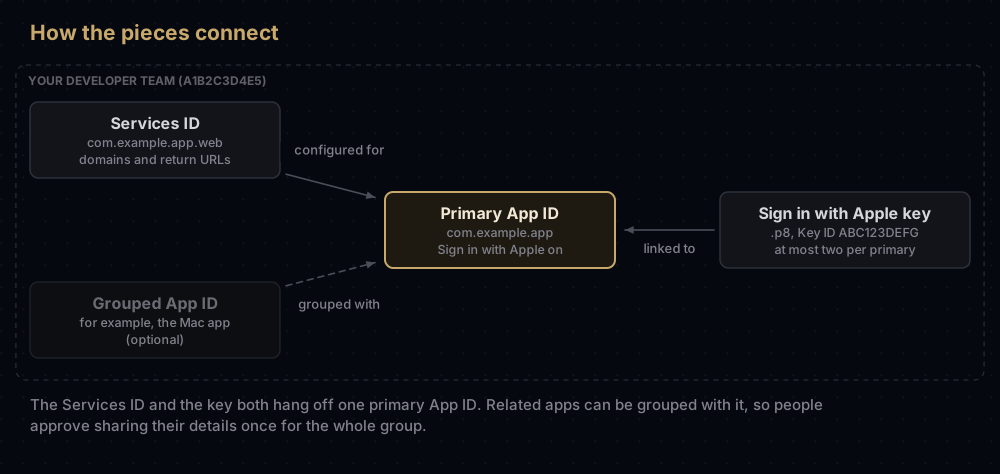
Sign in with Apple on Android or a website runs as a web page on Apple's own site, and Apple needs four things from you before it will work: a primary App ID with Sign in with Apple turned on, a Services ID that names your website, the domains and return URLs Apple may send people back to, and a Sign in with Apple private key (a .p8) that your server uses to prove it is you.
Your server uses that key to sign a client secret, a token that lasts at most six months. Firebase Authentication takes the key itself. Supabase asks you for a finished secret, so you have to make a new one before it expires.
The first section explains the flow in everyday terms. The rest walks through the Apple setup, then what Firebase, Supabase and a hand-built server each ask for.
How it works, in everyday terms
Picture a members' club that lets people in on the word of a trusted doorman.
- Apple is the doorman. People prove who they are to Apple, never to you, and Apple tells you the result.
- The Services ID is your club's entry in Apple's register. It says which website is asking, and which addresses Apple may send people back to afterwards.
- The client secret is a signed letter from your club to Apple, sealed with your private key. Apple swaps the one-time code for that person's tokens only when the request carries a valid letter.
The analogy breaks at one point: the letter has an expiry date you choose, up to six months ahead, and once it passes, Apple turns your server away even though the key that signed it still works. That detail is behind sign-ins that work for months and then stop.
On an iPhone, iPad or Mac, an app signs people in through Apple's AuthenticationServices framework. Other platforms do not have that framework. Apple's guidance for them, Android included, is the web flow: Sign in with Apple JS, or the same requests made by hand in a browser tab.
What Apple needs from you
| Piece | Example | What it does |
|---|---|---|
| Primary App ID | com.example.app, with Sign in with Apple enabled | The app everything else is grouped under. Users consent once per group |
| Services ID | com.example.app.web | Identifies your website or non-Apple app. It is the client_id in the web flow |
| Domains and return URLs | example.com, https://example.com/auth/apple/callback | Where Apple may send the result |
| Sign in with Apple key | AuthKey_ABC123DEFG.p8, Key ID ABC123DEFG | Signs the client secret. Linked to the primary App ID |
| Team ID | A1B2C3D4E5 | Goes into the client secret as its issuer |
Everything below is done in Certificates, Identifiers & Profiles in your developer account, and each of these steps needs the Account Holder or Admin role.
Step 1: a primary App ID
Open the App ID of your iOS or Mac app, tick Sign in with Apple, and enable it as a primary App ID. You can also turn the capability on from Xcode.
If you have several related apps, say an iPhone app and a Mac app, enable one as the primary and group the others with it. Apple's reason for grouping is consent: a person approves sharing their details once for the whole group of apps and websites. An App ID that joined by grouping cannot itself become the anchor for further grouping; Apple says it would need to be ungrouped and enabled as a primary first.
A note on wording. Apple's configuration guide says that to authenticate users on the web you must have an existing app in the App Store that uses Sign in with Apple. The portal step for the web asks you to pick a primary App ID with Sign in with Apple enabled. Plan for both.
Step 2: the Services ID, domains and return URLs
A Services ID identifies a website that uses Apple's web services, Sign in with Apple among them. Register one under Identifiers with a description and a reverse-domain identifier such as com.example.app.web.
Then open the Services ID, tick Sign in with Apple, and choose Configure:
- Pick the primary App ID from step 1.
- Enter your domains, subdomains and return URLs. Apple's help page describes them as one comma-separated list, and at least one domain or subdomain is required.
- Save, review and confirm.
Apple's rules for return URLs (Apple also calls them redirect URIs):
- Absolute, with scheme, host and path, such as
https://example.com/path/to/endpoint. - A real domain name. Apple's authorization request does not accept an IP address or
localhost, which is why local testing usually needs a tunnel or a staging domain. - No fragment (nothing after a
#). - Organisations can register up to 100 website URLs per Services ID; individual members up to 10.
Apple's help page adds that registering a domain or subdomain does not require uploading any file to your server.
Each web property you run gets its own Services ID. Apple's documentation describes one Services ID per web service, each configured with its own domains and return URLs.
Step 3: the Sign in with Apple key
Under Keys, add a key, tick Sign in with Apple, configure it with your primary App ID, and download the .p8. Note the Key ID shown under the key's name.
The rules that follow from how Apple ties keys to apps:
- Two keys per primary App ID, at most. That is enough to rotate without a gap.
- One download. Apple does not keep the file. If it is lost, make another key.
- Rotate by overlap. Apple's advice for a compromised key: create a new key for the same primary App ID, move to it, then revoke the old one.
The difference between this key and other Apple keys is covered in p8 vs p12. In short, the .p8 has no password, so it belongs in a secret manager, never in an app or a repository. An Android app never needs it: only the server, or Firebase or Supabase, does.
Step 4: the client secret
When your server trades a sign-in code for tokens, Apple wants a client_secret. It is not a fixed string from the portal. It is a JSON Web Token (JWT) you create, signed with the key from step 3.
| Part | Field | Value |
|---|---|---|
| Header | alg | ES256 |
| Header | kid | Your Key ID, ABC123DEFG |
| Payload | iss | Your Team ID, A1B2C3D4E5 |
| Payload | iat | When you made it, in Unix seconds |
| Payload | exp | When it expires. No more than 15,777,000 seconds (six months) ahead, by Apple's clock |
| Payload | aud | https://appleid.apple.com |
| Payload | sub | The same identifier you send as client_id: your Services ID on the web and Android. Case-sensitive |
Apple asks for ECDSA on the P-256 curve with SHA-256, which is what ES256 means. Here is a complete generator in Node.js with no extra packages. It ran for this post on Node 24 with a throwaway key, and the result verified against that key's public half:
import { readFileSync } from "node:fs";
import { createPrivateKey, sign } from "node:crypto";

const teamId = "A1B2C3D4E5";
const keyId = "ABC123DEFG";
const servicesId = "com.example.app.web"; // the client_id your sign-in uses
const privateKey = createPrivateKey(readFileSync(`AuthKey_${keyId}.p8`));

const now = Math.floor(Date.now() / 1000);
const header = { alg: "ES256", kid: keyId };
const payload = {
  iss: teamId,
  iat: now,
  exp: now + 180 * 24 * 60 * 60, // 180 days: under Apple's 15,777,000-second limit
  aud: "https://appleid.apple.com",
  sub: servicesId,
};

const encode = (part) => Buffer.from(JSON.stringify(part)).toString("base64url");
const unsigned = `${encode(header)}.${encode(payload)}`;
const signature = sign("sha256", Buffer.from(unsigned), {
  key: privateKey,
  dsaEncoding: "ieee-p1363",
}).toString("base64url");

console.log(`${unsigned}.${signature}`);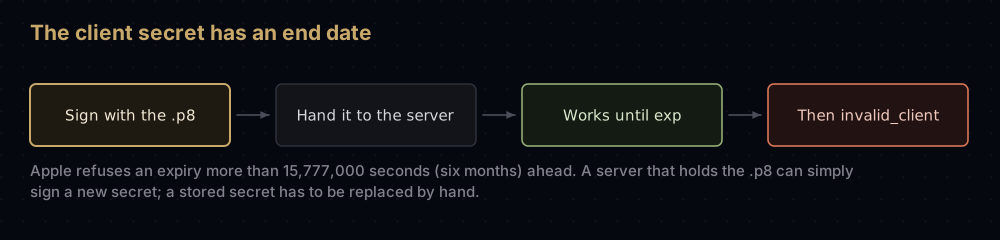
A server that holds the .p8 can sign a fresh secret whenever it likes, even for every request, and never think about expiry. A service that stores a secret you pasted in cannot, and that is where the six-month limit bites.
Handing the pieces to Firebase, Supabase or your own server
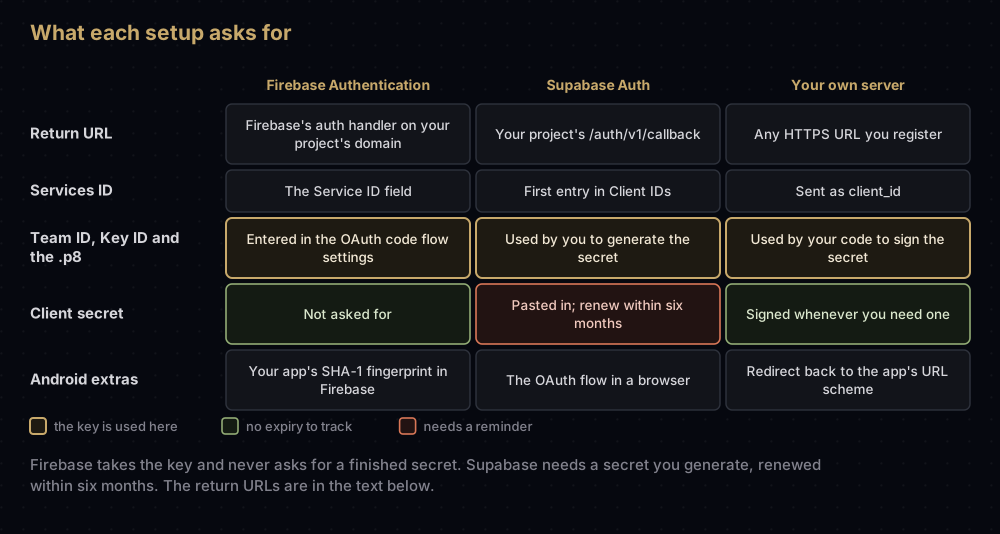
Firebase Authentication
Firebase's Android, iOS and web guides ask for the same Apple setup:
-
Configure the Services ID as above, and register this return URL:
https://YOUR_FIREBASE_PROJECT_ID.firebaseapp.com/__/auth/handler -
Create the Sign in with Apple key.
-
In the Firebase console, open Authentication, then the Sign-in method tab, and enable Apple. Enter the Service ID, and under OAuth code flow configuration enter your Apple Team ID, the Key ID and the private key.
Firebase asks for the private key itself rather than a finished client secret, and its guides say nothing about renewing one.
On Android, two more things apply. Firebase's guide asks for your app's SHA-1 fingerprint in the project settings, and the sign-in runs through the SDK's OAuth provider with the provider ID apple.com, which opens Apple's page in a Custom Chrome Tab. If your fingerprints are not set up yet, getting SHA-1 fingerprints for all three Android keys covers it. In Flutter, the firebase_auth plugin uses AppleAuthProvider with signInWithProvider on mobile and signInWithPopup on the web.
Firebase's guides also note three things that are easy to miss:
- People signing in need an Apple Account with two-factor authentication, signed in to iCloud on an Apple device. That applies to your testers too.
- If Firebase sends emails (email verification, sign-in links), register
noreply@YOUR_FIREBASE_PROJECT_ID.firebaseapp.comwith Apple's private email relay, or users who hid their address will not receive them. - To let users delete their account and revoke Apple's tokens, the Services ID and OAuth code flow settings must be filled in even for iOS-only apps, and the user has to sign in again first, because Firebase does not store Apple's tokens.
Supabase
Supabase's Apple guide splits the work in two. Native sign-in on Apple platforms needs only your App IDs. The OAuth flow, which is what web, Flutter web and non-iOS Kotlin apps use, needs the full setup:
-
A Services ID whose domain is your project's Supabase host (usually
YOUR_PROJECT_REF.supabase.co) and whose return URL is:https://YOUR_PROJECT_REF.supabase.co/auth/v1/callback -
The Sign in with Apple key, used to generate a client secret. Supabase's docs include a generator that runs in the browser, and a script like the one above does the same job.
-
In the dashboard's Apple provider settings, add the Services ID to Client IDs and paste the generated secret.
Two Supabase rules matter:
- Order of Client IDs. If you also list native App IDs, the Services ID must come first. Supabase uses the first entry for the web OAuth flow and accepts any entry as the audience of a native ID token. With an App ID first, native sign-in works and web sign-in is rejected by Apple.
- Six-month renewal. Supabase's guide says Apple requires a new secret every six months for the OAuth flow, and recommends a calendar reminder. Native-only projects do not need one.
The same settings can be made through Supabase's Management API, whose fields are external_apple_enabled, external_apple_client_id and external_apple_secret. Supabase also notes that it does not support Apple's server-to-server notification endpoint, and that Apple provides a user's full name only on their first sign-in, so the app has to save it then.
Your own server
Without a provider, your server makes the two requests itself. First, send the browser to Apple's authorize page:
https://appleid.apple.com/auth/authorize
  ?client_id=com.example.app.web
  &redirect_uri=https%3A%2F%2Fexample.com%2Fauth%2Fapple%2Fcallback
  &response_type=code
  &scope=name%20email
  &response_mode=form_post
  &state=RANDOM_STATE
  &nonce=RANDOM_NONCE
(Shown on several lines for reading. It is one URL.) The parameters, according to Apple:
| Parameter | What Apple requires |
|---|---|
client_id | Your Services ID, without the Team ID |
redirect_uri | One of the registered return URLs |
response_type | code, or both code and id_token. id_token on its own is not supported |
scope | name, email, both or neither, space-separated |
response_mode | query, fragment or form_post. Must be form_post if you request any scope |
state, nonce | Your values, to tie the response to the session and stop replays |
Apple then posts the result to your return URL: a one-time code that is valid for five minutes, the state you sent, an id_token if you asked for one, and a user field with the details your scopes requested. If the person cancels, the only error Apple sends there is user_cancelled_authorize.
Second, exchange the code:
curl -X POST "https://appleid.apple.com/auth/token" \
  -H 'content-type: application/x-www-form-urlencoded' \
  -d 'client_id=com.example.app.web' \
  -d 'client_secret=CLIENT_SECRET' \
  -d 'code=CODE' \
  -d 'grant_type=authorization_code' \
  --data-urlencode 'redirect_uri=https://example.com/auth/apple/callback'
Include redirect_uri only if you sent one in the first request. A successful answer has an id_token, an access_token and a refresh_token. Later, the same endpoint takes grant_type=refresh_token to check that the session is still valid.
On Android, Apple's guide describes the ending: platforms that rely on custom URL schemes, Android among them, must handle the result on the server at the redirect_uri endpoint, then redirect to the app's custom URL scheme to hand control back.
The private email relay
A person can choose to hide their email address. Your app then receives an address at privaterelay.appleid.com, and Apple forwards mail to the real inbox, but only from senders you registered.
To send to those addresses, register your outbound email domains, subdomains or addresses in your developer account. Organisations can register up to 100 sources and individuals up to 32. Apple asks you to authenticate the domains with SPF, DKIM or, preferably, both. Apple also offers an optional server-to-server notification endpoint (one URL per app group, TLS 1.2 or later) that tells you when a user changes email forwarding, deletes their account with your app, or deletes their Apple Account.
Why it fails
| What you see | Likely cause |
|---|---|
invalid_client from the token endpoint | Apple lists: a mismatched or invalid client ID, an invalid client secret (expired, malformed claims or a bad signature), or a mismatched or invalid redirect URI |
Web sign-in worked for months, then invalid_client everywhere | The client secret passed its exp. Sign a new one |
invalid_grant, "The code has expired or has been revoked." | The code is over five minutes old, was already used, or belongs to a different client ID |
invalid_request | A parameter is missing or unsupported, or the request carries more than one credential |
| The authorize request is refused before anyone can sign in | Check that the return URL is registered exactly, is not localhost or an IP address, and has no fragment |
| Name or email never arrives | Scopes need response_mode=form_post. Supabase also notes that Apple sends the full name only on the first sign-in, so an app that did not save it then will not see it again |
client_id and sub disagree | The secret was signed for the App ID while the web flow sends the Services ID, or the other way round. They must match, including case |
| Supabase: native works, web fails | An App ID is listed before the Services ID in Client IDs |
| Firebase sign-in fails on Android only | Check that the app's SHA-1 fingerprint is in the Firebase project, which Firebase's Android guide requires |
| Sign-ins stopped for everyone at once | The key was revoked (Apple says revoking affects every service that uses it), or a stored secret expired |
Questions people ask
Can I use Sign in with Apple on Android?
Yes, through the web flow. Apple points other platforms, Android included, to Sign in with Apple JS or the same requests made by hand in a browser tab. Firebase and Supabase both handle this for you once the Services ID and key are configured.
What is a Services ID in Apple's developer portal?
An identifier for a website, or an app on a non-Apple platform, that uses Apple web services such as Sign in with Apple. You configure it with your domains and return URLs, link it to a primary App ID, and use it as the client_id.
How long does the Sign in with Apple client secret last?
As long as its exp claim says, which may be no more than 15,777,000 seconds (six months) after Apple's current time. After that, token requests fail with invalid_client.
Does the Sign in with Apple key expire?
No. The .p8 keeps working until you revoke it. Only the client secrets you sign with it expire.
How many Sign in with Apple keys can I have?
Two per primary App ID, which leaves room to create a replacement before revoking the old key.
Do I need a Services ID for an iOS-only app?
Not for native sign-in itself. Firebase still asks for the Services ID and key settings if you want to revoke Apple tokens when a user deletes their account.
Why do I get invalid_client?
Apple lists three causes: a wrong client ID, a bad client secret (expired, malformed claims or an invalid signature), or a wrong redirect URI. An expired secret is the one that appears months after a working setup. Also check that the secret's sub matches the client_id exactly, that iss is your Team ID and that kid is your Key ID.
Can I test Sign in with Apple on localhost?
Not directly. Apple's authorization request needs a return URL with a domain name, not localhost or an IP address, so use a staging domain or a tunnel with a real hostname.
Keep reading
- p8 vs p12: why Apple's server APIs use keys, and how to store them.
- Bundle ID vs App ID: the App ID that becomes your primary.
- Every identifier in Apple's developer portal: Services IDs next to the other nine kinds.
- Getting SHA-1 fingerprints for all three Android keys: what Firebase needs before Android sign-in works.
- Google Sign-In error 10: the Google-side equivalent of a misconfigured sign-in.


