A .p8 file is a private key and nothing more. A .p12 file is a certificate and its private key packed together behind a password. Apple gives you a .p8 when your server needs to call one of its APIs, and a .p12 is how you carry a signing certificate from one machine to another.
So the quick test is what a tool asks you for. If it wants a Key ID plus a Team ID or an Issuer ID, it wants a .p8. If it wants a password, it wants a .p12. For push notifications, where both still work, pick the .p8: it never expires, and one key can cover every app on your team.
The first part of this post explains the difference in everyday terms. The rest is for developers: where each file comes from, what a JWT is, which Apple service takes which file, and how to store and replace them.
Two files, in plain words
Think of the tools a notary uses.
- A
.p12is a locked briefcase. Inside are your ID card (the certificate, which Apple signed to say who you are) and your stamp (the private key). The briefcase has a combination lock, which is the password you chose when you exported it. - A
.p8is the stamp on its own, with no ID card and no briefcase. When you use it, you tell Apple "this is teamA1B2C3D4E5, keyABC123DEFG". Apple kept the matching imprint when it made the key, so it can check your stamp without seeing any ID.
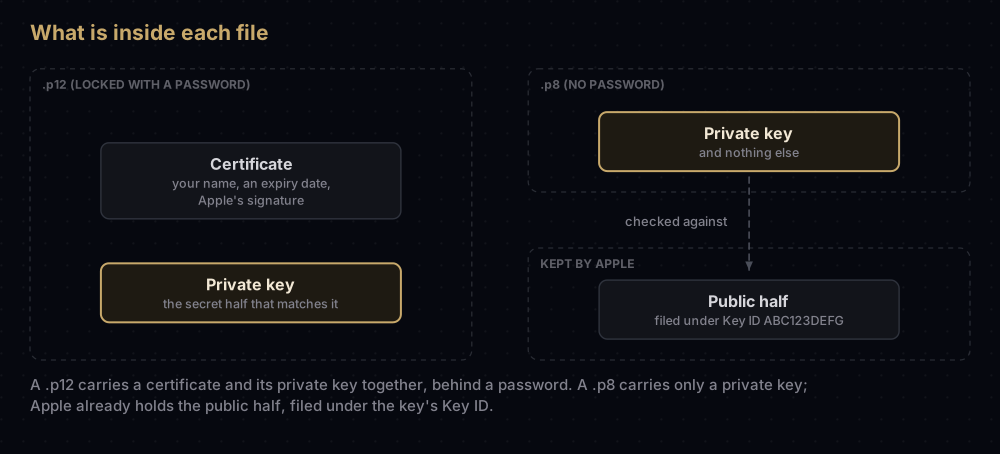
The analogy breaks in one place worth knowing. A real stamp is useless without paper and ink, but a .p8 works for anyone who holds it: it has no password. Whoever copies the file can act as your team for every service the key is enabled for, until you revoke it. Treat the file itself as the secret.
p8 and p12 side by side
.p8 | .p12 (also .pfx) | |
|---|---|---|
| Standard behind it | PKCS#8, a format for one private key | PKCS#12, a container for keys and certificates |
| First line if you open it | -----BEGIN PRIVATE KEY----- (it is plain text) | Unreadable binary |
| Holds | One private key | A certificate, its private key, sometimes the chain above it |
| Password | None | Yes, set when the file is exported |
| Expires | No. It works until revoked | The certificate inside expires |
| Getting another copy | Impossible: the download is offered once | Export again from any Mac that holds the private key |
| How it proves who you are | Your code signs a short-lived token (a JWT) | Presented as a certificate: in a TLS connection, or in an app's signature |
| Who makes it | Apple generates it for you | Your Mac makes the key; Apple signs the certificate |
| Typical scope | A whole team, or chosen apps for APNs keys | One certificate per purpose; a legacy push certificate covers one app |
Why Apple uses both
The two files solve different problems.
An app signature has to be checked by a device that may be offline and has never heard of you. So the app carries a certificate, and the device follows the chain from your certificate up to Apple's root certificate, which it already trusts. That chain is only possible if Apple signed something about you, and that something is the certificate inside your .p12.
A request to one of Apple's servers is different. Apple generated the key pair, kept the public half on its side, and handed you the private half. It does not need a certificate to recognise you. It only needs proof that you hold the private half, and a signed token is that proof. Apple's push documentation calls this stateless, and says it is faster for that reason: APNs does not have to look up a certificate for your server.
So in practice: signing an app uses certificates (moved around as .p12), and calling Apple's servers uses keys (.p8). Push notifications are where both routes still exist side by side.
Where a .p8 comes from
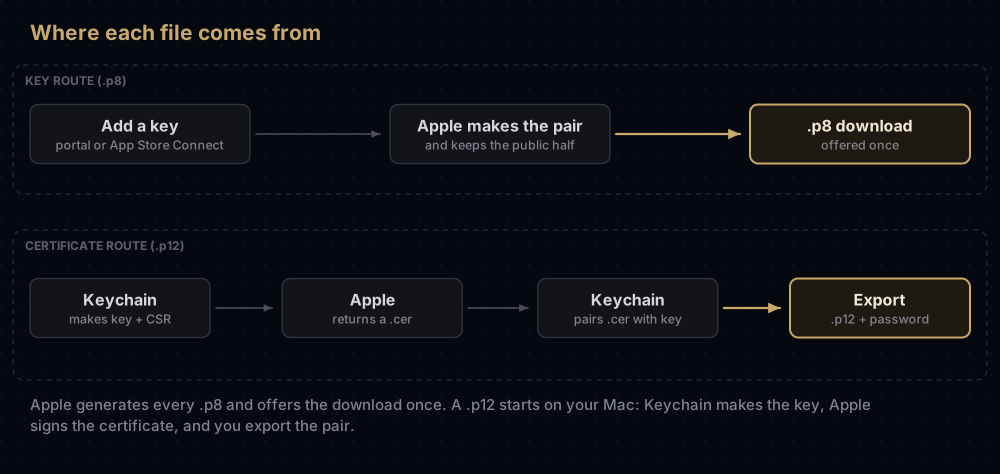
You never create a .p8 on your own machine. Apple generates it when you add a key, and the browser saves it as a text file, usually named like AuthKey_ABC123DEFG.p8.
There are two places that make them:
- Certificates, Identifiers & Profiles → Keys, in your developer account. This is where keys for APNs, Sign in with Apple, Maps, Media Services, WeatherKit and DeviceCheck are made. You name the key, tick the services it may use, and for APNs choose the environment and whether it covers the whole team or specific apps. Only the Account Holder or an Admin can do this.
- App Store Connect → Users and Access → Integrations. This is where App Store Connect API keys and In-App Purchase keys live.
Three details trip people up:
- The download happens once. Apple states plainly that it does not keep the private key. If the Download button is greyed out, someone already downloaded it. A lost
.p8cannot be recovered, only replaced. - The Key ID is not secret. It is a 10-character label shown under the key's name, and it tells Apple which public key to check your signature against. Your Team ID and Issuer ID are not secret either. The
.p8is. - A key can serve several services. One portal key can have more than one service ticked. That is convenient, but it also means that revoking it breaks all of them at once.
Where a .p12 comes from
A .p12 starts on your Mac, not at Apple:
- Keychain Access makes a key pair and a certificate signing request (CSR) when you use Certificate Assistant → Request a Certificate from a Certificate Authority. The private key stays in your keychain.
- You upload the CSR in Certificates, Identifiers & Profiles, for whichever certificate you need, and download the
.certhat Apple issues. - You double-click the
.cer. Keychain Access matches it to the private key it made in step 1, and the pair appears under My Certificates as one identity. - You export the pair. Select the certificate and its private key together, choose File → Export Items, and save in the Personal Information Exchange format. That file is the
.p12, and the password you choose during the export is the one every later tool will ask for.
Step 3 explains a common puzzle. A .cer downloaded on a second Mac has no private key to pair with, so Xcode reports it as missing. The .p12 is how you move the pair; see missing private key in Xcode for the full story.
To see which signing identities (certificate plus private key) a Mac already has:
security find-identity -v -p codesigningWhat a JWT is, in one paragraph
A JSON Web Token (JWT) is a short piece of text made of three parts separated by dots: a header that says how it was signed and with which key, a payload that says who is asking and until when, and a signature over the first two. Your server writes the header and payload, signs them with the .p8, and sends the result with each request as Authorization: bearer followed by the token. Apple looks up the public half by the Key ID in the header, checks the signature, and checks the times. Nobody can change a word of the token without breaking the signature, and every token stops working at a time set inside it, so a leaked token is worth far less than a leaked key.
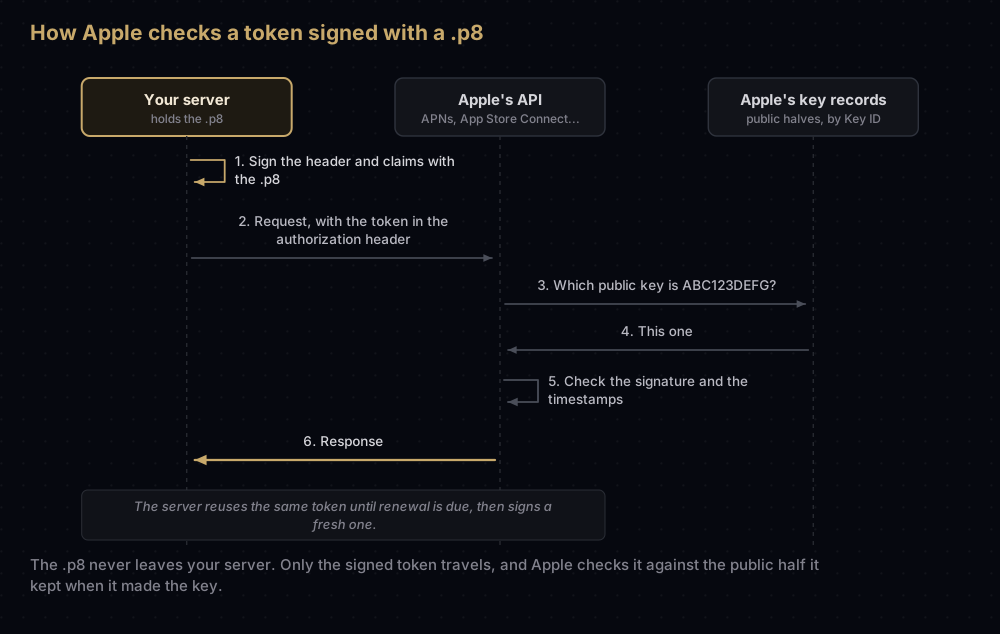
All Apple .p8 keys sign with ES256, which is ECDSA on the P-256 curve with SHA-256. What changes from one service to the next is the payload and how long a token may live:
| Service | iss (issuer) | Other claims | Longest a token may live |
|---|---|---|---|
| APNs | Your Team ID | iat | One hour. Apple asks you to refresh no more often than every 20 minutes and at least every 60 |
| App Store Connect API | Your Issuer ID (team keys), or sub: "user" (individual keys) | iat, exp, aud: appstoreconnect-v1 | 20 minutes for most requests |
| In-App Purchase (App Store Server API) | Your Issuer ID | iat, exp, aud: appstoreconnect-v1, bid (your bundle ID) | 60 minutes |
| Sign in with Apple | Your Team ID | iat, exp, aud: https://appleid.apple.com, sub (your client ID) | Six months |
Decoded, an APNs token is tiny. This is the whole thing before signing, with placeholder values:
{ "alg": "ES256", "kid": "ABC123DEFG" }
{ "iss": "A1B2C3D4E5", "iat": 1789660000 }
A .p12 involves no token at all. For a legacy push certificate, your server opens a TLS connection to APNs and presents the certificate, and the connection itself is the proof. For code signing, the certificate goes into the app's signature.
Which Apple service takes which file
| What you are doing | File | What goes with it |
|---|---|---|
| Sending push through APNs, directly or through Firebase or OneSignal | .p8 (recommended) | Key ID, Team ID |
| Sending push the legacy way | .p12 | Its password. One certificate per app |
| VoIP and complication pushes | .p8, or their own certificates | Key ID and Team ID, or the certificate's password |
| Uploading builds, TestFlight, certificates and profiles from CI | .p8 (App Store Connect API key) | Key ID, Issuer ID |
Notarizing a Mac app with notarytool | .p8 (App Store Connect API team key) | Key ID, Issuer ID |
| Checking purchases on your server | .p8 (In-App Purchase key) | Key ID, Issuer ID, bundle ID |
| Sign in with Apple on the web or Android | .p8 | Key ID, Team ID, Services ID |
| MusicKit and WeatherKit | .p8 | Key ID, Team ID (WeatherKit also wants a Services ID) |
| MapKit JS, the Maps Server API, DeviceCheck | .p8 | Key ID, plus whatever that service's token asks for |
| Signing an iOS or Mac app on another machine or in CI | .p12 | Its password and a provisioning profile |
| Signing Wallet passes, Apple Pay merchant identity | Certificate plus private key | The matching identifier |
Two patterns stand out. Most of what your server does with Apple runs on keys, and Wallet and Apple Pay are the main exceptions. Everything that signs an app still needs a certificate, because devices check it.
Storing each one safely
A .p8 has no password, so the file is the secret:
- Keep it in a secret manager or your CI provider's encrypted secrets, not in the repository and never in an app.
- Store its Key ID alongside the file. Nothing inside a
.p8says which key it is; the filename usually does, but only until someone renames it. - Give each environment the smallest key it needs. For APNs, that can now mean a key limited to one environment or to specific apps.
A .p12 has two secrets, the file and its password:
- Store them in separate places, or at least as separate CI secrets, so one leak is not enough.
- Choose a real password when exporting. An empty one makes the file as exposed as a
.p8. - On a Mac, the pair lives in the keychain. Exporting a
.p12is only needed to move it.
Both files belong on the "never commit" list along with Android keystores and service account files.
Replacing, rotating and losing them
The two files age differently.
A .p8 does not expire. You replace it because it leaked, because it was lost, or because a person who had it left the team. Revoking it is immediate and affects every service it was enabled for, so the safe order is always the same:
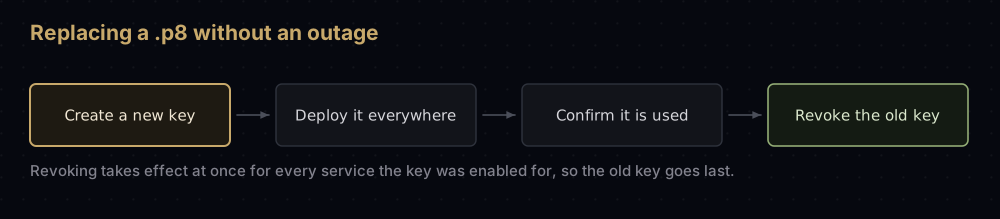
Apple describes exactly this order for APNs and Sign in with Apple keys: create the new key, move to it, then revoke the old one. Where Apple documents a cap on keys, the cap still leaves room for two at once (two Sign in with Apple keys per primary App ID, two team-scoped APNs keys per environment), so the old and new key can overlap.
A .p12 expires with its certificate. Development and distribution certificates typically last a year. When one runs out you create a new certificate from a new CSR, export a new .p12, and replace the old file wherever it was used. For a legacy push certificate the stakes are higher: when it expires or is revoked, Apple's documentation says you can no longer send push notifications to that app, and nothing in the app tells you why.
Losing a .p12 is less serious than losing a .p8, because any Mac that still has the private key in its keychain can export a fresh copy. If no Mac has it, revoke the certificate and make a new one.
Moving push from a .p12 to a .p8
If your push setup still uses a certificate, the move is small and removes the yearly renewal. Create an APNs key, give your push provider (or Firebase) the .p8, the Key ID and your Team ID, confirm that notifications arrive in both the sandbox and production environments, then let the certificate lapse or revoke it. The full walk-through is in renewing an APNs certificate or moving to a key, and the Firebase side is in creating an APNs auth key.
Common mistakes
- Treating a
.p8as less sensitive because it is "just text". It has no password, so it is the more sensitive of the two. - Downloading a key and not saving it properly. There is no second download. Store it before closing the tab.
- Giving a tool the Team ID where it wants the Issuer ID, or the other way round. APNs and Sign in with Apple use the 10-character Team ID. The App Store Connect API uses the Issuer ID, which looks like a UUID.
- Revoking an old key before its replacement is live. Pushes, sign-ins or CI uploads stop at once.
- Using one key for everything. It is allowed, but one leak then exposes every service, and one revocation breaks them all.
- Expecting a
.p8to work in place of a signing certificate. Code signing needs a certificate. Keys only talk to Apple's servers. - Making a
.p12with an empty password and then storing it like a harmless file. - Forgetting that a legacy push
.p12expires. Pushes stop about a year later without any error in the app.
Questions people ask
What is a .p8 file?
A private key in PKCS#8 format, saved as plain text. Apple issues one when you create a key for APNs, the App Store Connect API, Sign in with Apple, In-App Purchase or another Apple service. It has no certificate and no password.
What is a .p12 file?
A password-protected container, in PKCS#12 format, holding a certificate and its private key. On a Mac you create one by exporting a certificate and key from Keychain Access. A .pfx file is the same format with a different extension.
Should I use .p8 or .p12 for push notifications?
The .p8. It never expires and covers every app on the team unless you restrict it. Keys made before February 2025 work in both sandbox and production; for new ones, Apple recommends a separate key per environment. Firebase's current setup guides only describe the key. The certificate route still works but has to be renewed and needs one certificate per app.
Can I convert a .p12 into a .p8?
You can extract the private key from a .p12 and save it in PKCS#8 form, and the file will look like a .p8. Apple will not accept it, though. Apple checks every token against the public half of a key it generated itself, found by Key ID, so a key from anywhere else has nothing to match. The commands for the conversions that do make sense are in converting signing files.
I lost my .p8 file. Can I download it again?
No. Apple offers the download once and does not keep a copy. Create a new key, put it everywhere the old one was used, then revoke the old one.
Does a .p8 key expire?
No. It keeps working until someone revokes it in the developer portal or in App Store Connect. The tokens you sign with it are what expire, after minutes or months depending on the service.
Is the Key ID secret?
No. The Key ID, Team ID and Issuer ID are labels, and each one travels openly inside the tokens that use it. Only the .p8 file needs protecting.
Keep reading
- Converting signing files: P12 to PEM, P8 to PEM, JKS to P12: the tested commands for moving between formats.
- App Store Connect API key: the
.p8that CI tools use, and where the Issuer ID comes in. - Sign in with Apple on Android and the web: the key that signs a six-month client secret.
- APNs auth key (.p8): creating the push key and adding it to Firebase.
- Export a .p12 from Keychain: moving a signing certificate to another Mac or into CI.