
"Missing Private Key" means your Mac has the certificate but not the secret key that was made alongside it. A certificate on its own can't sign anything, so Xcode won't use it. To fix it, get that key onto this Mac as a .p12 file from whoever created the certificate. If nobody has the key, make a new certificate, or let Apple's cloud signing handle distribution builds.
Which of those fits depends on the kind of certificate and on who made it:
| Your situation | What to do |
|---|---|
| A teammate created the certificate | Ask them to export a .p12 (certificate plus key) and import it here |
| You created it on another Mac | Export a .p12 from that Mac, or recover the key from a backup of it |
| It's your own Apple Development certificate and the key is gone | Revoke it and let Xcode make a new one. Development certificates are personal, so this is routine |
| It's the team's Apple Distribution certificate and nobody has the key | Use cloud-managed signing, or have an Account Holder or Admin replace it (read the costs below first) |
| It's a Developer ID certificate | Keep looking for the key. Don't ask Apple to revoke it just because the key is lost |
The rest of this post explains why the key goes missing, how to confirm that it's missing, and what each fix costs.
Why a certificate can exist without its key
When you ask Apple for a certificate, the private key is created on your Mac and never leaves it. Keychain Access (or Xcode, doing the same job for you) makes a matching pair of keys, keeps the private one in your login keychain, and puts only the public one into the request you upload. Apple signs that public key into a certificate and hands the certificate back.
So Apple's developer website has never seen your private key, and it can't give it to you. Downloading the certificate again on a new Mac gets you the public half only. Xcode's certificate list also comes from your developer account, which is how a certificate you never made can show up there.
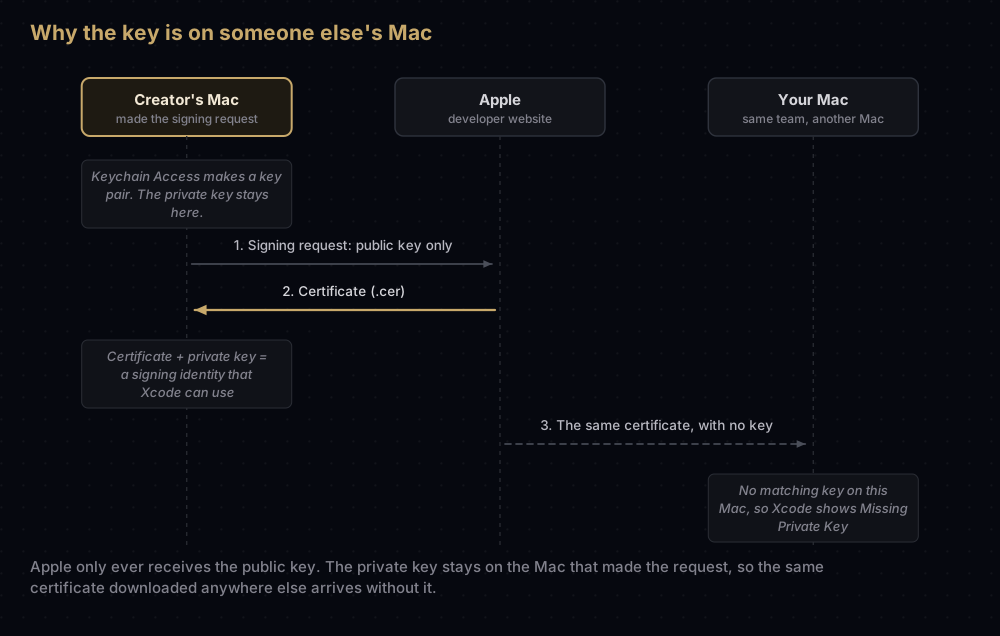
Your Mac pairs a certificate with a key by comparing a hash of the public key inside the certificate with the keys it holds. When nothing matches, there's no pair. According to Apple's developer support engineers, the key and the certificate also have to sit in the same keychain. A key in one keychain and its certificate in another won't pair.
The usual ways to end up here:
- A new Mac set up from scratch. Migrating with Setup Assistant copies your keychains across. Setting the Mac up as new and signing in to Xcode shows your certificates again, but the keys stayed on the old Mac.
- A teammate made the certificate. Apple Distribution certificates belong to the team, and Xcode lists the team's certificates for everyone. Only the Mac that created one holds its key.
- A
.cerwas shared instead of a.p12. A.cerfile holds a certificate only. A.p12holds the certificate and its key. - The certificate went into a different keychain from the one holding the key.
- The key was deleted, for example when someone cleaned up Keychain Access or reset the login keychain.
- A build machine was given the certificate only. CI needs the full
.p12.
How to confirm the key is missing
In Xcode
Open Xcode > Settings > Accounts, select your team and click Manage Certificates. A developer support engineer at Apple describes four possible states for each certificate:
| What you see | What it means |
|---|---|
| No row at all | Apple's developer website doesn't know this certificate |
| Not In Keychain | Apple knows the certificate, but there's no copy of it on this Mac |
| Missing Private Key | The certificate is on this Mac, but its private key isn't in your keychain |
| Blank status | Certificate and key are both here. Xcode can sign with it |
If you add only the certificate, the row moves from Not In Keychain to Missing Private Key. It goes blank only when the key is present too.
In Keychain Access
Search for Keychain Access in Spotlight and open it. Select the login keychain and click My Certificates. That view lists certificates that have their private key with them, which Apple calls digital identities. If your certificate appears under Certificates but not under My Certificates, the key isn't in that keychain. It may still be in another keychain on the same Mac, so check those too.
In Terminal
This lists every signing identity (a certificate with its key) that your Mac can use:
security find-identity -v -p codesigning 1) 8C1F…E097 "Apple Development: Example Developer (A1B2C3D4E5)"
1 valid identities foundTo compare, list every certificate with a given name, whether or not it has a key:
security find-certificate -a -c "Apple Distribution" -Z | grep "SHA-1"A hash that appears in the second list but never in the first is a certificate without its key. Two cautions. First, find-identity searches keychain files only, so an identity kept on a smart card or in the data protection keychain won't appear there. Second, -v hides identities that are expired or untrusted, which are different problems. Run the first command without -v to see those too, and see expired certificates or untrusted certificates if that's what you find.
Don't run these with sudo. Apple's support engineers warn that it's a common source of confusion when investigating signing problems.
Choosing a fix
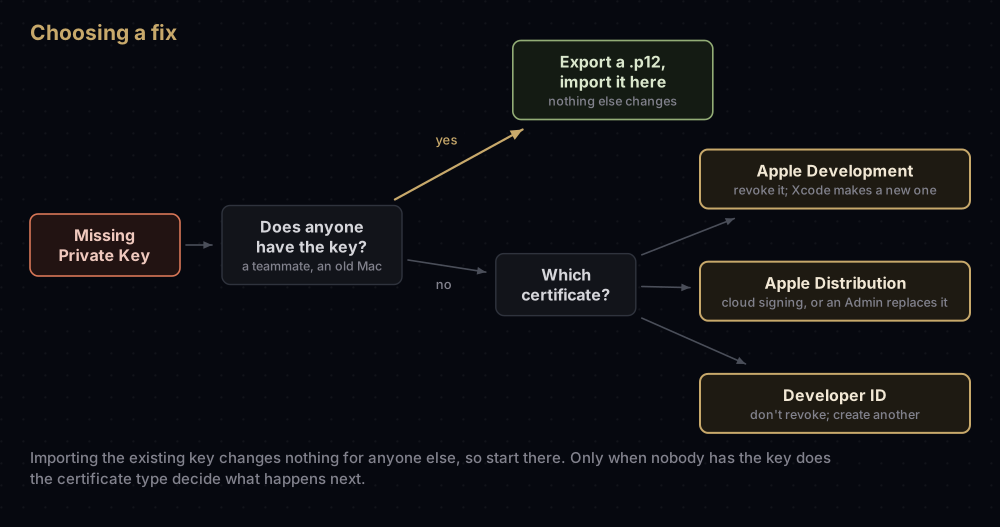
Start with one question: does anyone still have the key? Only if the answer is no does the type of certificate matter.
Fix 1: get the key from whoever has it
This fix changes nothing for anyone else, so try it first.
- In Manage Certificates, Control-click the certificate and choose Email Creator. Xcode opens a message to the person who made it.
- That person opens Keychain Access, selects the certificate under My Certificates, chooses File > Export Items and saves it as a Personal Information Exchange (.p12) file with a strong password. Apple's Xcode documentation also describes an Export Certificate command in the Manage Certificates sheet.
- They send you the file, and the password by another channel. Apple suggests, for example, a video call for the password rather than the same email as the file.
- You double-click the
.p12and enter the password. Keychain Access imports the certificate and key into your login keychain, and the Xcode row goes blank.
If you were the creator and the key is on an old Mac, export it from there the same way. If that Mac is gone, a developer support engineer at Apple describes recovering the key from a backup of its login keychain, which is worth the effort for a Developer ID certificate.
For the export itself, passwords and moving the file into CI, see exporting a .p12 from Keychain.
Fix 2: revoke the certificate and make a new one
When nobody has the key, the certificate can't be rescued. You make a new certificate with a new key, on this Mac.
For an Apple Development certificate this is routine. Apple's Xcode Help says you can revoke it in your developer account and delete it in Xcode. With automatic signing, Xcode then creates a replacement the next time it needs one. Xcode only enables Delete Certificate once a certificate's status is Revoked.
For a distribution certificate, only the Account Holder or an Admin can revoke it. The new one comes from a fresh signing request made on the Mac that will keep the key (see creating a certificate signing request), or from the + button in Manage Certificates. Afterwards, any provisioning profile that listed the old certificate is invalid. Edit or regenerate those profiles, or let automatic signing fetch new ones.
What revoking costs
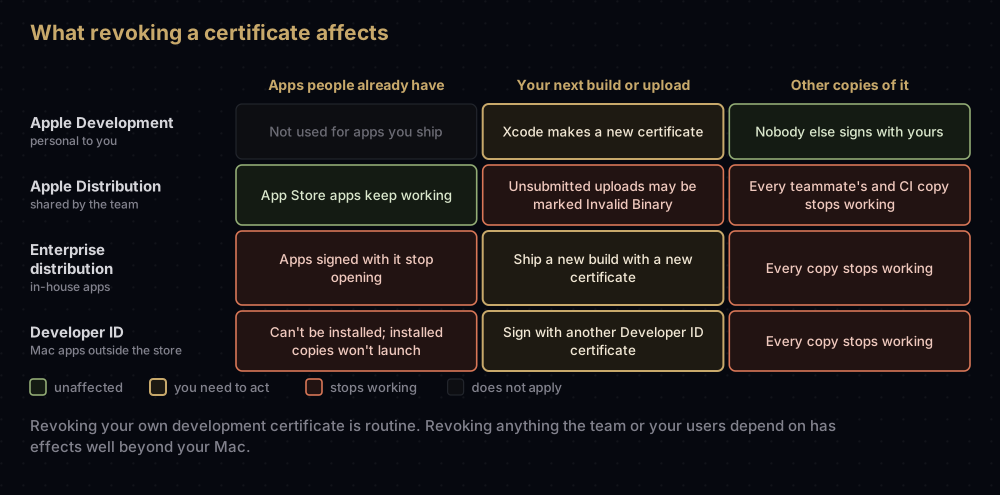
Revoking takes one click. What it breaks depends on the certificate type:
| Certificate | Who can revoke it | What revoking affects |
|---|---|---|
| Your Apple Development | You (an Account Holder or Admin can revoke other people's) | Development profiles that include it, until they're regenerated |
| Apple Distribution | Account Holder or Admin | Every teammate and build machine using it. Profiles that include it. Uploaded builds not yet submitted may be marked Invalid Binary. Apps already on the App Store keep working |
| Enterprise (in-house) distribution | Account Holder or Admin | Every in-house app signed with it stops opening |
| Developer ID Application or Installer | Nobody, in the portal. You email Apple | Users can no longer install software signed with it, and installed apps stop launching |
There's also a limit to think about. Apple's Certificates overview restricts how many distribution certificates of each type a team may hold (Developer ID is the exception), and only the Account Holder or an Admin can create them. Apple doesn't publish the number for Apple Distribution, but its support engineers confirm a limit applies. Creating a fresh distribution certificate for every lost key isn't a plan that lasts.
Developer ID has a published limit: five Application and five Installer certificates per team. Apple's developer support engineers treat these as precious. Losing the key is not a reason to revoke one. Revocation is for a key that has been stolen or exposed. If you're at the limit with no usable key, their advice is to contact Developer Programs Support. Developer ID certificates covers this in more detail.
In-house (Enterprise) teams can keep two distribution certificates active at once, which is the safer way to move to a new one.
Fix 3: let Apple hold the key
Cloud-managed certificates avoid the problem for distribution builds. Apple creates and stores both the certificate and the private key, and you never have a copy of either.
- In Xcode 13 and later, when you archive and choose Distribute App in the Organizer, Xcode cloud-signs the build if it can't find a local distribution certificate. Xcode Cloud signs this way too.
- Who may sign with them is controlled by permissions in App Store Connect's Users and Access. Cloud-managed Developer ID certificates are limited to the Account Holder and to Admins given that access.
- Apple rotates them for you, creating a new one 90 days before the old one expires once new signing requests come in.
- If an active Apple Distribution certificate with its key is in your keychain, Xcode signs locally instead.
Apple documents cloud signing for the Organizer's distribution workflow and Xcode Cloud. Scripts that call codesign directly still need an identity in a keychain. Everyday development still uses an Apple Development identity on your Mac, which automatic signing creates for you.
For teams that sign outside Xcode, the other way to stop keys going missing is to share one copy of each identity through a tool built for it, such as fastlane match.
Common mistakes
- Downloading the certificate again. The
.cerfrom the developer website never contains a key, however many times you download it. - Exporting the wrong thing. Exporting from the Certificates category, or as a
.cer, leaves the key behind. Export from My Certificates as.p12. - Importing into a different keychain from the one that holds the key.
- Revoking the team's distribution certificate without warning. Everyone else's copy stops working at once, including CI.
- Revoking a Developer ID certificate because the key is lost. Your users pay for that: they can no longer install or open what you signed.
- Making a new signing request on one Mac and building on another. The new key stays on the first Mac, and you're back where you started.
- Sending the
.p12and its password in the same message. Anyone holding both can sign software as your team.
Questions people ask
What does "Missing Private Key" mean in Xcode?
The certificate is on your Mac, but the private key that pairs with it isn't in your keychain. Xcode needs both to sign, so it can't use that certificate.
Can I download the private key from the Apple Developer website?
No. The key was created on the Mac that made the signing request, and Apple only ever received the public half. Only that Mac, a backup of it, or a .p12 exported from it has the key.
How do I find out who created the certificate?
In Manage Certificates, Control-click it and choose Email Creator, which addresses a message to that person. For development certificates, Apple's developer account also adds the computer name to the certificate's name, which tells you which Mac made it.
Will revoking my distribution certificate remove my app from the App Store?
No. Apple says existing App Store apps are unaffected as long as your membership is valid. You can't upload new builds signed with the revoked certificate, and builds uploaded but not yet submitted may be marked Invalid Binary.
Do I need a new certificate when I get a new Mac?
Not if you bring the key with you. Migrating with Setup Assistant copies your keychains, or you can export each identity as a .p12 and import it on the new Mac.
Why is the certificate in Keychain Access, but Xcode won't sign with it?
Check whether it's listed under My Certificates. If it only appears under Certificates, the key is missing or sits in another keychain. If it is under My Certificates, the certificate may be expired or untrusted rather than keyless.
Can the whole team use the same distribution certificate?
Yes. Distribution certificates belong to the team, and Apple describes sharing them securely with trusted team members. It asks you not to share them outside your organisation.
I lost the key for a Developer ID certificate. What now?
Search old Macs, other keychains and backups first. If the key is really gone, create another Developer ID certificate (up to five of each kind). If you've hit that limit, contact Developer Programs Support rather than asking for a revocation.
Where this comes from
Checked against Apple's documentation and its developer support engineers' forum posts in September 2026:
- TN3161: Inside Code Signing: Certificates
- Synchronizing code signing identities with your developer account
- Certificates overview and revoking privileges
- Cloud-managed certificates
- Certificate statuses in Manage Certificates and The Care and Feeding of Developer ID, Apple Developer Forums
Keep reading
- Exporting a .p12 from Keychain: moving a signing identity to another Mac or into CI.
- Creating a certificate signing request on a Mac: where the private key is born.
- Apple Development vs Apple Distribution certificates: which one is personal and which one the team shares.
- fastlane match: one set of signing files for the whole team.
- When a certificate "is not trusted": the other red cross in Keychain Access.


