
fastlane match keeps one shared, encrypted copy of your team's iOS signing certificates, private keys and provisioning profiles, in a private Git repository or a cloud bucket, and installs them on any Mac or CI machine that runs it. Instead of every developer making their own distribution certificate, the whole team signs with the same set.
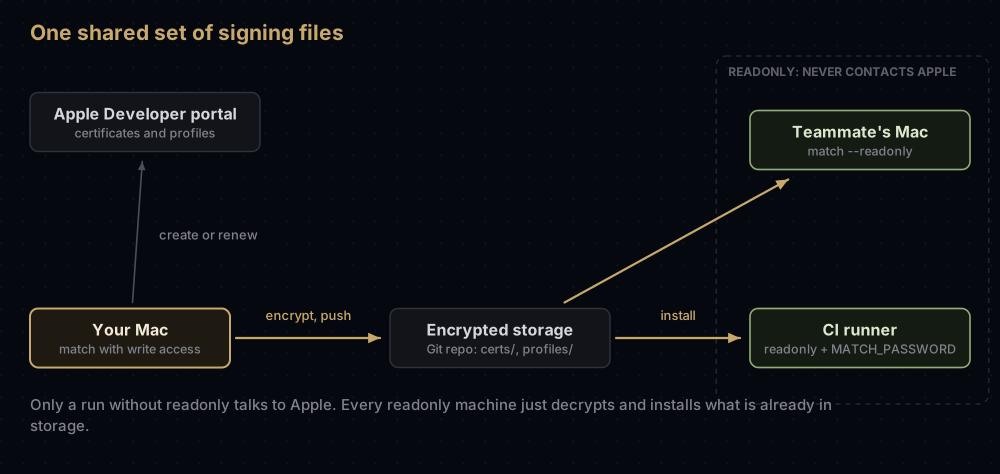
The usual pattern: one person with Apple Developer access runs match to create or renew everything, and every other machine, CI included, runs it in readonly mode, which only downloads and installs. The files are protected by a passphrase, supplied on CI through the MATCH_PASSWORD environment variable.
The first sections explain the idea in plain terms. The rest covers storage choices, match types, the App Store Connect API key, CI setup, and nuke, the command that can take down builds people are already testing.
The problem match solves
An Apple Distribution certificate belongs to the team, and Apple limits how many of each distribution type a team may hold. Its private key, though, is created on one Mac. So the question every team hits is: how do the other Macs, and the build server, get that key?
The codesigning guide that match is built on describes what usually happens instead: each developer ends up with a separate signing identity, the account fills with dozens of profiles and duplicates, and every new device or expired certificate means renewing and downloading profiles by hand again.
match picks one answer and automates it. Think of a key safe in the office with a combination lock:
- The safe is your storage: a private Git repository, a Google Cloud or Amazon S3 bucket, or GitLab.
- Inside are the certificates, their private keys and the provisioning profiles.
- The combination is the match passphrase, which encrypts the files (for Git and S3 storage).
- Anyone given the storage access and the combination can open the safe and copy the keys into their own Keychain.
The analogy stops at one point: match is not only a safe. When run without readonly, it also talks to Apple to create certificates and profiles that are missing, and to renew profiles, then puts the results in the safe.
What ends up where
After the first run, the storage holds two folders:
certs: every certificate with its private key. match keeps the.cerand the private key (as a.p12) as separate files.profiles: every provisioning profile.
match also writes a README.md into a Git repository to help new team members. In Google Cloud storage, the top-level folder is your Team ID.
On a machine that runs match, the private keys and certificates go into the Keychain, and the profiles go into ~/Library/Developer/Xcode/UserData/Provisioning Profiles (or ~/Library/MobileDevice/Provisioning Profiles for Xcode versions before 16). The fastlane docs warn that match picks the folder from the default Xcode on the machine, so if you switch Xcode versions in a lane, do it before match runs.
Profiles are named match + type + bundle ID, for example match AppStore com.example.app or match Development com.example.app, which makes them easy to select in Xcode.
Storage options
storage_mode | Where the files live | How they are protected | Key options |
|---|---|---|---|
git (default) | A private Git repository you control | Encrypted by match with OpenSSL, using your passphrase | git_url, git_branch (default master) |
google_cloud | A Google Cloud Storage bucket | Google-managed encryption; access through gc_keys.json or Google accounts | google_cloud_bucket_name, google_cloud_project_id |
s3 | An Amazon S3 bucket | Encrypted by match with your passphrase, unless you set s3_skip_encryption | s3_bucket, s3_region, s3_access_key, s3_secret_access_key |
gitlab_secure_files | GitLab's Secure Files for a project | GitLab's own storage; match does not add its passphrase | gitlab_project, gitlab_host, job_token or private_token |
A few notes from the fastlane documentation:
- For Git, use a private repository, and switch on two-factor authentication for every account that can read it.
- To keep several teams in one repository, give each team its own
git_branch. fastlane match migratemoves existing files from one storage backend to another.- Keep
gc_keys.jsonout of version control, like any credential.
Setting up
Run this in your project folder:
fastlane match initIt asks which storage to use and writes a Matchfile. It does not touch Apple or your certificates yet, and it does not check the Git URL. A typical Matchfile:
git_url("git@github.com:example/certificates.git")
storage_mode("git")
type("development")
app_identifier(["com.example.app", "com.example.app.widget"])
team_id("A1B2C3D4E5")
List every bundle ID that needs a profile, including extensions such as widgets. match reuses one certificate across them and makes a separate profile for each.
If the account already has a tangle of old certificates, the fastlane docs suggest considering match nuke before the first run (read the section on it below first). If you would rather keep an existing certificate, fastlane match import asks for the .cer, the .p12 and the profiles, checks the certificate against the portal, and adds them to storage. With --skip_certificate_matching true it skips that check, for when there is no portal access; the docs ask you to be sure the files match the type and are neither revoked nor expired.
Then generate or fetch:
fastlane match development
fastlane match appstore
Match types
| Type | Certificate it uses | Profile it makes | Typical use |
|---|---|---|---|
development | Apple Development | Development | Running on registered devices from Xcode |
adhoc | Apple Distribution | Ad Hoc | Test builds for registered devices |
appstore | Apple Distribution | App Store | TestFlight and App Store uploads |
enterprise | In-house distribution | In-House | Apple Developer Enterprise Program apps |
developer_id | Developer ID Application | Developer ID | Mac apps outside the Mac App Store |
Two more types, mac_installer_distribution and developer_id_installer, cover the certificates that sign Mac installer packages; the additional_cert_types option fetches them alongside a Mac app's certificate.
adhoc and appstore share the same distribution certificate; only the profiles differ. On a Mac with Xcode 11 or later, match creates the unified Apple Development and Apple Distribution certificates by default (generate_apple_certs). The difference between those two is covered in Apple Development vs Apple Distribution.
In a Fastfile, with an App Store Connect API key
match can log in with an Apple ID, but that involves two-factor authentication. fastlane recommends an App Store Connect API key instead, which needs no 2FA, and notes that provisioning needs a team key; an individual key cannot use the provisioning endpoints. How to create one is in App Store Connect API keys.
default_platform(:ios)

platform :ios do
  before_all do
    setup_ci
  end

  lane :beta do
    app_store_connect_api_key(
      key_id: ENV["ASC_KEY_ID"],
      issuer_id: ENV["ASC_ISSUER_ID"],
      key_content: ENV["ASC_KEY_P8_BASE64"],
      is_key_content_base64: true
    )

    match(
      type: "appstore",
      app_identifier: ["com.example.app", "com.example.app.widget"],
      readonly: is_ci
    )

    build_app(scheme: "Runner", export_method: "app-store")
    upload_to_testflight
  end
end
What each piece does:
app_store_connect_api_keybuilds the key from its Key ID, Issuer ID and.p8contents (key_filepathworks instead ofkey_content). Itsdurationoption is capped at 1200 seconds, andin_housemarks an Enterprise team. The key is stored in the lane context.matchpicks that key up from the lane context automatically, unless you passapi_key_path. After it runs, it records which profile belongs to which bundle ID, andbuild_appuses that mapping when exporting.readonly: is_cimeans: on CI, only fetch; on a developer's Mac, create what is missing.setup_ciis explained in the next section.
From the command line, the same key can come from a JSON file with key_id, issuer_id and key (the .p8 text):
fastlane match appstore --api_key_path fastlane/api_key.json --readonlyRunning match on CI
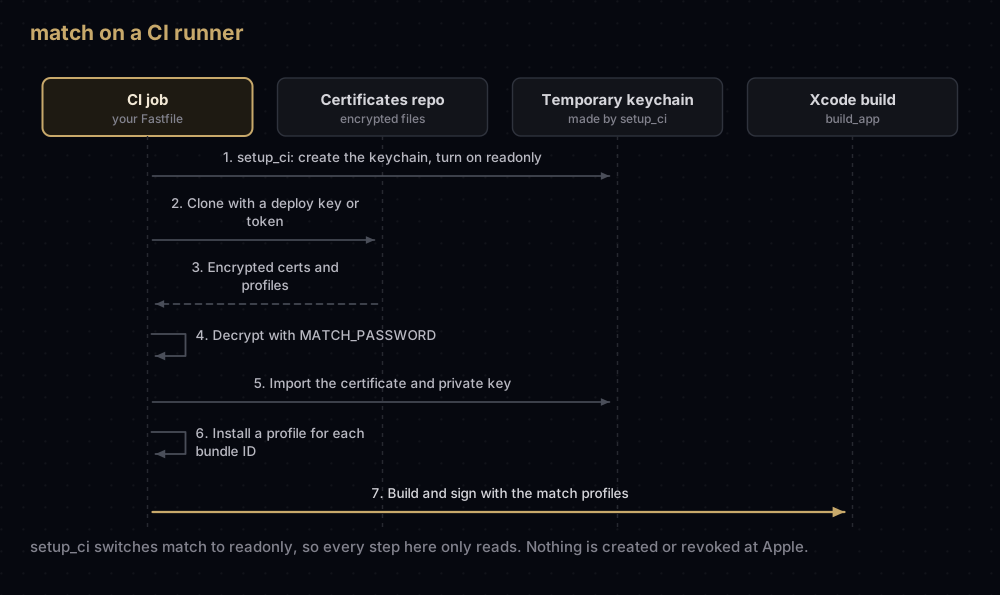
Four things make it work.
1. Readonly mode. The fastlane docs recommend always using readonly on CI. In that mode match skips logging in to Apple entirely and only installs what is already in storage, so a CI job can never create, renew or revoke anything.
2. A keychain. A CI runner has no logged-in user keychain to put keys into. The setup_ci action creates a temporary keychain for match, points match at it, and switches match to readonly mode. It only acts when it detects a CI environment, unless you pass force: true.
3. The passphrase. For Git and S3 storage, set a secret environment variable named MATCH_PASSWORD. On a developer's Mac, match asks once and stores the passphrase in the local keychain. On CI there is nobody to ask, so a missing variable ends the run with a message that neither the environment variable nor the keychain contained a password.
4. Access to the storage. For Git, this is the fiddly part. The fastlane docs point out that GitHub will not accept the same deploy key on two repositories, and your CI's key is probably already used for the app's own repository. The options match offers:
| Option | Environment variable | What it takes |
|---|---|---|
git_basic_authorization | MATCH_GIT_BASIC_AUTHORIZATION | Base64 of username:personal_access_token |
git_private_key | MATCH_GIT_PRIVATE_KEY | A path to a private key, or the key itself, for a separate deploy key |
git_bearer_authorization | MATCH_GIT_BEARER_AUTHORIZATION | A bearer token, for example on Azure DevOps |
The base64 value comes from:
echo -n your_github_username:your_personal_access_token | base64For Google Cloud, provide gc_keys.json to the job at build time. For S3, provide the region, access key, secret key and bucket, with read access.
Adding devices and renewing
When a tester's device is registered, Ad Hoc and development profiles must be regenerated to include it. match can do that for you:
lane :adhoc_build do
  register_devices(devices_file: "./devices.txt")
  match(type: "adhoc", force_for_new_devices: true)
end
force_for_new_devices regenerates the profile when the number of enabled devices has changed. It is ignored for appstore and developer_id profiles, which hold no device list. force: true regenerates profiles on every run.
For expired certificates, renew_expired_certs removes the expired certificate from storage and creates a new one, but it does not revoke the old one in the portal; the option's help text suggests match nuke if you need the slot back. It also notes that renewing Developer ID certificates needs the Account Holder signed in with an Apple ID, because an API key cannot do it.
These write operations need a machine that is not in readonly mode, with portal access.
nuke, and why to be careful with it
match nuke revokes certificates and deletes provisioning profiles in your developer account, for one type at a time:
fastlane match nuke development
fastlane match nuke distribution
fastlane match nuke enterprise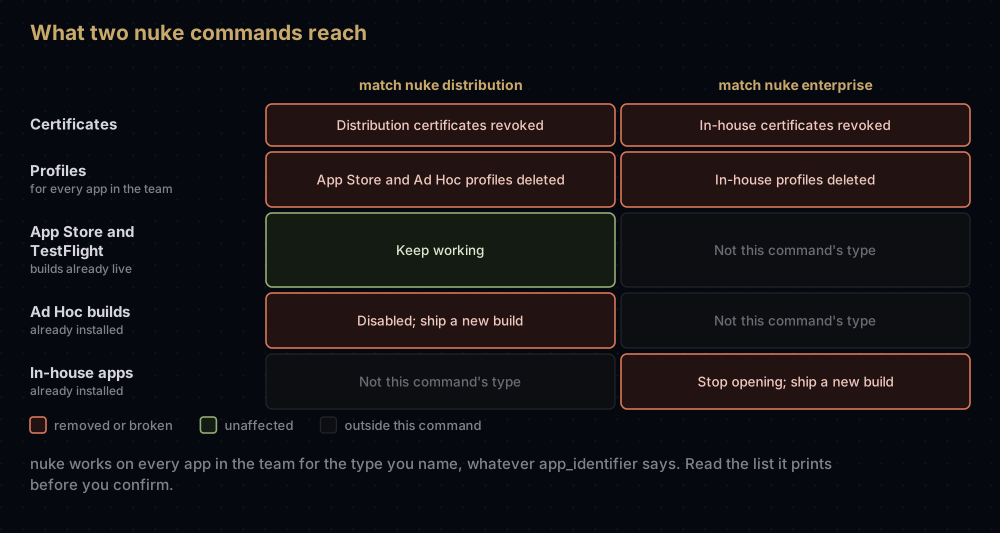
What the fastlane docs and the command's own warnings say:
- It lists what it will remove and asks you to confirm, unless you pass
--skip_confirmation. nuke distributiondeletes both App Store and Ad Hoc profiles. Its source code shows it also selects Developer ID profiles, and it removes the matching files from your storage.- Any
app_identifieryou set is ignored: it removes profiles for all your apps in the team, not just the current project. - Apps already on the App Store and in TestFlight keep working.
- Builds distributed through Ad Hoc or Enterprise are disabled, and you have to ship new builds.
- On an Enterprise account it shows an extra warning and asks again.
--safe_remove_certsremoves certificates from your storage without revoking them in the portal.
Revoking an Enterprise distribution certificate stops every in-house app signed with it from opening on every device, so treat nuke enterprise as an outage. Read the list it prints before you confirm, and make sure no one else's project relies on the same team.
Other commands worth knowing
| Command | What it does |
|---|---|
fastlane match change_password | Re-encrypts every file with a new passphrase. Every machine is asked for it on the next run |
fastlane match decrypt | Decrypts the repository and leaves it on disk |
match_file encrypt / match_file decrypt | Encrypts or decrypts a single file, asking for the passphrase |
fastlane match import | Adds an existing .cer, .p12 and profiles to storage |
fastlane match migrate | Moves files to another storage backend |
fastlane action match | Lists every option |
Because match stores the certificate and private key separately, a tool that wants a single .p12 needs them recombined; the fastlane docs show the OpenSSL commands, and export a .p12 from Keychain covers the more common route.
Is it safe to keep signing keys in Git?
The fastlane docs make the case this way. For Git storage, every file is encrypted with your passphrase, and you control who can read the repository. A stolen App Store profile is of little use, because a build only reaches users after Apple re-signs it, which needs your App Store Connect login. Development and Ad Hoc profiles only work on registered devices, and adding devices needs your developer account. The real risk is Enterprise profiles, which can install on any device, so the docs ask for extra care there: a private repository and a strong passphrase.
One more change to know: match's template_name option, which produced profiles with extra managed capabilities, has been deprecated since Apple removed that undocumented function from its API in May 2025. match cannot currently produce such profiles.
Common mistakes
- Running match without
readonlyon CI. A misconfigured job can create certificates or profiles you did not want. Usesetup_ci, orreadonly: is_ci. - Forgetting
MATCH_PASSWORDon CI. The run stops because nobody can type the passphrase. - Using an individual API key. Provisioning needs a team key.
- Not selecting the match profile in Xcode. For match's profiles, the fastlane docs describe turning off automatic signing and choosing the profile, such as
match AppStore com.example.app, for each target. - Forgetting extension bundle IDs. Each widget or notification extension needs its own profile, so list them all in
app_identifier. - One branch for two teams. Use a separate
git_branchper team. - Assuming
renew_expired_certsfrees a certificate slot. It does not revoke the old certificate. - Running
nuketo tidy one app. It ignoresapp_identifierand affects every app in the team. - Committing
gc_keys.jsonor an API key JSON file. Treat both like the certificates themselves.
Questions people ask
What does fastlane match do?
It creates your iOS and Mac signing certificates and provisioning profiles, stores them encrypted in a place your team shares, and installs them on any machine that runs it. Everyone signs with the same set.
Where does fastlane match store certificates?
In the storage you choose: a private Git repository (the default), a Google Cloud Storage bucket, an Amazon S3 bucket, or GitLab Secure Files. On each machine, keys go into the Keychain and profiles into Xcode's provisioning profiles folder.
What is MATCH_PASSWORD?
The passphrase match uses to encrypt and decrypt files in Git and S3 storage. Set it as a secret environment variable on CI, where match cannot prompt for it.
Does fastlane match need my Apple ID?
Not in readonly mode, which never logs in to Apple. To create or renew anything, it needs either an Apple ID or an App Store Connect API key; fastlane recommends a team API key.
What does fastlane match readonly do?
It only downloads and installs the certificates and profiles already in storage. It never creates, renews or revokes anything, and it does not contact Apple.
Is fastlane match nuke safe?
Only if you understand its reach. It revokes certificates and deletes profiles for every app in the team, for the type you name. App Store and TestFlight builds keep working; Ad Hoc and Enterprise builds stop.
Can I use existing certificates with fastlane match?
Yes. fastlane match import adds an existing certificate, its private key and profiles to your storage.
How do I add a new device to match profiles?
Register the device, then run match for adhoc or development with force_for_new_devices: true, or pair it with the register_devices action in a lane.
Sources
- match and App Store Connect API, fastlane documentation
- Setting up your Xcode project, fastlane documentation
- match source code and the setup_ci action, fastlane on GitHub
Keep reading
- App Store Connect API keys: the Issuer ID, Key ID and
.p8that let match work without an Apple ID. - Export a .p12 from Keychain: the manual way to share a certificate.
- Apple Development vs Apple Distribution: the two certificates match manages for iOS.
- Provisioning profiles explained: what match is creating and installing.
- Flutter iOS code signing: where match fits in a Flutter release.
- A Flutter CI/CD pipeline: match inside a GitHub Actions release job that ships to TestFlight and Play.


