An Apple Development certificate lets one developer build an app and run it on their own registered test devices. An Apple Distribution certificate lets the team ship that app: to TestFlight, to the App Store, or as an Ad Hoc build for named testers.
The other difference is ownership. A development certificate belongs to a person, and each developer has their own. A distribution certificate belongs to the team, Apple limits how many a team can have, and so the people who ship either share one or let Apple hold it in the cloud.
Both are the unified types Xcode 11 introduced in 2019, and each covers iOS, iPadOS, macOS, tvOS, visionOS and watchOS. Below is how they differ, which provisioning profiles each one goes into, how long they last, and where the older iOS-only types fit.
The difference at a glance
| Apple Development | Apple Distribution | |
|---|---|---|
| What it is for | Running and debugging your app on your own devices | TestFlight, App Store and Ad Hoc builds |
| Belongs to | One person | The team |
| Who can create it | Each team member, for themselves | Account Holder or Admin (see the note on roles below) |
| Who can revoke it | Its owner, an Admin, or the Account Holder | Account Holder or Admin |
| How many | Each developer has their own | Limited per team, so shared |
| Provisioning profiles | Development | Ad Hoc and App Store Connect |
| Devices | Only devices registered in the portal | Ad Hoc: registered devices. App Store: anyone, through the store or TestFlight |
| Typical lifetime | One year | One year |
| Name in Keychain Access | Starts with "Apple Development:" | "Apple Distribution: Example Team (A1B2C3D4E5)" |
If you remember one line: development is for your desk, distribution is for everyone else.
An everyday picture
Think of a bakery.
- Apple Development is each baker's own apron and badge. It gets them into the test kitchen, and only the test kitchen. Every baker has their own, and losing one affects nobody else.
- Apple Distribution is the bakery's official seal, pressed on boxes that leave the shop. There are only a few copies, so the people who pack orders share them, and they guard them, because anyone holding the seal can send out boxes in the bakery's name.
- The provisioning profile is the delivery note that says where a box may go: the test kitchen (development), a list of named tasters (Ad Hoc), or the shop counter (App Store Connect).
Here the bakery picture stops matching, and the mismatch is worth knowing. When a box reaches the App Store, Apple repacks it and puts on its own seal. That is why apps already in the store keep working after your distribution certificate expires: your seal only has to be valid on the day you submit.
Which profile each one goes into
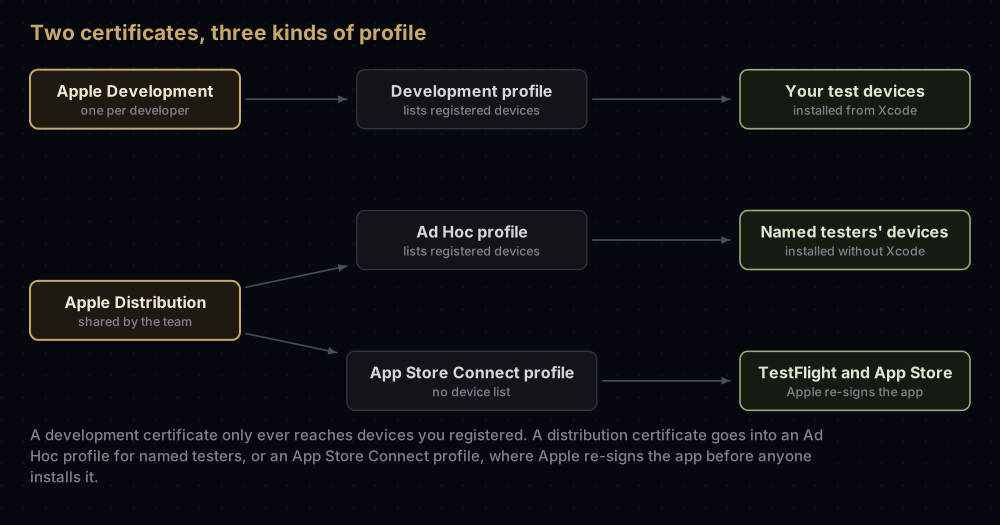
A certificate never works alone on iOS. Xcode signs with the certificate's private key, and the provisioning profile says where that signed app may run. Apple's portal pairs them strictly:
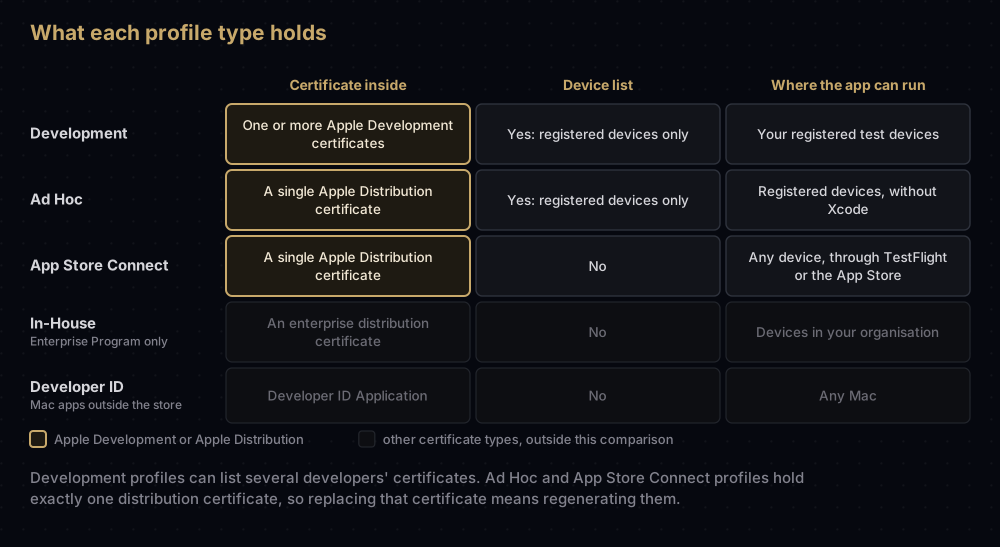
Three details matter in practice:
- A development profile can hold several developers' certificates. One profile can then serve the whole team, as long as each person's certificate is inside it and their device is on its list.
- An Ad Hoc or App Store Connect profile holds a single distribution certificate. If you create a new distribution certificate, those profiles have to be regenerated to include it.
- You cannot run an App Store build yourself. Apple's code signing technote says an app signed for App Store distribution is meant for submission, not for running. To test the release build, use TestFlight, which re-signs the app much as the App Store does. Ad Hoc is the other option, and Ad Hoc distribution compares the two.
With Automatically manage signing turned on, Xcode creates signing certificates when it needs them and manages development, Ad Hoc and App Store profiles for you. The pairing rules still apply. Xcode is just following them on your behalf.
Who owns each one
Apple Development: personal, and tied to a Mac
Apple's certificates overview is direct: development certificates belong to individuals. In the portal, the computer's name is added after the developer's name, as in "Example Developer (Work Mac)", so a team can tell them apart.
The Mac matters because of the private key. Whichever Mac made the certificate request holds the only copy of the key, in its login keychain. A developer who works on two Macs therefore either exports the key to the second one or ends up with a second development certificate. Neither is a problem, because development certificates are cheap and personal.
Any team member with access to Certificates, Identifiers & Profiles can create and revoke their own. Apple's guidance is that team members create their development certificates, and register their devices, through Xcode.
Apple Distribution: shared by the team
Distribution certificates belong to the team. Apple's certificates overview puts the limit this way: "only one type of each distribution certificate (with the exception of Developer ID certificates) is allowed per team". Xcode's help says more cautiously that the number you can create "may be limited", and that an organisation "must share distribution certificates between team members who are responsible for distributing your app". Neither page gives a count, so plan on sharing.
Sharing means passing around the certificate together with its private key, which is what a .p12 file is. The usual ways are:
- Export and import by hand. The Mac that created the certificate exports a password-protected
.p12, and each teammate imports it. Exporting a .p12 from Keychain has the steps. - fastlane match, which creates the certificates and profiles once and stores them, encrypted, in a private Git repository or cloud storage that every team machine can read. See fastlane match.
- Cloud-managed certificates, where Apple keeps the key and nobody shares anything. More on those below.
Anyone holding that .p12 and its password can sign software that appears to come from your team. Apple asks you to use a strong password and to send the file and the password through different channels.
Who is allowed to create a distribution certificate
Apple's certificates overview says only the Account Holder or an Admin can create distribution certificates (an individual member is their own Account Holder). The roles table in the same help site also ticks the App Manager role, provided that person has been given access to Certificates, Identifiers & Profiles. The two pages disagree, so if a teammate's attempt fails, check their role and access in App Store Connect's Users and Access. Revoking a distribution certificate is limited to the Account Holder and Admins.
How long they last
Apple does not publish one table of lifetimes. Its code signing technote says certificates typically last a year from issue, and that the exact length varies by type. In practice both Apple Development and Apple Distribution certificates last one year. (Developer ID certificates, for Mac apps outside the store, last much longer.)
What expiry does is different for each:
- A development certificate's profiles cannot outlive it, so development builds need a new certificate and a refreshed profile. With automatic signing, Xcode takes care of both.
- A distribution certificate's expiry does not remove your app from the App Store, as long as your membership is active, because Apple re-signs App Store apps. You simply cannot upload new builds with it. Ad Hoc builds are different: they stop opening once their profile expires, and the profile cannot outlive the certificate.
The full list of what breaks, including revocation, is in when an Apple certificate expires or is revoked.
Cloud-managed certificates
A cloud-managed certificate is one whose private key never reaches anyone's Mac. This section is about cloud-managed distribution certificates. Apple's code signing technote says both the key and the certificate are managed by Apple's cloud signing infrastructure, and you have no direct access to either. Xcode Cloud works this way.
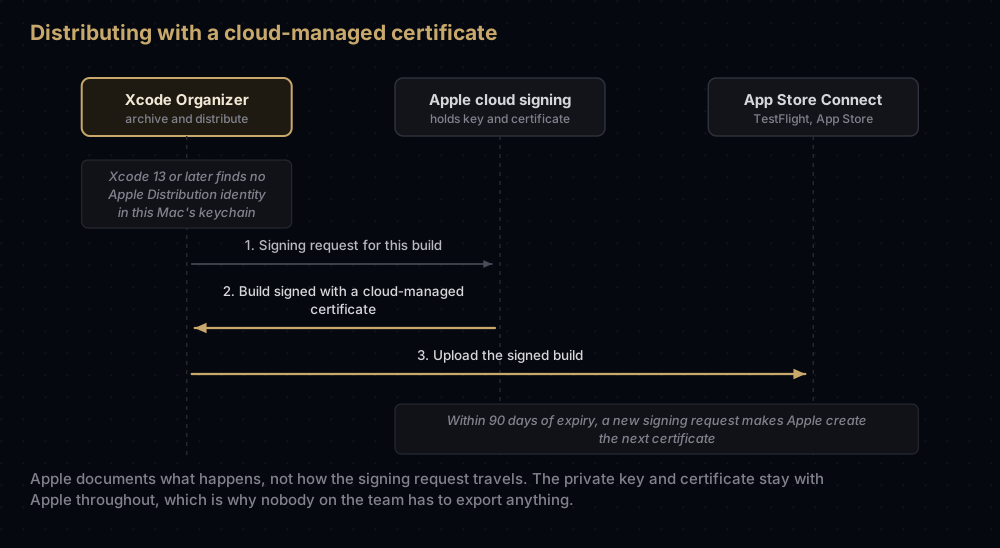
What Apple documents about them:
- When they are used. Xcode 13 or later cloud-signs apps for distribution through the Organizer's archive and distribution workflow when it does not find a local signing certificate. Put an active Apple Distribution certificate in your keychain and Xcode signs locally instead.
- Nobody exports them. Xcode creates and shares cloud-managed certificates among the team automatically.
- Rotation. A new cloud-managed certificate is created automatically 90 days before the current one expires, when new signing requests arrive, and the newest one is used. Account Holders and Admins can also rotate one manually once less than half of its validity remains, which Apple says is often 180 days.
- Permissions. Account Holders and Admins can use cloud-managed distribution certificates. App Managers and Developers need that access granted separately in Users and Access.
Apple documents cloud signing for the Organizer workflow and Xcode Cloud. A CI server that runs its own build scripts usually still needs an exported .p12 or fastlane match.
The older iOS-only types
The portal still offers iOS App Development and iOS Distribution (App Store Connect and Ad Hoc), plus Mac Development and Mac App Distribution for the Mac. These are the platform-specific certificates from before Xcode 11.
The Xcode 11 release notes explain why they remain: certificates of the older kinds keep working, new certificates made in Xcode 11 use the unified types, and earlier versions of Xcode cannot use the unified types at all. Apple's certificates overview still marks both iOS types "for use with Xcode 11 and earlier".
The older pair maps onto the new one directly. iOS App Development does the job of Apple Development for iOS, and iOS Distribution does the job of Apple Distribution, pairing with the same Ad Hoc and App Store Connect profiles. If you are on a current Xcode, create the unified types. A legacy certificate you already hold keeps working until it expires, and there is no need to revoke it early. Every certificate in Apple's developer portal covers the Mac-specific ones.
How to tell which one you have
In Keychain Access, open My Certificates (the view that shows certificates paired with their private keys) and read the names. Apple's overview notes that a signing certificate's name hints at its type and includes the team.
From Terminal, this lists the valid code signing identities in your keychains, meaning certificates whose private key is present:
security find-identity -v -p codesigningFor a downloaded .cer file, OpenSSL shows the name and the expiry date. Apple puts your Team ID in the subject's OU field:
openssl x509 -inform der -in distribution.cer -noout -subject -enddateIn Xcode, choose Settings, then Accounts, select your team, and click Manage Certificates. The sheet lists the team's signing certificates and flags any whose private key is missing on this Mac.
Common mistakes
- Making a new distribution certificate on every developer's Mac. You run into the team limit, and since each Ad Hoc and App Store profile holds only one of them, profiles keep needing rebuilds. Share one, or use cloud signing.
- Revoking the distribution certificate because one person lacks its key. Every profile that contains it becomes invalid for the whole team. Ask the person who created it to export it instead; Xcode's Manage Certificates sheet has an Email Creator option for exactly this. Missing private key in Xcode covers the rest.
- Uploading with a development profile. App Store Connect needs a build signed with a distribution certificate and an App Store Connect profile.
- Installing an App Store-signed build directly to test it. It is not meant to run. Use TestFlight.
- Panicking when the distribution certificate expires. Live App Store apps keep working. Create a new one before your next upload.
- Emailing a
.p12with its password. Send them separately, as Apple recommends.
Questions people ask
What is an Apple Distribution certificate?
It is the team's certificate for release builds on every Apple platform. Xcode uses it to sign builds for TestFlight, the App Store and Ad Hoc distribution, together with the matching provisioning profile.
What is an Apple Development certificate used for?
Running and debugging your app on your own devices. It is personal to one developer, and it only works with a development profile that lists those devices.
Can I upload to TestFlight with an Apple Development certificate?
No. TestFlight builds go through App Store Connect, which needs a build signed with Apple Distribution (or the older iOS Distribution) and an App Store Connect profile.
How many Apple Distribution certificates can a team have?
Apple's help gives no number. Its overview says "only one type of each distribution certificate" is allowed per team, apart from Developer ID, and Xcode's help says the number may be limited. Plan to share one.
How long does an Apple Distribution certificate last?
One year in practice. Apple's technote says code signing certificates typically last a year, with the exact length depending on the type. For a cloud-managed one, Apple creates a replacement automatically once it is within 90 days of expiry and you sign again.
Who can create an Apple Distribution certificate?
The Account Holder or an Admin, according to Apple's certificates overview. Apple's roles table also allows an App Manager who has access to Certificates, Identifiers & Profiles.
Is iOS Distribution the same as Apple Distribution?
They do the same job for iOS. iOS Distribution is the older, iOS-only type. Apple Distribution is the unified type from Xcode 11 that covers every Apple platform, and versions of Xcode before 11 cannot use it.
Do I need to create an Apple Development certificate myself?
Usually not. With automatic signing, Xcode creates one for you when it needs one. You make one by hand only when you sign manually.
Keep reading
- Every certificate in Apple's developer portal: the other eighteen types, and the intermediates.
- Export a .p12 from Keychain: sharing a distribution certificate with a teammate or a CI server.
- fastlane match: one set of certificates for the whole team.
- Provisioning profiles explained: what the profile adds to the certificate.
- When an Apple certificate expires or is revoked: what stops working on expiry or revocation, and what carries on.


