A provisioning profile is a small file, signed by Apple, that gives a build permission to run. It says who may sign the app, which app it is, which devices it may run on, until when, and which special powers it may use. iPhones, iPads, Apple TVs and Apple Watches will not run your code without one.
Almost every "code signing" error in Xcode is a disagreement between your build and its profile. Once you know the five things a profile checks, the error messages start to make sense.
The first sections explain the idea without jargon. The rest shows how to open a profile, which kinds exist, where Xcode keeps them, and how to fix the failures you will actually meet.
The backstage pass
Picture a concert venue.
- Your team is the company that booked the venue.
- The bundle ID is the performer's stage name, and the App ID is that name on the venue's list, together with the rooms it may use.
- A certificate is a photo ID that the venue (Apple) issued to your team or one of its members.
- The provisioning profile is the backstage pass. It names the performer, lists which photo IDs are accepted, which doors it works on (the devices), the date it runs out, and the rooms it lets the performer into.
- Entitlements are the rooms the performer actually asks to enter. Ask for one the pass does not list and security turns you away.
The picture fails in one useful place. For an App Store release, Apple checks the pass at the stage door and then takes it away: the copy that reaches customers' phones has been re-signed by Apple and carries no profile at all.
What's inside: five questions
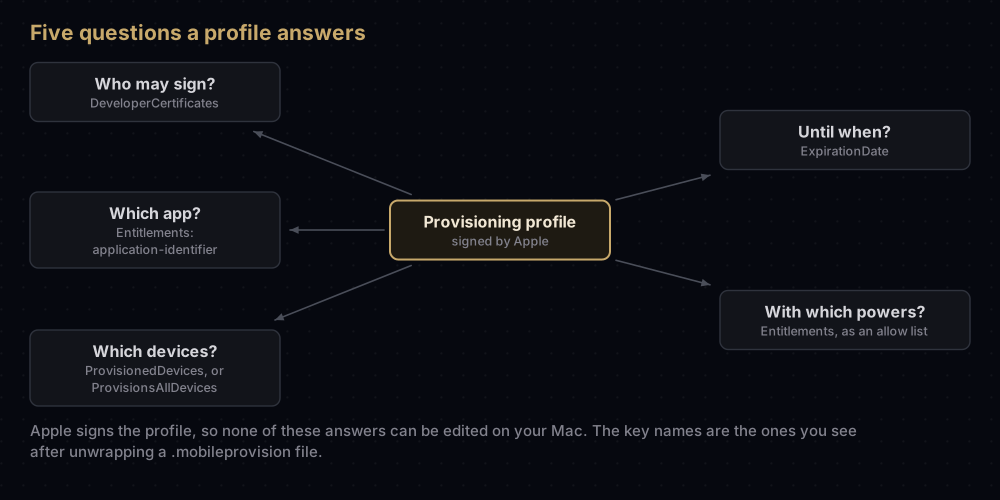
Apple's technote on profiles frames them exactly this way: every profile ties together who may sign, what apps, where they run, when, and how they may be entitled.
| Question | Where the profile answers it |
|---|---|
| Who may sign? | DeveloperCertificates: the certificates allowed to sign this app |
| Which app? | application-identifier inside Entitlements: one App ID, or a wildcard |
| Which devices? | ProvisionedDevices: a list of device IDs (UDIDs). App Store profiles have none; In-House and Developer ID profiles say ProvisionsAllDevices instead |
| Until when? | ExpirationDate |
| With which powers? | Entitlements: everything the app is allowed to claim |
The file itself is a property list wrapped in a cryptographic signature from Apple. That signature is why you cannot edit a profile: change one byte and the device rejects it. On modern systems the list you can read is not even the part the device trusts. Each profile also carries DER-Encoded-Profile, a binary copy that is the real source of truth, and iOS 15 and later require it.
Opening one up
A .mobileprovision file is safe to share (there is no private key in it), and you can read it with tools that ship with macOS. First remove the signature wrapper:
security cms -D -i profile.mobileprovision -o profile.plistThen pull out whatever you need. The profile's name and expiry date:
plutil -extract Name raw -o - profile.plist
plutil -extract ExpirationDate raw -o - profile.plist
What the app is allowed to claim, and which devices it may run on:
plutil -extract Entitlements xml1 -o - profile.plist
plutil -extract ProvisionedDevices xml1 -o - profile.plist
Who the first allowed certificate belongs to, and when that certificate expires:
plutil -extract DeveloperCertificates.0 raw -o - profile.plist \
  | base64 -D | openssl x509 -inform DER -noout -subject -enddate
A development profile made by Xcode looks roughly like this once unwrapped (trimmed, with placeholder values):
<key>AppIDName</key>
<string>Example App</string>
<key>CreationDate</key>
<date>2026-09-17T09:00:00Z</date>
<key>Entitlements</key>
<dict>
    <key>application-identifier</key>
    <string>A1B2C3D4E5.com.example.app</string>
    <key>aps-environment</key>
    <string>development</string>
    <key>com.apple.developer.team-identifier</key>
    <string>A1B2C3D4E5</string>
    <key>get-task-allow</key>
    <true/>
    <key>keychain-access-groups</key>
    <array>
        <string>A1B2C3D4E5.*</string>
        <string>com.apple.token</string>
    </array>
</dict>
<key>ExpirationDate</key>
<date>2027-09-17T09:00:00Z</date>
<key>Name</key>
<string>iOS Team Provisioning Profile: com.example.app</string>
<key>ProvisionedDevices</key>
<array>
    <string>00000000-0000000000000000</string>
</array>
<key>TeamIdentifier</key>
<array>
    <string>A1B2C3D4E5</string>
</array>
<key>TimeToLive</key>
<integer>365</integer>
A few of these keys trip people up:
TimeToLiveis the number of days betweenCreationDateandExpirationDate.get-task-allowistruein development profiles, which is what lets a debugger attach. Distribution profiles set it tofalse.keychain-access-groupsuses a wildcard. The profile grants every group that starts with your Team ID; the app then claims specific ones. Wildcards belong in the profile, never in the app's signature.aps-environmentisdevelopmenthere andproductionin distribution profiles, which is why push tokens from the two kinds of build are not interchangeable.
To read the profile inside a built app instead, look for embedded.mobileprovision in the app bundle. For an .ipa, unzip it first:
unzip -p Runner.ipa 'Payload/*.app/embedded.mobileprovision' > embedded.mobileprovision
security cms -D -i embedded.mobileprovision
Inside Xcode, the info button next to the Provisioning Profile field on the Signing & Capabilities tab shows the same details.
The five checks every build must pass
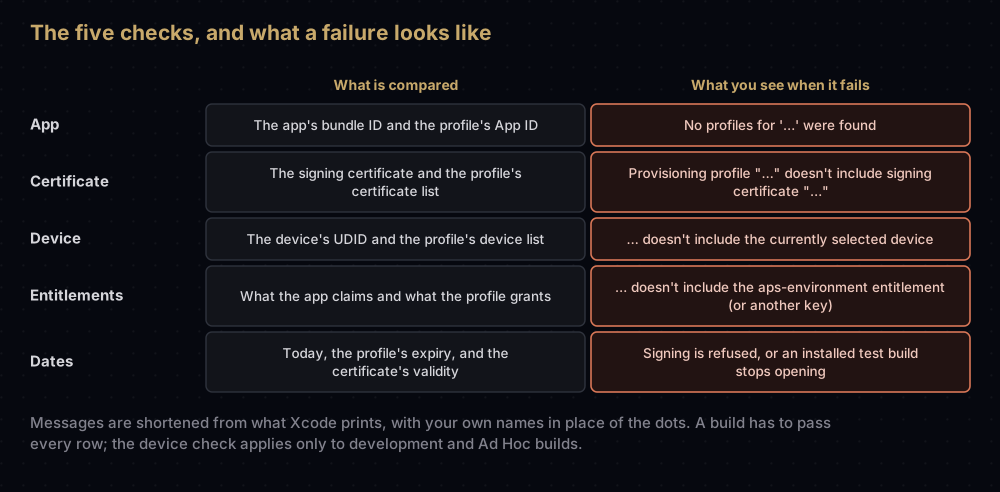
A build installs and runs only when all of these hold:
- The app's bundle ID matches the App ID in the profile.
- The certificate that signed the app is listed in the profile.
- For development and Ad Hoc builds, the device's UDID is listed in the profile.
- Every entitlement the app claims is granted by the profile. The reverse is not required: a profile may grant things the app never uses.
- Neither the certificate nor the profile has expired or been revoked.
When you run the app, the device first checks that Apple really signed the profile, then checks the app against it.
The kinds of profile
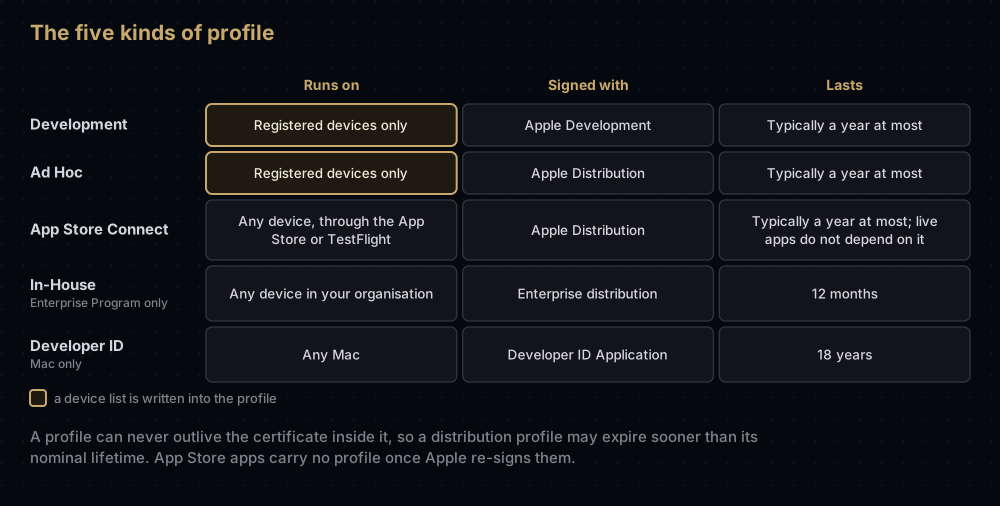
In the portal's Profiles area they are grouped under Development and Distribution, with a separate entry per platform:
- Development: iOS App Development (which also covers watchOS apps and App Clips), tvOS App Development, Mac App Development, and DriverKit Development for driver extensions.
- Distribution: App Store Connect (iOS, iPadOS, visionOS and watchOS), tvOS App Store Connect and Mac App Store Connect, plus Ad Hoc, In-House for Enterprise Program members, and Developer ID for Mac apps shipped outside the Mac App Store that use capabilities needing a profile.
A development profile can list several certificates and many devices. An App Store profile holds a single distribution certificate and no devices. Giving testers a build without TestFlight is its own topic: see Ad Hoc distribution on iOS.
Profiles Xcode makes for you. With automatic signing, Xcode creates and downloads profiles on its own, with names such as iOS Team Provisioning Profile: com.example.app for development and iOS Team Store Provisioning Profile: com.example.app for App Store builds. Apple notes that these Xcode-managed profiles do not appear in your developer account's list.
How long a profile lasts
Apple's technote says the validity varies by type but is typically not more than a year; Developer ID profiles are the exception, with an expiry date far in the future. Every development profile on the Mac used to check this post ran for exactly 365 days. Other rules:
- A profile cannot outlive its certificate. A distribution profile made eight months into a certificate's year expires when the certificate does, well short of 365 days.
- In-House profiles expire after 12 months, and Developer ID profiles made since 2017 last 18 years.
- Offline profiles. Teams created after 6 June 2021 have development and Ad Hoc builds that check in with Apple on first launch. For places without a network, the portal can create an offline profile, valid for 7 days.
- Free Apple ID builds stop opening after 7 days.
A profile can also stop working before its date. Changing its App ID's capabilities, or deleting the App ID, makes it invalid. Apple's help also tells you to edit a profile after revoking a certificate or disabling a device in it.
What expiry breaks depends on the kind. A development or Ad Hoc build stops opening on test devices. An App Store app is unaffected, because the copy on customers' phones has no profile.
Where profiles live
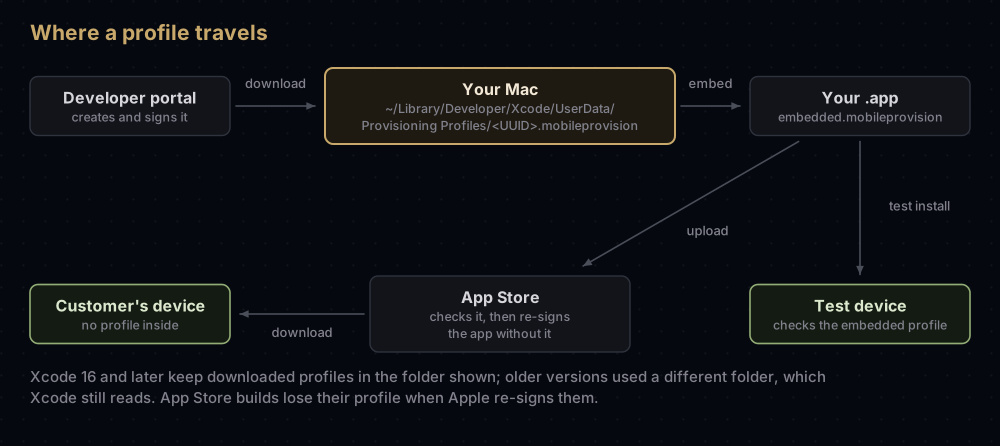
Inside the app. iOS, iPadOS, tvOS, watchOS and visionOS apps carry it as embedded.mobileprovision at the top of the app bundle. A Mac app keeps it at Contents/embedded.provisionprofile.
On your Mac. The Xcode 16 release notes say downloaded profiles now live in ~/Library/Developer/Xcode/UserData/Provisioning Profiles, and that Xcode still loads profiles from the previous location. Apple's account help page, however, still points to the older ~/Library/MobileDevice/Provisioning Profiles/ folder, so expect to see both paths in guides. Files are named by the profile's UUID, which makes the folder hard to read. This loop prints each profile's expiry date and name:
for f in ~/Library/Developer/Xcode/UserData/Provisioning\ Profiles/*.mobileprovision; do
  p=$(security cms -D -i "$f")
  echo "$(plutil -extract ExpirationDate raw -o - - <<< "$p")  $(plutil -extract Name raw -o - - <<< "$p")"
done
From the portal. Downloading a profile by hand puts a .mobileprovision (or, for Mac, .provisionprofile) file in your Downloads folder. In Xcode, the Download Manual Profiles button in the Accounts settings, with your team selected, fetches every profile you created in the portal.
Why builds fail, and the fix
| What you see | Usually means | Fix |
|---|---|---|
| No profiles for '…' were found | No profile on this Mac matches the bundle ID | With automatic signing, select your team on the Signing & Capabilities tab. With manual signing, create the App ID and profile, then use Download Manual Profiles. On a build server, see below |
| Provisioning profile "…" doesn't include signing certificate "…" | The profile was made for a different certificate, or this Mac does not hold that certificate's private key | Add your certificate to the profile and save it, or regenerate. If the key is missing, see missing private key in Xcode |
| … doesn't include the currently selected device | The phone is not registered, or was registered after the profile was made | Register the device, then edit the profile to include it and download it again |
| … doesn't include the aps-environment entitlement | A capability was turned on after the profile was made, or not turned on for the App ID | Enable the capability on the App ID, then regenerate the profile |
| A test build that worked now will not open | The profile or its certificate expired or was revoked | Regenerate the profile, re-sign the app and reinstall |
Regenerating by hand. In the portal's Profiles list, select the profile and click Edit. Change what you need, or for an invalid or expired profile just click Generate, then download it and install it in Xcode. Apple's page describes this as "regenerate", and it is needed after any capability change to the App ID.
Nudging automatic signing. Apple's help suggests backing up and removing cached profiles from the folder Xcode uses, then building again, so that Xcode requests fresh ones. Its page names the older folder; on Xcode 16 and later, look in the newer one as well.
On a build server. xcodebuild does not contact Apple unless you pass -allowProvisioningUpdates. With it, automatically signed targets get profiles, App IDs and certificates created or updated, and manually signed targets get missing profiles downloaded. Adding -allowProvisioningDeviceRegistration, which needs the first flag, also registers the destination device if necessary. For teams, fastlane match keeps one shared set of profiles and certificates instead.
Common mistakes
- Building for a phone that is not in the profile. With manual signing, registering the device is not enough: the profile must be edited to include it and downloaded again.
- Adding a capability and keeping the old profile. The App ID changed, so every profile built on it became invalid.
- Looking in the wrong folder. Xcode 16 moved downloaded profiles, and many guides still show the old path.
- Blaming the profile for a missing private key. A profile lists certificates, but signing also needs the matching private key in your keychain.
- Using a development build to test production push. Its profile sets
aps-environmenttodevelopment, so its tokens only work with APNs's sandbox. - Expecting an App Store app to stop when its profile expires. It will not. Only builds that carry their profile inside, such as development, Ad Hoc and In-House builds, depend on it after installation.
- Treating the profile as secret. It contains no private key. The certificate's private key is what you protect.
Questions people ask
What is a provisioning profile in iOS?
An Apple-signed file that authorises a build to run. It lists the allowed signing certificates, the App ID, the devices (for test builds), an expiry date and the entitlements the app may claim.
Where are provisioning profiles stored on a Mac?
Since Xcode 16, in ~/Library/Developer/Xcode/UserData/Provisioning Profiles. Earlier versions of Xcode used ~/Library/MobileDevice/Provisioning Profiles, which Xcode still reads.
How long is a provisioning profile valid?
Typically up to a year, and never longer than the certificate inside it. In-House profiles last 12 months and Developer ID profiles 18 years.
What is the difference between a certificate and a provisioning profile?
A certificate says who you are and, with its private key, lets you sign. A profile says what that signature is allowed to do: which app, which devices, until when, and with which entitlements.
How do I add a new device to a provisioning profile?
Register the device in your developer account, then edit the profile to select it and download the new version. Automatic signing does both when you build to the device.
How can I see what is inside a .mobileprovision file?
Run security cms -D -i on it to remove the signature, then read the property list with plutil, or use the info button next to the profile in Xcode's Signing & Capabilities tab.
Do App Store apps contain a provisioning profile?
No. The App Store checks the profile when you upload, then re-signs the app without it.
Is it safe to share a .mobileprovision file?
Yes. It holds no private key. It does list your Team ID, the App ID and, for test builds, the UDIDs of your devices.
Where this comes from
Checked in September 2026:
- TN3125: Inside Code Signing: Provisioning Profiles from Apple
- Edit, download, or delete provisioning profiles and Provisioning profile updates from Apple
- Xcode 16 release notes from Apple
- Diagnosing issues with entitlements from Apple
Keep reading
- iOS entitlements explained: the "which powers" half of every profile.
- Ad Hoc distribution on iOS: sending builds to registered devices.
- Apple Development vs Apple Distribution certificates: the "who may sign" half.
- Missing private key in Xcode: when the profile is right but signing still fails.
- fastlane match: one shared set of profiles for a whole team.


