An identifier in Apple's developer portal is a registered name. You register it once under Certificates, Identifiers & Profiles, and Apple then hangs other things off it: provisioning profiles, certificates, .p8 keys and entitlements.
The portal's "Register a new identifier" page offers eleven types. Almost every app needs only the first, the App ID. The other ten matter when you use the feature they are named after: Sign in with Apple on the web, Wallet passes and orders, Apple Pay, iCloud, data shared with a widget, Apple Music, MapKit JS, or a casting extension for your own TV or speaker hardware.
All eleven at a glance
| Identifier | What it names | You need it when |
|---|---|---|
| App IDs | An app, app extension or App Clip, plus the capabilities it may use | Always |
| Services IDs | A website that uses Sign in with Apple, WeatherKit, or Account & Organizational Data Sharing | Sign in with Apple outside your iOS app, or WeatherKit's web service |
| Pass Type IDs | One kind of Apple Wallet pass | You issue passes such as tickets or loyalty cards |
| Order Type IDs | One kind of Wallet order-tracking package | You send order status to Wallet |
| Website Push IDs | A website that sends Safari's original push notifications on macOS | You still use that legacy system |
| iCloud Containers | A storage space in iCloud | Your app uses CloudKit or iCloud Documents |
| App Groups | A shared container for your own apps and extensions | A widget or extension shares data with the app |
| Merchant IDs | You, as a merchant that accepts Apple Pay | You take Apple Pay for goods or services |
| Media IDs | An app or service that uses MusicKit, ShazamKit or Apple Music Feed | You call those services with developer tokens |
| Maps IDs | An app that uses MapKit JS | You show Apple Maps on a website |
| Media Device Sharing Extension | A casting protocol that your media sharing extension speaks | You make playback hardware and ship an iOS 27 extension for it |
Apple's help pages name the Account Holder or Admin role as the one that registers identifiers.
Which ones your feature needs
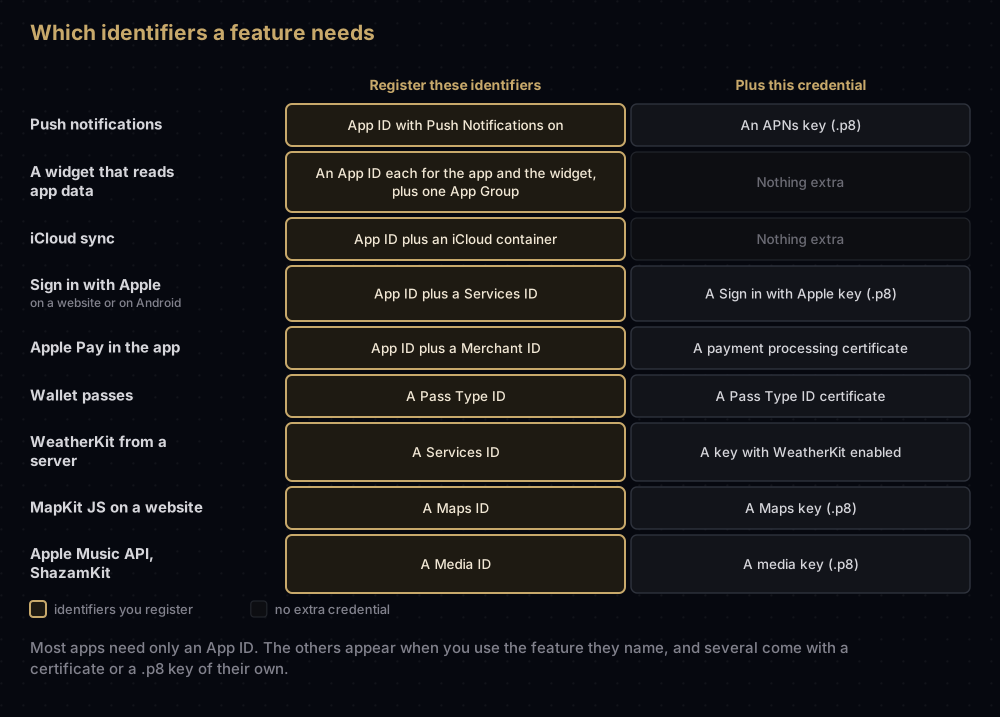
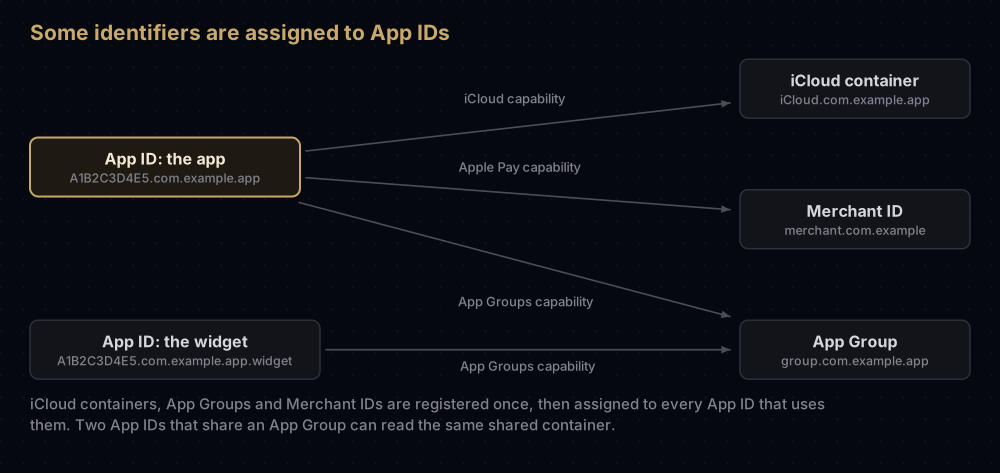
A useful way to sort the list: some identifiers are assigned to App IDs and end up inside your app's entitlements (iCloud containers, App Groups, Merchant IDs). Some are paired with a certificate that proves who signed something (Pass Type IDs, Order Type IDs, Website Push IDs, and Merchant IDs again). And some are paired with a .p8 key that your server uses to sign short-lived tokens (Services IDs, Media IDs, Maps IDs).
App IDs
An App ID is Apple's record of your bundle ID: your Team ID in front, A1B2C3D4E5.com.example.app, plus the list of capabilities the app may use. Every app, extension and App Clip needs one, and provisioning profiles are built around it. It comes in explicit and wildcard forms.
This one has a post of its own: Bundle ID vs App ID.
Services IDs
Apple's description: a Services ID identifies your website when it works with Apple web services such as WeatherKit, Sign in with Apple, and Account & Organizational Data Sharing. You register it with a reverse-domain style string, then configure the domain and return URL it is allowed to use.
It matters most for Sign in with Apple anywhere other than your Apple app: a website, or an Android app using a sign-in service such as Firebase Auth, Supabase or Auth0. Pair the Services ID with a Sign in with Apple key, which your server uses to sign the client secret it sends to Apple. The full setup is in Sign in with Apple on Android and the web.
For WeatherKit's web service, Apple says every registered Services ID is eligible. You also need a private key with WeatherKit enabled.
Pass Type IDs
A Pass Type ID names one kind of Wallet pass: this event's tickets, or this shop's loyalty cards. Apple's own example is a reverse-DNS string like com.example-company.passes.ticket.event-4631A.
You register the identifier first, then create a Pass Type ID certificate for it. That certificate signs each pass, and the passTypeIdentifier inside a pass must match the certificate that signed it. A pass is uniquely identified by its pass type identifier together with its serial number, so adding a pass with the same pair replaces the old one on the device.
An app can also read passes of its own types through the Wallet capability, which adds the pass type IDs to its entitlements. The certificate side, including what happens when it expires, is covered in Pass Type ID certificates.
Order Type IDs
An Order Type ID names one kind of order tracking package for Apple Wallet: the cards that show how an order is progressing, such as "your order has shipped", available from iOS 16. The steps mirror pass types: register the Order Type ID, then create an Order Type ID certificate under Certificates, Services.
Inside each order, orderTypeIdentifier must correspond with the certificate that signs it. People never see this value.
Website Push IDs
A Website Push ID registers one website for Safari's original push notification system on macOS. You create one per website, then a Website Push ID certificate to sign the site's notification packages and send the notifications through APNs.
For new work you probably do not need it. Standard Web Push, supported by Safari 16 on macOS 13 and by Home Screen web apps on iOS 16.4, needs no developer membership at all. Apple has not formally deprecated the older system, but the standard one has taken its place in practice.
iCloud Containers
An iCloud container is a named storage space in iCloud. You need at least one to turn on iCloud for an App ID, whether the app uses CloudKit (structured records in Apple's servers) or iCloud Documents (files synced across devices).
- The name must begin with
iCloud., followed by a unique reverse-DNS string:iCloud.com.example.app. - Several apps from the same team can share one container.
- In the app, the containers appear in the
com.apple.developer.icloud-container-identifiersentitlement.
Two cautions from Apple's documentation. If you later remove the iCloud capability in Xcode, you must turn iCloud off for the App ID yourself, and Xcode does not automatically detach a container you deselect, so that existing versions of the app keep working. And if you transfer an app that shares a CloudKit container with your other apps, the container goes with it, and the apps left behind lose access to it.
App Groups
An App Group is a shared container that several of your own apps and extensions can read and write. It is how a home screen widget or a notification service extension sees the main app's data, including a shared UserDefaults suite.
- The identifier must begin with
group.:group.com.example.app. - Each developer account can register up to 1,000 of them.
- Every target that uses the group must have it enabled, on its own App ID.
- A registered App Group also works as a keychain access group, so the apps can share keychain items.
- For an App Clip, an App Group can share data only between the App Clip and its parent app.
Mac apps can also use groups named after the Team ID, such as A1B2C3D4E5.shared, which do not need registering. The step-by-step setup, including the Flutter side, is in App Groups on iOS.
Merchant IDs
A Merchant ID identifies you to Apple Pay as a merchant that can accept payments. It never expires, and one Merchant ID can serve several apps. By convention it starts with merchant, as in merchant.com.example, and the app lists its Merchant IDs in the com.apple.developer.in-app-payments entitlement.
The expiring parts are the certificates created for it:
- the Apple Pay Payment Processing Certificate, whose key decrypts payment data (one active per Merchant ID, valid 25 months)
- the Apple Pay Merchant Identity Certificate, which your server presents for Apple Pay on the web (up to three active, also 25 months)
Payment providers such as Stripe often generate the certificate request for you. More in Apple Pay Merchant ID and its two certificates.
Media IDs
A Media ID identifies an app or service that talks to Apple's media services: MusicKit (the Apple Music API), ShazamKit and Apple Music Feed. You tick the services you plan to use when registering it, then create a Media Services private key, which signs the developer tokens those services require.
Two details from Apple's help page:
- You can attach two keys to each Media ID, so you can switch to a new key before revoking the old one.
- The identifier's description is shown to people as your app's name when the app asks for access to Apple Music. Write it as you want users to read it.
Maps IDs
A Maps ID registers an app that uses MapKit JS, the JavaScript version of Apple Maps for websites. You register one Maps ID per app, create a private key with MapKit JS enabled, and use the key to sign the JSON Web Tokens that MapKit JS asks for. Each Maps ID can have two keys at a time. The portal can now also create Maps tokens for you directly.
Media Device Sharing Extension
This is the newest type, and the one most developers can ignore. Apple describes it as a Media Sharing Extension Protocol ID: the name of a casting protocol that your media sharing extension speaks, which media apps use to declare that they support your extension.
It is for companies that make playback hardware, such as TVs and speakers. From iOS and iPadOS 27, such a company can ship an extension that makes its devices appear in the system media picker, the same picker people use for AirPlay and Bluetooth. The extension handles discovery, connection and playback, and it can stream real-time audio and video, including screen mirroring. Media apps then use Apple's AVSystemRouting framework instead of bundling each hardware maker's own casting code.
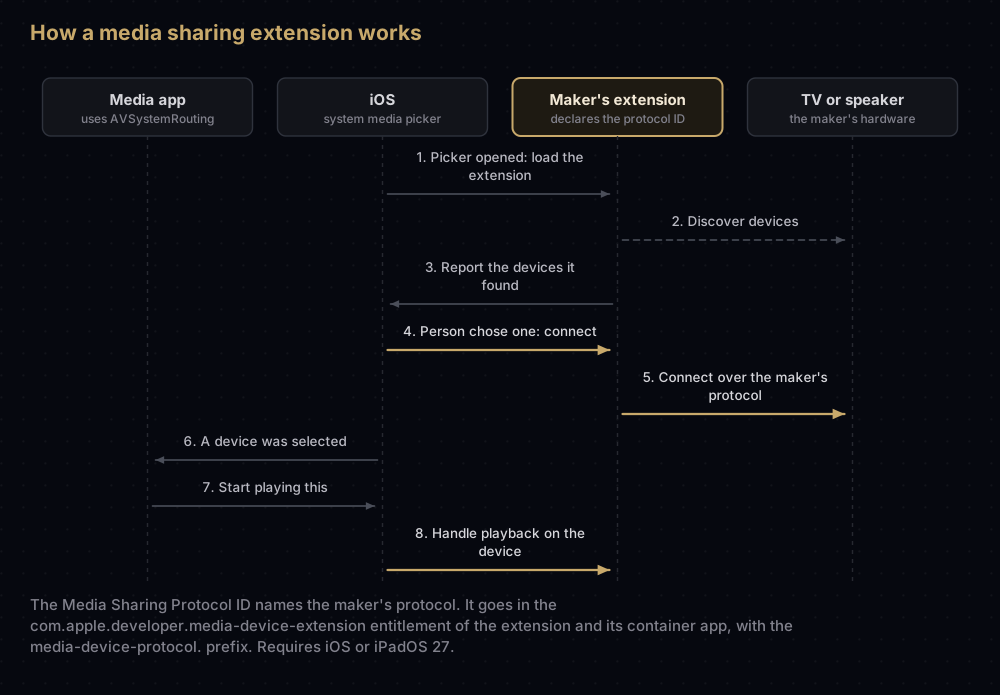
The protocol ID goes into the com.apple.developer.media-device-extension entitlement, with a media-device-protocol. prefix, and each value must match a protocol the extension declares. Apple adds some strict conditions:
- Both the extension and the app that contains it need the entitlement.
- That container app must exist only to deliver and install the extension.
- An app holding this entitlement cannot hold any other managed entitlement.
It replaces the Media Device Discovery Extension introduced with iOS 16.
What happens to identifiers over time
Identifiers are long-lived, but a few rules are worth knowing before you tidy up the list:
| Situation | What happens |
|---|---|
| Deleting an App ID you no longer use | Allowed, and any profile that contains it becomes invalid |
| Deleting the explicit App ID of an app you uploaded | Not allowed |
| App IDs grouped for Sign in with Apple | Must be ungrouped before you can delete them |
| Changing an App ID's capabilities | Profiles that contain it become invalid and need regenerating |
| A Merchant ID | Never expires; its certificates do |
| Transferring an app to another team | The App ID and iCloud containers move with it, and so does a Services ID associated with it for Sign in with Apple. An App Group can be deleted from the old account and registered in the new one |
Common mistakes
- Registering an App Group but enabling it on only one target. The widget or extension needs it on its own App ID too, or it cannot see the shared container.
- Naming a container without its prefix. iCloud containers must start with
iCloud.and App Groups withgroup.. - Using the App ID where a Services ID is needed. Sign in with Apple on a website or Android is configured on a Services ID, with its own domain and return URL.
- Setting up a Website Push ID for a new website. Standard Web Push works in current versions of Safari without one.
- Writing a careless Media ID description. People see it as your app's name when asked for Apple Music access.
- Confusing Media IDs with the Media Device Sharing Extension. One is for apps using Apple's media services; the other is for hardware makers building a casting extension.
- Deleting identifiers to clean up. Profiles that contain a deleted App ID stop working, and an uploaded app's App ID cannot be deleted anyway.
- Forgetting that one Merchant ID can serve many apps. There is no need to register a new one for each app.
Questions people ask
What is an identifier in Apple Developer?
A registered name in Certificates, Identifiers & Profiles. Apple attaches profiles, certificates, keys and capabilities to these names, so each app, website or service you connect to Apple starts with one.
What is the difference between an App ID and a Services ID?
An App ID registers an app and its capabilities. A Services ID registers a website, and is what Sign in with Apple and WeatherKit's web service use outside your Apple app.
Do I need an App Group for a widget?
Only if the widget needs the main app's data. Then both the app and the widget need the same App Group enabled on their own App IDs.
Can two apps share one iCloud container?
Yes. Apps from the same team can use the same container. Be careful when transferring one of them to another team: the container goes with it.
Does an Apple Pay Merchant ID expire?
No. The Merchant ID never expires. The payment processing and merchant identity certificates created for it last 25 months.
What is a Media ID used for?
Calling Apple's media services, MusicKit, ShazamKit and Apple Music Feed, with developer tokens signed by a media key. Its description is shown to users as your app's name.
What is the Media Device Sharing Extension identifier?
A protocol ID for hardware makers who build a media sharing extension in iOS or iPadOS 27, so their TVs or speakers appear in the system media picker. Most app developers never need it.
Can I delete an identifier?
Usually, yes. The exception that matters: you cannot delete the explicit App ID of an app you have uploaded to App Store Connect. Deleting an App ID also invalidates the profiles that use it.
Where this comes from
Checked against Apple's documentation in September 2026:
- Register an App ID, Register a Services ID and Delete an App ID
- Configuring iCloud services and Configuring app groups
- Create wallet identifiers and certificates and Configure Apple Pay
- Create a media identifier and private key and Create a Maps identifier and private key
- The media device extension entitlement and Media Device
Keep reading
- Bundle ID vs App ID: the identifier every app needs.
- App Groups on iOS: sharing data between an app and its widgets.
- Apple Pay Merchant ID and its two certificates: the payments side in full.
- Pass Type ID certificates: signing and updating Wallet passes.
- Sign in with Apple on Android and the web: the Services ID and key in practice.


