
Yes, until the first build is uploaded to App Store Connect. From that moment Apple fixes the bundle ID for good: you cannot edit it, you cannot delete its explicit App ID, and even removing the app from App Store Connect does not free the bundle ID for reuse.
After the lock, "changing the bundle ID" really means publishing a second app. It gets its own App Store record, and phones treat it as a different app, so people who installed the old one are not moved across. Google Play works the same way with an Android app's applicationId.
This post covers where the lock falls, what a new ID sets in motion, the alternatives that avoid it, and the exact places to edit in a Flutter project.
Can you still change it? Stage by stage
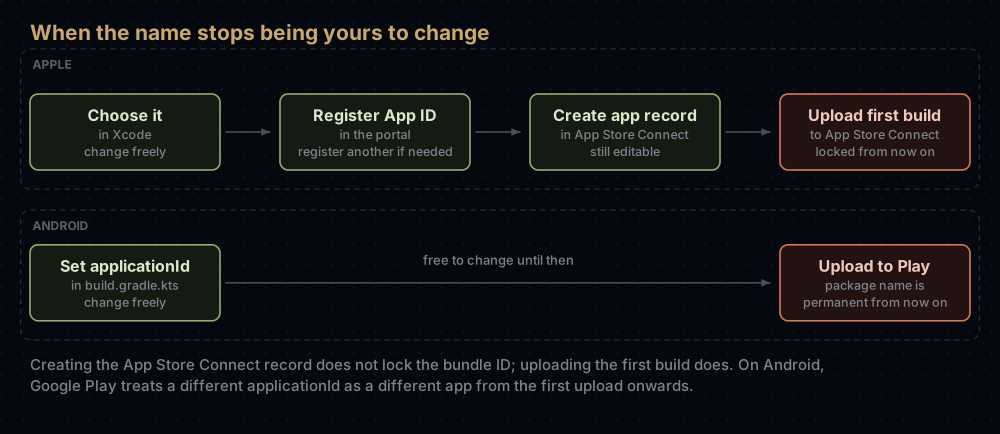
| Where you are | Can it change? | What to do |
|---|---|---|
| Only in your Xcode project | Yes | Edit it (steps below) |
| App ID registered, no App Store Connect record | Yes | Register a new App ID. Remove the old one if nothing uses it |
| App Store Connect record created, no build uploaded | Yes | Register the new App ID, then change the bundle ID in the app record's App Information section |
| Any build uploaded, even one never released | No | Keep the ID, or ship a new app |
| Android app uploaded to Google Play | No | Keep the applicationId, or publish a new app |
Three of Apple's pages agree on this. The Info.plist reference says that after a build is uploaded you can't change the bundle ID or delete the associated explicit App ID. The App Store Connect reference says the same of the record's Bundle ID property. The page on removing an app adds that if you have uploaded a build, the bundle ID can't be reused.
On Google's side, Android's build documentation warns that Google Play treats an upload with a different application ID as a completely different app, and Play Console's help says package names are unique and permanent and can never be deleted or reused.
What a new bundle ID really means
A bundle ID identifies one app throughout the system. So once the old one is locked, a new ID is not a rename. It is a separate app that happens to share your code:
- On people's phones, the new app installs next to the old one. It is not an update, and whatever the old app stored stays with the old app.
- On the App Store, it needs its own App Store Connect record and product page. The old record keeps the old ID.
- In your developer account, it needs its own App ID and profiles.
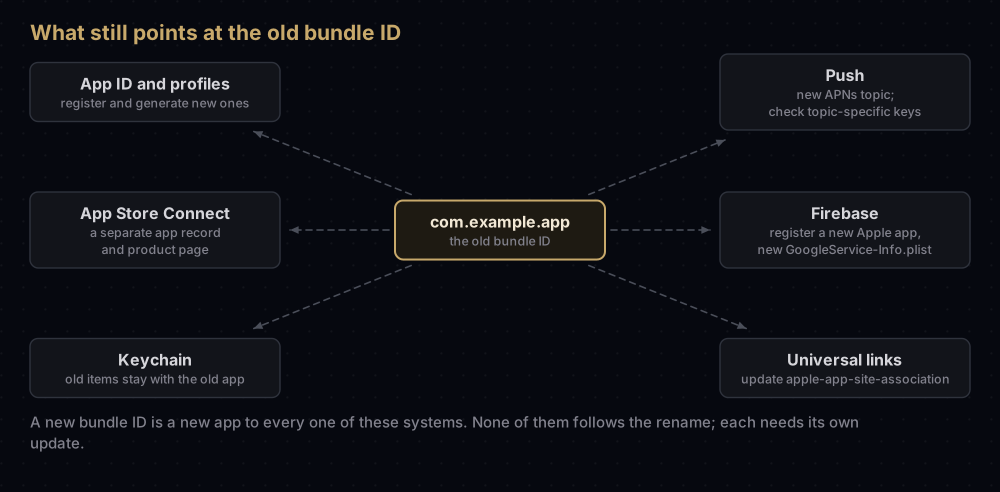
If you go ahead anyway, this is the work each piece needs:
| Piece | What to do for the new ID |
|---|---|
| App ID | Register a new explicit App ID and enable the same capabilities |
| App Groups, iCloud containers, Merchant IDs | These are separate identifiers, so assign the existing ones to the new App ID as well |
| Provisioning profiles | Generate new ones. Automatic signing does this for you |
| App Store Connect | Create a new app record with the new bundle ID |
| Push | The APNs topic is normally the bundle ID. A team-scoped .p8 key covers every app in the team; a topic-specific key covers only the bundle IDs chosen for it, and a legacy push certificate covers only one app |
| Firebase | Register a new Apple app and download its GoogleService-Info.plist; Firebase does not let you edit a registered bundle ID |
| Universal links | Add the new Team ID and bundle ID to the apple-app-site-association file on your website |
| Keychain | See below |
The keychain deserves its own note. Every app has a private keychain group named after its Team ID and bundle ID, and each keychain item belongs to exactly one group. Anything the old app saved in its private group, such as a login token, is invisible to the new app. Apps from the same team can share items through a shared keychain access group or an App Group, but only if the old app already saved them there.
For Android the list is shorter but similar: register the new package name as a new Android app in Firebase (its package name cannot be edited either) and download its google-services.json, and update assetlinks.json on your website if you use App Links, because it lists package names.
If you only wanted something else
Most requests to change a bundle ID are really about something the bundle ID does not control.
A different name on the Home screen. That is the display name, CFBundleDisplayName. In a Flutter project, set it in Xcode under the Runner target's General tab, in the Identity section. On Android, Flutter's guide points to the android:label attribute of the application tag in AndroidManifest.xml.
A different name on the App Store. That is set in App Store Connect. It can be 2 to 30 characters, and you can change it later when you create a new version.
A different owner. App Store Connect's app transfer moves an app to another developer account and keeps its bundle ID. The App ID moves with it. Apple warns that keychain sharing keeps working only until the app's next update, after which users have to sign in once more.
Separate test builds on the same phone. Give each build variant its own ID with a suffix instead of renaming the real one. The flavours section below shows how.
Changing it in a Flutter project
Commit your work first, so you can review exactly what changed. The grid below lists every place a new flutter create project keeps an identifier.
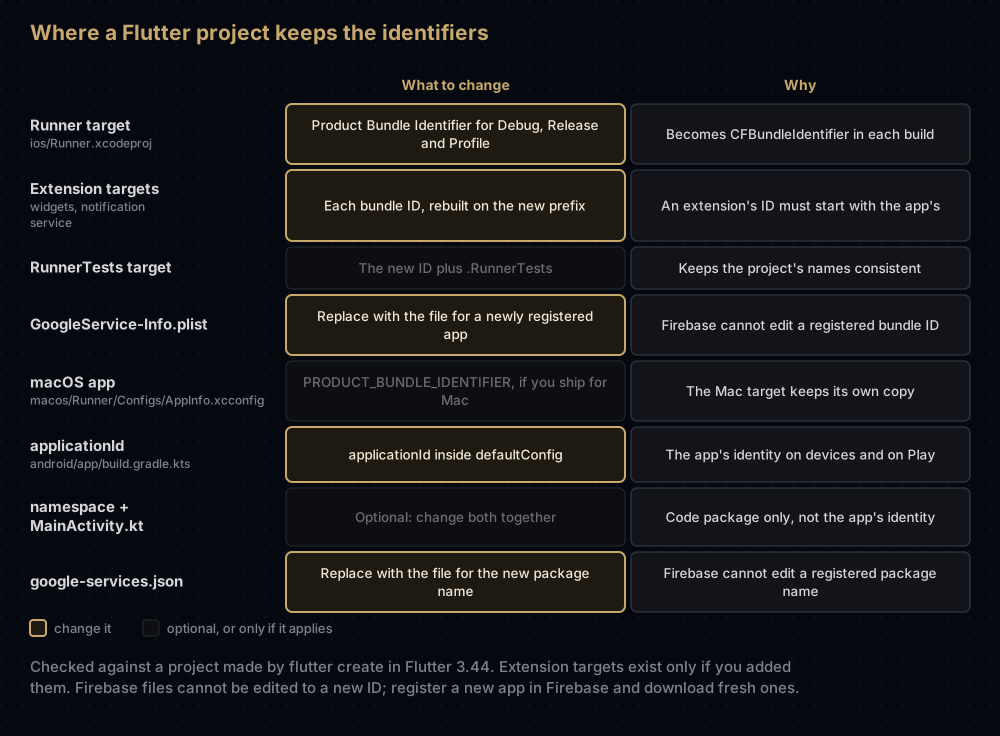
iOS
- From the project folder, open the workspace:
open ios/Runner.xcworkspace. - Select the Runner target. On the General tab, under Identity, type the new value into Bundle Identifier.
- Open the Build Settings tab, find Product Bundle Identifier in the Packaging section, and expand it. In a fresh Flutter project the value is stored separately for Debug, Release and Profile, so check that all three now show the new ID.
- Do the same for any extension targets you added (a widget, a notification service extension). Keep each one's suffix, but put the app's new bundle ID in front.
- Optionally, update the RunnerTests target, which Flutter names after the app's bundle ID with
.RunnerTestson the end. - On the Signing & Capabilities tab, let automatic signing register the new App ID and profiles, or register them yourself if you sign manually. Check every capability is still listed.
- If you use Firebase, replace the project's
GoogleService-Info.plistwith the file for the new Firebase app. - If you also ship the macOS version, its bundle ID lives in
macos/Runner/Configs/AppInfo.xcconfig.
Two terminal checks confirm nothing was missed. The first lists every place the project file sets a bundle ID. The second prints what one configuration actually resolves to; run it again with Debug and Profile.
grep -n "PRODUCT_BUNDLE_IDENTIFIER" ios/Runner.xcodeproj/project.pbxproj

xcodebuild -showBuildSettings -project ios/Runner.xcodeproj \
-target Runner -configuration Release | grep PRODUCT_BUNDLE_IDENTIFIER PRODUCT_BUNDLE_IDENTIFIER = com.example.newappThe project file is plain text, so a careful find-and-replace of the old ID also works. Review the diff before committing, because the old ID can appear as a prefix of other IDs.
Android
- Open
android/app/build.gradle.kts(orbuild.gradleif your project uses the Groovy syntax). - Change
applicationIdinsidedefaultConfig. - Leave
namespacealone unless you also want to rename the Kotlin package. Flutter's guide says that if you do change it, you must update thepackageline at the top ofMainActivity.ktand move the file into the matching folders. - Register the new package name in Firebase and replace
android/app/google-services.json, if you use Firebase.
android {
    // The code package. It can stay as it is.
    namespace = "com.example.app"

    defaultConfig {
        // The app's identity on phones and on Google Play.
        applicationId = "com.example.newapp"
    }
}
Android's own guidance is that you set applicationId explicitly, because a module without one takes the namespace's value. In that case, renaming the namespace would quietly rename the app.
After both edits, uninstall the old build from your test phones or expect to see two copies of the app: with different IDs, they install side by side.
Flavours instead of a rename
If the goal is a separate staging or development app, keep the production ID and add variants.
- iOS: Flutter's flavour guide creates build configurations such as
Debug-stagingandRelease-staging, then sets a different Product Bundle Identifier for each one, for examplecom.example.app.staging. - Android: add product flavours with an
applicationIdSuffix.
android {
    flavorDimensions += "default"
    productFlavors {
        create("staging") {
            dimension = "default"
            applicationIdSuffix = ".staging"
        }
        create("production") {
            dimension = "default"
        }
    }
}
Then pick the flavour when you run or build:
flutter run --flavor staging
flutter build appbundle --flavor production
Each variant with its own ID is a separate app to Apple, Google and Firebase, so each needs its own App ID, Firebase registration and config file. The production ID never changes.
Common mistakes
- Changing the General tab and missing a configuration. A Flutter project stores the ID per configuration, so a Release build can keep the old one. Check all three.
- Forgetting an extension. Its bundle ID must start with the app's, so it has to change with it.
- Keeping the old Firebase config file. Firebase expects each bundle ID and package name to have its own registered app and its own file.
- Renaming the Android namespace and expecting a new app ID. Only
applicationIdis the app's identity, unless it is missing. - Removing the old app from App Store Connect to free the ID. Once a build was uploaded, the ID cannot be reused, and you also give up the old app's name.
- Assuming existing users will move to the new app. They keep the old one, which stops receiving updates if you stop shipping it.
- Renaming to get a new display name. Change the display name instead.
Questions people ask
Can I change the bundle ID after my app is on the App Store?
No. Once any build has been uploaded, the bundle ID is fixed. A different ID means a different app with its own record and product page.
Can I change the bundle ID after creating the app in App Store Connect?
Yes, as long as no build has been uploaded. Register the new App ID first, then update the Bundle ID in the app record's App Information section.
If I remove my app from App Store Connect, can I reuse its bundle ID?
Not if you ever uploaded a build for it. Apple's help page on removing apps says so directly.
Will users of the old app get the new one as an update?
No. The new bundle ID is a different app, so it installs separately, and the old app's stored data stays behind with the old app.
How do I change the package name of a Flutter app?
Change applicationId in defaultConfig in android/app/build.gradle.kts, then register the new name in Firebase if you use it. If the app is already on Google Play, a new package name means a new app.
Do I have to rename the Kotlin package folders too?
No. Only change them if you also change namespace, in which case update the package line in MainActivity.kt and move the file to match.
Can I change the app's name without changing the bundle ID?
Yes. The Home screen name is the display name, and the App Store name is set in App Store Connect. Neither is tied to the bundle ID.
How do I move an app to another developer account?
Use App Store Connect's app transfer. The app keeps its bundle ID, and its App ID moves to the new account.
Where this comes from
Checked in September 2026:
- CFBundleIdentifier, App information and Remove an app from Apple
- Overview of app transfer from Apple
- Configure the app module from Android Developers
- Build and release an Android app, Build and release an iOS app and the flavour guides for Android and iOS from Flutter
Keep reading
- Bundle ID vs App ID: what the bundle ID is, and how Apple registers it.
- Flutter iOS code signing: getting the renamed app signed and onto TestFlight.
- google-services.json and GoogleService-Info.plist: the Firebase files you will be replacing.
- APNs auth key (.p8): checking your push key still covers the app.
- Provisioning profiles explained: why new profiles are needed after the change.


