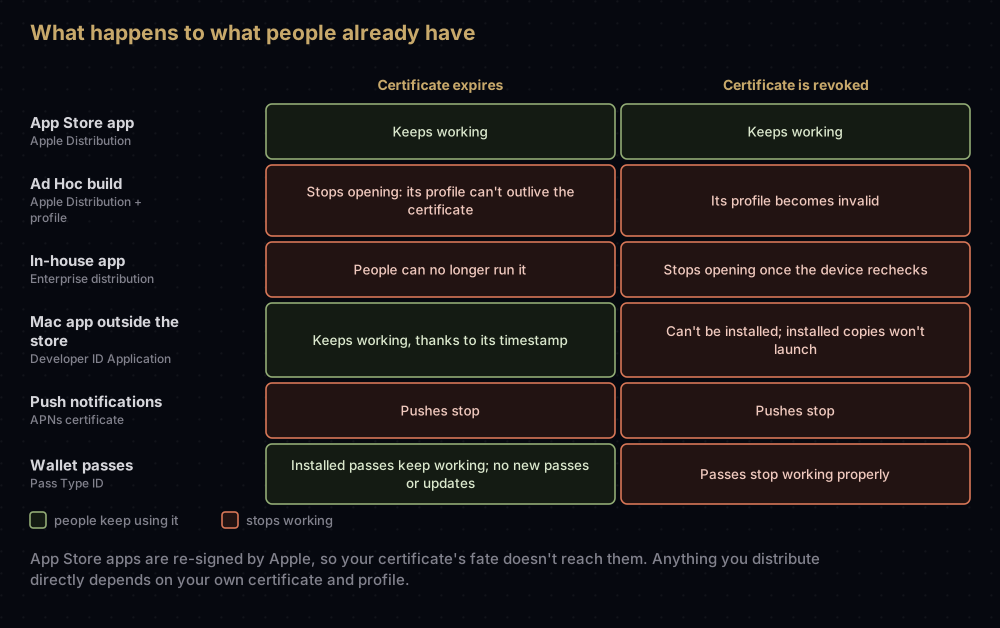
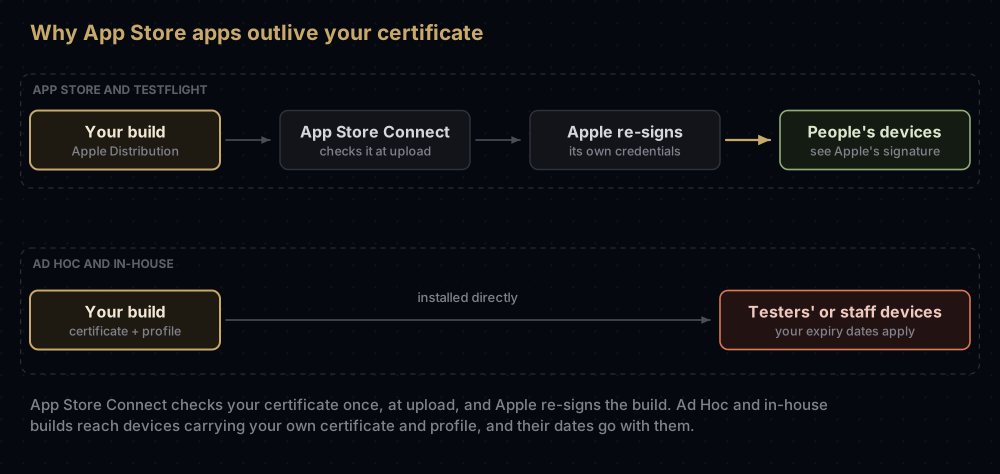
If your app is on the App Store, an expired or revoked Apple Distribution certificate changes nothing for the people using it. Apple re-signs App Store and TestFlight builds with its own credentials, so your certificate only has to be valid on the day you upload. What stops is your next upload with that certificate.
The builds that can break are the ones you hand out yourself. An Ad Hoc build stops opening when its provisioning profile runs out. Revoke an Enterprise (in-house) certificate and every app signed with it stops opening. Revoke a Developer ID certificate and people can no longer install or open the Mac software you signed with it. Expiry and revocation are also two different events, and they don't always have the same effect.
What breaks, certificate by certificate
| Certificate or profile | When it expires | When it's revoked |
|---|---|---|
| Apple Distribution (App Store, TestFlight) | Apps already on the App Store keep working while your membership is active. You can't upload with it any more | The same, and builds uploaded but not yet submitted may be marked Invalid Binary |
| Ad Hoc provisioning profile | That build stops opening on testers' devices. A profile can't outlive its certificate | If its certificate is revoked, the profile becomes invalid |
| Enterprise (in-house) distribution certificate | Apple says people can no longer run apps signed with it. It lasts three years, or until the Enterprise membership ends | Every in-house app signed with it stops opening |
| In-house distribution profile | Lasts 12 months. Afterwards it's removed and the app won't launch | If its certificate is revoked, the profile becomes invalid |
| Developer ID Application | People can still download, install and run what you signed. You need a new certificate for updates | People can't install it, and installed copies won't launch |
Push certificate (APNs .p12) | You can't send push notifications | You can't send push notifications |
| Pass Type ID (Wallet) | Passes already in Wallet keep working. You can't sign new passes or push updates | Passes stop working properly |
| Apple Pay certificates | Payments that depend on it fail | Payments that depend on it fail |
Two Mac details matter too. An app that uses a Developer ID provisioning profile has that profile checked at every launch, and won't launch once it expires, although profiles made since 22 February 2017 last 18 years. And Apple's pages disagree about the Developer ID Installer certificate: the Certificates overview says people can still install packages signed with an expired one, as long as the package carries a trusted timestamp. The Developer ID help page says a package signed with an expired Installer certificate must be re-signed before it will run. Until Apple settles it, re-sign installer packages before their certificate expires.
Expired and revoked are different
Expiry is a date set when the certificate is issued. Apple's technote says code signing certificates last "typically a year", depending on the type. Apple Development and Apple Distribution certificates last a year in practice. Enterprise distribution certificates last three years, and Developer ID certificates much longer.
Revocation cancels a certificate before that date. The Account Holder or an Admin can revoke distribution certificates in the developer account. Developer ID and Pass Type ID certificates can only be revoked by emailing Apple. Apple also says it can revoke certificates at any time, at its own discretion.
Why some apps survive expiry and others don't:
- App Store and TestFlight apps are re-signed by Apple with credentials that don't expire. Apple checks your certificate when you submit, and that's the last time it matters for that build. TestFlight builds expire after 90 days anyway, whatever happens to your certificate.
- Developer ID apps carry a secure timestamp. When the app runs, macOS checks that the certificate was valid at the moment of signing, not today.
- Ad Hoc and in-house apps rely on a provisioning profile embedded in the app. Profiles typically last no more than a year, and one can't outlive the certificate inside it.
How to tell whether yours has expired
In Keychain Access, select the certificate and look at the Expires field. An expired one shows a red cross and "… certificate is expired". (If it says "not trusted" instead, that's a different problem.)
In Terminal, list your signing identities without the -v flag, so invalid ones appear too:
security find-identity -p codesigningPolicy: Code Signing
Matching identities
1) 4E58…4977 "Apple Distribution: Example Developer (A1B2C3D4E5)" (CSSMERR_TP_CERT_EXPIRED)
1 identities found
Valid identities only
0 valid identities foundCSSMERR_TP_CERT_EXPIRED means the certificate has expired. Signing with it using codesign fails with error: The specified item could not be found in the keychain. To read an exact date:
security find-certificate -c "Apple Distribution" -p | openssl x509 -noout -enddateFor a provisioning profile, decode it and read its expiry date:
security cms -D -i Example.mobileprovision | plutil -extract ExpirationDate raw -o - -If a certificate that should still be valid looks expired, check the Mac's clock first. Apple's developer support engineers suggest that check, and Apple's technote confirms that codesign compares a certificate's dates with the current time. Turn on Set time and date automatically in System Settings > General > Date & Time.
Reminder emails. Developers on Apple's forums quote reminder emails with subjects such as "Action Needed: iOS Distribution Certificate Expires in 30 Days". Apple's help pages don't describe these emails or who receives them, so don't rely on one reaching you. Put the dates in a calendar.
Replacing a certificate that's expiring
A certificate's dates are fixed when Apple signs it, so "renewing" one means creating a new certificate next to the old one and moving everything across. For an Apple Development certificate, automatic signing in Xcode handles all of it. For distribution certificates:
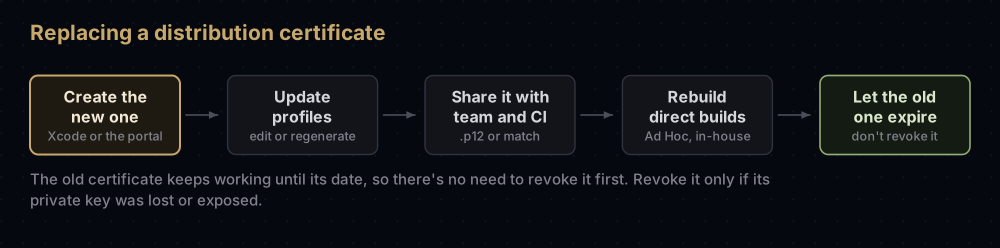
- Create the new certificate. Only the Account Holder or an Admin can. Use the + button in Xcode's Settings > Accounts > Manage Certificates, or the developer account with a new signing request (see creating a certificate signing request).
- Leave the old one alone for now. It keeps working until its date. For in-house certificates, Apple says explicitly not to revoke the first when you request the second.
- Update your provisioning profiles. With automatic signing, Xcode fetches new ones. For manual profiles, edit each one in the developer account to include the new certificate (or regenerate it if it has expired), then download it in Xcode.
- Share the new identity. Export it as a
.p12for teammates and build machines (see exporting a .p12), or update whatever fastlane match stores. - Rebuild anything you distribute directly. Ad Hoc testers and in-house users need builds made with the new certificate and profile before the old ones run out.
- Let the old certificate expire. Revoke it only if its private key was lost or exposed.
Cloud-managed certificates rotate themselves. Apple creates a new one 90 days before the old one expires, once new signing requests come in. If signed software needs to keep running on devices for more than 90 days, the Account Holder or an Admin can rotate one by hand once less than half of its lifetime is left, which is often 180 days.
Push certificates are better replaced by a key than by another certificate. An APNs .p8 key doesn't expire, as the post on APNs certificate renewal explains.
What to tell the people using your builds
Ad Hoc testers
Tell them the build will stop opening on the profile's expiry date, and send a new build, made with a new profile, before then. Memberships created after 6 June 2021 have one more rule: development and Ad Hoc apps check in with Apple the first time they launch, and may not launch without an internet connection. If you're sending builds to testers often, TestFlight is usually easier, because Apple re-signs those builds.
Enterprise (in-house) users
In-house apps have two clocks:
- The distribution profile expires 12 months after it's issued. Apple says that after that date the profile is removed and the app won't launch. Create a new profile before then. You can ship the new profile inside your next app update, or distribute just the new
.mobileprovisionfile, so people don't have to reinstall the app. - The distribution certificate lasts three years, or until the Enterprise membership ends. Apple lets you hold two at once, so you can move apps to the second before the first expires.
Revocation is the one to avoid. The first time someone opens an in-house app, the device asks Apple's OCSP server whether the certificate is still good. The answer is cached for three to seven days. The device checks again after a restart once that cache has expired, and if the certificate has been revoked, the app won't launch. Apple calls revocation a last resort, for a key that's lost or compromised. The notice people get the first time they open a manually installed in-house app, saying its developer isn't trusted on the device, is a separate step, explained here.
People using your Mac software
After a Developer ID certificate expires, there's nothing to tell them: signed and timestamped software keeps working. If the certificate is revoked, they can no longer install or open what you signed with it. Developer ID certificates covers the Mac side in full.
Membership expiry is a separate event
If your Apple Developer Program membership lapses, your apps are no longer available for download, you can't submit updates, and you lose access to Certificates, Identifiers & Profiles. Apps people have already installed keep working. For the Enterprise program, Apple says software keeps running for 90 days after the membership expires, as long as its certificates and profiles stay valid that long. You can renew from 30 days before the expiry date.
Common mistakes
- Revoking the old distribution certificate as a way to "renew" it. Every copy of it stops working at once, and in-house apps signed with it stop opening.
- Forgetting manual profiles. They still list the old certificate until you edit them.
- Letting a push certificate lapse. Pushes stop, and nothing in the app says why.
- Assuming App Store apps die with the certificate. They don't. Only your uploads are affected.
- Running an in-house app on one certificate with no overlap. Keep a second one ready before the first expires.
- Updating your Mac but not CI. Build machines hold their own copy of the identity and profiles.
- Trusting a reminder email to arrive. Apple doesn't document one.
Questions people ask
Will my app stop working if my Apple Distribution certificate expires?
Not if it's on the App Store. Apple says existing App Store apps are unaffected while your membership is valid. Ad Hoc builds are different: they stop opening when their provisioning profile expires, and that profile can't outlive the certificate.
What happens to TestFlight builds when my certificate expires?
Nothing in practice. TestFlight re-signs builds, as the App Store does. Every TestFlight build expires after 90 days regardless.
How long is an Apple Distribution certificate valid?
A year in practice. Apple's technote describes code signing certificates as "typically a year" from issue, varying by type. Enterprise distribution certificates last three years, and Developer ID certificates longer.
Can I renew an Apple certificate, or do I need a new one?
You create a new one. Keep the old one until it expires, move your profiles and team to the new one, then let the old one lapse.
Should I revoke my old certificate after creating a new one?
Usually not. Revoke only when the private key is lost or compromised. Revoking an in-house certificate stops every app signed with it, and Apple asks you not to revoke the first when requesting a second.
What happens when an enterprise certificate is revoked?
Apps signed with it stop launching. Devices check with Apple when an app is first opened, cache the answer for three to seven days, and check again after a restart once that cache has expired.
Does Apple email me before a certificate expires?
Developers report receiving reminder emails about 30 days before, but Apple's documentation doesn't describe them. Track the dates yourself.
What happens if my developer membership expires?
Apps you've already shipped keep working for people who installed them, but they're no longer available to download, and you can't upload updates or manage certificates until you renew.
Where this comes from
Each fact above comes from these Apple pages, read in September 2026:
- Certificates overview and Developer ID certificates, Apple Developer Account Help
- TN3161: Inside Code Signing: Certificates and TN3125: Inside Code Signing: Provisioning Profiles
- Distribute proprietary in-house apps, Apple Platform Deployment
- Cloud-managed certificates and program renewal
- Fixing an untrusted code-signing certificate, Apple Developer Technical Support
Keep reading
- APNs certificate expired?: renewing a push certificate, or moving to a key.
- Ad Hoc distribution on iOS: when a direct build is worth its expiry date.
- Untrusted Enterprise Developer: the trust step for in-house apps.
- Provisioning profiles explained: the other file with an expiry date.
- Developer ID certificates: expiry and revocation for Mac apps.


