This alert means the app did not come from the App Store. An organisation handed it out through Apple's enterprise programme, and iOS will not open it until you say you trust that organisation. You do that once, in Settings > General > VPN & Device Management, while connected to the internet.
Trust it when the app comes from your employer or school and their IT team asked you to install it. Do not trust it when a website or seller offered you paid apps for free, modified games, or a "certificate" to install them. Apple's rules do not allow that use, Apple can revoke those certificates, and once it does, the apps stop opening.
What the message means
Apple lets large organisations build apps for their own people and hand them out without the App Store, through the Apple Developer Enterprise Program. Apple describes it as being only for proprietary, internal-use apps. An organisation needs 100 or more employees to join, has to pass Apple's verification, and may distribute the apps privately to its own employees.
These apps reach an iPhone in one of two ways:
- Through device management (MDM), the system many organisations use to set up work phones. Apple says trust is set up automatically for apps installed this way, so you never see the alert.
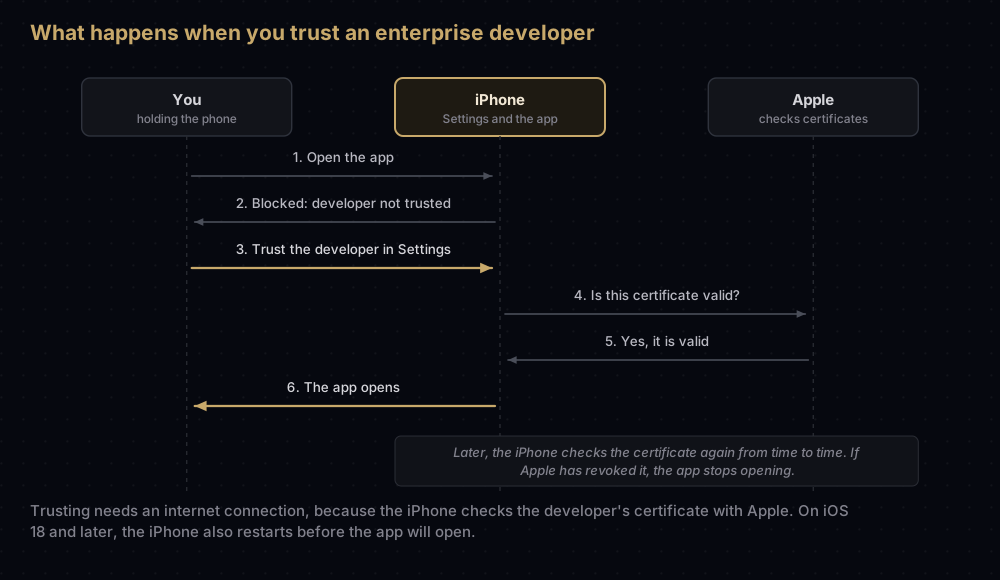
- From a web page the organisation runs. Here you have to trust the developer yourself, once. Until you do, the app shows an alert saying its developer is not trusted on this iPhone, and it will not open. Apple's older Xcode help calls this the "Untrusted Enterprise Developer" dialog.
The name you will see under Enterprise App in Settings is the developer whose enterprise certificate signed the app. For a genuine work app, that is your organisation. It is the most useful clue you have.
How to trust the developer
These are Apple's steps for current iOS:
- Open the app. When the alert appears, tap Cancel.
- Go to Settings > General > VPN & Device Management.
- Under Enterprise App, tap the developer's name.
- Tap Trust "developer name".
- On iOS 18 and later, tap Allow & Restart. On earlier versions, tap Trust.
- After the iPhone restarts, follow the on-screen steps to finish.
You need an internet connection. The iPhone checks the developer's certificate with Apple while you do this. If you are offline, the screen shows Not Verified; connect, then tap Verify App. On a work network that blocks the check, Apple tells IT teams to allow https://ppq.apple.com.
Cannot find the screen? Older versions of iOS called it Device Management or Profiles & Device Management. On current iOS it is VPN & Device Management, under General.
Two things are worth knowing before you tap Trust:
- You are trusting the developer, not one app. Apple says that once you trust a developer, you can install their other apps and open them immediately.
- The iPhone keeps checking. It must re-verify the developer's certificate from time to time. If it cannot, you may see a warning that verification will expire soon.
When trusting is reasonable, and when it is not
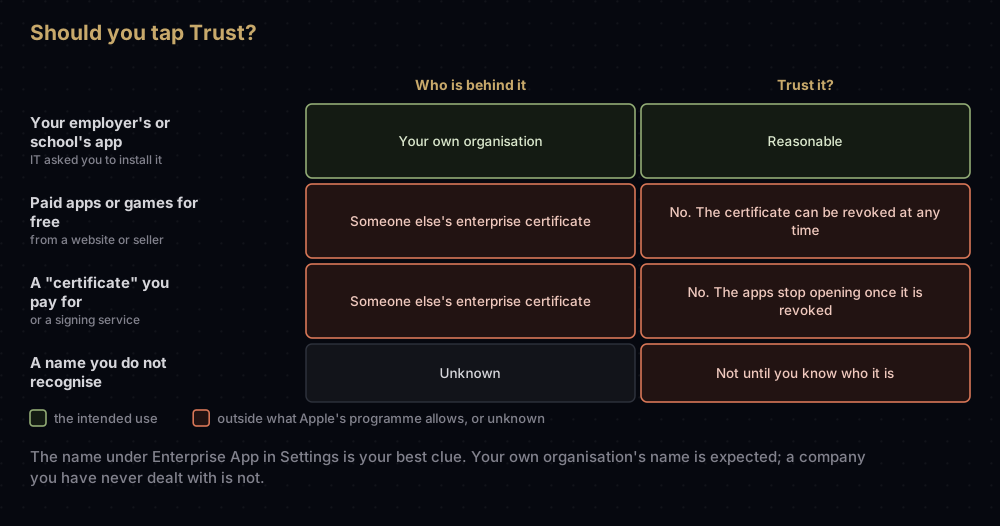
Reasonable: an app your employer or school built for its own people, where IT sent you the link and the name under Enterprise App matches the organisation. If you are unsure, ask IT before you tap Trust.
Not reasonable: anything sold or offered to the public. Services that sell "certificates", "signing" or free versions of paid apps and games show this same alert when they sign apps with an enterprise certificate. Here is why that goes wrong:
- It is not what the programme is for. Apple's enterprise licence agreement lets an organisation give these apps only to its employees and certain other permitted users, such as its contractors. The same agreement lets Apple revoke a certificate at any time, and lists a breach of the agreement among its example reasons.
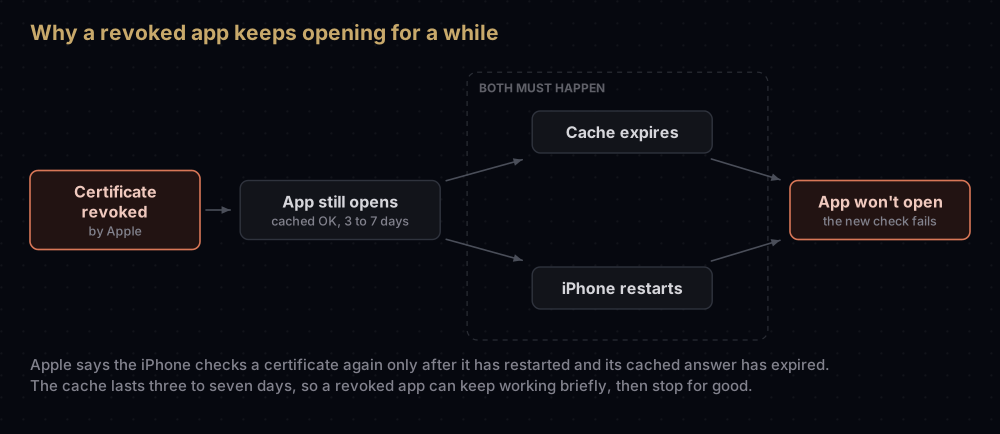
- Revocation switches the apps off. Apple's deployment guide says the iPhone checks an enterprise app's certificate with Apple, and a revoked certificate means the app won't launch. Apple warns organisations that revoking a certificate invalidates every app signed with it.
- It does not always stop at once, which makes it confusing. The iPhone keeps Apple's last answer for three to seven days, and checks again only after it has restarted and that answer has expired. So a revoked app can keep opening for a few days, then stop for good.
- You do not know who signed the app. The name under Enterprise App belongs to whichever organisation's certificate the service is using. If it is a company you have never dealt with, you have no way to know what is inside the app.
Some of these services also ask you to install a configuration profile. Apple describes profiles as settings for using an iPhone with corporate or school networks or accounts, and lists them on the same VPN & Device Management screen. Deleting a profile, Apple notes, also deletes the settings, apps and data that came with it.
If an app stops opening
| What you see | Likely reason | What to do |
|---|---|---|
| Not Verified, or a warning that verification will expire soon | The iPhone could not reach Apple to check the certificate | Connect to the internet, open the developer in VPN & Device Management and tap Verify App |
| A work app stops after about a year | In-house provisioning profiles expire 12 months after they are issued, and the app won't launch after that | Ask IT for an update. Apple advises organisations to tell staff not to delete the old app first if they want to keep its data |
| A work app stops suddenly | The organisation's certificate expired (they last three years at most) or was revoked | Ask IT. The app has to be signed again |
| An app from a paid "certificate" service stops | The certificate was revoked | That copy will not open again. Delete it and use the App Store version |
| An app a friend installed from their Mac with a free Apple account stops | Apps installed with a free account stop opening after 7 days | Ask them to reinstall it, or get the app from the App Store |
| A beta app stops | TestFlight builds expire after 90 days | Install a newer build from TestFlight |
To stop trusting a developer, delete their apps. Apple says a developer stays trusted until you use Delete App to remove all of that developer's apps.
Questions people ask
Is it safe to trust an enterprise developer on iPhone?
It is as safe as the organisation behind it. Your own employer's or school's app is the intended use. A developer name you do not recognise, or one attached to "free" paid apps, is not.
Why do I need the internet to trust an app?
The iPhone checks the developer's certificate with Apple when you trust it, and again from time to time afterwards. Without a connection, the developer shows as Not Verified.
Where is Device Management on iPhone?
On current iOS it is Settings > General > VPN & Device Management. Older versions called it Device Management or Profiles & Device Management.
Why does my iPhone restart when I trust an app?
From iOS 18, Apple requires a restart to finish trusting a manually installed enterprise app. The button reads Allow & Restart.
Why did an app that worked yesterday stop opening?
For an enterprise app, the causes Apple describes are an expired profile, an expired certificate or a revoked one. The iPhone caches Apple's answer for a few days, so a revoked app can keep working briefly before it stops.
How do I untrust a developer?
Delete every app from that developer. Trust is removed along with the last one.
Is trusting a developer the same as installing a profile?
No. Trusting a developer lets that developer's apps open. A configuration profile changes settings, for things like networks and accounts. Both appear on the VPN & Device Management screen.
Where this comes from
- Install custom enterprise apps on iOS, iPadOS, and visionOS, Apple Support
- Distribute proprietary in-house apps to Apple devices, Apple Platform Deployment
- Apple Developer Enterprise Program, Apple Developer
- Install or remove configuration profiles on iPhone, iPhone User Guide
Keep reading
- When an Apple certificate expires or is revoked: the developer's side of a revoked certificate.
- Provisioning profiles explained: the file that decides where an app may run.
- Ad Hoc distribution on iOS: another way to put a test app on specific iPhones.
- App signing explained: certificates, keys and profiles on iPhone and Android, from the start.
- "App not installed as package conflicts": the Android message people hit when installing apps from outside a store.


