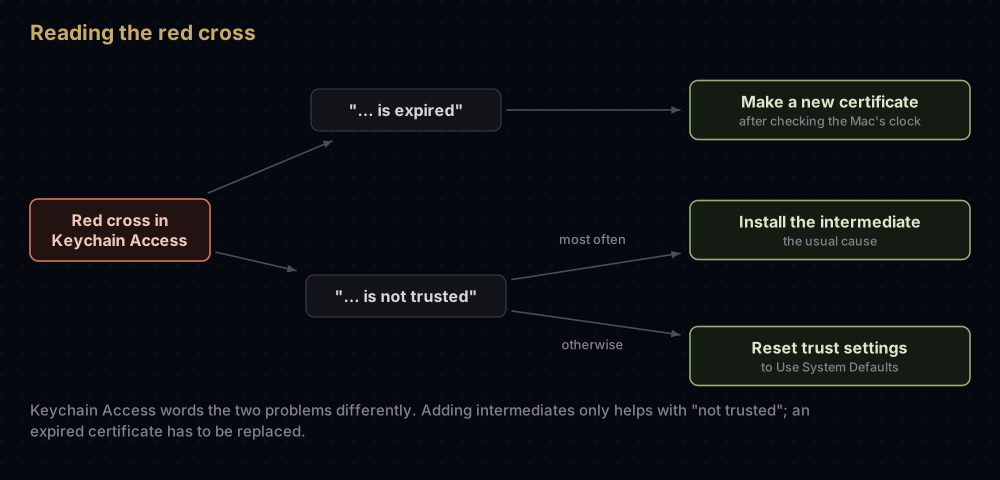
Your Mac can't link the certificate back to Apple. Every Apple signing certificate is vouched for by a middle certificate, called an intermediate, which Apple's root certificate in turn vouches for. When that intermediate is missing from your Mac, Keychain Access shows your certificate with a red cross and the words "certificate is not trusted", and code signing fails.
The fix takes a couple of minutes. Read which intermediate issued your certificate, download that one from Apple's certificate authority page, and add it to your login keychain. For most iOS and Mac developers it's Worldwide Developer Relations - G3.
The fix, step by step
- In Keychain Access, double-click your certificate and open Details.
- Under Issuer Name, note the Common Name and the Organizational Unit (for example
G3). - On apple.com/certificateauthority, download the intermediate with that name from the Apple Intermediate Certificates list.
- Drag the downloaded
.cerfile onto Keychain Access with the login keychain selected, or double-click it. - Select your certificate again. It should now say "This certificate is valid".
If it still doesn't, the cause is one of the less common ones further down.
What "not trusted" means
A certificate is only as good as whoever signed it. Your certificate was signed by an Apple intermediate, and the intermediate was signed by an Apple root certificate that macOS trusts from the start. To trust your certificate, the Mac has to walk that chain from one end to the other.
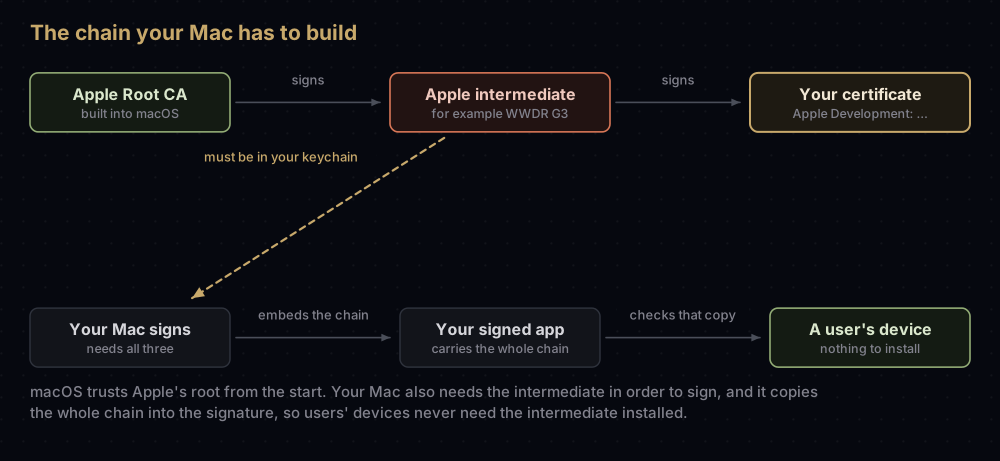
Apple's technote on certificates calls this three-level chain standard for Apple code signing. The root comes with macOS. Xcode installs the intermediates automatically, and Apple's advice for anyone signing without Xcode, such as a build machine that only runs codesign, is to download and install them yourself. An intermediate someone deleted has the same effect.
Only the Mac that signs needs the intermediate. When you sign, codesign embeds the whole chain in the signature, so the phones and Macs that run your app never need it installed.
How it shows up
| Where | What you see |
|---|---|
| Keychain Access | A red cross and "… certificate is not trusted" |
codesign | Warning: unable to build chain to self-signed root for signer "Apple Development: …", then errSecInternalComponent |
security find-identity -p codesigning | The identity appears under "Matching identities" but not under "Valid identities only", with no reason given |
| Xcode | The CodeSign step of the build fails |
The wording in the first three rows comes from Apple's technote and from a troubleshooting post by one of Apple's developer support engineers. The same symptoms have a second cause, customised trust settings, covered below.
Which intermediate you need
Apple has replaced its intermediates over the years and now uses different ones for different kinds of certificate. So "download the WWDR certificate" isn't quite enough: you need the one that issued yours.
Read the issuer
In Keychain Access the issuer is under Details > Issuer Name. In Terminal, this prints the issuer and expiry date of the first certificate whose name matches:
security find-certificate -c "Apple Development" -p | openssl x509 -noout -issuer -enddateissuer=CN=Apple Worldwide Developer Relations Certification Authority, OU=G3, O=Apple Inc., C=US
notAfter=Mar 4 09:15:00 2027 GMTFor a .cer file you downloaded from the developer website, read the file directly:
openssl x509 -in development.cer -inform der -noout -issuer -enddateLook closely at the OU part. The G3, G4, G5 and G6 intermediates all have exactly the same Common Name, "Apple Worldwide Developer Relations Certification Authority". The Organizational Unit is the only thing that tells them apart.
Match it to Apple's list
| Issuer shows | Download this from Apple | Expires | Issues |
|---|---|---|---|
WWDR name with OU=G3 | Worldwide Developer Relations - G3 | 20 Feb 2030 | Apple Development, Apple Distribution, the older iOS and Mac development and distribution types, Mac Installer Distribution, Merchant Identity, Swift Package Collection |
WWDR name with OU=G4 | Worldwide Developer Relations - G4 | 10 Dec 2030 | Push certificates, Pass Type ID, Order Type ID, Website Push ID, WatchKit Services, VoIP Services |
WWDR name with OU=G5 | Worldwide Developer Relations - G5 | 10 Dec 2030 | Apple-managed certificates, including App Store signing |
WWDR name with OU=G6 | Worldwide Developer Relations - G6 | 19 Mar 2036 | Swift package signing |
CN=Apple Worldwide Developer Relations CA - G2 | Worldwide Developer Relations - G2 | 6 May 2029 | Apple Pay Payment Processing |
CN=Developer ID Certification Authority, OU=G2 | Developer ID - G2 | 17 Sep 2031 | Newer Developer ID certificates (the default since 27 January 2022) |
CN=Developer ID Certification Authority, OU=Apple Certification Authority | Developer ID - G1 | 1 Feb 2027 | Older Developer ID certificates |
WWDR name with OU=Apple Worldwide Developer Relations | The original intermediate | 7 Feb 2023, expired | Certificates issued before the move to G3 and G4 |
The Developer ID G2 certificate itself, and Apple's certificate authority page, give its expiry as 00:00 UTC on 17 September 2031. Apple's Developer ID support page gives the date as 16 September 2031.
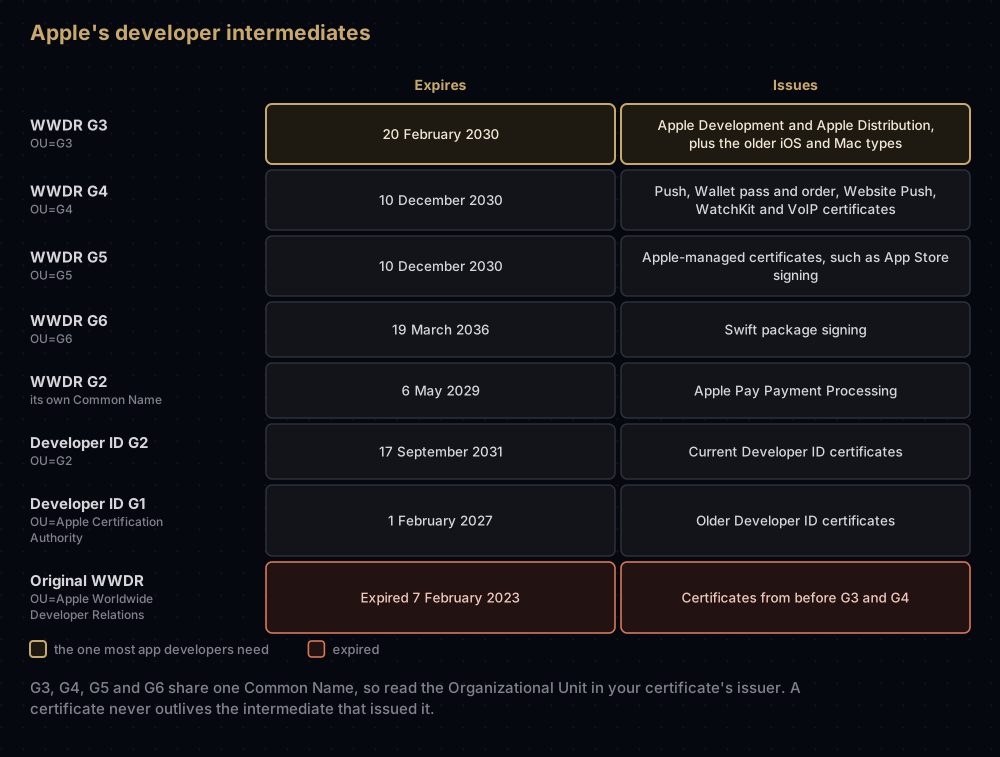
A certificate can't outlive the intermediate that issued it. Apple says so directly on its Developer ID intermediate page. So if your issuer turns out to be the original intermediate, installing it won't help: that certificate expired long ago. Make a new one instead. See what happens when a certificate expires.
Install it
- Open apple.com/certificateauthority and find the Apple Intermediate Certificates list.
- Download the matching
.cerfile. - Open Keychain Access (search for it in Spotlight), select the login keychain, and drag the file onto the window. Double-clicking the file also imports it.
Before you install a file, you can check what's inside it:
openssl x509 -in AppleWWDRCAG3.cer -inform der -noout -subject -datessubject=CN=Apple Worldwide Developer Relations Certification Authority, OU=G3, O=Apple Inc., C=US
notBefore=Feb 19 18:13:47 2020 GMT
notAfter=Feb 20 00:00:00 2030 GMTNot sure which one you need? The developer support engineer's post suggests a shortcut: download every certificate in Apple's intermediate list and add them all. Having extra intermediates installed is generally not a problem.
Check the chain
Keychain Access can show you the whole chain for a certificate:
- Select your certificate and choose Keychain Access > Certificate Assistant > Evaluate.
- Choose Generic (certificate chain validation only) and click Continue.
- Double-click the first certificate in the result. You should see three: an Apple root, an Apple intermediate, and your certificate. Each should say "This certificate is valid".
Don't pick Code Signing in step 2. Apple's engineer explains that this option quietly downloads a missing intermediate to finish the check, which hides the very problem you're looking for.
If it still says "not trusted"
Someone changed the trust settings
macOS lets you override how far a certificate is trusted, with choices such as Always Trust and Never Trust. Apple's code signing certificates are trusted by default and don't need any override. Apple's engineer warns that customising their trust settings might cause problems, and names an override as another possible cause of these symptoms.
Check each certificate in the chain: your certificate, the intermediate and the root.
- Double-click the certificate in Keychain Access and expand Trust.
- The first pop-up menu should say Use System Defaults, and the others no value specified.
- If they don't, set them back and close the window. macOS may ask for your password to save the change.
If the same certificate is in more than one keychain, check each copy. To list overrides from Terminal:
security dump-trust-settings
security dump-trust-settings -d
On a Mac with no overrides, both print SecTrustSettingsCopyCertificates: No Trust Settings were found. A Mac managed by an employer may show entries that have nothing to do with code signing. Remove only an override you can't explain on a certificate in your signing chain.
The Mac's clock is wrong
Validity is judged against your Mac's clock. codesign checks that the current time falls inside the certificate's valid range, and Apple's engineer suggests checking the clock whenever a certificate looks expired but shouldn't be. Open System Settings > General > Date & Time and turn on Set time and date automatically.
It's expired, not untrusted
Keychain Access words these differently: "… certificate is expired" instead of "… certificate is not trusted". An expired certificate can't be fixed by adding intermediates. You need a new one, which the post on expired certificates walks through.
The key is missing instead
If the certificate is trusted but still isn't offered for signing, check whether its private key is on this Mac. That's a different problem, covered in Missing Private Key in Xcode.
Common mistakes
- Setting the certificate to Always Trust. It doesn't install the missing intermediate, and a custom trust setting is a known cause of these symptoms in its own right.
- Installing the wrong generation. G4 won't help an Apple Development certificate. Match the
OUin the issuer. - Deleting an intermediate that looks old. Apple asks you to keep the Developer ID G1 intermediate installed for as long as you sign with certificates that chain to it.
- Evaluating with the Code Signing policy. It fills in the missing piece for you and reports success.
- Running the checks with
sudo. Apple's support engineers advise against it when investigating signing problems, and call it a common source of confusion. - Telling users to install the intermediate. They never need it. The chain travels inside your app's signature.
Questions people ask
What is the Apple WWDR certificate?
WWDR stands for Worldwide Developer Relations, Apple's certificate authority for developers. Its intermediate certificates sit between Apple's root certificate and the certificates Apple issues to you. Your Mac needs the right one to trust your signing certificate.
Which WWDR certificate do I need?
The one named in your certificate's issuer. For Apple Development and Apple Distribution certificates, that's G3. Push and Wallet certificates use G4. Developer ID certificates use one of the two Developer ID intermediates instead.
Where do I download the WWDR G3 certificate?
From Apple's certificate authority page, apple.com/certificateauthority, in the Apple Intermediate Certificates list, as "Worldwide Developer Relations - G3".
Do my app's users need the intermediate certificate?
No. codesign puts the full chain inside the signature, and devices use that copy to check it.
What does "unable to build chain to self-signed root" mean?
codesign couldn't connect your certificate to a trusted root. Apple's technote names a missing intermediate as the most common cause. A customised trust setting is the other one to check.
Is it safe to install all of Apple's intermediate certificates?
Yes, as long as you download them from Apple's own page. Apple's developer support engineer calls installing the whole list the simplest fix, and says extra intermediates are generally not a problem.
What happened to the original WWDR certificate?
It expired on 7 February 2023. Apple began issuing development and distribution certificates from the G3 replacement on 28 January 2021, and push certificates from G4 in January 2022, so current certificates chain to those instead.
Should I set my certificate to "Always Trust"?
No. Apple's signing certificates are trusted by default, and Apple's support engineers warn that custom trust settings might cause problems. Reset it to Use System Defaults.
Where this comes from
Checked in September 2026 against:
- TN3161: Inside Code Signing: Certificates, Apple
- WWDR intermediate certificates and the Apple PKI page, whose files were inspected with OpenSSL
- Fixing an untrusted code-signing certificate, by Apple Developer Technical Support
- Developer ID intermediate certificate updates, Apple
- Determine if a certificate is valid, Keychain Access User Guide
Keep reading
- Missing Private Key in Xcode: the certificate is trusted, but its key isn't on this Mac.
- When an Apple certificate expires or is revoked: the other red cross in Keychain Access.
- Every certificate in Apple's developer portal: what each type is for.
- Developer ID certificates: the Mac certificates with their own intermediates.
- Creating a certificate signing request on a Mac: starting over with a new certificate.


