
A Developer ID certificate is what you sign a Mac app with when you distribute it yourself, from your own website, GitHub or Homebrew rather than the Mac App Store. It tells macOS which Apple developer the software comes from and that nobody has changed it since.
Signing alone isn't enough on current macOS. You also send the signed software to Apple's notary service, which scans it and returns a ticket, and you attach that ticket to your download. Gatekeeper, the part of macOS that checks downloaded apps, then lets people open it. Without notarization, macOS warns people that Apple can't check the app for malicious software.
Application and Installer: the two kinds
| Developer ID Application | Developer ID Installer | |
|---|---|---|
| Signs | Apps, other code and disk images | Installer packages (.pkg) |
| Name in Keychain Access | Developer ID Application: Example Developer (A1B2C3D4E5) | Developer ID Installer: Example Developer (A1B2C3D4E5) |
| How many a team can have | Up to five | Up to five |
| Who can create one | The Account Holder | The Account Holder |
Most developers need one Application certificate, and an Installer certificate only if they ship a .pkg. For the Mac App Store you use different certificates altogether (Apple Distribution or Mac App Distribution for the app, Mac Installer Distribution for the package), and notarization isn't required there. Every certificate in Apple's developer portal sets them side by side.
A Developer ID app can also use some advanced capabilities, such as CloudKit and push notifications. Those need a Developer ID provisioning profile as well as the certificate.
Who can create them, and how many
Only the Account Holder can create a Developer ID certificate. Apple's developer support engineers point out that in an organisation the Account Holder is often not technical and may need a developer's help. Admins can use cloud-managed Developer ID certificates, which Apple creates and holds, but only once they've been given that access in App Store Connect's Users and Access.
To create one, the Account Holder opens Certificates in the developer account, clicks +, chooses Developer ID under Software, picks Application or Installer, and uploads a signing request (see creating a certificate signing request). Double-clicking the downloaded .cer adds it to Keychain Access, where it pairs with the private key made alongside the request. Xcode can create them too.
Apple's developer support engineers call these certificates "precious": anyone holding one can sign software as you, the number is capped at five per kind, and you can't revoke one yourself. Their advice:
- Make as few as you can. Each extra copy is another chance for the key to leak, and anyone with it can sign software as you.
- Back up the identity (certificate plus private key) as a password-protected
.p12straight after creating it. See exporting a .p12. - Clean up after the Account Holder. If a developer helped the Account Holder create it, the private key sits in the Account Holder's login keychain. Once it's exported and working, delete that copy.
- Don't sign everyday builds with it. That's what Apple Development certificates are for.
- At the limit? Contact Apple's Developer Programs Support instead of revoking one.
If the key is lost, Missing Private Key in Xcode covers the search and the options.
How long they last
Apple doesn't publish a single figure. Developer ID certificates last much longer than the one year typical of other signing certificates: about five years. An example in Apple's technote runs from July 2017 to August 2022. A certificate also can't outlive the intermediate certificate that issued it, which matters in 2027 (see below).
Expiry matters less than you might expect. A Developer ID signature carries a secure timestamp from Apple, which Xcode's archive and export workflow adds for you (with codesign, pass --timestamp). When the software runs, macOS checks that the certificate was valid when it was signed, not that it's still valid today. So an expired Developer ID certificate doesn't stop existing downloads from working. You just need a valid one to sign updates.
There are two exceptions:
- Apps with a Developer ID provisioning profile. Gatekeeper checks the profile at install and at every launch, and the app won't launch once the profile expires. Profiles created after 22 February 2017 last 18 years, whatever the certificate's own date.
- Installer packages. Apple's pages disagree here. The Certificates overview says a package signed with an expired Installer certificate still installs if it carries a trusted timestamp. The Developer ID help page says it must be re-signed with a valid certificate before it will run. The safe course is to re-sign packages before the certificate expires.
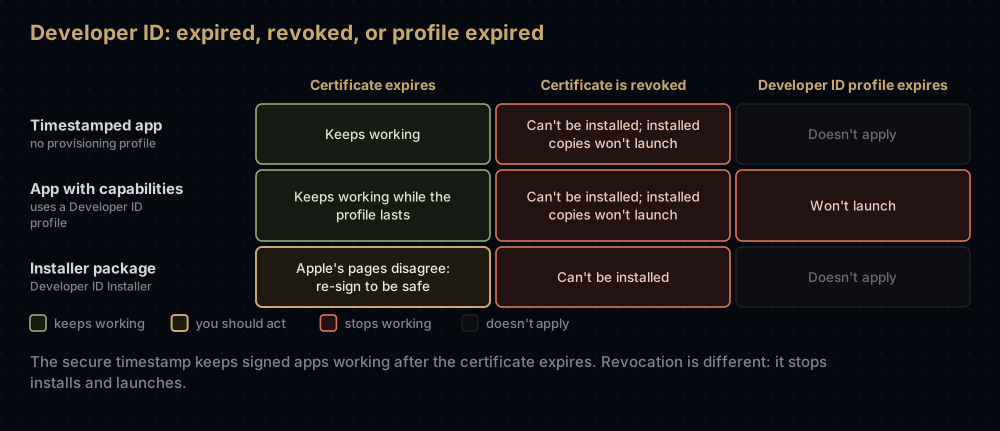
If your Apple Developer Program membership lapses, people can still download, install and run software you signed with Developer ID. You'll need an active membership to get a new certificate once yours expires. Notarization is also a paid-membership service.
Sign, notarize, staple
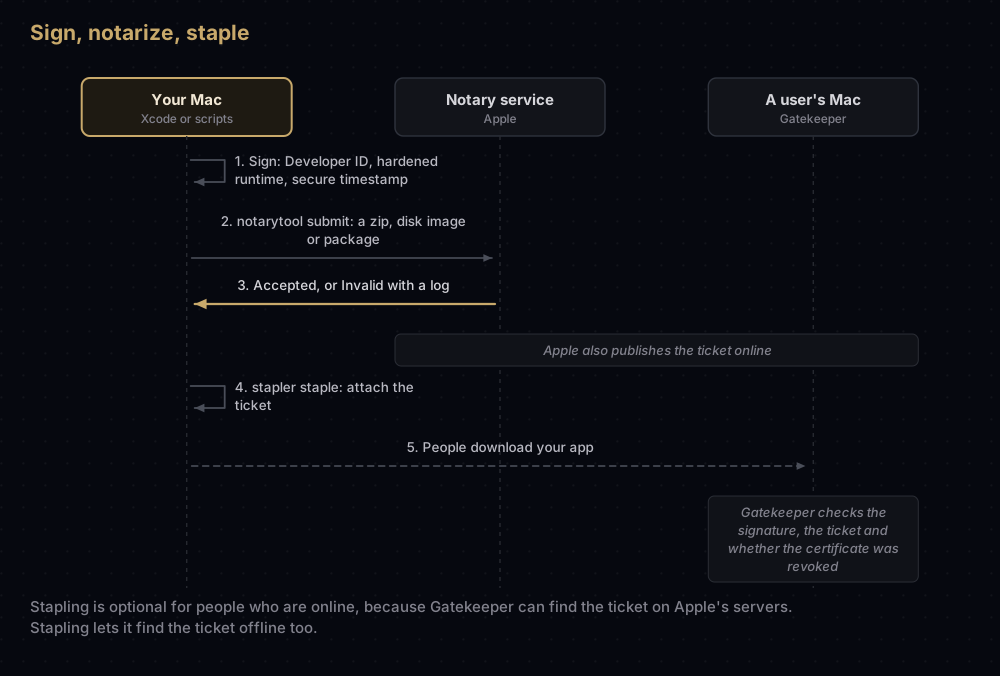
Apple says notarization isn't App Review. It's an automated scan for malicious content and code signing problems. Since macOS 10.15, software built after 1 June 2019 and distributed with Developer ID must be notarized. The service has not accepted uploads from altool, or from Xcode 13 and earlier, since 1 November 2023.
Before you upload, Apple requires:
- every executable signed, with a valid signature
- a Developer ID certificate, not Apple Development or Mac App Distribution
- the hardened runtime turned on
- a secure timestamp in the signature
- no
com.apple.security.get-task-allowentitlement (Xcode adds it for debugging and removes it when you export) - a macOS 10.9 SDK or later, and correctly formatted entitlements
From Xcode
Archive the app, open the Organizer and click Distribute App. Choose Direct Distribution, which Apple describes as the option for notarizing a Developer ID app (the custom list calls the same method Developer ID). Xcode uploads the archive and, when notarization finishes, staples the ticket to it. Export the archive again to get the notarized copy you distribute. Apple says most notarizations finish within 5 minutes, and 98 percent within 15.
From the command line
For scripted builds, disk images and installer packages, use notarytool and stapler, both included with Xcode.
-
Sign with the hardened runtime and a secure timestamp:
codesign --force --options runtime --timestamp \ --sign "Developer ID Application: Example Developer (A1B2C3D4E5)" MyApp.app -
Zip the app. The notary service accepts zip files, disk images and signed flat installer packages, not a bare
.app:ditto -c -k --keepParent MyApp.app MyApp.zip -
Save your credentials in the keychain once. You're asked for an app-specific password:
xcrun notarytool store-credentials "notary-profile" \ --apple-id "you@example.com" --team-id A1B2C3D4E5 -
Upload and wait for the verdict:
xcrun notarytool submit MyApp.zip --keychain-profile "notary-profile" --wait -
Staple the ticket to the app itself, then zip it again for your download page:
xcrun stapler staple MyApp.app
Instead of an Apple ID and app-specific password, notarytool also accepts an App Store Connect API key. If a submission comes back Invalid, fetch the log with xcrun notarytool log and the submission ID. Apple suggests reading the log even after a success, since it can contain warnings. Its tips for avoiding slow responses include limiting yourself to 75 notarizations a day.
Installer packages are signed with the Installer certificate using productbuild, pkgbuild or productsign. Each adds a secure timestamp by default when the identity is a Developer ID one:
productsign --sign "Developer ID Installer: Example Developer (A1B2C3D4E5)" \
  MyApp-unsigned.pkg MyApp.pkg
Stapling
Notarization produces a ticket. Apple publishes it online, and Gatekeeper on macOS 10.14 or later finds it there the next time someone opens the software, even if they downloaded it before you notarized. Stapling also attaches the ticket to the file itself, so Gatekeeper can find it offline.
You can staple an app, a disk image or a flat installer package. You can't staple a zip file or a standalone command-line binary. Try it on a zip and stapler says so:
Stapler is incapable of working with ZIP archive files.So staple the items inside, then zip them again for your download page.
Check the result
codesign --verify --deep --strict -vvv MyApp.app    # the signature is intact
codesign --display -vv MyApp.app                    # the chain, and a Timestamp= line
xcrun stapler validate MyApp.app                    # a ticket is stapled
spctl --assess --type execute -vv MyApp.app         # what Gatekeeper decides
pkgutil --check-signature MyApp.pkg                 # an installer's signature
spctl --assess --type install -vv MyApp.pkg         # Gatekeeper's verdict on a package
A notarized app passes the Gatekeeper check like this:
MyApp.app: accepted
source=Notarized Developer ID
origin=Developer ID Application: Example Developer (A1B2C3D4E5)
In the codesign --display output, Timestamp= is the secure timestamp. Signed Time= means there isn't one.
What people see when they open it
For apps, plug-ins and installer packages from outside the App Store, macOS checks the Developer ID signature, and since macOS Catalina it also requires notarization by default. Apple's support article describes what people see:
- Software from an identified developer: the first time they open a downloaded app, macOS asks whether they're sure they want to open it.
- Software Apple can't check, or from a developer who can't be verified: macOS warns them. Someone who is certain the app is safe can try to open it, then go to System Settings > Privacy & Security, click Open Anyway, and click Open when the warning returns.
- Software whose authorisation was revoked, or that contains malicious content: macOS says the app will damage the computer. Software that has been modified or damaged gets a message that it can't be opened.
In Privacy & Security, people can allow apps from the App Store only, or from the App Store and identified developers. Gatekeeper also checks online whether an app contains known malware and whether its developer's signing certificate has been revoked.
Revoking a Developer ID certificate
You can't revoke one in the developer account. If the private key has been compromised, email Apple at product-security@apple.com, and create another certificate to keep shipping.
Think carefully first. Once a Developer ID certificate is revoked, nobody can install software signed with it, and copies already installed won't launch. Apple's developer support engineers describe revocation as an extreme measure for a stolen or exposed key, not a way to deal with a lost one.
Notarization gives you a second line of defence here. The notary service keeps an audit trail of software distributed with your signing key, so if unauthorised versions turn up, you can work with Apple to revoke the tickets for those versions.
The Developer ID G1 intermediate expires on 1 February 2027
Your Developer ID certificate is issued by an Apple intermediate certificate, and there are two of them:
| Intermediate | Valid until | Issues |
|---|---|---|
| Developer ID G1 (the original) | 1 February 2027, 22:12 UTC | Older Developer ID certificates |
| Developer ID G2 | 17 September 2031, 00:00 UTC | Certificates issued since 27 January 2022 (the default) |
(Apple's Developer ID support page gives the G2 date as 16 September 2031. The certificate itself says 00:00 UTC on 17 September.)
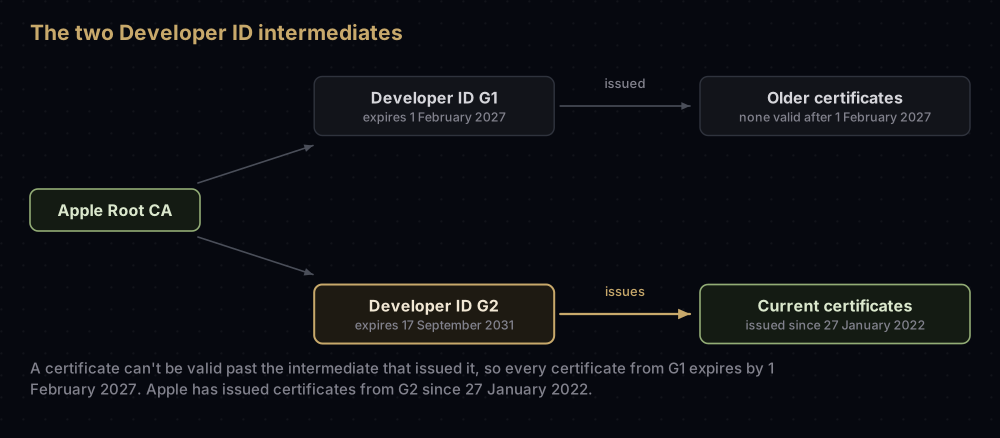
Apple explains the change on its Developer ID intermediate page. A certificate can't be issued with a validity period that runs past its intermediate's expiry, so Apple introduced G2 in January 2022 to keep issuing certificates with their normal lifespan. It follows that every certificate G1 issued expires by 1 February 2027 at the latest. On what the change means, Apple says:
- existing certificates keep working until they expire or are revoked, and you don't need to regenerate them
- users aren't affected by the renewal
- keep the G1 intermediate installed for as long as you sign with certificates that chain to it
- notarization doesn't change, but remember the secure timestamp
- Xcode 13.2 and later download G2 automatically, and G2 certificates work with Xcode 11.4.1 and later
Apple doesn't publish a separate statement about the moment G1 itself expires. What it does document is the secure timestamp: macOS checks that a Developer ID certificate was valid when the code was signed.
To see which intermediate issued your certificate:
security find-certificate -c "Developer ID Application" -p | openssl x509 -noout -issuer -enddateOU=G2 in the issuer means G2. OU=Apple Certification Authority means G1. (codesign --display shows "Developer ID Certification Authority" for both, so it can't tell you.) If you still sign releases with a G1 certificate, create a new Developer ID certificate before February 2027 and move your signing to it, remembering the five-per-kind limit.
Common mistakes
- Notarizing something signed with the wrong certificate. The log says
The binary is not signed with a valid Developer ID certificate. - Leaving out the secure timestamp in a custom workflow:
The signature does not include a secure timestamp. - Forgetting the hardened runtime:
The executable does not have the hardened runtime enabled. - Shipping the debugging entitlement:
The executable requests the com.apple.security.get-task-allow entitlement. - Changing the bundle after signing, which gives
The signature of the binary is invalid. - Stapling the zip instead of the app inside it.
- Signing a
.pkgwith the Application certificate. Packages need the Installer certificate. - Leaving the only copy of the key on the Account Holder's Mac, with no backup.
- Asking Apple to revoke a certificate because its key was lost. Your users are the ones who lose out.
Questions people ask
What is a Developer ID certificate?
The certificate Apple issues for signing Mac software you distribute outside the Mac App Store. It identifies you to Gatekeeper, and it's required before Apple will notarize your software.
Do I need a paid Apple Developer account for Developer ID?
Yes. Developer ID certificates and notarization come with Apple Developer Program membership. Free accounts can't use either.
Why can't I create a Developer ID certificate?
Only the Account Holder can. If you are the Account Holder, check whether the team already has five of that kind.
Is notarization the same as App Review?
No. Apple describes notarization as an automated check for malicious content and code signing problems. Nobody reviews your app's features or content.
Do I have to notarize my Mac app?
For software distributed with Developer ID, yes. Since macOS 10.15, software built after 1 June 2019 must be notarized, and macOS warns people about software Apple hasn't checked. Mac App Store apps don't need it.
What happens to my app when my Developer ID certificate expires?
Nothing, for apps signed with a secure timestamp. You need a valid certificate to sign updates. Apps that use a Developer ID provisioning profile keep working for as long as that profile is valid, and installer packages are the unclear case described above.
How do I revoke a Developer ID certificate?
Email Apple at product-security@apple.com. The developer account can't do it. Do this only if the private key was compromised, because installed copies of your software will stop launching.
Does the Developer ID G1 expiry in 2027 affect my app?
Apple says existing certificates keep working until they expire, and users aren't affected by the move to G2. Any certificate issued by G1 expires by 1 February 2027, so if you still sign with one, replace it before then.
Can I staple a notarization ticket to a zip file?
No. Staple the app, disk image or package inside, then create the zip again.
Where this comes from
Sources for this post, all read in September 2026:
- Developer ID certificates and the Certificates overview, Apple Developer Account Help
- Notarizing macOS software before distribution, customizing the notarization workflow and resolving common notarization issues
- Developer ID intermediate certificate updates and the Apple PKI page
- TN3161: Inside Code Signing: Certificates, on secure timestamps
- Safely open apps on your Mac, Apple Support
- The Care and Feeding of Developer ID, Apple Developer Technical Support
Keep reading
- Every certificate in Apple's developer portal: where Developer ID sits among the rest.
- Missing Private Key in Xcode: when the Developer ID key isn't on your Mac.
- When a certificate "is not trusted": installing the Developer ID intermediates.
- Exporting a .p12 from Keychain: backing up the identity you can't easily replace.
- App Store Connect API keys: an alternative way to sign in to notarytool.


