Apple's developer portal offers twenty kinds of certificate, in two lists. The nine under Software sign apps and installers. The eleven under Services let a server, a Wallet pass, an Apple Pay setup or a Swift package prove who it belongs to. A third section, Intermediate Certificates, holds Apple's own middle-link certificates, which you can download but never create.
An iOS app, whether written in Swift or Flutter, needs two of the twenty: Apple Development to run builds on your own devices, and Apple Distribution to ship through TestFlight, the App Store or Ad Hoc. Push notifications no longer need a certificate at all, because an APNs key (a .p8 file) does the same job. Most of the others are older types, Mac-only, or tied to one feature such as Wallet or Apple Pay.
What follows takes every item on the portal's "Create a New Certificate" page in turn, grouped the way the page groups them, then the intermediates and what each one issues.
Two lists, two kinds of job
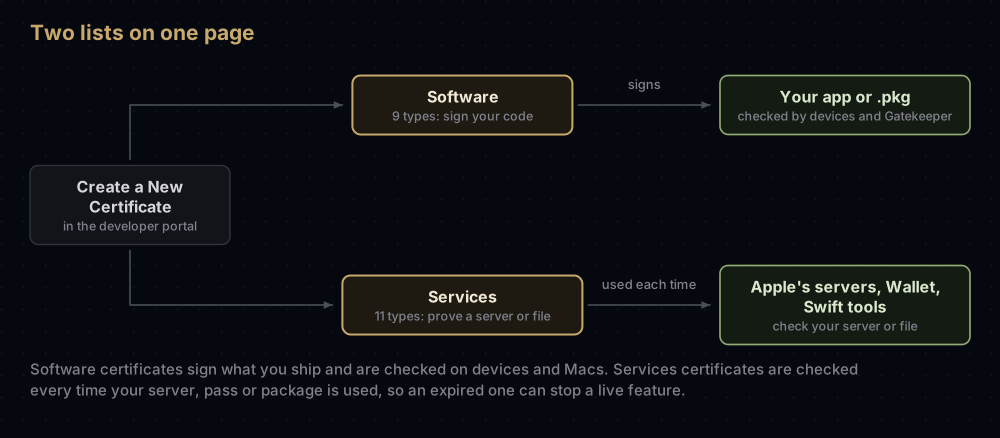
You reach the page from Certificates, Identifiers & Profiles: choose Certificates in the sidebar, then the add (+) button. If the portal has been rearranged, Apple's Account Help still documents it under "Certificates overview".
The two lists fail in different ways, which is the main reason to know which is which:
- A software certificate is checked when you build, install or submit an app. When it expires, App Store apps already on sale keep working (as long as your membership is active), because the App Store re-signs them.
- A services certificate is checked each time your server or your file is used. When an APNs certificate expires, pushes stop. When an Apple Pay certificate expires, payments fail.
Every certificate on both lists starts the same way. You upload a certificate signing request (CSR), and the private key that matches the certificate stays on the Mac that made it (how to create a CSR). Without that key a certificate signs nothing, which is what missing private key in Xcode is about.
What an iOS or Flutter developer actually needs
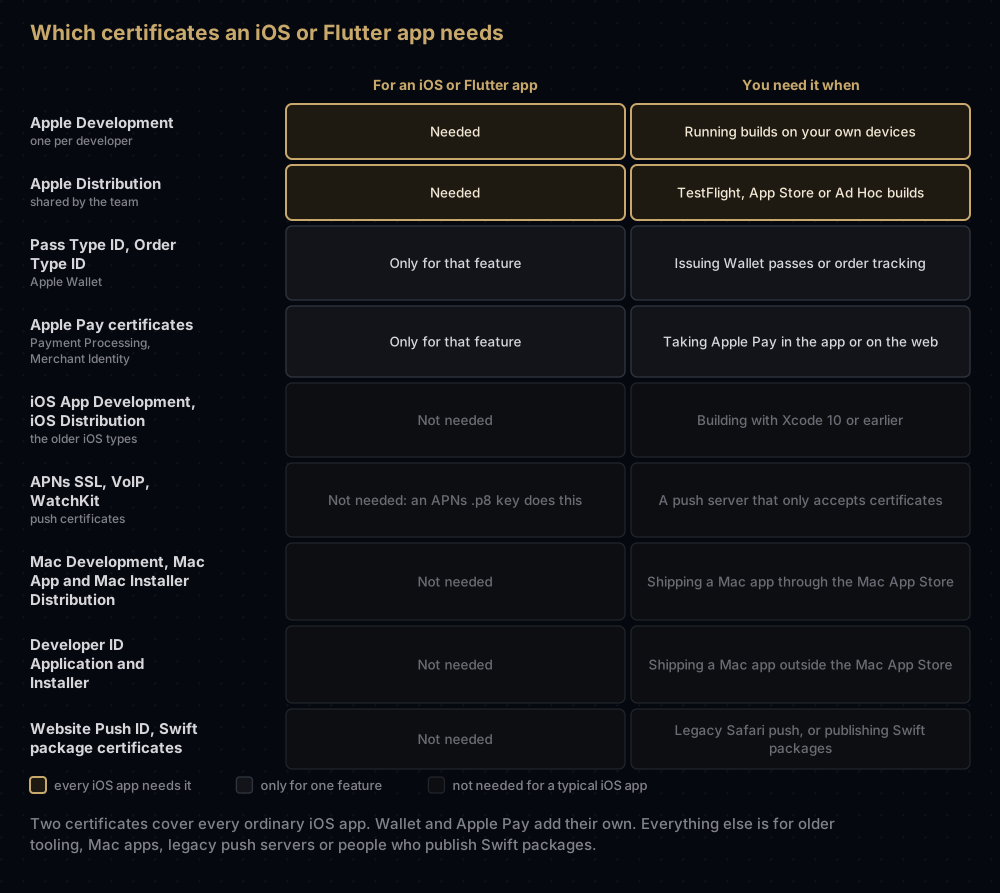
On the iOS side, a Flutter app is an ordinary Xcode project, so the same two certificates apply. With automatic signing turned on, Xcode creates signing certificates for you as it needs them, so you may not need this page until something breaks.
Software certificates: they sign your code
| Certificate on the page | What it signs | Who can create it | Needed today? |
|---|---|---|---|
| Apple Development | Development builds for iOS, iPadOS, macOS, tvOS, visionOS and watchOS | Each team member, for themselves | Yes |
| Apple Distribution | Release builds for the same platforms: App Store Connect (TestFlight and the App Store) and Ad Hoc | Account Holder or Admin | Yes |
| iOS App Development | Development builds of an iOS app, the older way | Each team member | Only for very old Xcode |
| iOS Distribution (App Store Connect and Ad Hoc) | Release builds of an iOS app, the older way | Account Holder or Admin | Only for very old Xcode |
| Mac Development | Development builds of a Mac app, the older way | Each team member | Rarely |
| Mac App Distribution | A Mac app going to the Mac App Store | Account Holder or Admin | Mac App Store apps |
| Mac Installer Distribution | The .pkg installer uploaded to the Mac App Store | Account Holder or Admin | Mac App Store apps |
| Developer ID Application | A Mac app distributed outside the Mac App Store | Account Holder only | Mac apps shipped directly |
| Developer ID Installer | A .pkg distributed outside the Mac App Store | Account Holder only | Mac installers shipped directly |
Apple's roles table also lets an App Manager with portal access create distribution certificates, although its certificates overview names only the Account Holder and Admin. If a teammate cannot create one, check their role first.
Apple Development and Apple Distribution
These are the modern, unified pair. Xcode 11 introduced them in 2019, and one certificate of each covers every Apple platform.
- Apple Development belongs to one person. The portal adds the computer name to it, such as "Example Developer (Work Mac)", so a team can tell whose is whose. In Keychain Access its name starts with "Apple Development:".
- Apple Distribution belongs to the team. Its name in Keychain Access looks like "Apple Distribution: Example Team (A1B2C3D4E5)". Because Apple limits how many distribution certificates a team can hold, the people who ship builds usually share one.
The differences in ownership, limits and lifetime get their own post: Apple Development vs Apple Distribution certificates.
The older iOS and Mac types
Before Xcode 11, each platform had its own certificates. Those keep working, but versions of Xcode before 11 cannot use the unified types, which is why iOS App Development, iOS Distribution and Mac Development are still offered. Apple's overview labels the iOS pair "for use with Xcode 11 and earlier". With a current Xcode, choose the unified types.
The long name "iOS Distribution (App Store Connect and Ad Hoc)" shows that one certificate serves both routes. The provisioning profile decides which.
The Mac App Store pair
A Mac App Store upload is an installer package with the app inside, so it involves two signatures:
- Mac App Distribution signs the app. In Keychain Access it appears as "3rd Party Mac Developer Application:" followed by the team, a name that puzzles almost everyone the first time.
- Mac Installer Distribution signs the
.pkgaround it, and appears as "3rd Party Mac Developer Installer:".
Apple's code signing technote shows that the app itself can also be signed with Apple Distribution. The installer package still needs Mac Installer Distribution, which is why Xcode's manual signing sheet has a separate installer certificate menu for Mac apps.
The Developer ID pair
Developer ID Application and Developer ID Installer sign Mac software that people download from your website, a package manager or GitHub, and that you then submit to Apple's notary service. The portal marks both "Account Holder only", though an Admin can be given access to a cloud-managed one. A team can hold up to five of each, and revoking one means emailing Apple. Developer ID certificates has the details.
How long software certificates last
Apple does not publish a single table. Its code signing technote says certificates typically last a year from the date of issue, with the exact length depending on the type. In practice Apple Development and Apple Distribution certificates last one year, and Developer ID certificates much longer (about five years). Enterprise distribution certificates last three years, or until the Enterprise membership ends if that comes first. What breaks on expiry is covered in when an Apple certificate expires or is revoked.
Services certificates: they prove a server or a file is yours
| Certificate on the page | What it is for | Still the right tool? |
|---|---|---|
| Apple Push Notification service SSL (Sandbox) | Lets your server push to one app, in the test environment only | No. Use an APNs .p8 key |
| Apple Push Notification service SSL (Sandbox & Production) | The same, for both environments | No. Use an APNs .p8 key |
| Pass Type ID Certificate | Signs Apple Wallet passes and sends the pushes that update them | Yes, Wallet passes still need it |
| Order Type ID Certificate | Signs Wallet order-tracking packages and sends their updates | Yes, for order tracking |
| Website Push ID Certificate | The original Safari-only website notifications on macOS | Rarely. Standard Web Push needs no membership |
| Swift Package Collection Certificate | Signs a curated list of Swift packages | Only if you publish a collection |
| Swift Package Certificate | Signs Swift packages, and collections, published to a registry (SwiftPM 5.9 or later) | Only if you publish to a registry |
| WatchKit Services Certificate | Pushes that update Apple Watch complication data (ClockKit) | No. ClockKit is deprecated, and a .p8 key can send these |
| VoIP Services Certificate | PushKit pushes that wake a calling app for an incoming call | Optional. A .p8 key can send these too |
| Apple Pay Payment Processing Certificate | Apple Pay encrypts payment data to this certificate, and you or your payment provider decrypt it | Yes, if you accept Apple Pay |
| Apple Pay Merchant Identity Certificate | Proves your server is the merchant when it calls Apple Pay's servers | Yes, for Apple Pay on the web |
Push: four certificates that one key replaces
The two APNs SSL certificates are the legacy way for a server to authenticate to Apple's push service. Apple asks for a separate one for each app, and each one expires, at which point pushes stop with no error in the app. VoIP Services and WatchKit Services are narrower push certificates, one App ID each. VoIP pushes wake a calling app; WatchKit pushes refresh ClockKit complications, which are deprecated from watchOS 10.
An APNs authentication key (.p8) does all four jobs, covers every app in the team unless you restrict it, and does not expire. Start with creating an APNs auth key. For an inherited certificate, see APNs certificate renewal, and for calling apps, VoIP push on iOS.
Wallet: passes and orders
A Pass Type ID Certificate signs Wallet passes (boarding passes, tickets, loyalty cards) and sends the pushes that update them. If it expires, passes already in Wallet keep working, but you cannot sign or update any. If it is revoked, passes stop working properly, and revoking one means emailing Apple. An Order Type ID Certificate does the same job for order tracking in Wallet (iOS 16 and later). Each needs its identifier registered first, as Pass Type ID certificates shows.
Website Push ID
The Website Push ID Certificate belongs to the original, Safari-only notification system for websites on macOS: one Website Push ID per site, with the certificate signing its notification package. Standard Web Push (Safari 16 on macOS 13, and Home Screen web apps on iOS 16.4) needs no membership and has replaced it in practice, though Apple has not formally deprecated it.
Swift package signing
Two certificates exist for people who publish Swift code:
- The Swift Package Collection Certificate signs a package collection, a curated JSON list of packages that others add to Xcode or SwiftPM (SwiftPM 5.5 onward).
- The Swift Package Certificate signs packages themselves, and collections, when they are published to a package registry, so users can check who published them. It needs SwiftPM 5.9 or later. Apple's overview calls this type "Swift signing".
App developers who only use packages never need either.
Apple Pay
Apple Pay uses two certificates, both created for a Merchant ID and both valid for 25 months:
- The Payment Processing Certificate is about encryption. Apple Pay encrypts payment data with its public key, and whoever holds the private key decrypts it. Its CSR needs an ECC 256-bit key, and payment providers such as Stripe usually supply the CSR. One can be active per Merchant ID. If it lapses, Apple Pay fails in apps and on websites.
- The Merchant Identity Certificate is a TLS client certificate that proves your server is the merchant. Apple Pay on the web requires it, up to three can be active per Merchant ID, and if it lapses, web payments fail.
Apple Pay Merchant ID and its two certificates has the setup.
The Intermediate Certificates section
Your certificate is not signed by Apple's root certificate directly. An intermediate sits between them, and different certificate types hang from different intermediates.
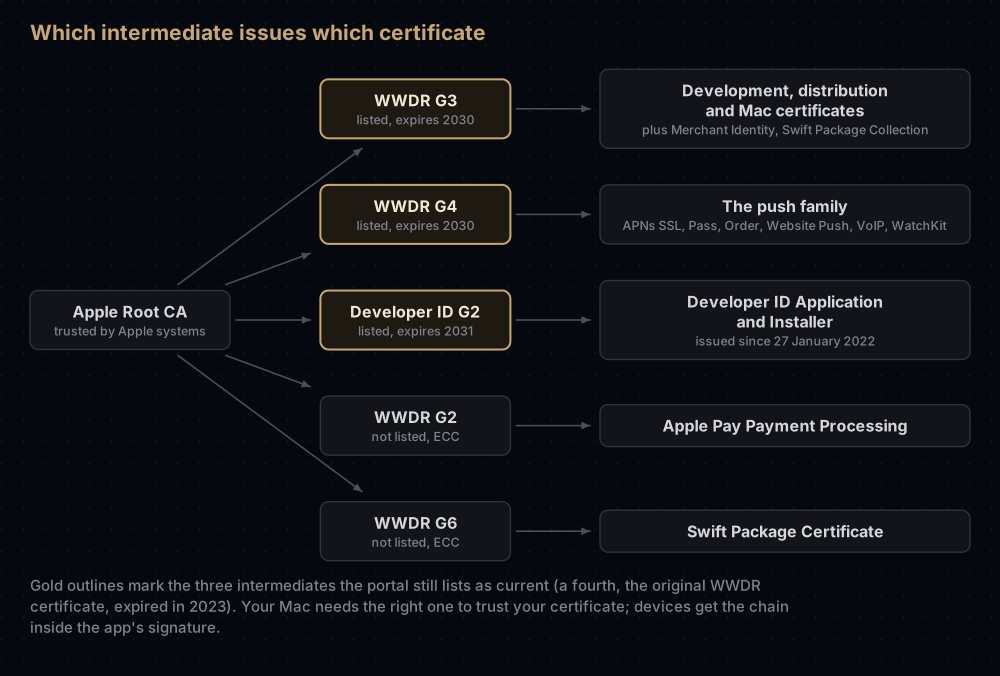
Your Mac needs the right intermediate in its keychain to trust your certificate. Xcode installs them automatically. When one is missing, Keychain Access calls your certificate not trusted and codesign cannot build the chain; Apple certificate "is not trusted" has the fix. People who install your app never need these files, because the chain travels inside the app's signature.
The portal lists four:
| As the portal lists it | Also known as | Expires | What it issues |
|---|---|---|---|
| Worldwide Developer Relations Certificate Authority (Expiring 02/07/2023) | The original WWDR intermediate | 7 February 2023, already expired | Nothing new. Kept for certificates issued before the switch |
| Worldwide Developer Relations Certificate Authority (Expiring 02/20/2030) | WWDR G3 | 20 February 2030 | Development and distribution certificates (unified, iOS and Mac), Merchant Identity, Swift Package Collection |
| Worldwide Developer Relations - G4 (Expiring 12/10/2030) | WWDR G4 | 10 December 2030 | The push family: APNs SSL, Pass Type ID, Order Type ID, Website Push ID, WatchKit Services, VoIP Services |
| Developer ID - G2 (Expiring 09/17/2031) | Developer ID G2 | 17 September 2031 | Developer ID certificates issued since 27 January 2022 |
The two WWDR rows share a name and differ only by date, so check the expiry before you download. Apple's support page gives Developer ID G2's expiry as 16 September 2031, one day before the portal's date; the certificate ends at 00:00 UTC on 17 September.
Apple runs more intermediates than the portal shows: WWDR G2 and G6 (both ECC) for Apple Pay Payment Processing and Swift Package certificates, G5 and G7 for certificates Apple manages itself, and the original Developer ID intermediate, which expires on 1 February 2027.
Certificates that are not on that page
- APNs Auth Key. Apple's overview lists it beside the certificates, but it is a key, created under Keys. The p8 vs p12 post sets the two side by side.
- In-House and Ad Hoc. Enterprise Program members see this under Software. It creates enterprise distribution certificates for internal apps.
- MDM Vendor CSR Signing. For makers of device management products. Account Holders request it from Apple.
- App License Delivery. For authorised alternative app marketplaces.
Common mistakes
- Creating a new Apple Distribution certificate for each person. Distribution certificates belong to the team and are limited in number. Share one, or let Xcode use a cloud-managed one.
- Creating an APNs certificate for a new app. It covers one app and it expires. A
.p8key covers every app in the team and works until you revoke it. - Revoking a certificate to fix one Mac. Every provisioning profile that contains it becomes invalid, which can break teammates' builds.
- Assuming "not trusted" means the certificate is bad. Usually the matching intermediate is missing from that Mac.
- Creating certificates on a Mac you are about to replace. The private key lives in that Mac's keychain. Export it first, as described in exporting a .p12 from Keychain.
Questions people ask
How many types of Apple developer certificate are there?
Twenty on the "Create a New Certificate" page of a standard Apple Developer Program membership: nine under Software, eleven under Services. Enterprise members see one more, and a few others exist only by request or for specific kinds of business.
Which certificate do I need to upload an app to the App Store?
Apple Distribution, paired with an App Store Connect provisioning profile. Older setups use iOS Distribution for the same job. A Mac App Store upload also needs Mac Installer Distribution for the package.
What is the difference between iOS Distribution and Apple Distribution?
iOS Distribution is the platform-specific type from before Xcode 11. Apple Distribution is the unified type Xcode 11 introduced, which covers iOS, iPadOS, macOS, tvOS, visionOS and watchOS. Versions of Xcode before 11 cannot use it.
Do I still need a push notification certificate?
No. An APNs authentication key (.p8) sends every kind of push, including VoIP and complication pushes, and does not expire. The certificates remain for servers that were built around them.
Why is Developer ID greyed out or missing for me?
Only the Account Holder can create Developer ID certificates. An Admin can use a cloud-managed one if they have been given that permission in Users and Access.
What are the intermediate certificates for?
They are the middle link between Apple's root certificate and yours. Your Mac needs the right one to trust your certificate. Xcode normally installs them, and the portal offers them for machines where it has not.
Does a Flutter app need a Mac certificate?
Not for iOS. A Flutter iOS app uses Apple Development and Apple Distribution like any other iOS app. You need Mac App Store or Developer ID certificates only if you also ship the macOS version of the app.
Keep reading
- Apple Development vs Apple Distribution certificates: who owns each, and which profiles they pair with.
- How to create a certificate signing request on a Mac: the first step for every certificate above.
- Apple certificate "is not trusted": fixing a missing intermediate.
- Developer ID certificates: the Mac certificates for software sold or shared outside the Mac App Store.
- App signing explained: how certificates, keys and profiles fit together on iOS and Android.


