When an APNs certificate expires, your server can no longer send push notifications to that app, and nothing inside the app tells anyone why. Apple's provider certificates last a year. To fix it, create a new certificate from a fresh certificate signing request, export it with its private key as a .p12, and deploy it wherever the old one lived.
The better fix is to stop renewing. An APNs auth key (a .p8 file) authenticates the same pushes, covers every app in your team, and never expires. This post covers both: renewing the certificate you have, and moving off it for good.
If you are not sure which file you have, a push certificate arrives from Apple as a .cer and usually lives on servers as a .p12 or .pem. A key is a single .p8. p8 vs p12 explains the difference.
What an expired push certificate looks like
For the people using the app, notifications simply stop. The app still opens and works, because a push certificate does not sign the app at all. It only proves to Apple that your server may send notifications for it.
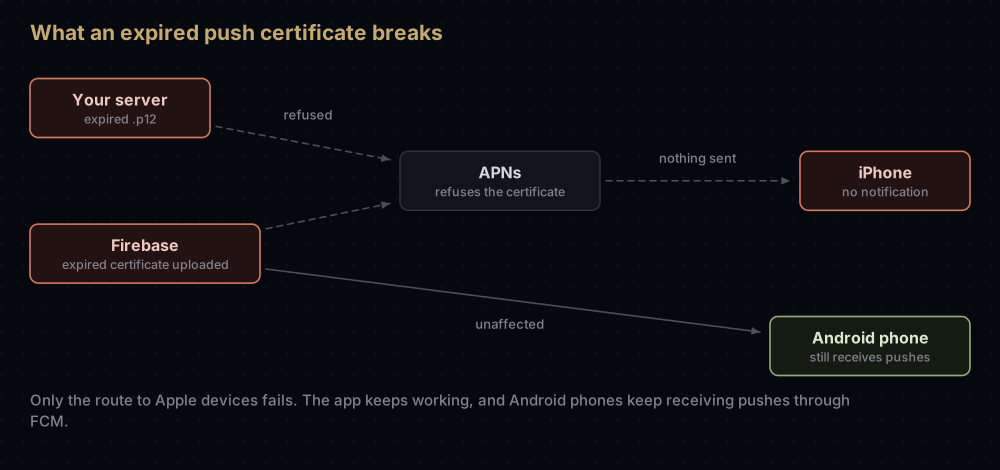
For developers, the signs depend on who sends the pushes:
| Where you look | What you see |
|---|---|
| The app | Nothing. No error, no crash, just no notifications |
| Your own server | Usually a failed TLS connection to APNs, worded however your HTTP/2 library words it. Apple's 403 reasons for certificate problems are BadCertificate and BadCertificateEnvironment |
| Firebase HTTP v1 API | THIRD_PARTY_AUTH_ERROR (HTTP 401): "APNs certificate or web push auth key was invalid or missing" |
| Firebase Admin SDK | messaging/invalid-apns-credentials: the APNs certificate "was not uploaded or has expired" |
| Android users | Unaffected. Only Apple devices use the certificate |
Apple's certificate support page puts it in one line: once an Apple Push Notification service certificate expires or is revoked, "You can no longer send push notifications to your app."
Check when yours expires
Apple's advice is to check expiry in Keychain Access and replace the certificate before it runs out. On a server, OpenSSL tells you the same thing. These commands were tested on throwaway files, and each prints one line such as notAfter=Sep 17 15:48:58 2027 GMT.
The .cer that Apple gave you is in binary (DER) format:
openssl x509 -inform der -in aps.cer -noout -enddateA .pem file on your server:
openssl x509 -in apns.pem -noout -enddateA .p12 file, which asks for its password (add -legacy after pkcs12 if OpenSSL 3 refuses the file):
openssl pkcs12 -in apns.p12 -nokeys | openssl x509 -noout -enddateFor monitoring, -checkend takes a number of seconds and exits with status 1 if the certificate expires within that window. Thirty days is 2,592,000 seconds:
openssl x509 -in apns.pem -noout -checkend 2592000 || echo "APNs certificate expires within 30 days"Run that from a scheduled job and send the output somewhere a person will read it.
To confirm a certificate belongs to the right app, open it in Keychain Access: Apple says the topic (the bundle ID) is under Details, in the subject's Common Name. Extra topics for VoIP, complications or Push to Talk are listed in two certificate extensions, 1.2.840.113635.100.6.3.4 and 1.2.840.113635.100.6.3.6.
Renew, or move to a key?
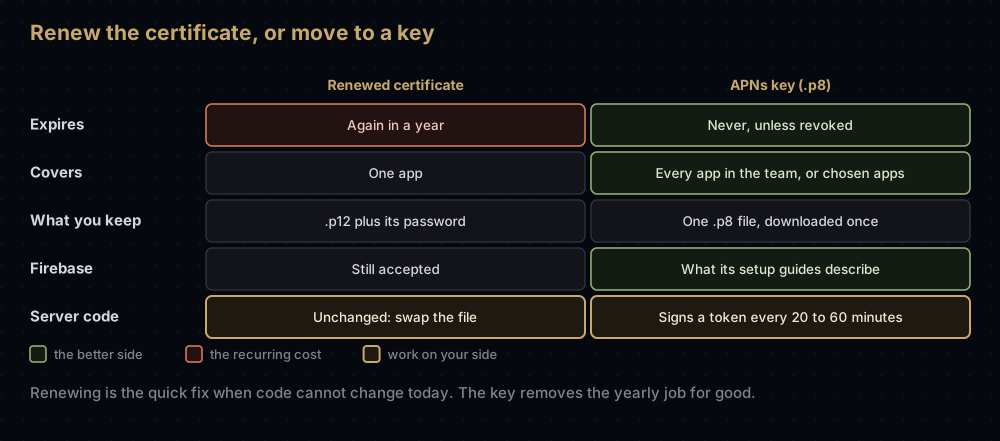
| Renew the certificate | Move to a .p8 key | |
|---|---|---|
| Expires | Again in a year | Never, unless revoked |
| Covers | One app (its App ID) | Every app in the team, or the apps you choose |
| Files to guard | A .p12 and its password | One .p8 |
| Download limit | Export again from the Mac that holds the private key | The .p8 downloads once |
| Server change | None: swap the file | Your code must sign tokens, unless a service does it for you |
| Firebase | Still accepted | What its setup guides now describe |
| Best when | The deadline is today and code cannot change | Every other case |
If pushes are down right now and your server only knows how to use certificates, renew first and plan the move for next week. If you use Firebase or OneSignal, the move is small, because they do the token signing for you.
Option 1: renew the certificate
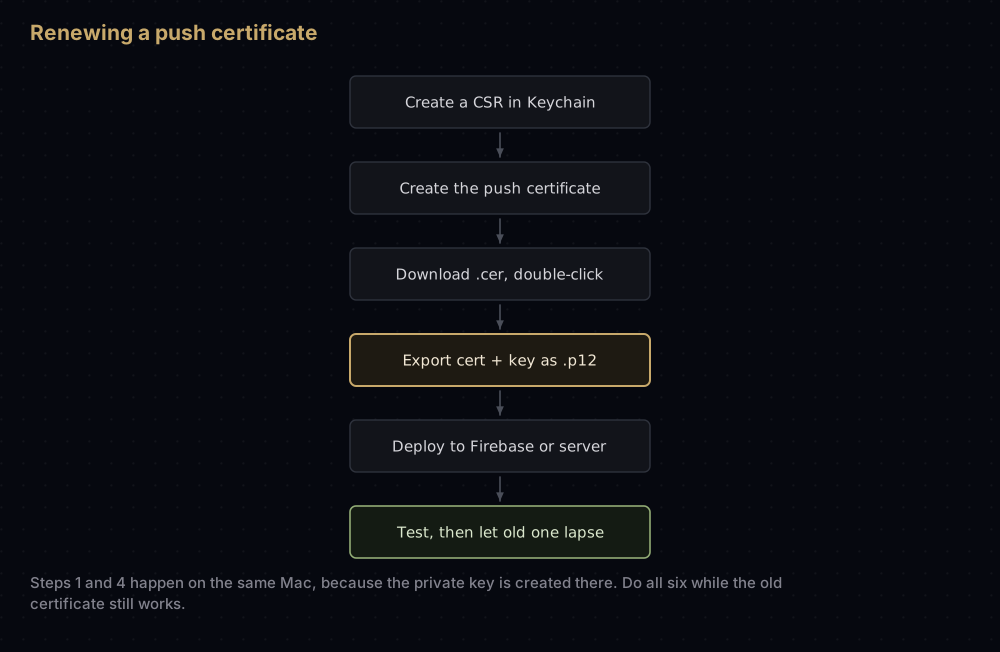
There is no "extend" button. Renewing means creating a new certificate while the old one still works, deploying it, and letting the old one go. Apple's best-practice list says to get the new certificate and deploy it before the current one expires, so start early. You need the Account Holder or Admin role.
1. Create a certificate signing request
On a Mac, open Keychain Access and choose Certificate Assistant, then Request a Certificate from a Certificate Authority. Enter your email address and a common name (something like "APNs com.example.app 2026"), leave the CA email address empty, and choose Saved to disk.
This step also creates a private key in that Mac's keychain. The certificate you are about to download will only be usable on that Mac, or anywhere you later export it from there. Creating a CSR on a Mac covers the details.
2. Create the certificate in Apple's portal
Apple documents two routes to the same place. Either one works:
- From Certificates. Click the add button (+), choose Apple Push Notification service SSL (Sandbox & Production) under Services, pick the App ID, upload the CSR, and download the result.
- From Identifiers. Select the app's bundle ID, find Push Notifications under Capabilities, click Configure, then Create Certificate under the production SSL certificate, upload the CSR, and download.
The portal also offers a sandbox-only push certificate. Choose the Sandbox & Production type unless you have a reason not to; a sandbox-only certificate cannot send to TestFlight or App Store builds.
3. Install it
Double-click the downloaded .cer. Keychain Access adds it under My Certificates, paired with the private key from step 1.
If Keychain marks it as not trusted, the Mac is missing Apple's intermediate certificate. Push certificates issued after 27 January 2022 chain to the Worldwide Developer Relations G4 intermediate. The "not trusted" fix shows how to install it.
4. Export a .p12
In Keychain Access, open My Certificates, expand the new certificate so you can see its private key, select both, and choose File, then Export Items. Pick the Personal Information Exchange (.p12) format and set a password.
Exporting only the certificate gives you a file with no private key, which cannot authenticate anything. Exporting a .p12 from Keychain goes through this screen in detail, and missing private key explains what to do if the key is on another Mac.
5. Convert, if your server wants PEM
Some push libraries take the .p12 directly. Others want a PEM file:
openssl pkcs12 -in apns.p12 -out apns.pem -nodesOpenSSL 3 rejects .p12 files that use older encryption with an "unsupported" error. Add -legacy to the command if that happens. The output file contains the private key unencrypted, so store it like any other secret. More conversions are in converting signing files.
6. Deploy and test
- Firebase. Upload the new
.p12in place of the old one, in the Cloud Messaging tab of the project's settings. Firebase's launch checklist says that if you use certificates, the production certificate must be uploaded. - Your own server. Replace the file, then restart the process or open new connections. A TLS connection presents its certificate when it opens, so connections made with the old certificate keep using it.
- Test by sending a push to a production build (TestFlight is fine) and, if you use it, a development build.
Once the new certificate works everywhere, the old one can simply expire. If you revoke it instead, APNs refuses TLS connections that present it, so revoke only after every sender has switched.
Option 2: move to a .p8 key
Moving to a key is a one-time change. After it, there is nothing to renew.
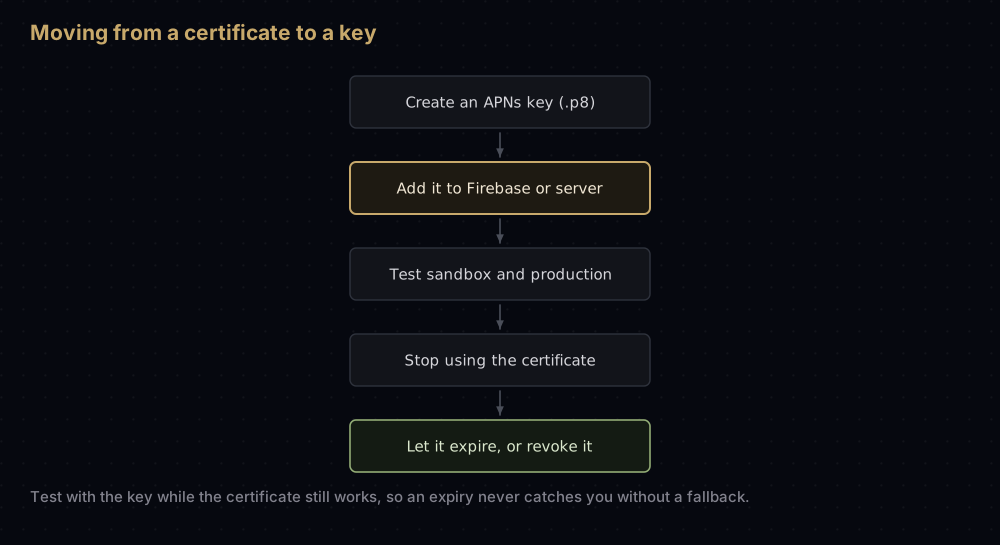
- Create the key. In Keys, add a key with APNs enabled, choose its scope and environment, and download the
.p8. The APNs auth key guide walks through each choice. - Add it where the certificate was.
- Firebase: upload it under APNs authentication key in the Cloud Messaging tab, with the Key ID and your Team ID.
- OneSignal: switch the authentication method to the
.p8option and fill in the same values plus the bundle ID. - Your own server: change the code from presenting a certificate to sending a signed token in the
authorizationheader. APNs explained has a tested example.
- Test both environments before the certificate expires, so a surprise shows up while you still have a working fallback.
- Stop using the certificate. On your own server, remove the certificate code path once the token path is proven. Firebase's documentation does not say which credential it prefers when both are uploaded, so do not rely on the order; confirm the key works on its own.
- Let the certificate expire, or revoke it once nothing depends on it.
The key also covers the special push types that once needed their own certificates, including VoIP and watch complication pushes. If you run a VoIP Services certificate as well, VoIP push on iOS covers that switch.
Why it fails
| Symptom | Likely cause |
|---|---|
The exported .p12 is rejected or cannot authenticate | Often only the certificate was exported, without its private key |
| No private key appears under the new certificate | The CSR was made on a different Mac. Export from there, or start again with a new CSR |
| Pushes work from Xcode builds only | A sandbox-only certificate, or no production certificate uploaded to Firebase |
OpenSSL says "unsupported" when reading the .p12 | OpenSSL 3 and older .p12 encryption. Add -legacy |
| Keychain shows the certificate as not trusted | The WWDR G4 intermediate is missing on that Mac |
| Pushes stopped after you revoked the old certificate | A sender was still using it. Deploy first, revoke last |
| Pushes to one app fail after renewing another | Certificates are per app. Each App ID needs its own |
Common mistakes
- Waiting for the expiry. The new certificate can be created and deployed while the old one still works, so do it well ahead.
- Losing the
.p12password. Without it the file is useless. Export a new one from the Mac that holds the private key. - Renewing every year out of habit. A key removes the task entirely.
- Committing the
.p12or.pemto a repository. Both contain the private key. - Forgetting a reminder. If you do keep a certificate, put its
notAfterdate in a calendar and a monitoring job.
Questions people ask
How long is an APNs certificate valid?
Apple says provider certificates are valid for a year and must be updated to keep communicating with APNs.
What happens when an APNs certificate expires?
Your server can no longer send push notifications to that app. The app keeps working, and Android users are unaffected.
Do users need to update the app after I renew the push certificate?
No. The certificate lives on your server or in Firebase, not in the app. Device tokens belong to the app and the device, so they stay the same.
Can I renew an APNs certificate before it expires?
Yes, and Apple recommends it. Create and deploy the new certificate while the old one still works, then let the old one lapse.
Does Firebase still accept APNs certificates?
Yes. Firebase's launch checklist still mentions uploading a production APNs certificate, although its setup guides now describe the .p8 key.
Is the .p8 key better than a push certificate?
For almost every setup, yes. It never expires, covers several apps, and is a single file. The one case for a certificate is a server that cannot sign tokens and cannot be changed yet.
Do I need separate sandbox and production push certificates?
Not usually. The Sandbox & Production certificate type covers both environments. A sandbox-only certificate cannot reach TestFlight or App Store builds.
Sources
- Establishing a certificate-based connection to APNs, Apple
- Communicate with APNs using a TLS certificate, Apple
- Certificates overview, Apple
- Create a certificate signing request, Apple
- FCM error codes and launch checklist, Firebase
Keep reading
- APNs auth key (.p8): create the key that replaces the certificate.
- When an Apple certificate expires or is revoked: what happens to every other certificate type.
- Export a .p12 from Keychain: the export step in detail.
- APNs explained: how certificate and token connections differ.
- VoIP push on iOS: the other push certificate you may be renewing.


