APNs, the Apple Push Notification service, is Apple's delivery network for notifications. An app's server sends a short HTTPS request to Apple, naming one device and carrying a small JSON message. Apple delivers it over a connection it already keeps open with that iPhone, iPad, Mac or Apple Watch.
The server never talks to the phone directly. It talks to Apple, proves it is allowed to send for that app, and gets a status code back. Everything a developer configures for push on Apple platforms (device tokens, .p8 keys, certificates, topics) exists to make that one request succeed.
This post covers Apple's side in depth: first the plain picture, then the request itself, header by header, and what each response means. If you want the whole journey, including Firebase and Android, start with how push notifications work.
APNs in plain terms
Three parties are involved, and only one of them is yours.
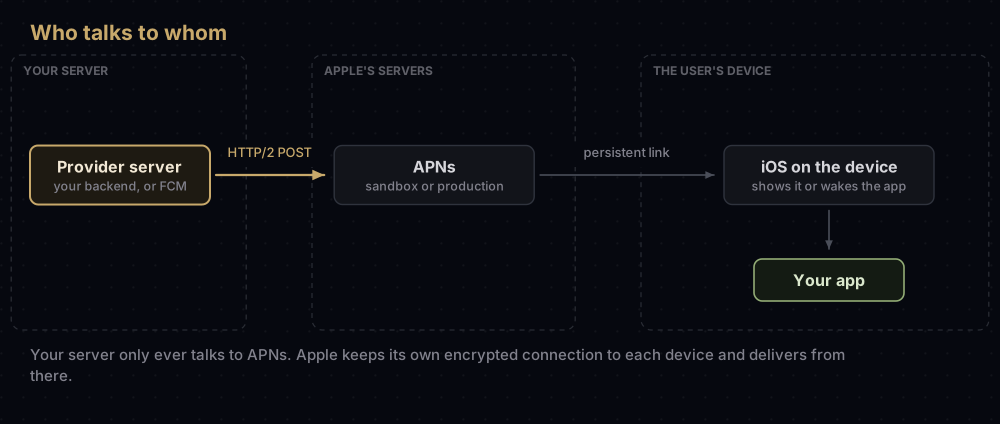
- Your provider server. Apple's name for whatever sends the notification: your backend, a cloud function, or a service such as Firebase acting for you.
- APNs. Apple's servers. They check the request, find the device and deliver.
- The device. Apple describes APNs as keeping an "accredited, encrypted, and persistent IP connection" to it. The operating system receives the message and either shows it or wakes your app.
Two things surprise people who meet APNs for the first time.
First, it is best-effort. Apple's documentation says APNs may reorder notifications sent to the same device, and that notifications can be throttled, stored for later, or in some cases not delivered, depending on how the person uses the app and the device's power state.
Second, an offline device gets one message per app, not a queue. If the device cannot be reached, APNs may keep a notification for up to 30 days (you choose, with a header covered below). It keeps only one per bundle ID, usually the latest.
One naming trap: APN without the "s" is the Access Point Name in a phone's mobile data settings. It has nothing to do with notifications.
The pieces you work with
| Piece | What it is | Where it comes from |
|---|---|---|
| Device token | The address of one app on one device | The app asks iOS for it at launch and sends it to your server |
| Topic | Which app the notification is for, usually its bundle ID | Your app's bundle ID, sometimes with a suffix such as .voip |
| Credential | Proof your server may send for that topic | A .p8 key (signed tokens) or a .p12 certificate |
| Environment | Sandbox (development) or production | Decided by how the app was built and installed |
| Payload | The JSON message, with an aps dictionary | Your server writes it |
| Response | A status code, and a reason string when something failed | APNs |
Step 1: the app gets a device token
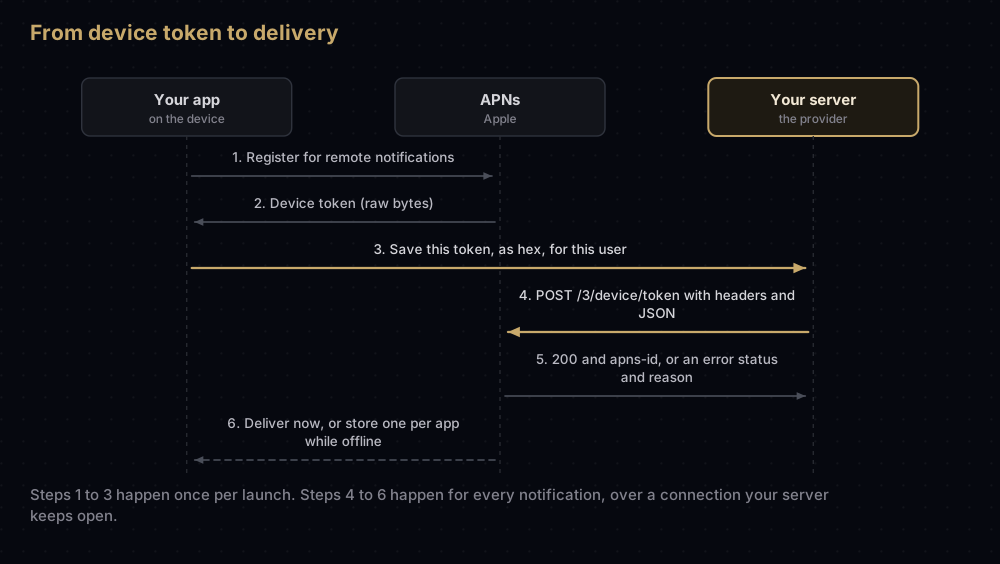
An app registers with APNs each time it launches. On iOS it calls registerForRemoteNotifications(), and the token arrives in the app delegate's application(_:didRegisterForRemoteNotificationsWithDeviceToken:). Failures arrive in application(_:didFailToRegisterForRemoteNotificationsWithError:), for example when the device is offline or the app lacks the push entitlement.
The token arrives as raw bytes. The request path needs it as hexadecimal text:
func application(_ application: UIApplication,
                 didRegisterForRemoteNotificationsWithDeviceToken deviceToken: Data) {
    let hex = deviceToken.map { String(format: "%02x", $0) }.joined()
    // Send `hex` to your server, together with the signed-in user's ID.
}
Apple's rules for tokens are short and worth following to the letter:
- Enable the Push Notifications capability in Xcode. It adds the APS Environment entitlement, and the App ID must have push turned on in your developer account. See iOS entitlements explained for how that entitlement reaches the build.
- Never cache the token on the device. Apple issues a new one after a restore from backup, on a new device, and after the operating system is reinstalled. Ask for it on every launch.
- One token per app. Two apps on the same phone never share a token.
- Do not assume a length. Apple's best-practice list says not to make assumptions about device token size, so store it as a variable-length string.
- Expect several per person. Someone with an iPhone and an iPad has two tokens for your app.
Step 2: open a connection to Apple
APNs speaks HTTP/2 over TLS 1.2 or later. There are two hosts:
| Environment | Host | Used by |
|---|---|---|
| Development (sandbox) | api.sandbox.push.apple.com | Builds installed from Xcode with a development profile |
| Production | api.push.apple.com | TestFlight, App Store and Ad Hoc builds |
Both listen on port 443. Apple also accepts port 2197 on either host, which helps if a firewall should let APNs traffic out but block other HTTPS.
A token from one environment does not work in the other. That single rule explains most "it works from Xcode but not from TestFlight" reports.
Apple's advice for the connection itself:
- Keep it open. Reuse one connection for many requests; Apple says hours to days is normal. If it sits idle, send an HTTP/2 PING after an hour of inactivity.
- Look the host up fresh. Do an uncached DNS query before each new connection, which spreads load across Apple's servers.
- Open more than one for volume. Multiple connections, each carrying several concurrent streams, raise throughput. Do not assume a fixed number of streams per connection.
- Trust the right roots. Your server must trust the AAA Certificate Services root and the SHA-2 Root: USERTrust RSA Certification Authority certificate. Both ship in the keychain on macOS Sequoia and later; on other systems you may need to install them yourself. Apple notes that APNs is migrating from the AAA root to USERTrust.
- Watch for GOAWAY. APNs can close a connection with a GOAWAY frame whose JSON
reasonuses the same strings as the error table further down.
Step 3: prove you may send
APNs accepts two kinds of proof. Which one you pick changes the connection, not the notification.
Token-based (.p8 key) | Certificate-based (.p12) | |
|---|---|---|
| How it works | Each request carries a signed JSON Web Token in the authorization header | The TLS connection presents your certificate |
| Covers | Every app in the team, or chosen topics | One app |
| Expires | The key does not; each token lasts up to an hour | The certificate, after a year |
| Push types | All of them | A subset. The location type, for one, needs a token |
| Apple's view | Stateless and faster, since APNs need not look up a certificate | Supported, with more to manage |
Creating the key is its own job, covered step by step in the APNs auth key guide. If you still run a certificate, the renewal guide explains how to renew it or retire it. The file formats themselves are compared in p8 vs p12.
What the token contains
The token is a JWT with two small parts and a signature:
| Part | Field | Value |
|---|---|---|
| Header | alg | ES256, the only algorithm APNs accepts |
| Header | kid | Your 10-character Key ID |
| Claims | iss | Your 10-character Team ID |
| Claims | iat | When you made the token, in seconds since the epoch |
Apple's timing rule has two edges. A token whose iat is more than an hour old is rejected with ExpiredProviderToken. Replacing it more often than once every 20 minutes earns TooManyProviderTokenUpdates. So make one token, reuse it, and replace it somewhere between 20 and 60 minutes.
This Node.js function builds one with no dependencies. It was tested against a throwaway P-256 key:
import { createPrivateKey, sign } from "node:crypto";
import { readFileSync } from "node:fs";

const TEAM_ID = "A1B2C3D4E5";
const KEY_ID = "ABC123DEFG";
const key = createPrivateKey(readFileSync("apns-key.p8"));
const part = (value) => Buffer.from(JSON.stringify(value)).toString("base64url");

let cached = { token: "", madeAt: 0 };

export function apnsToken() {
  const now = Math.floor(Date.now() / 1000);
  if (now - cached.madeAt < 30 * 60) return cached.token; // reuse for 30 minutes

  const unsigned = `${part({ alg: "ES256", kid: KEY_ID })}.${part({ iss: TEAM_ID, iat: now })}`;
  // ES256 in a JWT is the raw 64-byte signature (RFC 7518). Node's default encoding is DER.
  const signature = sign("sha256", Buffer.from(unsigned), { key, dsaEncoding: "ieee-p1363" });
  cached = { token: `${unsigned}.${signature.toString("base64url")}`, madeAt: now };
  return cached.token;
}
Two connection rules catch people out. A connection belongs to one team, so an agency pushing for several clients needs a separate pool per team. And APNs ties the connection to the first key it sees: a token from an unrelated key on the same connection returns UnrelatedKeyIdInToken, so open a fresh connection when you switch keys.
Step 4: send the request
Each notification is one POST to /3/device/ followed by the hexadecimal token.
The headers
| Header | Required? | What it does |
|---|---|---|
:method / :path | Yes | POST to /3/device/ plus the token |
authorization | With tokens | bearer followed by your JWT. Ignored on a certificate connection |
apns-topic | Yes | Usually the bundle ID. Some push types add a suffix |
apns-push-type | Required on watchOS 6 and later, recommended everywhere else | Says what kind of notification this is. It must match the payload |
apns-priority | No | 10 sends now (the default), 5 waits on power considerations, 1 avoids waking the device |
apns-expiration | No | A UNIX time in seconds. Non-zero means store and retry until then; 0 means try once, do not store |
apns-collapse-id | No | Notifications sharing this value merge into one on screen. At most 64 bytes |
apns-id | No | A UUID you choose, echoed in the response. APNs makes one if you leave it out |
Apple recommends sending apns-push-type with every request, because newer features may not work without it. A mismatch between the header and the payload can get the notification rejected, delayed or dropped.
Push types and their topics
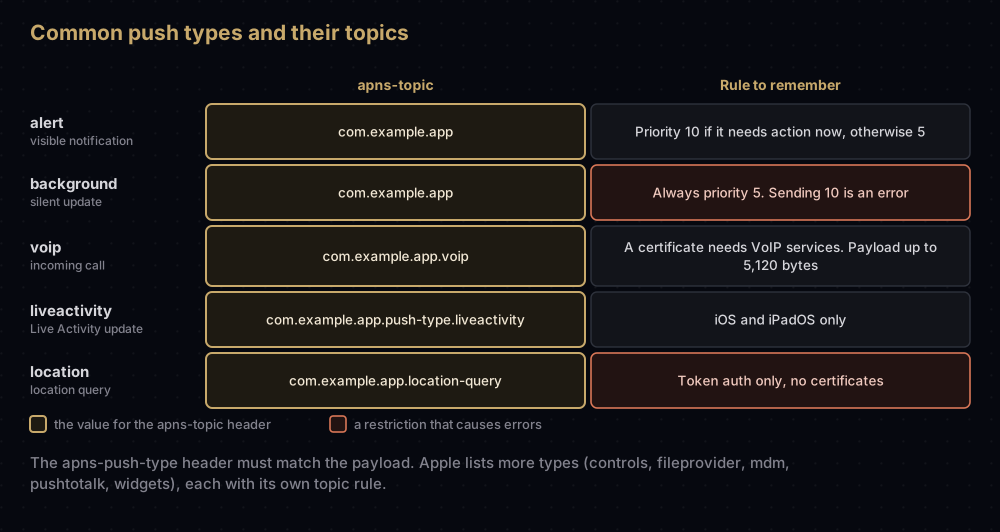
The full list also includes controls, fileprovider, mdm, pushtotalk and widgets, each with its own topic rule on Apple's sending requests page. A certificate can only send the push types whose topics it lists; a key can send them all.
A complete request
This sends one visible alert using the apnsToken() function above. It was run against a local HTTP/2 test server, never against Apple:
import http2 from "node:http2";
import { apnsToken } from "./apns-token.mjs";

const client = http2.connect("https://api.sandbox.push.apple.com");

export function sendAlert(deviceToken, title, body) {
  return new Promise((resolve, reject) => {
    const request = client.request({
      ":method": "POST",
      ":path": `/3/device/${deviceToken}`,
      authorization: `bearer ${apnsToken()}`,
      "apns-topic": "com.example.app",
      "apns-push-type": "alert",
      "apns-priority": "10",
    });
    let status = 0;
    let text = "";
    request.on("response", (headers) => { status = headers[":status"]; });
    request.on("data", (chunk) => { text += chunk; });
    request.on("end", () => resolve({ status, reason: text ? JSON.parse(text).reason : null }));
    request.on("error", reject);
    request.end(JSON.stringify({ aps: { alert: { title, body } } }));
  });
}
For a one-off test from a terminal, Apple documents the same request with curl:
curl -v \
  --header "apns-topic: com.example.app" \
  --header "apns-push-type: alert" \
  --header "authorization: bearer $AUTHENTICATION_TOKEN" \
  --data '{"aps":{"alert":"test"}}' \
  --http2 https://api.sandbox.push.apple.com/3/device/$DEVICE_TOKEN
The payload
The body is JSON, uncompressed, and at most 4,096 bytes (VoIP pushes may use 5,120). Apple's own keys go inside a dictionary called aps. Your own data goes beside it, never inside it; APNs ignores custom keys placed in aps.
{
  "aps": {
    "alert": {
      "title": "Your order has shipped",
      "body": "It should arrive on Thursday."
    },
    "badge": 1,
    "sound": "default",
    "thread-id": "orders",
    "interruption-level": "time-sensitive"
  },
  "orderId": "A1042"
}
The keys you will use most:
| Key | Type | Effect |
|---|---|---|
alert | Dictionary or string | The visible text: title, subtitle, body, or localisation keys |
badge | Number | The number on the app icon. 0 removes it |
sound | String | A sound file in the app, or default |
thread-id | String | Groups related notifications |
category | String | Picks a set of action buttons the app registered |
content-available | Number | 1 makes it a silent background update (with no alert, badge or sound) |
mutable-content | Number | 1 passes it through your notification service extension first |
interruption-level | String | passive, active, time-sensitive or critical |
relevance-score | Number | 0 to 1, used to rank your notifications in the summary |
Live Activities add their own keys (event, content-state, timestamp and others). Apple's payload reference lists them all.
Apple also warns against putting customer data or anything sensitive in a payload. If you must, encrypt it and decrypt it on the device in a notification service extension.
Step 5: read the response
A success is short: status 200, an empty body, and the apns-id header. A failure adds a JSON body with a reason string. In the development environment only, the response also carries apns-unique-id, which finds that notification in Apple's delivery log.
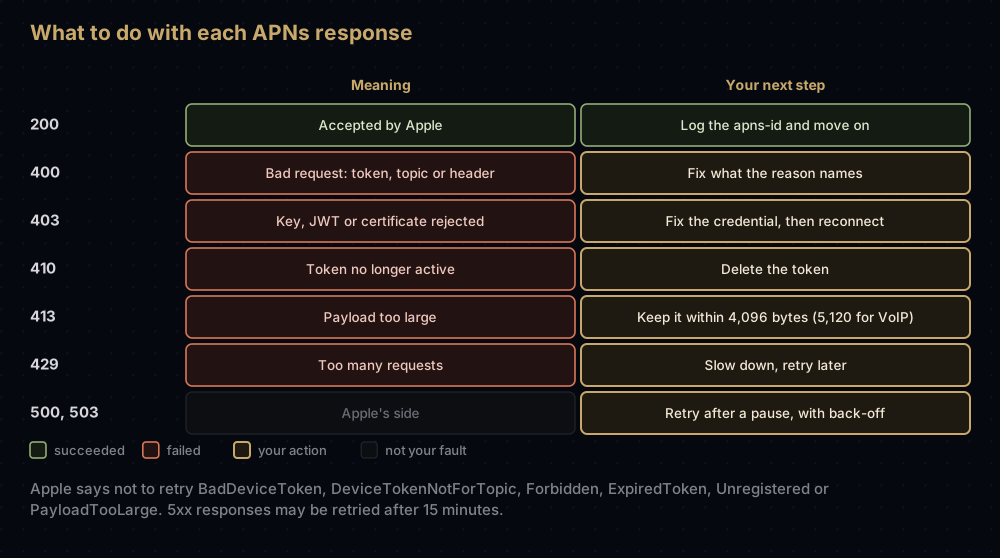
| Status | Meaning | Reasons you will see most |
|---|---|---|
200 | Accepted | None |
400 | Bad request | BadDeviceToken, DeviceTokenNotForTopic, BadTopic, MissingTopic, TopicDisallowed, InvalidPushType, BadPriority, BadCollapseId, PayloadEmpty |
403 | Certificate or token problem | InvalidProviderToken, ExpiredProviderToken, MissingProviderToken, BadCertificate, BadCertificateEnvironment, BadEnvironmentKeyIdInToken, UnrelatedKeyIdInToken, Forbidden |
404 | Invalid path | BadPath |
405 | Not a POST | MethodNotAllowed |
410 | Token no longer active for this topic | Unregistered, ExpiredToken |
413 | Payload too large | PayloadTooLarge |
429 | Too many requests | TooManyRequests, TooManyProviderTokenUpdates |
500 / 503 | Apple's side | InternalServerError, ServiceUnavailable, Shutdown |
What Apple says to do with them:
- Do not retry
BadDeviceToken,DeviceTokenNotForTopic,Forbidden,ExpiredToken,UnregisteredorPayloadTooLarge. Fix the cause or drop the token. - Delete tokens that return 410. The body includes a
timestamp(milliseconds) for when APNs found the token inactive. Apple does not count a 410 as an error condition. - Retry 5xx responses after 15 minutes, with back-off.
- Wait before retrying
TooManyRequests. - Keep 4xx errors rare. They slow down how fast APNs lets you send, and a connection with too many errors is closed.
BadDeviceTokentriggers that sooner than most.
A 200 means Apple accepted the request, not that a person saw anything. Delivery still depends on the device, its settings and its power state.
Testing without writing a server
Apple's Push Notifications Console, in your developer account, sends test notifications to a device token, shows a delivery log for the development environment, and keeps 30 days of history. It can also check whether a device token is valid, generate a JWT, and print the equivalent curl command. Any team member can send to the sandbox; only Admins can send to production.
Its Metrics tab shows what happened after APNs accepted your requests: delivered, stored (for example "Stored - Device Offline") or discarded. Apple reads a rise in "Discarded - Disabled" as a sign that people find your notifications irrelevant or noisy.
Where Firebase fits
If your app uses Firebase Cloud Messaging, FCM is the provider server from Apple's point of view. Your backend calls FCM, and FCM makes the APNs request, using the APNs key (or certificate) you uploaded. The apns block of an FCM message is how you set these same headers and aps keys. FCM fills in apns-expiration as 30 days and apns-priority as 10 unless you say otherwise. The server side of that is covered in where the FCM server key went.
Common mistakes
- Sandbox token, production host (or the reverse). The result is
BadDeviceToken. Store the environment next to each token. - Minting a new JWT for every request. That hits
TooManyProviderTokenUpdates. Cache it for 20 to 60 minutes. - Using a topic without its suffix. Apple requires
.voipon the topic of a VoIP push, and other push types have suffixes of their own. - Background pushes at priority 10. Apple calls it an error. Use
5withapns-push-type: background. - Custom keys inside
aps. APNs ignores them. Put them beside it. - Retrying
Unregisteredforever. Delete the token instead. - Opening a new connection per notification. Apple asks you to reuse connections, which costs less bandwidth and CPU.
- Forgetting that one connection serves one team. Pushes for a second team's app fail on that connection.
Questions people ask
What does APNs stand for?
Apple Push Notification service. It is the Apple service that delivers remote notifications to Apple devices. It is unrelated to the APN (Access Point Name) setting for mobile data.
How big can an APNs payload be?
4,096 bytes for most notifications and 5,120 bytes for VoIP pushes. Anything larger is refused with 413 PayloadTooLarge.
What is the APNs port?
443 on both hosts. Apple also allows 2197 on either host, which is useful when a firewall should pass APNs traffic but block other HTTPS.
Does APNs guarantee delivery?
No. Apple calls it a best-effort service. It may reorder, throttle, store or drop notifications, and an offline device receives at most one stored notification per app.
What is the difference between the APNs sandbox and production?
They are separate environments with separate hosts and separate device tokens. Builds run from Xcode use the sandbox; TestFlight, App Store and Ad Hoc builds use production.
How long does APNs keep a notification for an offline device?
Until the date in apns-expiration, for up to 30 days. With 0, it tries once and does not store it. Without the header, APNs applies its own storage policy.
Why does APNs return BadDeviceToken?
The token is malformed, or it belongs to the other environment. Check that the host matches the build type that produced the token.
Can one server send pushes for several apps?
Yes, with a team-scoped .p8 key, as long as the apps belong to the same team. Apps from different teams need separate connections, and a certificate covers only one app.
Sources
- Sending notification requests to APNs, Apple
- Handling notification responses from APNs, Apple
- Establishing a token-based connection to APNs, Apple
- Generating a remote notification, Apple
- Registering your app with APNs, Apple
- Testing notifications using the Push Notification Console, Apple
Keep reading
- How push notifications work: the whole journey, including FCM and Android.
- APNs auth key (.p8): create the key this post signs tokens with, and add it to Firebase.
- APNs certificate expired?: renewing a legacy push certificate, or moving off it.
- VoIP push on iOS: the
.voiptopic, PushKit and CallKit. - p8 vs p12: what each Apple file holds.


