A VoIP push is the notification that makes a calling app ring on an iPhone. iOS delivers it through Apple's PushKit framework, wakes the app, and expects the app to hand the call to the system's call screen through CallKit straight away. You can authenticate these pushes with a VoIP Services certificate, or with the same APNs auth key (.p8) you use for ordinary notifications.
The key is the simpler choice. It never expires and covers every push type, so there is no second credential to renew. Either way, the request goes to APNs with the push type voip and a topic made of your bundle ID plus .voip, and the payload may be up to 5,120 bytes.
The strict part is on the device. Since the iOS 13 SDK, an app that receives a VoIP push and does not report a call is terminated, and repeated failures can stop VoIP pushes reaching it at all. This post covers that rule, including the change Apple made in iOS 26.4, and then the server side.
What makes a VoIP push different
An ordinary notification shows a banner. The app might never run.
A VoIP push shows nothing by itself. Apple's PushKit documentation describes it as a push that wakes up or launches your app and gives it time to respond. The app's job is to turn it into the familiar full-screen incoming call, then connect to its call service.
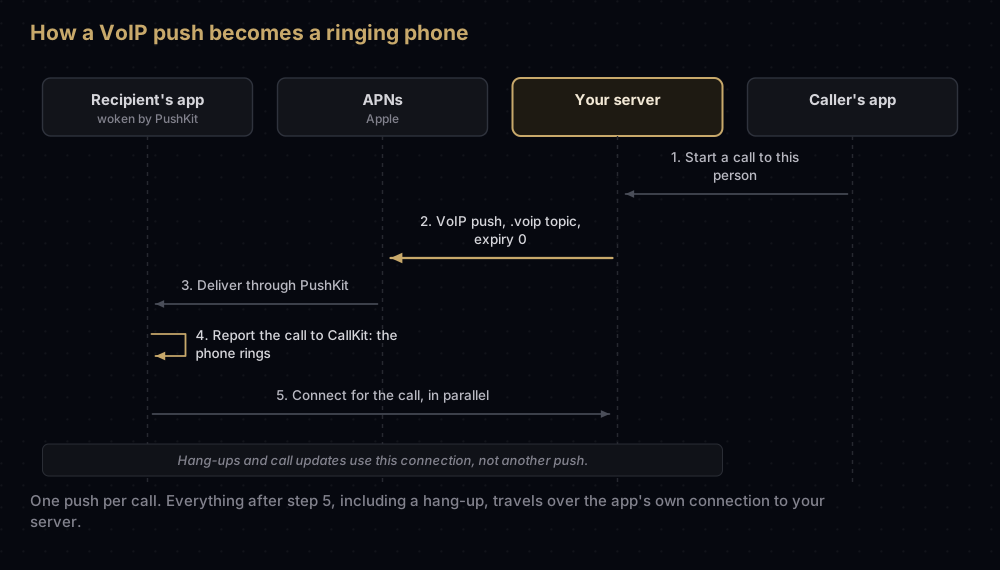
In everyday terms:
- Someone taps "call" in your app. Their app tells your server.
- If the person being called does not have your app open and connected, your server sends a VoIP push through APNs.
- The phone wakes your app, and your app tells iOS "there is an incoming call from this person".
- iOS shows its standard incoming call screen, and the phone rings.
- Meanwhile your app connects to your server to set up the audio.
Apple's advice is to send one push per call. If the caller hangs up, or details change, tell the app over the connection it opened in step 5, not with another push.
Apple's rule: every VoIP push must become a call
For apps built with the iOS 13 SDK or later, PushKit requires CallKit for VoIP calls. Apple's documentation for the delegate method that receives these pushes is direct:
On iOS 13.0 and later, if you fail to report a call to CallKit, the system will terminate your app. Repeatedly failing to report calls may cause the system to stop delivering any more VoIP push notifications to your app.
"Report" means calling reportNewIncomingCall(with:update:completion:) on your app's CXProvider. The system then shows the incoming call screen, unless something stops it; Apple gives Do Not Disturb as an example of a case where the call is refused with an error.
If your app cannot use CallKit, Apple says it cannot use PushKit either. Use ordinary notifications through the User Notifications framework instead, with a notification service extension if you need to do work such as decrypting the message.
What changed in iOS 26.4
iOS 26.4 added a new delegate method, pushRegistry(_:didReceiveIncomingVoIPPushWith:metadata:withCompletionHandler:), which passes a PKVoIPPushMetadata object. Its one property, mustReport, tells the app whether this particular push has to be reported.
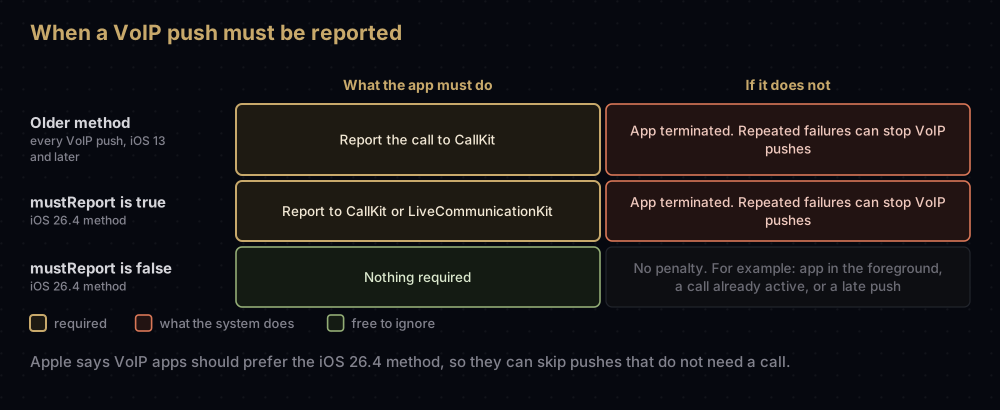
mustReport | What the app must do |
|---|---|
true | Report the call with CallKit (reportNewIncomingCall) or LiveCommunicationKit (reportNewIncomingConversation(uuid:update:)). Failing to do so gets the app terminated, and repeated failures can stop VoIP pushes |
false | Nothing is required. Apple's examples: the app is in the foreground, it already has an active call or conversation, or the push arrived after a long delay because of network conditions |
Apple says VoIP developers should prefer the new method, so the app can ignore pushes that do not need reporting. Apps that also run on earlier iOS versions still need the older pushRegistry(_:didReceiveIncomingPushWith:for:completion:), where the iOS 13 rule applies to every VoIP push. LiveCommunicationKit itself has been available since iOS 17.4.
Two registrations, two tokens
A calling app usually registers twice, and each registration produces its own token:
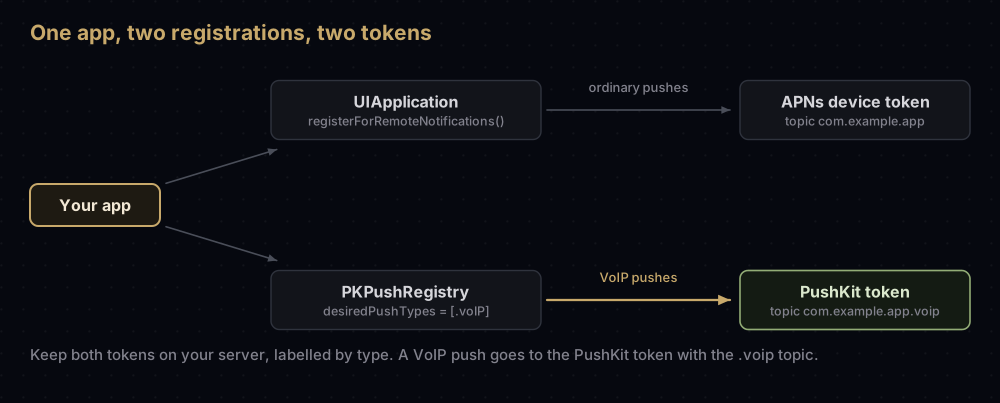
- The ordinary token, from
registerForRemoteNotifications(), for banners, badges and silent updates. Firebase maps this one to its own registration. - The PushKit token, which arrives in
pushRegistry(_:didUpdate:for:)after you create aPKPushRegistryand set itsdesiredPushTypes. Apple's advice is to be ready for multiple tokens for each notification type your app supports.
Store them separately on your server, labelled by type. A VoIP push must go to a PushKit token with the .voip topic.
This Swift handler covers registration, the iOS 26.4 method and token invalidation. It type-checks against the iOS 26.5 SDK under Swift 6:
import CallKit
import PushKit

final class CallPushHandler: NSObject, PKPushRegistryDelegate {
    private let registry = PKPushRegistry(queue: nil)
    private let provider = CXProvider(configuration: CXProviderConfiguration())

    func start() {
        registry.delegate = self
        registry.desiredPushTypes = [.voIP] // set this last: it starts registration
    }

    func pushRegistry(_ registry: PKPushRegistry,
                      didUpdate credentials: PKPushCredentials,
                      for type: PKPushType) {
        let voipToken = credentials.token.map { String(format: "%02x", $0) }.joined()
        // Send voipToken to your server. Store it apart from the regular APNs token.
    }

    @available(iOS 26.4, *)
    func pushRegistry(_ registry: PKPushRegistry,
                      didReceiveIncomingVoIPPushWith payload: PKPushPayload,
                      metadata: PKVoIPPushMetadata,
                      withCompletionHandler completion: @escaping @Sendable () -> Void) {
        guard metadata.mustReport else {
            completion() // for example, the app already has a call in progress
            return
        }
        let update = CXCallUpdate()
        let caller = payload.dictionaryPayload["handle"] as? String ?? "Unknown"
        update.remoteHandle = CXHandle(type: .phoneNumber, value: caller)
        let callID = (payload.dictionaryPayload["callUUID"] as? String)
            .flatMap(UUID.init(uuidString:)) ?? UUID()

        provider.reportNewIncomingCall(with: callID, update: update) { error in
            // error is non-nil if the system declined the call, for example in Do Not Disturb.
            completion()
        }
        // Start connecting to your call server here, in parallel.
    }

    func pushRegistry(_ registry: PKPushRegistry,
                      didInvalidatePushTokenFor type: PKPushType) {
        // Tell your server to stop using the old VoIP token.
    }
}
The app also needs the Push Notifications capability, like any app that receives remote notifications. iOS entitlements explained covers how that reaches the build.
Certificate or key?
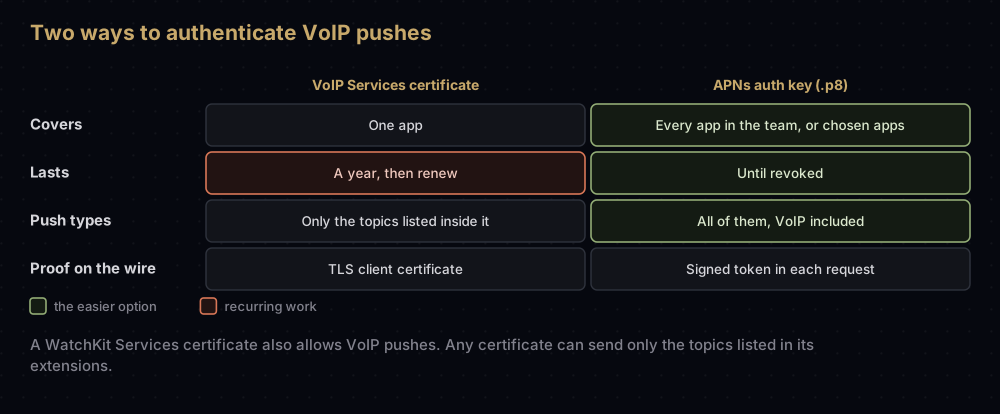
| VoIP Services certificate | APNs auth key (.p8) | |
|---|---|---|
| Covers | One app | Every app in the team, or chosen apps |
| Lasts | Apple says provider certificates are valid for a year | Until revoked |
| Also sends ordinary pushes | Only the topics listed inside it | Yes, every push type |
| How the server proves itself | TLS client certificate | Signed token in each request |
| Made from | A certificate signing request | Nothing extra; download once |
A few details from Apple's documentation that decide edge cases:
- A WatchKit Services certificate also allows PushKit VoIP pushes, as well as watch complication pushes.
- Any push certificate lists the topics it may send in two extensions,
1.2.840.113635.100.6.3.4and1.2.840.113635.100.6.3.6. If the.voiptopic is not listed, that certificate cannot send VoIP pushes. Keychain Access shows them under the certificate's details. - A key needs no VoIP-specific setup. The same
.p8that sends your alerts sends VoIP pushes once you set the push type and topic.
For a new app, use the key. The APNs auth key guide covers creating it. If you already run a VoIP certificate, the certificate renewal guide covers checking its expiry and moving to a key; the steps are the same for VoIP.
Creating a VoIP Services certificate
If you do need one (a server that cannot sign tokens, for example), Apple's steps are:
- Create a certificate signing request in Keychain Access. See creating a CSR on a Mac.
- In Certificates, Identifiers & Profiles, open Certificates and click the add button (+).
- Under Services, choose VoIP Services Certificate and continue.
- Pick the App ID, then upload the
.certSigningRequestfile. - Download the
.cerand double-click it to add it to Keychain Access. - Export the certificate together with its private key as a
.p12for your server.
Only the Account Holder or an Admin can create one.
Sending a VoIP push
A VoIP push is an ordinary APNs request with four things set deliberately:
| Setting | Value | Why |
|---|---|---|
apns-push-type | voip | Tells APNs what the payload is. Not available on watchOS |
apns-topic | com.example.app.voip | The bundle ID with .voip appended |
apns-expiration | 0, or a few seconds from now | Apple's advice, so a stale call never rings long after it ended |
| Body | Call details, at most 5,120 bytes | A call identifier and caller information for the call screen |
The payload is your own JSON. Apple's sample reads a handle and a callUUID from it, which is what the Swift handler above expects:
{
  "callUUID": "0f5c9a3e-6d1b-4c2a-9f0e-2b7d4a1c8e55",
  "handle": "+15555550123"
}
With token authentication, the request looks like this. It was tested against a local HTTP/2 server, not Apple's:
curl -v --http2 \
  --header "authorization: bearer $AUTHENTICATION_TOKEN" \
  --header "apns-topic: com.example.app.voip" \
  --header "apns-push-type: voip" \
  --header "apns-expiration: 0" \
  --data '{"callUUID":"0f5c9a3e-6d1b-4c2a-9f0e-2b7d4a1c8e55","handle":"+15555550123"}' \
  "https://api.sandbox.push.apple.com/3/device/$VOIP_DEVICE_TOKEN"
$AUTHENTICATION_TOKEN is the signed JWT made from your .p8; APNs explained shows how to build it and how to read the response. With a certificate, the authorization header goes away and the certificate is presented on the connection instead.
Where Firebase fits
Firebase Cloud Messaging's Apple guides do not mention PushKit or VoIP pushes, and FCM's Apple setup is built around the ordinary APNs token from registerForRemoteNotifications(). So plan to send VoIP pushes from your own server straight to APNs. You can use the same .p8 key you uploaded to Firebase.
The same applies to Flutter: Firebase's Flutter messaging guide does not cover PushKit, so the PushKit and CallKit side is native iOS code, or a plugin that wraps it.
Why it fails
| Symptom | Likely cause |
|---|---|
| The app is killed right after a VoIP push arrives | It did not report a call to CallKit (or, with the iOS 26.4 method, ignored a push where mustReport was true) |
| VoIP pushes stop arriving altogether | Repeated failures to report calls. Apple says the system may stop delivering VoIP pushes |
400 DeviceTokenNotForTopic | The token does not match the topic. Check that the PushKit token is the one paired with .voip |
413 PayloadTooLarge | The body is over 5,120 bytes |
| A certificate cannot send VoIP pushes | The .voip topic is not listed in the certificate's extensions |
| A call rings long after the caller hung up | apns-expiration was not 0 or a few seconds, so APNs stored the push |
400 BadDeviceToken or 403 BadEnvironmentKeyIdInToken | Sandbox and production mixed up, exactly as with ordinary pushes |
Common mistakes
- Using VoIP pushes for chat messages or other non-call events. A push that must be reported, but that you cannot turn into a call, gets the app terminated. Use ordinary notifications for everything else.
- Waiting for the network before reporting the call. Apple's sample reports first and connects in parallel.
- Sending a second push to cancel a call. Use your app's own connection instead; Apple notes APNs may not be able to deliver in poor conditions anyway.
- Storing only one token per device. The PushKit token and the ordinary token are different values for different topics.
- Assuming Firebase will deliver VoIP pushes. Its Apple guides do not describe it.
- Keeping a separate VoIP certificate alive for years. The APNs key you already have can send the same pushes.
Questions people ask
What is a VoIP push certificate?
A VoIP Services certificate is an Apple certificate that lets your server send PushKit VoIP pushes for one app. An APNs auth key does the same job for all your apps and never expires.
Do I need a VoIP certificate if I already have an APNs key?
No. A .p8 key sends every push type, including VoIP. Set apns-push-type to voip and add .voip to the topic.
What happens if my app does not report a VoIP push to CallKit?
On iOS 13 and later, iOS terminates the app, and repeated failures may stop VoIP pushes reaching it. With the iOS 26.4 method, that applies to pushes marked mustReport.
What is the VoIP push payload size limit?
5 KB, or 5,120 bytes. Other notifications are limited to 4,096 bytes.
Is the VoIP token the same as the APNs device token?
No. PushKit gives the app its own token through PKPushRegistry. Store it separately and use it only with the .voip topic.
Can Firebase Cloud Messaging send VoIP pushes?
Firebase's Apple guides do not describe it. Plan to send VoIP pushes from your own server directly to APNs, using the same APNs key.
Does a VoIP Services certificate expire?
Apple says its provider certificates are valid for a year and must be updated before they expire. A key avoids that.
Can I show a call without CallKit?
Not with PushKit. Apple says apps that cannot support CallKit should use the User Notifications framework instead.
Sources
- Responding to VoIP notifications from PushKit, Apple
- pushRegistry(_:didReceiveIncomingPushWith:for:completion:), Apple
- PKVoIPPushMetadata, Apple
- Supporting PushKit notifications in your app, Apple
- Create VoIP services certificates, Apple
- Sending notification requests to APNs, Apple
Keep reading
- APNs explained: the request format, token signing and every response code.
- APNs auth key (.p8): the key that replaces the VoIP certificate.
- APNs certificate expired?: checking and replacing push certificates.
- How push notifications work: the ordinary notification path this post builds on.
- Every certificate in Apple's developer portal: where the VoIP certificate sits among the rest.


