Google Sign-In error 10 is status code DEVELOPER_ERROR. Google's reference defines it in one line, "The application is misconfigured", and does not say which setting is wrong. The cause developers report far more often than any other is a missing SHA-1: the certificate that signed the copy on the phone is not registered, with your package name, in Firebase or Google Cloud.
The usual fix. If sign-in works when you run the app from Android Studio but fails for people who install it from Google Play, open the app signing page in Play Console, copy the SHA-1 of the app signing key, add it to your Android app in Firebase (or to an Android OAuth client in Google Cloud), download a fresh google-services.json if you use Firebase, then rebuild and test again.
If that is not your situation, the checklist below covers the rest.
The fix, step by step
- Work out which key signed the failing copy. Copies you run from Android Studio or with
flutter runare signed by that computer's debug key. A release APK you built yourself is signed by your upload key. Anything installed from Google Play, testing tracks included, is signed by Google's app signing key. Internal app sharing uses a key of its own. - Get that key's SHA-1. For keys on your computer, run
./gradlew signingReportin the Android project (insideandroid/for Flutter). For Google's keys, open Play Console: the Play app signing page (currently under Protected with Play; search for "app signing" if it has moved) or the internal app sharing page. With Play's quantum-ready hybrid signing, the page lists three app signing keys; add all three. - Register it with the exact package name.
- Firebase: open the project settings, find the Android app in Your apps, click Add fingerprint and paste the SHA-1. Then download the updated
google-services.jsonand replace the one in your project. - Google Cloud without Firebase: in the console page that lists your OAuth clients (Google's guides call it the Credentials page, and newer ones Google Auth Platform), create an Android client with your package name and this SHA-1. Each Android client holds one SHA-1, so add one client per key.
- Firebase: open the project settings, find the Android app in Your apps, click Add fingerprint and paste the SHA-1. Then download the updated
- Check the client ID in your code. The ID you pass to
setServerClientId(Credential Manager) orrequestIdToken(the legacy library) must belong to a Web application client, not the Android client. - Check the package name. It must be the app's final application ID, including any suffix a build type adds, such as
.debug. - If you use Firebase Authentication, make sure Google is enabled as a sign-in provider and the project has a support email.
- Rebuild, reinstall and try again. Google does not document how long a new fingerprint takes to apply, so if it still fails, recheck each step before assuming a delay.
How to get SHA-1 and SHA-256 fingerprints shows every way to read each key's fingerprint in more detail.
What Google actually says
Google's documentation is short on this error, so it helps to separate what it states from what developers report.
- Google's definition. In the Google Play services reference,
CommonStatusCodes.DEVELOPER_ERRORhas the value10and the description: "The application is misconfigured. This error is not recoverable and will be treated as fatal. The developer should look at the logs after this to determine more actionable information." Nothing more. Check Logcat around the failure for extra detail. - Firebase's FAQ covers a neighbouring code. For "Google Sign-in is showing the error 12500 after I released my app", it gives two causes: no support email in the project settings, or a missing SHA key. Its fix is to add the SHA-1 from your release keystore and the SHA-1 from the Google Play Console to the Firebase Android app.
- What developers report. A missing or wrong SHA-1 is the cause developers most often report for error 10, and the pattern "works in debug, fails from Play" points straight at Play's app signing key. This is widely reported experience, not a statement from Google.
Why it fails for some installs and not others
Sign-in looks at the certificate of the copy that is actually installed. The same app can be signed by four different keys depending on where it came from, so a setup that works on your desk can fail for everyone else.
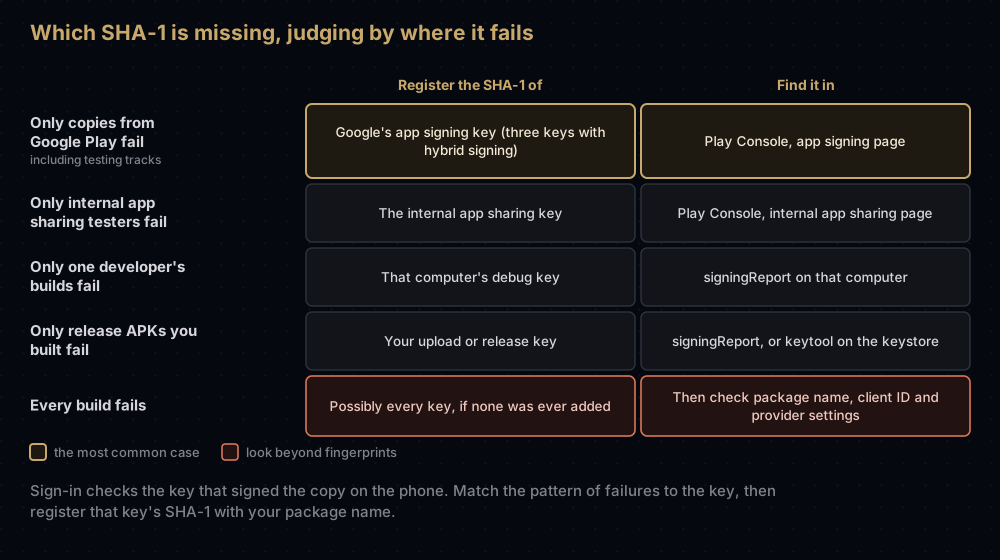
The Play case is the easiest to miss. With Play App Signing, which app bundles require, you sign with your upload key and Google re-signs every copy with its own app signing key. Your upload key's SHA-1 is on your computer; the key users actually receive is not. Play App Signing explains that split, and Play's hybrid signing explains why new apps now have three app signing fingerprints.
Two other causes look the same from the outside:
- A new or rebuilt computer. Each machine creates its own debug key, and deleting
debug.keystoremakes a new one. The debug keystore post covers both. - Internal app sharing. Play Console Help says every upload there is re-signed with an internal app sharing key that Google creates. Its certificate is in the Internal test certificate section of that page.
What has to match
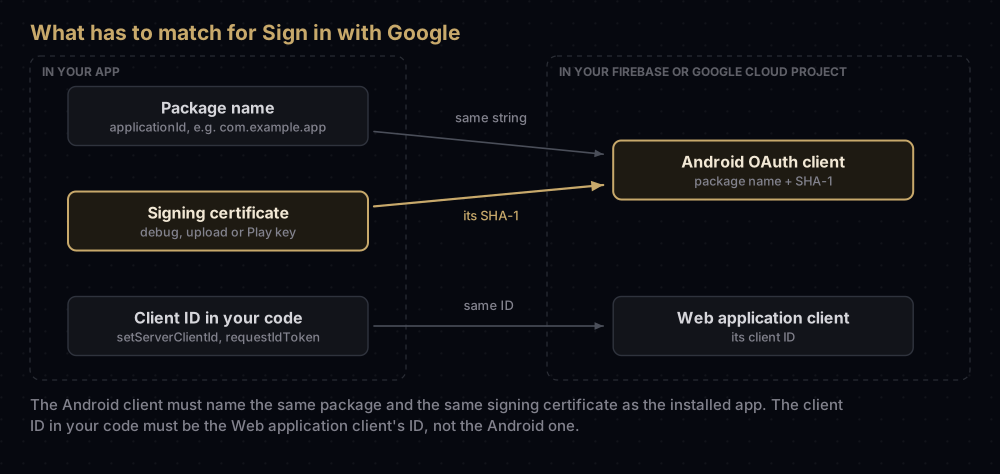
Google's setup guides, for both the legacy library and Credential Manager, ask for two kinds of OAuth client:
| Client type | What you enter | What it is for |
|---|---|---|
| Android | Package name and SHA-1 of the signing certificate | Tying sign-in to your app's package name and signing key |
| Web application | Nothing extra for this purpose | Its client ID goes in your code as the server client ID |
A Firebase project is a Google Cloud project with Firebase added, so both client types live in the same place whether you set them up through Firebase or directly.
A few details trip people up:
- The package name is the application ID, not the Java package. A build type with
applicationIdSuffix ".debug"producescom.example.app.debug, which needs its own registration. - Do not put the Android client ID in your code. Firebase's sample passes
R.string.default_web_client_id, with the comment: your server's client ID, not your Android client ID. - A package name and SHA-1 pair already used elsewhere is refused. Firebase's FAQ describes the error "An OAuth2 client already exists for this package name and SHA-1 in another project", which appears when another Firebase or Google Cloud project already has an OAuth client with that pair.
The same problem under other names
Error 10 is a Google Play services status code, which the legacy Google Sign-In API surfaces as ApiException: 10. Newer libraries report the same misconfiguration differently.
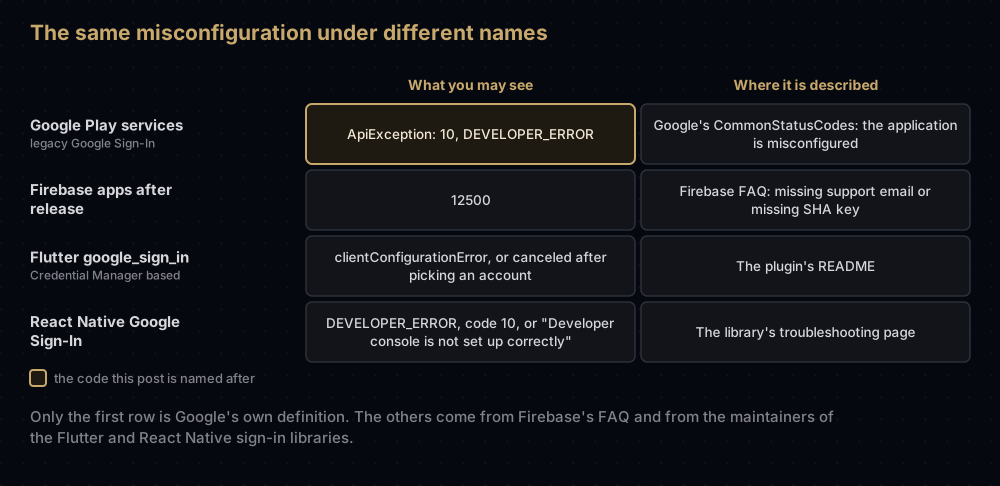
The Flutter row deserves a warning. The google_sign_in_android README says some configuration errors make the underlying Credential Manager return "canceled", and the plugin cannot tell that apart from a user who really cancelled. If sign-in "cancels" right after someone picks an account, treat it as a configuration problem and run the checklist.
Credential Manager and the legacy library
Google has deprecated Google Sign-In for Android, the play-services-auth API whose sign-in calls report ApiException: 10, and says it will be removed in a future release. Google recommends Credential Manager for signing users in and the AuthorizationClient API for access to Google account data.
The checklist does not change when you migrate. Credential Manager's Sign in with Google still needs the Android client with your package name and SHA-1, and it still takes the web client ID, through GetGoogleIdOption.Builder().setServerClientId(...).
One Credential Manager error is not a configuration problem: NoCredentialException. Android's troubleshooting guide lists its causes as filtering by authorised accounts when there are none, no signed-in Google accounts on the device, or sign-in prompts turned off in the account settings. That one needs a different fix.
Flutter and React Native notes
Flutter (google_sign_in). With Firebase's Gradle setup, the plugin needs no client ID in Dart, as long as google-services.json contains a web OAuth client. If you see "serverClientId must be provided on Android", the README says the file lacks an oauth_client entry with client_type: 3: add a web app to the Firebase project, or enable Google sign-in, and download the file again. Without google-services.json, pass the web client ID as serverClientId. The README's list of usual causes matches this post: a missing or wrong SHA for a build configuration, a wrong package name on the server side, and a missing or wrong serverClientId.
React Native (@react-native-google-signin/google-signin). The library's troubleshooting page calls this error "always" a configuration mismatch, says webClientId must be the web client type, not Android, and notes that Internal App Sharing re-signs your app. React Native's app template also ships its own android/app/debug.keystore, so read that project's SHA-1 with signingReport rather than assuming the one in your home folder.
Why it fails
- Only the upload key's SHA-1 is registered. Copies from Google Play carry the app signing key.
- Hybrid signing adds keys. Registering one of the three app signing fingerprints is not enough.
- The web client ID and Android client ID are swapped. The code needs the web one.
- A stale
google-services.json. After adding fingerprints or enabling Google sign-in, download it again. - The debug build has a different application ID. An
applicationIdSuffixneeds its own registration. - A teammate's computer, a new laptop or a deleted
debug.keystore. Each is a new debug key. - The fingerprint went into a different Firebase project or Google Cloud project from the one the app's configuration points at.
- Google sign-in is not enabled in Firebase Authentication, or the project has no support email.
Questions people ask
What does Google Sign-In error 10 mean?
It is DEVELOPER_ERROR, which Google defines as "The application is misconfigured". The cause developers report most often is that the SHA-1 of the key that signed the installed app is not registered for your package name.
Why does Google Sign-In work in debug but not in release?
Because a different key signs each build. The debug key's SHA-1 is registered and the release key's is not. For copies from Google Play, the release key that matters is Google's app signing key, whose SHA-1 is in Play Console.
Do I need to add SHA-256 as well as SHA-1?
Google's sign-in setup guides ask for the SHA-1. Firebase asks for the SHA-256 for other features, such as phone sign-in with Play Integrity, so add it when a feature you use needs it.
Do I need to download google-services.json again after adding a SHA-1?
Firebase's Google sign-in guide says to download the updated file after enabling Google sign-in, because it then contains the OAuth client information. Downloading a fresh copy after adding fingerprints is the safe habit.
Which client ID goes in requestIdToken or setServerClientId?
The client ID of the Web application OAuth client. Firebase's sample reads it from R.string.default_web_client_id.
What is Google Sign-In error 12500?
Firebase's troubleshooting FAQ describes 12500 after release and gives two causes: no support email in the Firebase project, or a missing SHA-1 from your release keystore or from Play Console.
How long does it take for a new SHA-1 to work?
Google does not publish a figure. Reinstall the app and try again; if it still fails, check the package name, the project and the client ID before waiting longer.
Does error 10 happen with Credential Manager?
Credential Manager uses the same Android and web clients, so the same misconfiguration still breaks sign-in. Libraries built on it may report it differently, for example as a configuration error or as "canceled".
Where this comes from
- CommonStatusCodes from the Google Play services reference
- Firebase Android troubleshooting FAQ and Google sign-in with Firebase on Android
- Migrate from legacy Google Sign-In and Sign in with Google using Credential Manager from Android Developers
- google_sign_in_android on pub.dev and the React Native Google Sign-In troubleshooting page
- Use Play App Signing and Share app bundles and APKs internally from Play Console Help
Keep reading
- How to get SHA-1 and SHA-256 fingerprints for all three Android keys: every way to read the fingerprint you need.
- Play App Signing: upload key vs app signing key: why Play copies carry a different key.
- Play's quantum-ready hybrid signing: the extra fingerprints new apps have.
- What google-services.json holds: the file you download again after adding a fingerprint.
- The Android debug keystore: why a teammate's build fails when yours works.


