
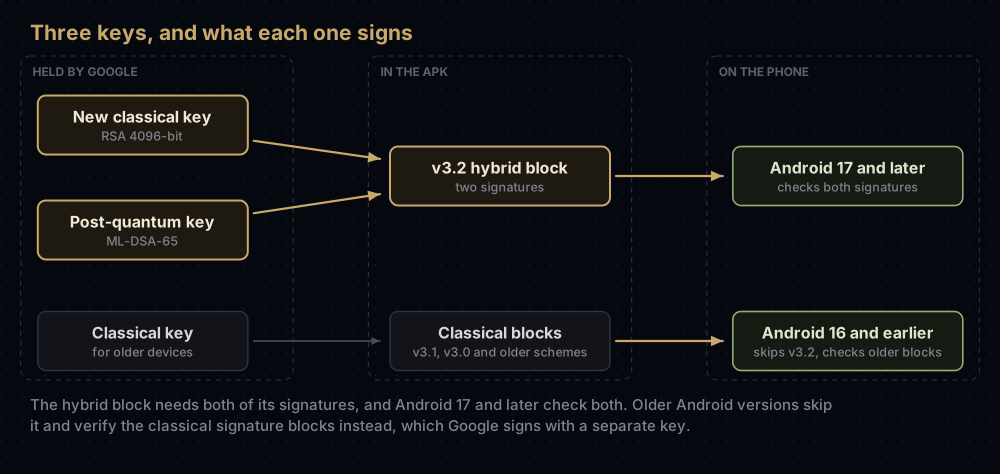
Google Play now signs new apps with a pair of keys instead of one: a classical RSA key and a post-quantum ML-DSA key, with a third, separate classical key for phones older than Android 17. Play calls this quantum-ready hybrid signing, and new apps are enrolled in it by default.
For most developers the visible change is on the Play app signing page. A hybrid-signed app has three app signing keys, and Play's help page says to copy the fingerprints of all three and register each of them with your API providers: Firebase, Google Cloud API keys, assetlinks.json and anything else that asks for a fingerprint. Your upload key and your build setup do not change.
Everything below comes from Google's own pages as they stood on 17 September 2026. This is new, and parts of it are still being rolled out, so the last section lists what Google has not yet published.
Why Google is doing this
Apps are signed with public-key cryptography, the kind Google says future quantum computers put at risk. Its security blog puts it plainly: such machines could bypass the digital locks in use today. For apps, the danger is a forged signature, which would let someone publish an "update" that your users' phones accept as yours.
Post-quantum algorithms are designed to resist that. ML-DSA is one of them, a signature scheme standardised by the US National Institute of Standards and Technology (NIST). Android's documentation describes the hybrid approach as defence in depth: each APK is signed with a proven classical algorithm and a post-quantum one, keeping the track record of classical signatures while adding protection against quantum attacks.
A picture that helps: think of a passport that gains a new chip. New border gates read the chip and check it against the printed photo, and both must be right. Older gates only look at the photo and carry on as before. Android 17 and later are the new gates.
The picture breaks in one place. On a passport, the chip and the photo describe the same person in the same way. In Play's setup, the older phones check a different classical key from the one paired with the post-quantum key. That is why there are three keys, not two.
The three keys, in Play's words
Play's "Use Play App Signing" page says hybrid signing "combines a classical RSA 4096-bit key and a post-quantum ML-DSA-65 key", and that Google "generates a new classical key for the hybrid signature that is different to the classical key it uses for pre-Android 17 devices, resulting in your app using three distinct keys."
| Key | Algorithm | Checked by | Fingerprint to register? |
|---|---|---|---|
| New classical key | RSA 4096-bit | Android 17 and later, together with the post-quantum key | Yes |
| Post-quantum (PQC) key | ML-DSA-65 | Android 17 and later, together with the new classical key | Yes |
| Classical key for older devices | Classical (Google-generated app signing keys are RSA 4096-bit) | Android 16 and earlier | Yes |
| Your upload key | RSA, 2048 bits or more | Google, when you upload | Only for builds you sign and install yourself |
The upload key is not part of the hybrid setup. You keep signing bundles with it exactly as before, as the Play App Signing post describes.
Who is enrolled
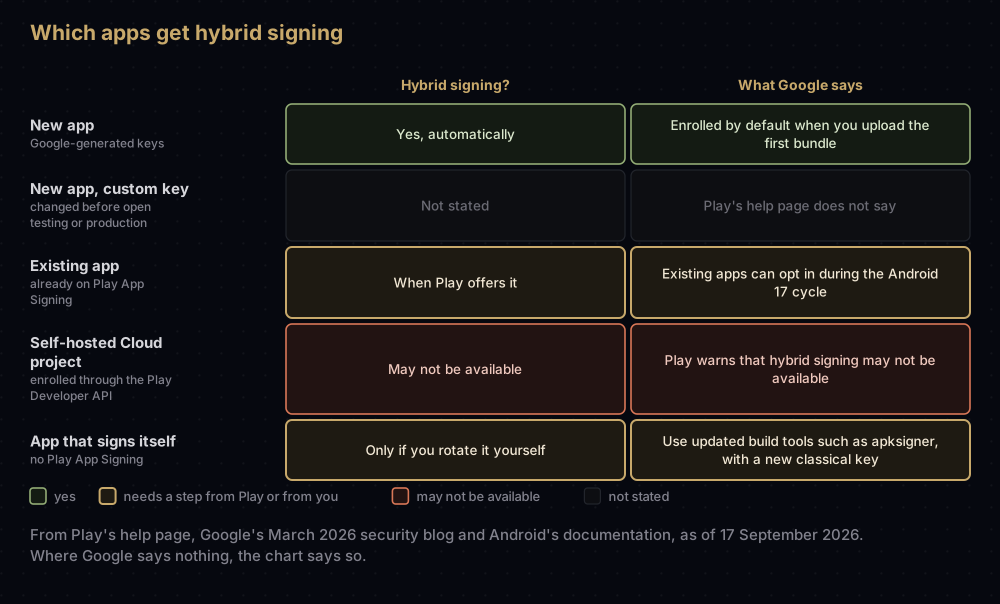
New apps. Play's page says a new app "will be automatically enrolled in quantum-ready, hybrid signing with Google-generated keys", along with a separate classical key for signature blocks that devices on Android 16 and lower recognise.
New apps with a custom key. Before any release rolls out on the open testing or production track, you can still change the app signing key: reuse another app's key from your developer account, or provide your own. Play's page does not say whether those choices are hybrid-signed.
Existing apps. Google's security blog (25 March 2026) says that during the Android 17 release cycle, Play will generate ML-DSA keys "for new apps and existing apps that opt-in, independent of the applications target API". Android's own documentation, and Flutter's, tell Play App Signing users they can wait for Google Play to offer the upgrade. Play's help page covers upgrades for Android 17 and above under "Upgrade your app signing key" and does not describe a separate opt-in step, so watch the Play app signing page for your app.
Apps enrolled through a self-hosted Google Cloud project. This is a non-standard setup for developers with special security needs. Play's page warns that "security features like Quantum-ready hybrid signing may not be available in this configuration."
Apps that sign themselves. Without Play App Signing, there is no Play-managed hybrid key. Android's documentation says developers who manage their own keys can use updated build tools, such as apksigner, to rotate to a hybrid identity, and must create a new classical key to pair with the post-quantum one. The old classical key cannot be reused.
What Android 17 and v3.2 add
Android 17 (API level 37) introduced APK Signature Scheme v3.2, and that is what makes hybrid signing work on the phone. The Android Open Source Project describes it in detail. The parts that matter to app developers:
- Two signers, always. A v3.2 block holds exactly two signatures: one classical (such as RSA or ECDSA) and one post-quantum. Android verifies both.
- Two algorithms supported so far: ML-DSA-65 and ML-DSA-87. Play uses ML-DSA-65.
- Older phones are not left out. An APK must still carry a standard v3.0 or v3.1 block signed by a single classical key. Android 16 and earlier skip the v3.2 block and verify with the earlier schemes instead.
- New key material only. Moving to a hybrid block needs new classical and post-quantum keys. Android treats the move as a key rotation: the new classical key joins the app's signing history, and the post-quantum key becomes its current identity.
- Both keys stay involved. An update that tries to use only one of the two hybrid keys, without a proper rotation, is rejected.
One side effect: Play normally adds APK Signature Scheme v4 for eligible apps on Android 11 and later, but its help page says hybrid-signed apps are excluded, because hybrid signing "is not yet compatible with v4 signing".
The history of the earlier schemes, from v1 to v4, is in the signature schemes post.
What you need to do with fingerprints
This is the practical part. Services that recognise your app by its signing certificate need to know about every key your users' phones might present.
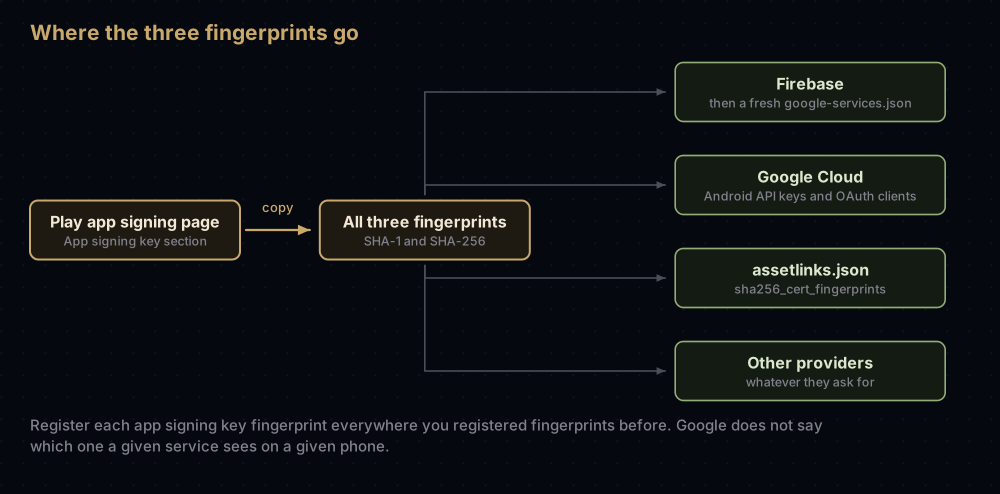
- Open the Play app signing page. Play's help page gives the route as Protected with Play, then Play Store distribution, then Go to Play app signing. Menus move, so search Play Console for "app signing" if that route is gone.
- Scroll to the App signing key section and copy the SHA-1 or SHA-256 fingerprints, whichever each service asks for, for all three keys.
- Add every one of them wherever you registered fingerprints before:
| Where | What to add | Notes |
|---|---|---|
| Firebase, Android app settings | SHA-1 and SHA-256 for each key | Needed for Google Sign-In and Phone Auth. Download a fresh google-services.json afterwards |
| Google Cloud, API keys restricted to Android apps | Package name plus SHA-1, added as a separate entry for each key | Maps and other Google APIs |
| Google Cloud, OAuth clients for Android | Package name plus SHA-1 | Google's setup page describes one package name and one SHA-1 per Android client |
assetlinks.json | SHA-256 for each key | The sha256_cert_fingerprints field accepts several values |
| Other providers | Whatever they ask for | Play names Facebook Login as an example of an API provider |
For App Links, the file ends up with a longer list. With placeholder values, it looks like this:
[
  {
    "relation": ["delegate_permission/common.handle_all_urls"],
    "target": {
      "namespace": "android_app",
      "package_name": "com.example.app",
      "sha256_cert_fingerprints": [
        "AA:AA:AA:AA:AA:AA:AA:AA:AA:AA:AA:AA:AA:AA:AA:AA:AA:AA:AA:AA:AA:AA:AA:AA:AA:AA:AA:AA:AA:AA:AA:AA",
        "BB:BB:BB:BB:BB:BB:BB:BB:BB:BB:BB:BB:BB:BB:BB:BB:BB:BB:BB:BB:BB:BB:BB:BB:BB:BB:BB:BB:BB:BB:BB:BB",
        "CC:CC:CC:CC:CC:CC:CC:CC:CC:CC:CC:CC:CC:CC:CC:CC:CC:CC:CC:CC:CC:CC:CC:CC:CC:CC:CC:CC:CC:CC:CC:CC"
      ]
    }
  }
]
Android's App Links guide also says the Play app signing page shows a ready-made Digital Asset Links snippet for your app. Copying it is safer than typing fingerprints, but check that it lists all three. The assetlinks.json post covers the rest of that file.
Why all three? Google asks for all three and does not say which one a particular service will see on a particular phone. Registering every fingerprint covers both older and newer devices. If Google Sign-In fails only for Play Store installs, a missing fingerprint is the first thing to check, as the error 10 post explains.
Key upgrades from here on
Play's help page describes an annual key upgrade for installs on Android 17 and above, for when a key is compromised or you want a stronger one. It also spells out how each Android version treats an upgraded key:
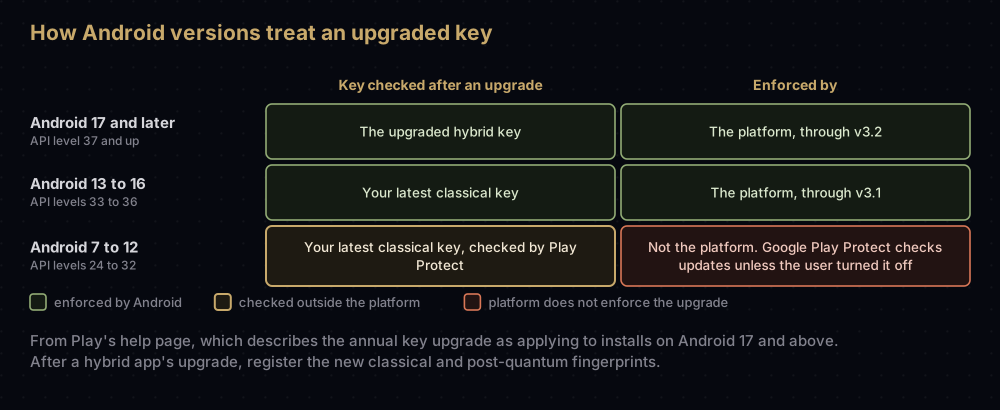
After an upgrade, a hybrid-signed app has two new keys to register: the new classical key and the new post-quantum key.
Two more things point to more frequent fingerprint changes ahead:
- Google's March 2026 blog post says Play "will also start prompting developers to upgrade their signing keys at least every two years."
- The same post says developers will "later" be able to choose their own classical and ML-DSA keys and hand them to Play for a hybrid upgrade.
So treat fingerprint registration as a recurring task, not a one-off. After each upgrade, add the new fingerprints before relying on them. Play tells you to register the new keys; it does not tell you to remove the old ones.
Google's documents are not fully in step. Android Studio's signing guide still says an upgraded key signs installs on Android 13 and higher, while Play's newer help page describes the Android 17 behaviour above. Follow Play Console.
What is still unknown or changing
Google has not published the following, as of 17 September 2026. Do not rely on anything that claims otherwise without a Google source:
- When existing apps can opt in, or how the offer will appear in Play Console. Google's blog says existing apps can opt in during the Android 17 cycle; Android's and Flutter's docs say to wait for Play's offer.
- Whether a new app with a custom app signing key is hybrid-signed. Play's page does not say.
- Whether you can supply your own ML-DSA key yet. Google's March blog post said "later", and Play's help page does not say whether its "provide a copy of your app signing key" option covers one.
- When the upgrade prompts begin (Google's post says "at least every two years"), and what they will look like.
- When hybrid-signed apps get v4 signing. Play says the two are "not yet" compatible.
- Which of the three fingerprints each service checks on a given device. Google's instruction is simply to register all three.
- Where the page lives. Play's own help page gives two different menu routes to the app signing page, and older Google pages give two more.
Developer verification, which asks for the SHA-256 fingerprint of an app's signing key when registering package names, is covered separately in the developer verification post. Its FAQ says apps on Play App Signing are registered automatically, and it does not mention hybrid signing.
Common mistakes
- Registering only one of the three fingerprints, usually the one you have always had.
- Registering only the upload key. Play installs are signed with Google's keys, so Sign-In, Maps and App Links fail for store users.
- Deleting the old classical fingerprint. Phones on Android 16 and earlier still check the classical key meant for them.
- Changing your Flutter or Gradle setup for hybrid signing. With Play App Signing, nothing in your build changes. Google adds the hybrid signature.
- Reusing an old classical key when rotating to hybrid yourself. Android's documentation requires new key material for both hybrid keys.
- Assuming v4 incremental installs apply. Play excludes hybrid-signed apps from v4 signing for now.
- Treating a key upgrade as done once you click Save. Play's steps continue with registering the new fingerprints, and the upgrade is only finished when every service has them.
Questions people ask
What is quantum-ready hybrid signing on Google Play?
It is Play App Signing with two signatures on each app for Android 17 and later: one from a classical RSA key and one from a post-quantum ML-DSA key. Older phones check a separate classical signature.
Is my app enrolled in hybrid signing?
New apps with Google-generated keys are enrolled automatically. For an existing app, check the Play app signing page: a hybrid-signed app lists three app signing keys.
Why does Play Console show three app signing keys?
Because Google uses a new classical key and an ML-DSA key for the hybrid signature on Android 17 and later, and a different classical key for older Android versions.
Do I need to change my upload key or build for hybrid signing?
No. You sign and upload bundles exactly as before. Google adds the hybrid signature when it builds the APKs.
Which fingerprints do I add to Firebase?
All three app signing key fingerprints from the Play app signing page, plus your debug and upload key fingerprints if your own builds need Google Sign-In.
What is APK Signature Scheme v3.2?
The signature format Android 17 introduced for hybrid signing. It holds exactly two signatures, one classical and one post-quantum, and Android checks both.
Will a hybrid-signed app still install on older Android versions?
Yes. The APK still carries classical signatures in the older formats, and Android 16 and earlier verify those instead.
Can I use my own ML-DSA key?
Google's March 2026 post said developers would be able to supply their own classical and ML-DSA keys to Play "later", and Play's help page does not yet say how. Apps that manage their own keys can rotate to a hybrid identity with updated build tools such as apksigner.
Where this comes from
Checked on 17 September 2026:
- Use Play App Signing from Play Console Help
- APK signature scheme v3.2 from the Android Open Source Project
- Android 17 features: PQC APK signing from Android Developers
- Security for the quantum era from the Google Security Blog, 25 March 2026
- Configure assetlinks.json from Android Developers
- Build and release an Android app from the Flutter documentation
Keep reading
- Play App Signing: upload key vs app signing key.
- APK signature schemes v1, v2, v3 and v4.
- Getting SHA-1 and SHA-256 fingerprints for every Android key.
- assetlinks.json: setting up App Links, and why they fail.
- Google Sign-In error 10: the missing fingerprint.


