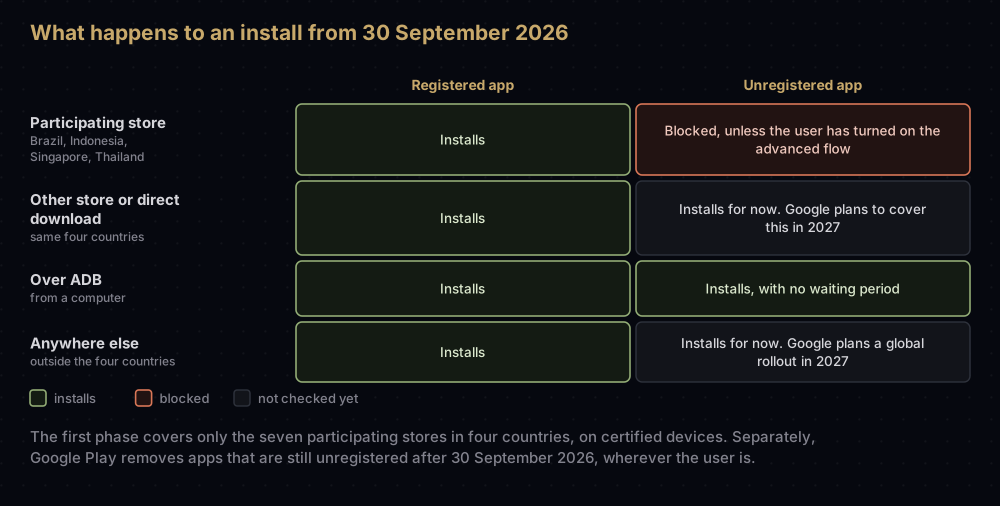
From 30 September 2026, certified Android phones in Brazil, Indonesia, Singapore and Thailand will install an app from seven participating stores, Google Play among them, only if its package name is registered to a developer whose identity Google has verified. Google plans to extend the requirement to all apps on certified devices worldwide in 2027.
For developers, that comes down to three jobs: verify who you are, register your package names, and prove you hold each app's signing key. Most apps on Google Play have already been registered automatically, and installs over ADB are not affected.
Everything below reflects Google's own pages as of 17 September 2026. The programme is new, and Google has already narrowed its first phase once, so check developer.android.com/developer-verification before you rely on a detail.
What changes, and what does not
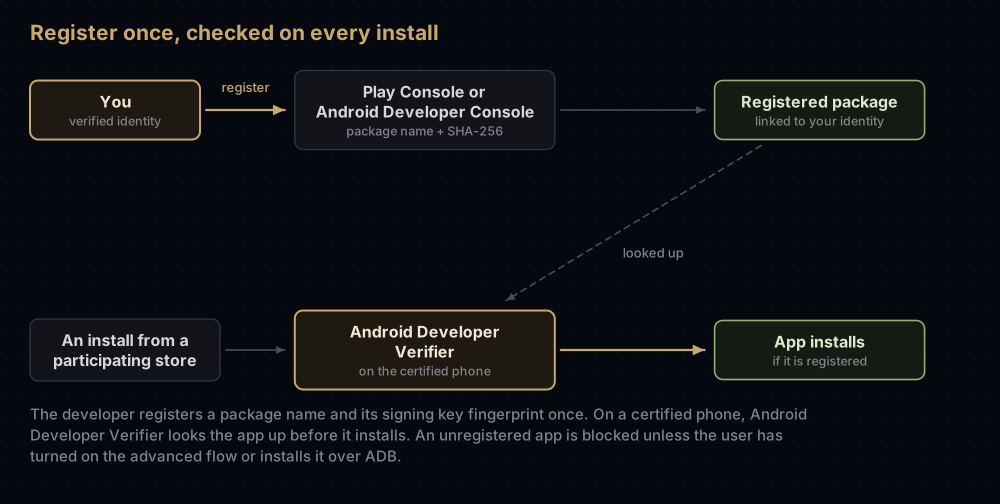
Android already checks that an update is signed with the same key as the installed app. The phone has never checked who holds that key: Android signing certificates are self-signed, with no authority vouching for the name inside. Developer verification adds that missing link. A package name and its signing key are registered to a real person or organisation, and the phone checks the registration before it installs.
Google compares it to the ID check at an airport, which confirms who a traveller is and is separate from screening their bags. Verification confirms who the developer is; Google says it does not collect information about what the app contains or does. The comparison stops short in one place: an airport checks each traveller in person, but the phone never sees your ID. It only checks that the app is registered to a developer Google has verified.
On the phone, the check is done by Android Developer Verifier, a Google system service (package com.google.android.verifier). Google said it would introduce the service in April 2026, and in June said it was rolling it out automatically to most Android devices.
The timeline
| When | What happens |
|---|---|
| 25 August 2025 | Google announces developer verification |
| Late 2025 | Early access for developers who signed up |
| March 2026 | Verification opens to all developers, in Play Console and the new Android Developer Console |
| April to June 2026 | Android Developer Verifier starts reaching phones |
| August 2026 | Limited distribution accounts, the advanced flow for users and the Android Developer Console API launch |
| 30 September 2026 | Registration becomes required for installs from participating stores in Brazil, Indonesia, Singapore and Thailand. Play apps that are still unregistered are removed from Google Play |
| 2027 | Google plans to expand the requirement to all apps on certified devices worldwide |
The seven participating stores are Google Play, HONOR App Market, OPPO App Market, Galaxy Store, Palm Store, V-Appstore and GetApps. Google says the verification capability will soon be expanded to all third-party Android app stores.
The first phase is narrower than first announced. The August 2025 announcement, and a March 2026 update, said that from September 2026 any app installed on a certified device in the four countries would need to be registered. Google's June 2026 update and its current FAQ limit the first phase to the seven stores: if users download your app directly, or from another store, the requirement does not apply to it yet. Some Google pages still use the broader wording, so read the FAQ's date stamps.
Google's pages also disagree on Android versions. The developer pages say certified devices running Android 7 or higher; the Android Help page for users says Android 8 and up.
Who is affected
| If you... | What Google asks of you |
|---|---|
| Publish only on Google Play | Check Play Console and register any app that was not registered automatically |
| Publish on Google Play and elsewhere | Use Play Console for everything, including apps you distribute outside Play |
| Distribute only outside Google Play | Create an Android Developer Console account, verify, and register your apps |
| Are a student, teacher or hobbyist | You can use a free limited distribution account, for up to 20 devices |
| Ship apps through your organisation's store to managed devices | Nothing is required, as your IT admin has vetted them. Google still recommends registering |
| Are a developer in a sanctioned country | Excluded from the checks |
Some installs are outside the rules altogether. Google's help pages say AOSP builds and devices that are not certified are exempt, as are regions where Google Mobile Services are unsupported. For apps distributed outside Play, enforcement in the four countries covers phones and tablets only. For apps on Play, every form factor must be registered.
If you publish on Google Play
Most Play developers have little to do. An identity you already verified in Play Console is reused; check it under Settings > Developer account.
Google says 99% of apps on Play were registered automatically, and apps that use Play App Signing are claimed automatically. To find the rest:
- Look for the notice above the app list on the Play Console Home page.
- Open the Android developer verification page, which shows the registration status of each app.
- For any app still unregistered, follow the prompts: pick your key from the list of eligible keys, then sign and upload a small proof-of-ownership APK (described below). Google notes it does not need to be your real app.
The deadline matters beyond the four countries. Google's Play help says apps not registered by 30 September 2026 will be removed from Google Play under the Play Console Requirements policy, and its developer guide calls this "global removal".
New apps are registered as soon as you create them in Play Console. If another developer is already using the package name, Play Console asks you to choose a different one. Apps you distribute outside Play can be registered in Play Console too.
If you distribute only outside Google Play
You need an account in the Android Developer Console, signed in with a Google Account. You make two choices when you create it:
- Account type: Personal, or Organization.
- Distribution: full distribution, with a one-time fee of 25 USD, or limited distribution, which is free and capped at 20 devices.
What Google asks for depends on the account type:
| Personal | Organization | |
|---|---|---|
| Legal name and address | From a linked Google payments profile | From a linked Google payments profile |
| Identity documents, if the payments profile is not already verified | An official government ID | A government ID from someone authorised to act for the organisation, plus official organisation documents |
| D-U-N-S number | Not needed | Required (governments can ask for another route) |
| Website | Not needed | Verified through Google Search Console; social media pages are refused |
| Contact email and phone | Verified with one-time codes | Verified with one-time codes |
A D-U-N-S number is free from Dun & Bradstreet, but it takes time: Google's FAQ says up to 28 days, and its Console help says up to 30. You cannot register package names until identity verification is complete.
Registering a package name
The steps are the same in both consoles:
- Open the package names page, choose Register package name, and enter the name plus a friendly label.
- Add the key. For a package name that has never been seen on Android, you only provide the SHA-256 fingerprint of your app's signing certificate. Google describes this key as the one Android uses to check that updates come from you.
- For a name that already has installs, pick your fingerprint from the list of eligible keys, then prove you hold the private key. Copy the snippet the console shows you into a file named exactly
adi-registration.propertiesin the app'sassetsfolder, build a release APK (an empty project with the same package name is fine), sign it with that key, and upload it. - Wait for the email. The status moves to Registered.
Google's help lists these ways to read the fingerprint, from your keystore or from a signed APK:
keytool -list -v -keystore upload-keystore.jks -alias upload
apksigner verify --print-certs app-release.apk
A few details catch people out:
- A store may hold your key. If a platform such as Samsung Galaxy Store signs your app for you, download the store-signed release APK from that platform and upload that as your proof.
- One package can have several keys. The Android Developer Console lets you add and verify more than one.
- A lost key cannot be registered. Google is blunt: if you lose your signing key, you won't be able to register your packages.
- Shared names go through Google's rules. When several developers have used a package name, Google decides who may register it from install counts:
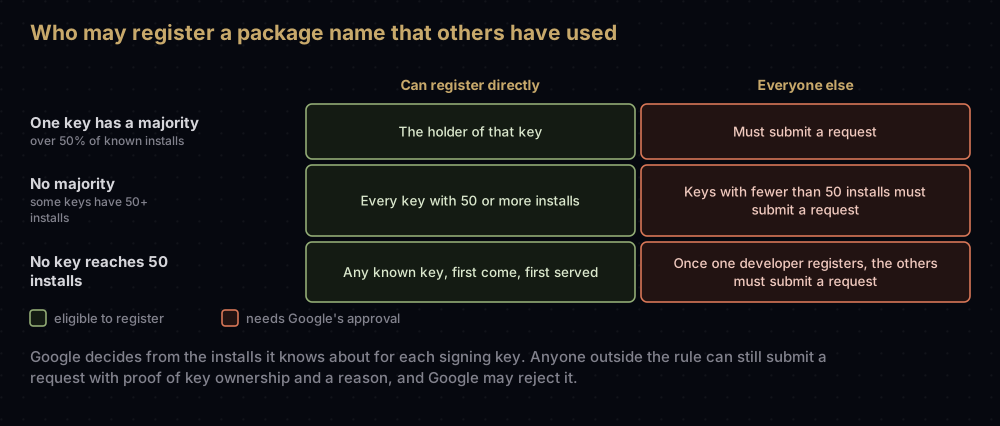
A request needs the same proof of key ownership plus a reason for using the name, and Google may reject it. Unless you have a real need to share a name, Google recommends picking a new one.
Automating it
Google offers two APIs for CI pipelines and bulk work. The Android Developer ID Status API checks whether a package name is already registered and whether your key is eligible. The Android Developer Console API registers package names and manages keys. Both support OAuth delegation, so an app store can do this on your behalf. Android Studio (Panda 4 and later) also shows an app's registration status when you generate a signed App Bundle or APK.
Limited distribution accounts
This account type is for students, teachers and hobbyists who share apps with people they know. It is free, and it needs no government ID. You do need:
- a Google Account with 2-Step Verification turned on
- a linked Google payments profile, for your legal name and address
- a contact email address, which Google does not show publicly
The limits are specific:
- Up to 20 authorised devices at any one time. Devices that are not authorised cannot install or update your apps.
- New package names only. A name that already exists on Android cannot be registered in a limited account.
- Devices are added one by one, on the Devices page. Scan the console's QR code with the device, or send the owner a link. The link shows your developer name, asks them to confirm they know and trust you, and expires after 7 days. The device then generates a code, which you enter in the console.
- Removing a device cannot be undone. The device can no longer install or update your apps until you authorise it again from scratch.
Can you move up to full distribution later? Google's FAQ says a limited account can be migrated to a full one, but not the other way round. The Console help page says the plan cannot be changed once the account exists, and that you would create a new account and transfer your package names. Check the console before you rely on either.
What people using Android will notice
For most people, nothing: Google expects most apps people download to be registered.
When someone tries to install an unregistered app where the rule applies, the phone shows a notification and the install does not go ahead. Google's advice to users is to contact the developer and ask them to complete verification. Anyone unsure whether their phone is certified can check in the Play Store app: profile icon, then Settings, then About.
People who want to install apps from unverified developers anyway can turn on the advanced flow. Google's help gives the switch as Settings > System > Developer options > Allow apps from unverified developers, and the setup runs like this:
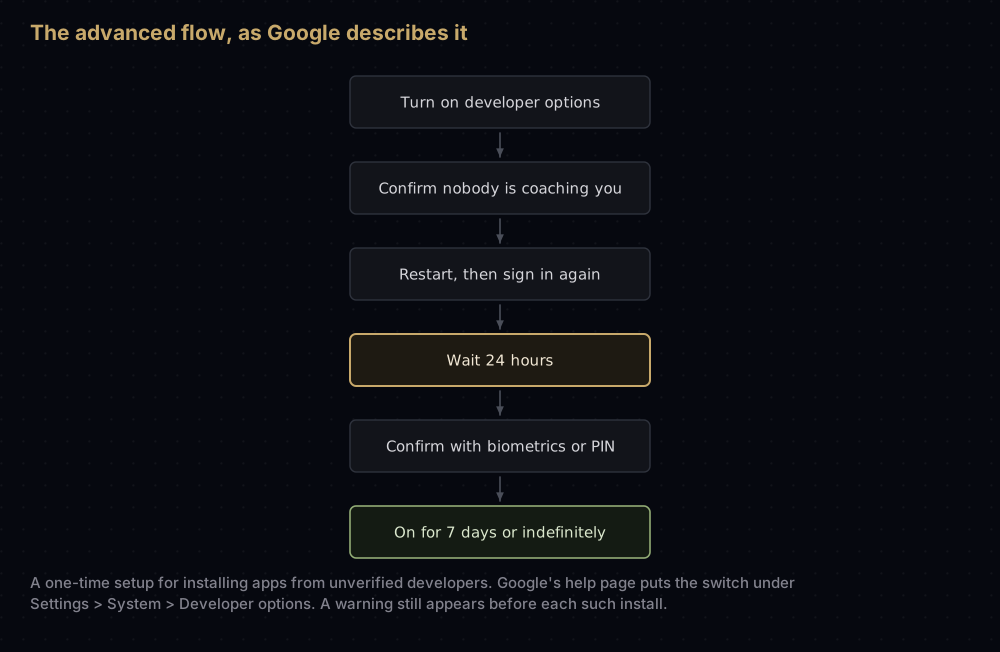
Google explains the waiting period as a defence against scams in which a caller pressures a victim into switching off protections during a live call. Afterwards, installing an unregistered app still shows a warning, with an Install anyway button. Developer options can be switched off again without undoing the setting. If the advanced flow itself is turned off, unregistered apps can no longer be installed or updated, except over ADB.
ADB and your development builds
Installs over ADB need no verification and no waiting period. Google's guide puts it simply: the ADB workflow and experience stay the same. That covers debug builds, test builds and apps you modify for your own device. There is no ADB command to skip the 24-hour wait for the advanced flow itself.
If you work under an NDA, Google says registration does not collect anything about your app's content or purpose, only your identity and the package-to-key link.
Common mistakes
- Leaving the D-U-N-S number to the last week. Google says it can take up to a month.
- Assuming a Play app is covered without looking. Check the Android developer verification page in Play Console; an unregistered app faces removal from Play.
- Registering the wrong fingerprint. The key that counts is the one Android uses to check your updates. How to get SHA-1 and SHA-256 fingerprints covers all three Android keys.
- Putting an existing app in a limited distribution account. Only brand-new package names are accepted there.
- Assuming direct downloads are exempt for good. They are outside the first phase only; Google plans a global rollout in 2027.
Questions people ask
Is Google banning sideloading on Android?
No. Google says verified developers can still distribute outside stores, and that power users can install apps from unverified developers through the advanced flow or ADB.
When does Android developer verification start?
On 30 September 2026, for installs from seven participating stores on certified devices in Brazil, Indonesia, Singapore and Thailand. Google plans a global rollout in 2027.
Do I need to do anything if my app is on Google Play?
Probably very little, but check. Google registered 99% of Play apps automatically. Open the Android developer verification page in Play Console and register anything left by 30 September 2026, or the app will be removed from Play.
How much does developer verification cost?
A full distribution account in the Android Developer Console has a one-time fee of 25 USD, which Google compares to Play's own 25 USD registration fee. Limited distribution accounts are free.
Can I still install APKs with ADB?
Yes. They need no verification and no waiting period.
What is the advanced flow on Android?
A one-time setup that lets a person install apps from unverified developers. It includes a check that nobody is coaching you, a restart, a 24-hour wait and a biometric or PIN confirmation.
Which Android versions does it apply to?
Google's developer pages say certified devices running Android 7 or higher. Its Android Help page for users says Android 8 and up.
What happens if I lost my signing key?
Google says you won't be able to register that package, and without the key you cannot sign updates the installed app will accept, so the way forward is a new package name. If your app uses Play App Signing, Google holds the signing key, and a lost upload key can be reset instead.
Where this comes from
Checked on 17 September 2026:
- Android developer verification, its guides and FAQ, Android Developers
- Android Developer Console guide and limited distribution guide
- Registering Play package names, Play Console Help
- Learn about Android developer verification and Allow app installs from unverified developers, Android Help
- Android Developers Blog: the August 2025 announcement, the advanced flow and the June 2026 update
Keep reading
- How to get SHA-1 and SHA-256 fingerprints: the fingerprint registration asks for.
- Play App Signing: why most Play apps were registered for you.
- keytool commands Android developers actually use: reading and exporting the keys involved.
- "App not installed as package conflicts": the older signature check that runs on every update.
- App signing explained: how signing works on Android and iOS.


