Python was designed to be read. That is not a slogan, it is the decision everything else in the language follows from: no braces, no semicolons, and indentation that forces the shape of the code to match its meaning. It is why a language one man started over a Christmas holiday in 1989 is now the first language taught in most computer science degrees, the language Instagram's backend is written in, and the language nearly every machine-learning library speaks.
This post takes you from "I have never written a line of code" to "I can read and write Python". It covers the core language end to end: installing it, the interactive prompt, comments, variables, every built-in type, arithmetic, strings in detail, operators, conditions, loops, lists, tuples, sets, dictionaries, comprehensions, functions, modules, files, errors, classes, and the parts of the standard library you will genuinely use. It finishes with what Python is actually used for in industry, where it is the wrong tool, and which editor to learn in.
Read it with a Python window open beside you. Every Python block below is real code that runs, and the plain block underneath it is the output that code genuinely produces. Type them in. Change a number and watch what breaks. That habit is worth more than any tutorial, this one included.
Who made Python, and why it has that name
Guido van Rossum was a programmer at CWI, the national research institute for mathematics and computer science in Amsterdam. In December 1989 he had a quiet Christmas holiday and a specific frustration: for the small system-administration programs he kept needing, shell scripts were too crude and C was far too much work. So he started a language of his own. He took the readable syntax and the beginner-friendly feel of ABC — a teaching language he had helped build at the same institute — and added everything ABC lacked, starting with the ability to talk to the operating system.
He posted it publicly in February 1991 as version 0.9.0. Even that first release had functions, exceptions, modules, classes, and the list and dictionary types you will meet later in this post. The core ideas were right early, which is a large part of why the language is still recognisably itself thirty-five years on.
The name has nothing to do with snakes. Guido was reading the published scripts of Monty Python's Flying Circus while he worked, and he wanted a name that was short, slightly irreverent, and memorable. The two-snake logo came much later. The joke came first, and it is still baked into the documentation: when Python's own docs need a meaningless placeholder name they use spam, eggs and ham, which is a sketch reference, not a breakfast preference.
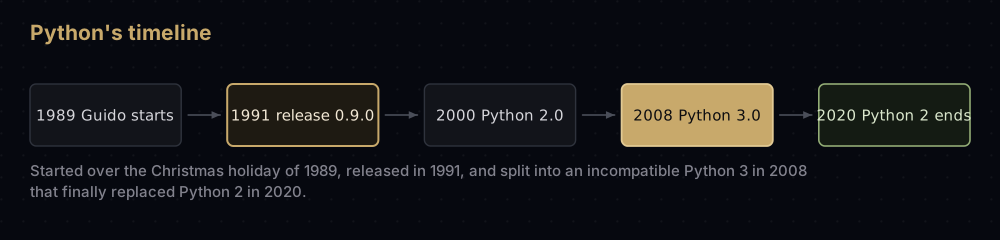
Two version numbers matter to you. Python 2.0 arrived in 2000. Python 3.0 arrived in December 2008 and deliberately broke backwards compatibility to fix design mistakes that could not be fixed any other way: most visibly, print became an ordinary function and text became Unicode by default. The migration took more than a decade, and Python 2 stopped receiving fixes of any kind on 1 January 2020. Everything in this post is Python 3, which is what you get when you install Python today. If you find a tutorial with print "hello" and no brackets, it is from the dead branch of the family tree; close it.
Guido stepped down as Python's "benevolent dictator for life" in 2018. The language is now steered by an elected steering council, and every significant change to it arrives as a numbered proposal called a PEP, a Python Enhancement Proposal. PEP 8, the style guide, is the one you will hear quoted most: four spaces per indent, lower_case_with_underscores for variables and functions, lines kept short.
Why it reads like English
Here is a condition and a loop in a C-style language, of the sort most languages inherited:
if (score >= 50 && attempts < 3) {
    System.out.println("pass");
}
Three kinds of punctuation are doing structural work there: brackets around the condition, && for "and", and braces to mark where the block starts and ends. The indentation is decoration — the compiler ignores it entirely, so code can be indented in a way that actively lies about what it does.
Python removes all three. The condition needs no brackets, and is spelled and, and the block is marked by indentation alone, introduced by a colon:
names = ["Ada", "Grace", "Guido"]

if "Grace" in names and len(names) < 10:
    print("Grace is here, and the list is short")

for position, person in enumerate(names, start=1):
print(position, person)Grace is here, and the list is short
1 Ada
2 Grace
3 GuidoRead that first line aloud: if "Grace" in names and the length of names is less than 10. There is nothing to translate. The cost is that whitespace is now load-bearing: indent by the wrong amount and the program's meaning changes or it refuses to run. Beginners trip on this for about a week and then never think about it again, and the payoff is that all Python in the world is indented the same way. Use four spaces per level and let your editor insert them when you press Tab.
Installing Python and running your first program
Go to python.org, open the Downloads page, and take the installer it offers for your operating system. On Windows, tick the box labelled Add python.exe to PATH on the first screen of the installer: skipping it is the single most common reason a beginner's terminal replies "python is not recognised". On macOS the installer adds a python3 command. Most Linux distributions ship Python already.
Then open a terminal (Command Prompt or PowerShell on Windows, Terminal on macOS and Linux), and check it:
$ python3 --version
Python 3.12.4
On Windows that command is usually python --version or py --version. Any version starting with 3. is fine; this post works on Python 3.9 and newer. If you get an error instead of a version number, the installer did not put Python on your PATH, and reinstalling with that box ticked is faster than fixing it by hand.
Now write a program. Make a file called hello.py anywhere you like, with one line in it:
print("Hello, world!")Hello, world!Run it by pointing Python at the file from the same folder:
$ python3 hello.py
Hello, world!
That is the entire cycle: write a text file ending in .py, run python3 thefile.py, read the output. There is no compiler to invoke, no build step, no project file. This is one of the reasons Python is used for quick scripts more than almost anything else.
The REPL: a Python that answers back
Type python3 with no filename and you get an interactive prompt, universally called the REPL: read, evaluate, print, loop. It reads a line, evaluates it, prints the result, and loops back for another one.
$ python3
Python 3.12.4 (main, Jun  6 2024, 18:26:44)
Type "help", "copyright", "credits" or "license" for more information.
>>> 2 + 2
4
>>> name = "Ada"
>>> name.upper()
'ADA'
>>> len(name)
3
>>> exit()
The REPL prints the value of any expression automatically, so you do not need print there. That makes it the best possible scratchpad: when you cannot remember whether "a,b".split(",") returns a list or a string, do not search for it, ask Python. Two built-ins make it a genuine reference: help(str.split) prints the documentation for anything, and dir(str) lists everything a string can do.
Use the REPL for experiments and files for anything you want to keep. Everything in this post can be pasted into either.
Comments and docstrings
A comment starts with a hash mark and runs to the end of the line. Python ignores it completely; it is there for the next human, who is usually you in six months.
# Rates arrive per second from the sensor, so convert once here
# rather than in every function that reads them.
speed_of_light = 299_792_458  # metres per second, exact by definition


def light_travel_time(metres: float) -> float:
    """Return the seconds light needs to cross `metres` in a vacuum."""
    return metres / speed_of_light


print(speed_of_light)
print(light_travel_time(384_400_000))299792458
1.2822203819416964Two things there are worth noticing. Underscores inside a number are ignored by Python and exist purely so a human can see that 299_792_458 has nine digits. And the triple-quoted string on the first line of the function is a docstring, not a comment, but a real string that stays attached to the function. help(light_travel_time) prints it, editors show it when you hover, and documentation tools extract it.
Write comments that explain why. # add one to the counter next to counter += 1 is noise; # the API is 1-indexed, ours is 0-indexed is the comment that saves someone an hour.
Variables and the rules for naming them
A variable is a name pointing at a value. You create one by assigning to it. There is no declaration step and no type to write down.
user_name = "ada"
attempts = 0
attempts = attempts + 1
attempts += 1  # shorthand for the line above

first, second = "left", "right"   # assign two names at once
first, second = second, first     # swap them, no temporary needed

print(user_name, attempts, first, second)ada 2 right leftThe rules for names are short. They may contain letters, digits and underscores; they may not start with a digit; they are case sensitive, so total and Total are two different variables; and they may not be one of Python's roughly thirty-five keywords (if, for, class, import, None, lambda and friends). Beyond the rules there is one convention that matters: separate words with underscores, and spell names out. elapsed_seconds beats es every single time, because you read code far more often than you write it.
One habit to avoid early: do not name a variable after a built-in. Assigning list = [1, 2, 3] works, and then list("abc") stops working for the rest of the program because you have covered the built-in list with your own value. The same trap waits under sum, type, id, str and dict.
The built-in types you start with
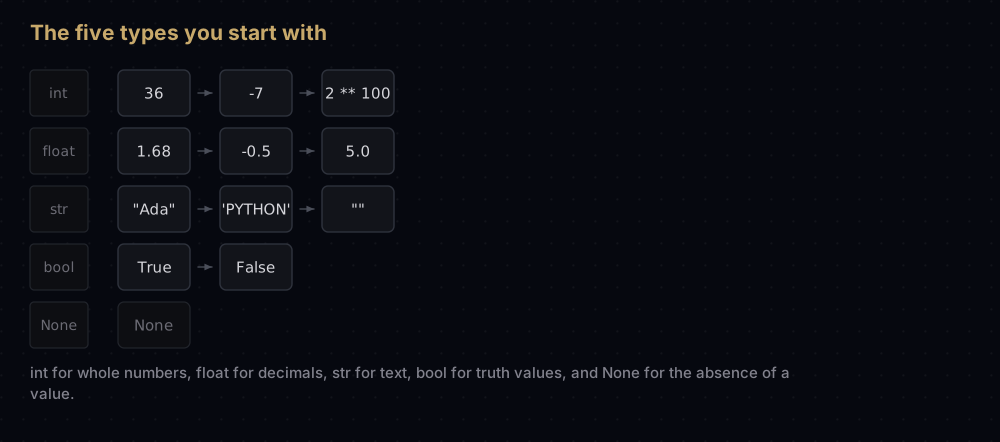
Python has five types you will meet in the first hour. Everything else is built out of them.
name = "Ada Lovelace"
age = 36
height_m = 1.68
is_member = True
middle_name = None

for value in (name, age, height_m, is_member, middle_name):
print(f"{str(value):<13} {type(value).__name__}")Ada Lovelace str
36 int
1.68 float
True bool
None NoneTypeint is a whole number, and in Python it has no size limit: it grows to whatever memory allows, so factorials and huge powers just work. float is a decimal number stored in the hardware's 64-bit format. str is text, written in single or double quotes (Python does not care which, as long as they match). bool is True or False, capitalised. None is the value that means "nothing here". It is what a function returns when it does not return anything, and it is not the same as 0 or the empty string.
type(value) reports the type of anything, which is the fastest way to answer "why is this line failing" for a beginner. Nine times out of ten the answer is that a number is secretly a string.
Numbers and arithmetic
The four operators you expect behave as you expect, and then there are three more that carry real weight in algorithm work.
print(7 + 3, 7 - 3, 7 * 3)
print(7 / 3)
print(7 // 3, 7 % 3, 7 ** 3)
print(-7 // 2, -7 % 2)
print(10 / 2, type(10 / 2).__name__)
print(0.1 + 0.2)
print(2 ** 100)10 4 21
2.3333333333333335
2 1 343
-4 1
5.0 float
0.30000000000000004
1267650600228229401496703205376Line by line, because three of those results surprise people.
/ always produces a float. 10 / 2 is 5.0, not 5, even though the division is exact. This was one of the changes in Python 3, and it is the right one: division of two integers is not generally an integer, so the result type should not pretend otherwise.
// is floor division — divide, then round down to a whole number. For positive numbers that looks like chopping off the decimals: 7 // 3 is 2. For negatives it does not, which is the trap. -7 // 2 is -4, not -3, because -3.5 rounded down is -4. Floor division is how you find the middle of a list without producing a fractional index, and you will see (low + high) // 2 in every binary search ever written.
% is the remainder, and it pairs with //. 7 % 3 is 1 because 7 is two threes with 1 left over. It is how you test divisibility (n % 2 == 0 means even), how you wrap a counter around a fixed range, and how hash tables choose a bucket. In Python the result always takes the sign of the right-hand operand, so -7 % 2 is 1, not -1.
Two stars are exponentiation. 7 ** 3 is 343. Because integers are unbounded, 2 ** 100 prints all thirty-one of its digits rather than overflowing the way a fixed-width integer would in C or Java.
0.1 + 0.2 is not 0.3. This is not a Python bug, it is how binary floating point works in every language: 0.1 has no exact representation in base 2, exactly as 1/3 has no exact representation in base 10. The tiny error is real and it accumulates. Never compare floats with ==; compare with a tolerance, or use the decimal module when you are handling money.
Strings, in detail
Text is where beginners spend most of their first month, so this section is long on purpose.
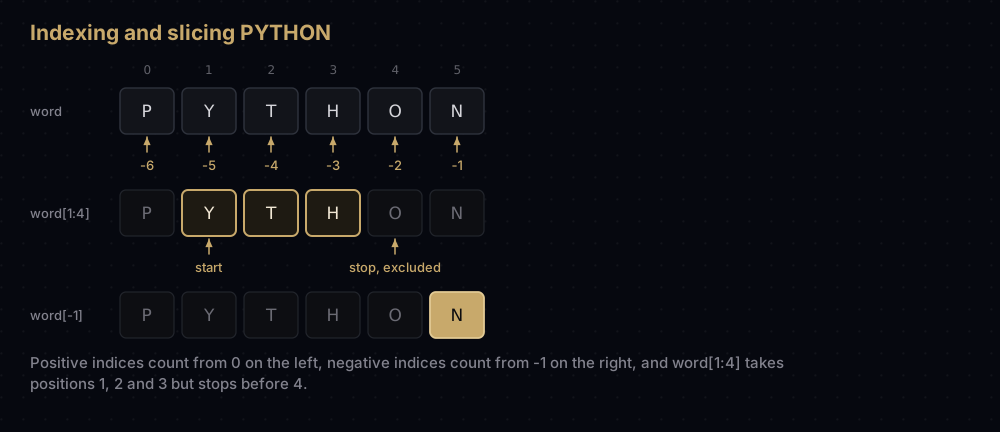
A string is a sequence of characters, and every character has a position, counting from zero. The first character is at index 0. Negative indices count backwards from the end, so index -1 is always the last character, which saves you from writing len(word) - 1 constantly.
word = "PYTHON"

print(word[0], word[3], word[-1], word[-6])
print(word[1:4])
print(word[:3], word[3:], word[:])
print(word[::2], word[::-1])
print(len(word), repr(word[2:2]))P H N P
YTH
PYT HON PYTHON
PTO NOHTYP
6 ''The bracket-with-colons form is a slice, and it is one of the most useful things in the language. word[start:stop] takes everything from start up to but not including stop. That exclusive end looks arbitrary until you notice two consequences: the length of a slice is stop - start when both ends are inside the string, and word[:3] followed by word[3:] reassembles the original with no overlap and no gap. Leave out the start and it means "from the beginning"; leave out the stop and it means "to the end".
A slice can take a third number, the step. word[::2] takes every second character. word[::-1] steps backwards through the whole string, which is the idiomatic way to reverse anything in Python. And a slice that asks for nothing, like word[2:2], quietly gives you an empty string rather than an error, unlike word[99], which raises IndexError.
Methods every string has
A method is a function attached to a value, called with a dot. Strings have around forty; these are the ones that earn their keep.
raw = "  Monty Python's Flying Circus  "
clean = raw.strip()

print(repr(clean))
print(clean.lower())
print(clean.upper())
print(clean.replace("Circus", "Cirque"))
print(clean.split())
print("-".join(["red", "green", "blue"]))
print(clean.startswith("Monty"), clean.endswith("Circus"), "Flying" in clean)
print(clean.find("Python"), clean.count("y"))
print("42".isdigit(), "abc".isalpha(), "Hello World".title())"Monty Python's Flying Circus"
monty python's flying circus
MONTY PYTHON'S FLYING CIRCUS
Monty Python's Flying Cirque
['Monty', "Python's", 'Flying', 'Circus']
red-green-blue
True True True
6 3
True True Hello Worldstrip() removes whitespace from both ends and is the first thing you call on anything a user typed. split() cuts a string into a list, on whitespace by default or on whatever you pass it. join() is its opposite and reads backwards the first time you see it: the string you call it on is the glue, and the list is the material. find() returns the index of a substring or -1 if it is absent. Note that repr() printed the string with double quotes because the text itself contains an apostrophe: Python picks quotes that avoid escaping.
f-strings
An f-string is a string with an f in front of it, and any expression inside braces gets evaluated and dropped into the text. It replaced three older formatting styles and you should use nothing else.
name = "Ada"
score = 0.87654
count = 1234567

print(f"{name} scored {score:.1%} on {count:,} rows")
print(f"pi is roughly {22 / 7:.4f}")
print(f"|{'left':<10}|{'centre':^10}|{'right':>10}|")
print(f"{score=}")Ada scored 87.7% on 1,234,567 rows
pi is roughly 3.1429
|left | centre | right|
score=0.87654Everything after the colon is a format specification. .4f means four digits after the decimal point, .1% multiplies by 100 and adds a percent sign, , groups thousands, and <, ^, > pad to a width by aligning left, centre or right, which is how you print an aligned table without any external library. The = suffix prints the expression and its value, which is a debugging tool worth remembering.
Strings never change
This is the property that catches everyone once.
greeting = "hello"
shouted = greeting.upper()
print(greeting, shouted)

try:
    greeting[0] = "j"   # strings cannot be edited in place
except TypeError as error:
print("TypeError:", error)hello HELLO
TypeError: 'str' object does not support item assignmentStrings are immutable: no method changes a string, every one of them returns a new string. greeting.upper() does not shout at greeting, it hands you a different string and leaves the original alone. So text.strip() on its own line does nothing at all. You have to assign the result somewhere.
Immutability sounds like a limitation and is mostly a gift. Because a string can never change under you, it is safe to use as a dictionary key, safe to share between functions without defensive copying, and safe to cache. The cost shows up in loops. Building a long string by repeatedly writing result = result + piece has to copy the whole accumulated text on every pass, so joining n one-character pieces copies 1 + 2 + 3 + … + n characters, about n²/2 in total, which is O(n²) for a job that should be O(n). Collect the pieces in a list and call "".join(pieces) once at the end instead.
Converting between types
Values do not convert themselves. Python will not add a string to a number and guess what you meant, which feels strict for a week and then saves you from an entire category of bug.
print(int("42") + 8, float("3.5") + 0.5, str(2026) + "!")
print(int(3.99), int(-3.99), round(3.5), round(2.5), round(3.14159, 2))
print(bool(0), bool(""), bool([]), bool("0"), bool([0]))

try:
    int("twelve")
except ValueError as error:
print("ValueError:", error)50 4.0 2026!
3 -3 4 2 3.14
False False False True True
ValueError: invalid literal for int() with base 10: 'twelve'int() on a float truncates towards zero: it throws the decimals away rather than rounding, so int(3.99) is 3 and int(-3.99) is -3. round() genuinely rounds, but note round(2.5) giving 2: Python rounds halves to the nearest even number, which is the standard behaviour for scientific computing because it stops a long column of rounded halves drifting upwards. int("twelve") raises a ValueError rather than returning nothing, which is the correct design: a failed conversion is not a value.
Reading input from the person running the program
input() prints a prompt, waits for a line to be typed, and returns it. It always returns a string, even when the user typed digits, so anything numeric needs converting.
Here is a complete program, greet.py:
name = input("What is your name? ")
year_born = int(input("What year were you born? "))

print(f"Hello, {name}! You turn {2026 - year_born} this year.")
Running it looks like this, with Ada and 1990 typed by the person at the keyboard:
$ python3 greet.py
What is your name? Ada
What year were you born? 1990
Hello, Ada! You turn 36 this year.
Forgetting the int() is the classic first bug: without it, 2026 - year_born fails with TypeError: unsupported operand type(s) for -: 'int' and 'str'. And typing "nineteen ninety" at that prompt crashes the program with a ValueError, which is exactly the situation the exception section below exists to handle.
Operators
You have seen the arithmetic operators. Three more families complete the set.
Comparison operators produce True or False: == (equal), != (not equal), >, <, >=, <=. The double equals is not optional: a single = assigns, and Python will refuse to run a comparison written with one, which is a deliberate protection against a bug that plagues C.
Logical operators are the English words and, or, not. and is true only when both sides are; or is true when either is; not flips a value.
Membership and identity: in asks whether a value appears inside a container, and is asks whether two names point at the same object rather than at equal values.
x, y = 7, 3

print(x > y, x == y, x != y, x >= 7, y <= 3)
print(0 < x < 10)                       # chained, no 'and' needed
print(True and False, True or False, not True)
print("y" in "python", 5 in [1, 2, 3], "a" not in "xyz")

first = [1, 2, 3]
second = [1, 2, 3]
third = first

print(first == second, first is second, first is third)True False True True True
True
False True False
True False True
True False TrueLook hard at the last line. first == second is True because the two lists hold equal values. first is second is False because they are two separate objects that happen to match. first is third is True because third is another name for the very same list. Use == for almost everything; use is only for None, where if value is None is the correct and universal spelling.
and and or also short-circuit: or stops as soon as it finds something true, and stops as soon as it finds something false. That is why if items and items[0] == "x" is safe on an empty list: the second half never runs.
Truthiness
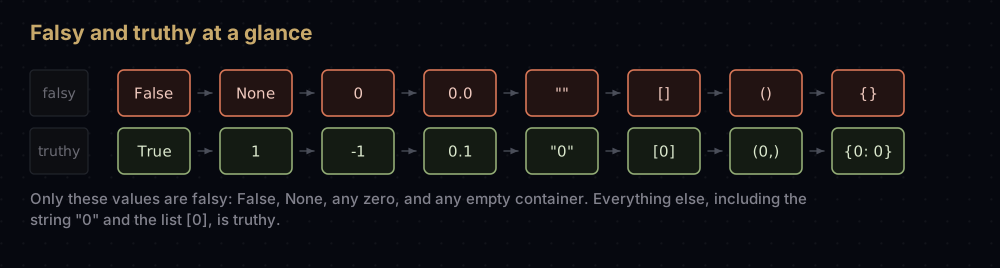
Any value can be used where Python expects a condition, and every value is either "truthy" or "falsy". The falsy list is short enough to memorise, and everything not on it is truthy.
for value in (0, 1, -1, "", "0", [], [0], {}, (), None, 0.0):
print(f"{repr(value):<5} -> {bool(value)}")0 -> False
1 -> True
-1 -> True
'' -> False
'0' -> True
[] -> False
[0] -> True
{} -> False
() -> False
None -> False
0.0 -> FalseFalsy: False, None, zero of any numeric type, and every empty container — empty string, empty list, empty tuple, empty dict, empty set. Everything else is truthy, including -1, the string "0", and a list containing only a zero.
The practical upshot is that if items: is the idiomatic way to ask "does this list have anything in it", rather than if len(items) > 0. Be careful with the one genuine trap: if count: is false when count is 0, which may be a perfectly valid count. When zero and "missing" mean different things, test explicitly with is None.
Making decisions: if, elif, else
def grade(score: int) -> str:
    """Return a letter grade. The first branch that matches wins."""
    if score >= 90:
        return "A"
    elif score >= 80:
        return "B"
    elif score >= 70:
        return "C"
    elif score >= 50:
        return "D"
    else:
        return "F"


for score in (95, 83, 71, 55, 40):
print(score, grade(score))95 A
83 B
71 C
55 D
40 Felif is "else if" contracted, and Python has no other spelling for it. The branches are tested top to bottom and the first true one runs; the rest are skipped without being evaluated. That is why the conditions above can be this loose: by the time score >= 80 is tested, we already know score is below 90.
else is optional. If no branch matches and there is no else, nothing happens and the program carries on.
Order matters enormously here. Flip the checks so score >= 50 comes first and every passing student gets a D, because the first matching branch wins and it now matches everything. When a chain of elifs misbehaves, check the order before you check the conditions.
Loops
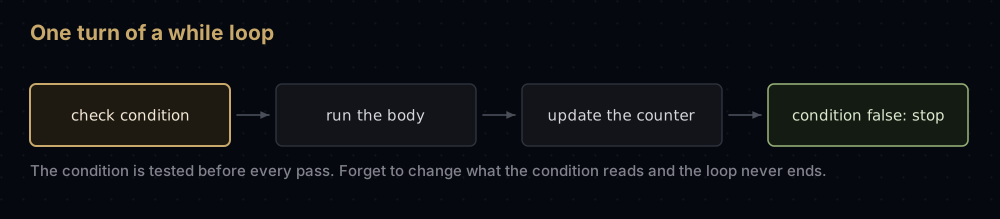
Two loops, and a clear division of labour between them: while repeats until a condition goes false, for repeats once per item in a collection. If you know how many times to go round, use for.
countdown = 3
while countdown > 0:
    print(countdown)
    countdown -= 1
print("lift off")

total, n = 0, 1
while True:                 # loop forever, and leave from the middle
    total += n
    if total > 20:
        break
    n += 1
print(n, total)3
2
1
lift off
6 21The line countdown -= 1 is the most important one in the first loop. A while loop whose condition never becomes false runs forever; forgetting to change the variable the condition tests is how beginners write their first infinite loop. If that happens, press Ctrl+C to stop the program.
The second loop shows the deliberate version: while True with a break in the middle, used when the natural exit point is not at the top. Adding 1 + 2 + 3 + 4 + 5 + 6 reaches 21, which is the first total above 20, so the loop leaves with n at 6.
for and range
for letter in "abc":
    print(letter)

print(list(range(5)), list(range(2, 8)), list(range(0, 10, 3)), list(range(5, 0, -1)))

for index, city in enumerate(["Pokhara", "Kathmandu"], start=1):
    print(index, city)

for city, altitude in zip(["Pokhara", "Kathmandu"], [822, 1400]):
print(f"{city} sits at {altitude} m")a
b
c
[0, 1, 2, 3, 4] [2, 3, 4, 5, 6, 7] [0, 3, 6, 9] [5, 4, 3, 2, 1]
1 Pokhara
2 Kathmandu
Pokhara sits at 822 m
Kathmandu sits at 1400 mA for loop walks over anything iterable: a string gives characters, a list gives items, a dictionary gives keys, a file gives lines.
range(stop) counts from 0 up to but not including stop, matching the slice convention exactly, so range(5) gives five numbers starting at zero. range(start, stop) and range(start, stop, step) do what they look like, and a negative step counts down. range does not build a list: it generates numbers as they are needed, which is why range(10_000_000) costs nothing until you loop over it. Wrap it in list() only when you want to see it, as above.
Two helpers appear constantly. enumerate gives you the index alongside the item, so you never need to write for i in range(len(items)). zip walks two or more sequences in step, stopping when the shortest runs out.
break, continue, and the loop's else
def first_divisor(n: int) -> int:
    """Return the smallest divisor of n above 1, or n itself when n is prime."""
    for candidate in range(2, n):
        if n % candidate:      # non-zero remainder is truthy: not a divisor
            continue
        return candidate       # found one, stop looking
    return n


print(91, first_divisor(91))
print(97, first_divisor(97))

for candidate in range(2, 10):
    if 97 % candidate == 0:
        print("97 divides by", candidate)
        break
else:
print("no divisor below 10, so the loop finished without breaking")91 7
97 97
no divisor below 10, so the loop finished without breakingbreak leaves the loop immediately. continue skips the rest of this iteration and starts the next one. Both work in while and for loops, and both apply to the innermost loop only.
The else attached to a for loop is unusual enough that most people misread it. It runs when the loop finished without breaking. Read it as "no break" rather than "otherwise", and it becomes genuinely useful for searches: the break means "found it", the else means "went through everything and found nothing".
Lists
A list is an ordered, changeable collection written in square brackets. It is the container you will reach for by default, and it is what the rest of this series calls an array.
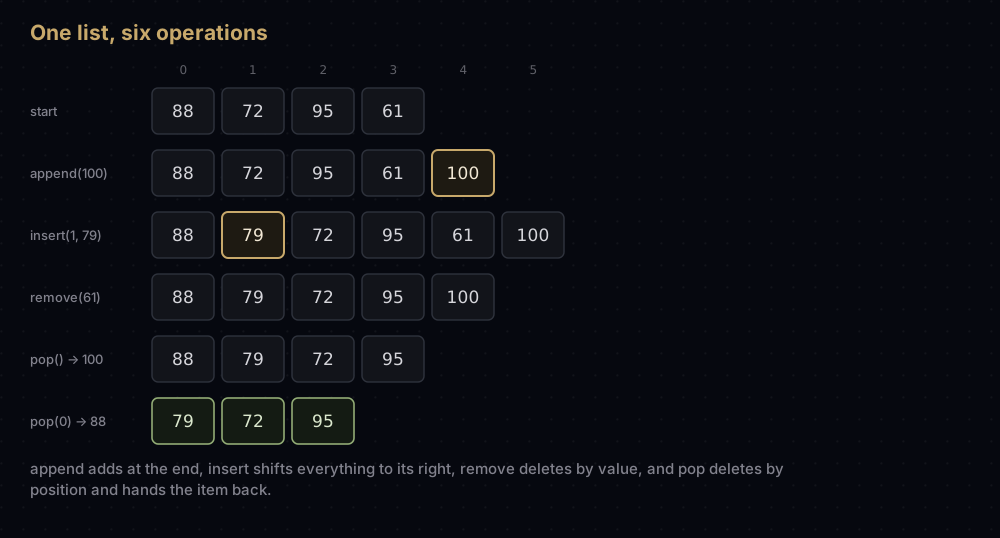
scores = [88, 72, 95, 61]

print(scores[0], scores[-1], scores[1:3], len(scores))

scores.append(100)      # add to the end
scores.insert(1, 79)    # add at a position, shifting the rest right
print(scores)

scores.remove(61)       # delete the first item equal to 61
last = scores.pop()     # remove and return the last item
first = scores.pop(0)   # remove and return the item at index 0
print(scores, last, first)88 61 [72, 95] 4
[88, 79, 72, 95, 61, 100]
[79, 72, 95] 100 88Indexing and slicing work exactly as they do on strings, because both are sequences: index from 0, negative indices count from the right, scores[1:3] gives the items at positions 1 and 2.
The difference is that a list is mutable. append adds one item to the end and is the cheapest thing you can do to a list, because nothing else has to move, except when the list runs out of reserved space and Python copies it into a bigger block. That makes append O(1) amortised: cheap averaged over many appends, not cheap every single time. insert is not free: putting an item at position 1 of a six-item list means shifting five items one slot to the right, and inserting at the front of a million-item list means shifting a million. That is O(n) work per insert, and it is exactly why deques exist. remove deletes by value (it scans for the first match, then closes the gap by shifting the rest left), and raises ValueError if the value is absent. pop deletes by position and hands you the removed item back; pop() at the end costs nothing, pop(0) shifts everything.
Sorting, searching and the rest
values = [5, 1, 4, 2, 8]

values.sort()                  # sorts this list, returns None
print(values)
values.sort(reverse=True)
print(values)
values.reverse()               # flips the order, no sorting involved
print(values)

original = [5, 1, 4]
print(sorted(original), original)   # sorted() builds a new list instead

words = ["banana", "fig", "apple"]
print(sorted(words), sorted(words, key=len))
print(sum(values), min(values), max(values), values.count(4), values.index(4))[1, 2, 4, 5, 8]
[8, 5, 4, 2, 1]
[1, 2, 4, 5, 8]
[1, 4, 5] [5, 1, 4]
['apple', 'banana', 'fig'] ['fig', 'apple', 'banana']
20 1 8 1 2list.sort() rearranges the list in place and returns None. sorted(anything) leaves the original untouched and returns a new list. Writing values = values.sort() is a rite of passage: it sets values to None and deletes your data. The key argument takes a function applied to each item to decide what to sort on: key=len sorts by length. Both use Timsort, which merges already-ordered runs in passes that each touch all n items, and needs about log n passes to reduce them to one run: O(n log n) in the worst case, and the subject of its own post.
index returns the position of the first matching item, and count says how many times a value appears. Both compare items one at a time from the start, so finding the last item in a list of a million costs a million comparisons — O(n). That is fine for a hundred items and the wrong tool for a million. When you find yourself calling index inside a loop, you want a dictionary instead.
The copy trap
This is the most important paragraph in the section, because the bug it describes is silent.
original = [1, 2, 3]
alias = original          # a second name for the SAME list
copy = original[:]        # a new list holding the same values

original.append(4)
print(original, alias, copy)
print(original is alias, original is copy, original == alias)

grid = [[0] * 3] * 2      # two references to ONE row
grid[0][0] = 9
print(grid)

safe = [[0] * 3 for _ in range(2)]   # a fresh row each time round
safe[0][0] = 9
print(safe)[1, 2, 3, 4] [1, 2, 3, 4] [1, 2, 3]
True False True
[[9, 0, 0], [9, 0, 0]]
[[9, 0, 0], [0, 0, 0]]Assignment never copies. alias = original makes a second label for one list, so a change through either name is visible through both. To get an independent list, ask for one: original[:], list(original) or original.copy() all work.
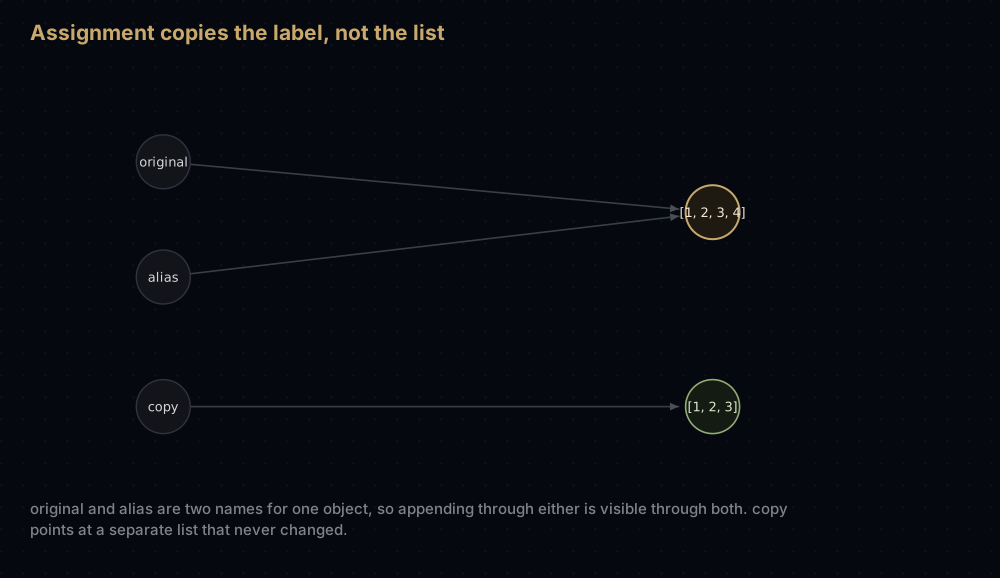
Those three make a shallow copy: a new outer list containing the same inner objects. If the items are themselves lists, the inner lists are still shared, which is what [[0] * 3] * 2 demonstrates: multiplying a list repeats the reference, so writing to grid[0][0] writes to both rows. Build nested structures with a comprehension, or use copy.deepcopy when the nesting is genuinely deep.
Tuples
A tuple is a list that cannot be changed. Round brackets instead of square ones, and no append, remove or item assignment.
point = (3, 4)
x, y = point                    # unpacking, the same trick as multiple assignment
print(point, x, y, len(point))

try:
    point[0] = 10
except TypeError as error:
    print("TypeError:", error)

locations = {(0, 0): "origin", (3, 4): "target"}   # tuples can be dict keys
print(locations[(3, 4)])

single = (5,)                   # the comma makes it a tuple, not the brackets
print(type(single).__name__, type((5)).__name__)(3, 4) 3 4 2
TypeError: 'tuple' object does not support item assignment
target
tuple intImmutability is not a restriction for its own sake, it buys three things. A tuple can be used as a dictionary key or a set member, because those containers need values that will not change their hash halfway through: a list can never be a key. A tuple in a function signature or a return value tells the reader "these belong together and none of them will move". And when a function returns several things, it is really returning one tuple, which is why total, mean = summarise(data) works.
Use a tuple for a fixed group of related values: a coordinate, an RGB colour, a database row. Use a list for a collection of similar things that will grow and shrink.
Sets
A set is an unordered collection with no duplicates, written with braces. Its point is speed. Asking item in some_list compares against the items one by one, so a list of a million values costs up to a million comparisons. Asking item in some_set computes one number from the item — its hash — and looks in the single slot that number points at, so the work does not grow with the size of the set at all. That is O(n) against O(1) on average, and it comes from the hash table underneath.
primes = {2, 3, 5, 7, 11}
evens = {2, 4, 6, 8, 10}

print(sorted(primes | evens))    # union: in either
print(sorted(primes & evens))    # intersection: in both
print(sorted(primes - evens))    # difference: in the first only
print(sorted(primes ^ evens))    # symmetric difference: in exactly one
print(3 in primes, 4 in primes, len(primes))

seen = set()                     # set() for an empty set: {} is an empty dict
for word in ["fig", "kiwi", "fig", "plum", "kiwi"]:
    seen.add(word)
print(sorted(seen))
print(sorted(set([3, 1, 3, 2, 1])))[2, 3, 4, 5, 6, 7, 8, 10, 11]
[2]
[3, 5, 7, 11]
[3, 4, 5, 6, 7, 8, 10, 11]
True False 5
['fig', 'kiwi', 'plum']
[1, 2, 3]Every print above wraps the set in sorted() for one reason: a set has no order, so printing one directly gives you whatever order the hash table happens to produce. Never rely on it.
Two uses cover most real code. Removing duplicates is list(set(items)), and it is a one-liner. Membership testing on a large collection ("have I seen this user before?", "is this word in the stop list?") is what sets are for, and swapping a list for a set there can turn a program that takes a minute into one that takes a second.
Dictionaries
A dictionary maps keys to values. It is the single most useful data structure in Python, and the language itself is built out of them: module contents, object attributes and function keyword arguments are all dictionaries underneath.
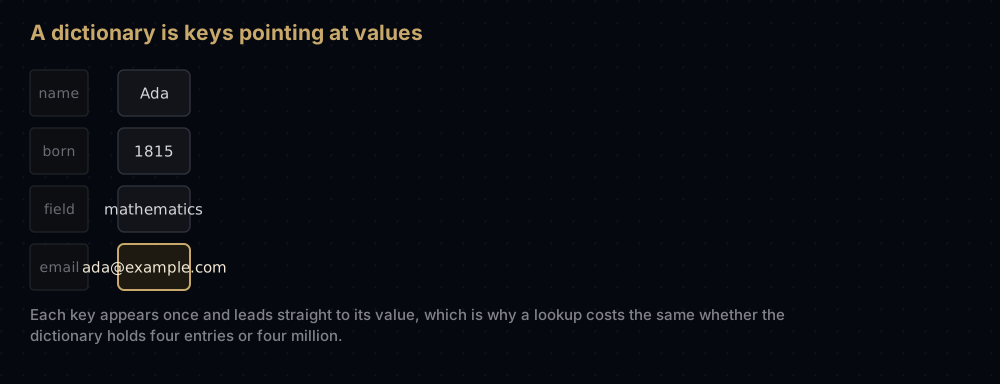
person = {"name": "Ada", "born": 1816, "field": "mathematics"}

print(person["name"], person.get("email"), person.get("email", "unknown"))

person["email"] = "ada@example.com"   # a new key is added
person["born"] = 1815                 # an existing key is overwritten, not duplicated
print(list(person.keys()))
print(list(person.values()))

for key, value in person.items():
    print(f"  {key}: {value}")

print("born" in person, len(person))
removed = person.pop("email")
print(removed, len(person))Ada None unknown
['name', 'born', 'field', 'email']
['Ada', 1815, 'mathematics', 'ada@example.com']
name: Ada
born: 1815
field: mathematics
email: ada@example.com
True 4
ada@example.com 3person["email"] on a missing key raises KeyError. person.get("email") returns None instead, and person.get("email", "unknown") returns whatever default you pass. Choose deliberately: use the brackets when a missing key is a bug you want to hear about, and get when absence is normal.
keys(), values() and items() give you views to loop over, and items() is the one you want nine times out of ten because it hands you both halves at once. Since Python 3.7 dictionaries keep insertion order, so looping over one is predictable. That is a language guarantee now, not an implementation accident.
Lookup by key is O(1) on average, the same as a set, and for the same reason. That is what makes dictionaries the standard fix for a slow program: any time you are scanning a list to find a matching record, a dictionary keyed by that field turns the scan into a single lookup.
Nested dictionaries
Real data is rarely flat. A dictionary's values can be lists, or other dictionaries, as deep as you need.
library = {
    "python": {"created": 1991, "creator": "Guido van Rossum"},
    "c": {"created": 1972, "creator": "Dennis Ritchie"},
}

print(library["python"]["creator"])

for language, facts in library.items():
    print(f"{language:<7} {facts['created']}  {facts['creator']}")

library["python"]["paradigms"] = ["procedural", "object-oriented"]
print(library["python"]["paradigms"][1])Guido van Rossum
python 1991 Guido van Rossum
c 1972 Dennis Ritchie
object-orientedRead the chained brackets left to right: library["python"] is a dictionary, so ["creator"] picks a key out of that one. This is exactly the shape data arrives in from a web API, which is why every Python program that touches JSON is doing this within three lines.
Comprehensions
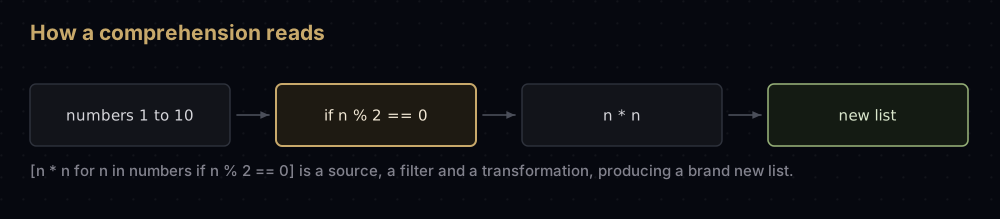
A comprehension builds a container from a loop, in one expression. It is the most distinctively Python thing in the language, and once it clicks you will write it without thinking.
numbers = list(range(1, 11))

squares = [n * n for n in numbers]
print(squares)

evens = [n for n in numbers if n % 2 == 0]
print(evens)

labels = ["even" if n % 2 == 0 else "odd" for n in range(5)]
print(labels)

pairs = [(letter, digit) for letter in "ab" for digit in (1, 2)]
print(pairs)

lengths = {word: len(word) for word in ["fig", "banana", "kiwi"]}
print(lengths)

initials = {word[0] for word in ["fig", "banana", "kiwi", "fennel"]}
print(sorted(initials))

print(sum(n * n for n in numbers)) # a generator: no list is ever built[1, 4, 9, 16, 25, 36, 49, 64, 81, 100]
[2, 4, 6, 8, 10]
['even', 'odd', 'even', 'odd', 'even']
[('a', 1), ('a', 2), ('b', 1), ('b', 2)]
{'fig': 3, 'banana': 6, 'kiwi': 4}
['b', 'f', 'k']
385The shape is always the same: the expression you want, then the for, then an optional if. Read it as "n times n, for each n in numbers, where n is even". The filter sits at the end and drops items; a conditional at the front is a different thing. That is an if/else choosing between two values, and it needs both halves.
Swap the square brackets for braces and you get a dict comprehension (with a key: value pair) or a set comprehension (with a single expression). Swap them for round brackets and you get a generator, which produces values one at a time instead of building the whole container. That last line sums ten squares without ever holding a list of them, which matters when the source has ten million items rather than ten.
Two rules keep comprehensions readable. If it does not fit on one line comfortably, write a normal loop. And if it has more than one for plus an if, write a normal loop. Comprehensions are for replacing three obvious lines with one obvious line, not for winning a golf tournament.
map, filter and lambda
lambda makes a small unnamed function in one expression. map applies a function to every item; filter keeps the items a function says yes to.
numbers = [1, 2, 3, 4, 5, 6]

print(list(map(lambda n: n * n, numbers)))
print([n * n for n in numbers])                 # the same thing

print(list(filter(lambda n: n % 2 == 0, numbers)))
print([n for n in numbers if n % 2 == 0])       # the same thing

words = ["banana", "fig", "apple"]
print(sorted(words, key=lambda word: word[-1]))
print(max(words, key=len))[1, 4, 9, 16, 25, 36]
[1, 4, 9, 16, 25, 36]
[2, 4, 6]
[2, 4, 6]
['banana', 'apple', 'fig']
bananaThe pairs above are deliberate: map and filter do nothing a comprehension cannot do, and the comprehension is shorter and reads left to right in the order things happen. Guido argued for dropping both from the language when Python 3 was designed, on exactly that basis. They survived, but reduce did not. It was moved out of the built-ins into functools, where you have to import it on purpose. map and filter also return lazy iterators rather than lists, so you have to wrap them in list() to see anything, which is one more piece of friction the comprehension does not have.
Where lambda genuinely earns its place is as a key argument, exactly as in the last two lines. Sorting words by their final letter takes a function, and defining a named function for something used once and never referred to again is more ceremony than the job deserves. Anything longer than one short expression should be a proper def with a name.
Functions
A function is a named block of code you can run whenever you like, with different inputs. Functions are how a program stops being a script and starts being software: they name an idea, they let you test one piece in isolation, and they stop you writing the same six lines four times.
def greet(name: str, greeting: str = "Hello") -> str:
    """Return a greeting line for `name`."""
    return f"{greeting}, {name}!"


print(greet("Ada"))
print(greet("Ada", "Namaste"))
print(greet(greeting="Hi", name="Bimal"))   # keyword arguments, any order


def summarise(values: list) -> tuple:
    """Return the total and the mean of `values` as a pair."""
    total = sum(values)
    return total, total / len(values)


total, mean = summarise([2, 4, 6])
print(total, mean)Hello, Ada!
Namaste, Ada!
Hi, Bimal!
12 4.0The parts of the definition, in order: def, the name, the parameters in brackets, the return type after the arrow, a colon, then the indented body.
greeting: str = "Hello" is a default value. Parameters with defaults may be left out by the caller and must come after the ones without. Passing arguments by name, as in the third call, makes the call site readable and frees you from remembering the order.
return sends a value back and ends the function immediately. A function with no return returns None. Returning several values, as summarise does, really returns one tuple that the caller unpacks.
The annotations (name: str, -> str) are type hints. Python does not enforce them at runtime; you can pass a number to name: str and nothing will stop you. They exist for humans and for tools: your editor uses them for autocompletion and to underline mistakes as you type, and a checker like mypy verifies a whole codebase without running it. On any function that will outlive the afternoon, write them.
Default arguments have one sharp edge
def add_bad(item: str, basket: list = []) -> list:
    """The default list is created ONCE, when the function is defined."""
    basket.append(item)
    return basket


print(add_bad("apple"))
print(add_bad("pear"))    # the same list is still there, still holding apple


def add_good(item: str, basket=None) -> list:
    """Use None as the default and build a fresh list per call."""
    if basket is None:
        basket = []
    basket.append(item)
    return basket


print(add_good("apple"))
print(add_good("pear"))['apple']
['apple', 'pear']
['apple']
['pear']The default value is evaluated once, when the def line runs, not on each call. So a mutable default (a list, a dict, a set) is shared by every call that does not supply one, and it accumulates. The fix is always the same: default to None and create the real value inside.
Any number of arguments
def tally(*values: int, label: str = "total", **options) -> str:
    """*values collects extra positional arguments into a tuple,
    **options collects extra keyword arguments into a dict."""
    result = f"{label}: {sum(values)}"
    if options.get("shout"):
        result = result.upper()
    return result


print(tally(1, 2, 3))
print(tally(1, 2, 3, label="score", shout=True))

numbers = [4, 5, 6]
print(tally(*numbers, label="unpacked")) # * spreads a list into argumentstotal: 6
SCORE: 6
unpacked: 15A star before a parameter name collects any extra positional arguments into a tuple; two stars collect any extra keyword arguments into a dictionary. The names args and kwargs are pure convention: the stars do the work. The same stars used at a call work in reverse, spreading a list or a dict back out into separate arguments, which is how you forward arguments through a wrapper function.
Scope
counter = 0            # a module-level (global) variable


def bump() -> int:
    counter = 100      # a NEW local variable; the global is untouched
    return counter


print(bump(), counter)


def bump_global() -> int:
    global counter     # say so explicitly, and now it is the same variable
    counter += 1
    return counter


print(bump_global(), counter)100 0
1 1Names assigned inside a function are local to that call and vanish when it returns. Reading an outer variable works without ceremony, but assigning to one creates a local that shadows it, unless you declare global. Needing global is usually a sign the function should take the value as an argument and return the new one instead: functions that only touch their arguments are the ones you can test.
Recursion, in one paragraph
A function is allowed to call itself. That sounds circular, and it works because each call is given a smaller problem, and because there is a case small enough to answer outright without recursing.
def factorial(n: int) -> int:
    """n! = n x (n-1)!, with 0! and 1! defined as 1."""
    if n <= 1:            # base case: answer directly, stop recursing
        return 1
    return n * factorial(n - 1)


print(factorial(5), factorial(0))120 1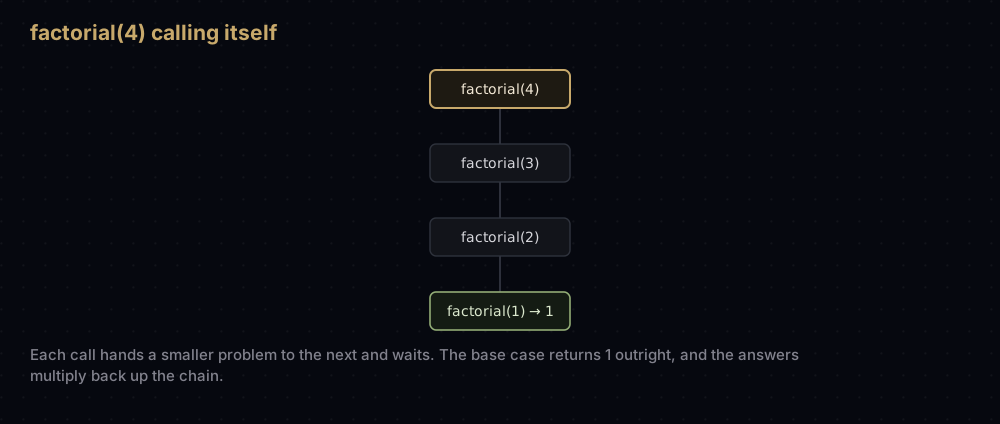
Every call gets its own n and its own place on the call stack, and none of them finish until the innermost one does. Forget the base case and the calls never stop, until Python gives up with RecursionError at around a thousand levels deep. Recursion is the natural way to work with trees, graphs and divide-and-conquer sorting, and it gets a whole post of its own in recursion and backtracking.
Modules, imports, pip and virtual environments
A module is just a Python file. Import it and you get its contents.
import math
from collections import Counter
import statistics as stats

print(math.sqrt(144), math.floor(3.7), math.ceil(3.2), math.gcd(12, 18))
print(round(math.pi, 5), math.inf > 10 ** 100)
print(stats.mean([1, 2, 3, 4]), stats.median([3, 1, 2]))
print(Counter("mississippi").most_common(3))12.0 3 4 6
3.14159 True
2.5 2
[('i', 4), ('s', 4), ('p', 2)]Three import styles, all legitimate. import math brings in the module and you reach through it with math.sqrt. from collections import Counter pulls one name straight into your file. import statistics as stats renames a long module on the way in. Avoid only from module import *, which dumps every name into your file and makes it impossible to see where anything came from.
Your own files work the same way. A file called helpers.py next to your script is imported with import helpers, and its functions are helpers.clean_name(...). That is the entire module system; there is no manifest to edit.
Python ships with a large standard library, around two hundred modules covering maths, dates, JSON, CSV, file paths, HTTP, compression, databases and testing, with nothing to install. Everything in this post uses only that.
For anything else there is pip, the package installer, which fetches from PyPI, the Python Package Index. It runs in the terminal, not inside Python:
$ python3 -m pip install requests
$ python3 -m pip list
$ python3 -m pip uninstall requests
Installing packages system-wide gets ugly fast: two projects want different versions of the same library, and one of them loses. The fix is a virtual environment, a private folder of packages belonging to one project.
$ python3 -m venv .venv          # create it, once per project
$ source .venv/bin/activate      # switch it on (Windows: .venv\Scripts\activate)
(.venv) $ python3 -m pip install requests
(.venv) $ python3 -m pip freeze > requirements.txt
(.venv) $ deactivate
While the environment is active, python3 and pip refer to that folder, so installs are local to the project and cannot break anything else. pip freeze > requirements.txt writes down the exact versions, and pip install -r requirements.txt recreates them on another machine. Make one per project from your very first project; it costs eight seconds and saves whole afternoons.
Reading and writing files
Files are opened with open(), and always inside a with block. The with guarantees the file is closed afterwards, whether the block finished normally or blew up in the middle.
import tempfile
from pathlib import Path

folder = Path(tempfile.mkdtemp())    # a throwaway directory, so this demo is tidy
path = folder / "notes.txt"

with open(path, "w") as handle:      # "w" creates or truncates
    handle.write("first line\n")
    handle.write("second line\n")

with open(path, "a") as handle:      # "a" appends to what is there
    handle.write("third line\n")

with open(path) as handle:           # "r", read, is the default
    print(repr(handle.read()))

with open(path) as handle:           # a file iterates line by line
    for number, line in enumerate(handle, start=1):
        print(number, line.rstrip())

print(path.exists(), path.stat().st_size)
path.unlink()
folder.rmdir()
print(path.exists())'first line\nsecond line\nthird line\n'
1 first line
2 second line
3 third line
True 34
FalseThe modes are "r" to read, "w" to write from scratch, and "a" to append. "w" empties an existing file the moment it opens it, so mixing those two up loses data. This is the one place to be careful.
handle.read() gives you the whole file as one string. Looping over the handle gives one line at a time and never loads more than a line into memory, which is how you process a 10 GB log file on a laptop. Each line keeps its trailing newline, hence the rstrip().
For text that is not plain, use the right module rather than parsing by hand: json for JSON, csv for spreadsheets, pathlib for manipulating paths. Path objects, as above, join with / and carry useful methods like exists(), read_text() and unlink().
Errors and exceptions
When Python cannot do what you asked, it raises an exception. Uncaught, it stops the program and prints a traceback: read those from the bottom up, because the last line names the error and the line above it points at your code.
def safe_divide(a: float, b: float) -> float:
    """Divide, handling the two failures a caller actually hits."""
    try:
        result = a / b
    except ZeroDivisionError:
        print("  cannot divide by zero")
        return float("inf")
    except TypeError as error:
        print("  wrong type:", error)
        return float("nan")
    else:
        print("  the division worked")
        return result
    finally:
        print("  finally always runs")


print(safe_divide(10, 4))
print(safe_divide(10, 0))
print(safe_divide(10, "x")) the division worked
finally always runs
2.5
cannot divide by zero
finally always runs
inf
wrong type: unsupported operand type(s) for /: 'int' and 'str'
finally always runs
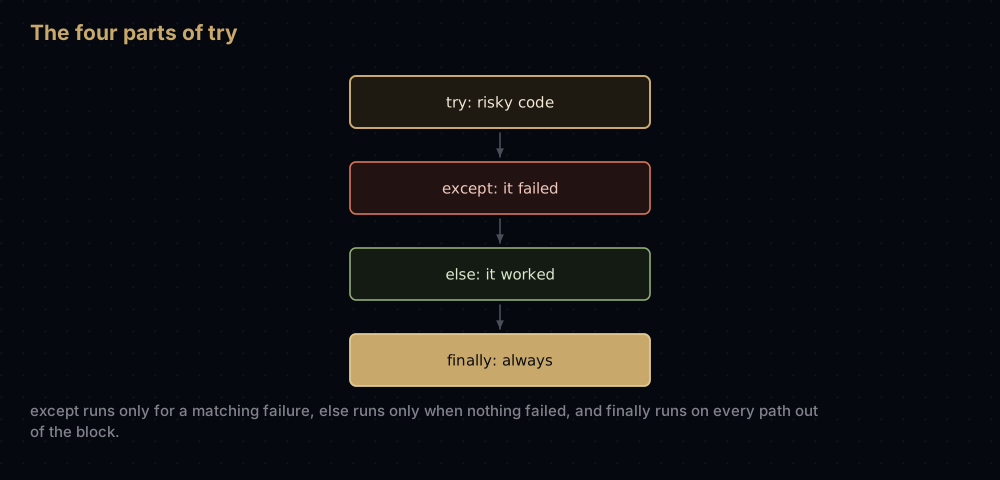
nanThe four parts: try holds the risky code, except catches one kind of failure (you may have several, tested top to bottom), else runs only when nothing was raised, and finally runs on the way out no matter what — even, as above, when the block returns from inside a branch.
Catch the specific exception. A bare except: swallows everything including typos in your own code and Ctrl+C, and turns a five-second bug into an afternoon. The names you will meet first are ValueError (right type, impossible value), TypeError (wrong type entirely), KeyError and IndexError (nothing at that key or position), FileNotFoundError, and ZeroDivisionError.
You can raise exceptions too, and define your own by subclassing an existing one.
class TooYoungError(ValueError):
    """Raised when an age fails the minimum-age rule."""


def check_age(age) -> str:
    """Validate an age, refusing loudly rather than returning something odd."""
    if not isinstance(age, int):
        raise TypeError(f"age must be a whole number, got {type(age).__name__}")
    if age < 13:
        raise TooYoungError(f"{age} is below the minimum age of 13")
    return "ok"


for candidate in (21, 9, "twelve"):
    try:
        print(candidate, check_age(candidate))
    except (TooYoungError, TypeError) as error:
print(candidate, "rejected:", error)21 ok
9 rejected: 9 is below the minimum age of 13
twelve rejected: age must be a whole number, got strraise throws an exception with a message. Making TooYoungError a subclass of ValueError means callers can catch either the precise error or the general category, which is the whole design of Python's exception hierarchy. One except clause can name several types in brackets.
The house style here is "ask forgiveness, not permission": try the operation and handle the failure, rather than checking every precondition first. Checking is racy for files and slower for dictionaries, and the try version reads better.
Classes and objects
A class is a template for making objects that bundle data with the functions that work on it. You have been using objects all along: every string, list and dictionary is one, and "abc".upper() is a method call on a str object.
class Student:
    """A student with a name and a running list of scores."""

    school = "Pokhara Secondary"        # class attribute: shared by every student

    def __init__(self, name: str, scores: list) -> None:
        self.name = name                # instance attributes: one set per object
        self.scores = list(scores)

    def add_score(self, score: int) -> None:
        """Record one more score for this student."""
        self.scores.append(score)

    def average(self) -> float:
        """Mean of the scores recorded so far."""
        return sum(self.scores) / len(self.scores)

    def __repr__(self) -> str:
        return f"Student({self.name!r}, {self.scores!r})"

    def __len__(self) -> int:
        return len(self.scores)


ada = Student("Ada", [88, 92])
ada.add_score(96)

print(ada)
print(ada.name, ada.average(), len(ada), Student.school)Student('Ada', [88, 92, 96])
Ada 92.0 3 Pokhara Secondary__init__ is the constructor: it runs when you write Student(...) and its job is to attach the starting data to the new object. self is that object, handed to every method as the first parameter. You never pass it at the call site, Python does it for you. Attributes set on self belong to one object; attributes set in the class body, like school, are shared by all of them.
The names wrapped in double underscores are dunder methods, and they are how a class hooks into Python's own syntax. Define __len__ and len(obj) works. Define __repr__ and printing the object shows something useful instead of a memory address. Define __eq__ and == compares objects your way, __lt__ and sorted() can sort them, __add__ and + joins them. This is why the language feels consistent: len works on your class for exactly the same reason it works on a list.
class Prefect(Student):
    """A student with one extra responsibility and a service credit."""

    def __init__(self, name: str, scores: list, house: str) -> None:
        super().__init__(name, scores)   # run Student's setup first
        self.house = house

    def average(self) -> float:
        """Prefects get two points added for service."""
        return super().average() + 2


bimal = Prefect("Bimal", [80, 90], "Blue")

print(bimal.name, bimal.house, bimal.average(), len(bimal))
print(isinstance(bimal, Student), isinstance(ada, Prefect))Bimal Blue 87.0 2
True Falseclass Prefect(Student) means a Prefect is a Student and starts with everything Student has. It adds house, replaces average, and inherits add_score, __len__ and __repr__ untouched, which is why len(bimal) reports 2, the length of its own score list, with no code written for it. super() reaches the parent version of a method, so Prefect.average extends the original rather than copying it. And isinstance(bimal, Student) is True while isinstance(ada, Prefect) is False: every prefect is a student, but not the other way round.
Do not build a class for everything. A function that takes data and returns data is simpler and easier to test. Reach for a class when several functions keep passing the same bundle of values around, or when you want many independent copies of a thing that has both state and behaviour.
The standard library, for algorithm work
Five modules do most of the heavy lifting in the rest of this series. Knowing they exist stops you writing a slower version by hand.
from collections import deque, defaultdict
import heapq
import bisect
import itertools

queue = deque([1, 2, 3])          # a list that is fast at BOTH ends
queue.append(4)
queue.appendleft(0)
print(queue.popleft(), queue.pop(), list(queue))

groups = defaultdict(list)        # missing keys build themselves
for word in ["fig", "fennel", "kiwi"]:
    groups[word[0]].append(word)
print(dict(groups))

heap = [5, 1, 4]                  # a heap: cheap access to the smallest item
heapq.heapify(heap)
heapq.heappush(heap, 0)
print(heapq.heappop(heap), heapq.heappop(heap))

ordered = [10, 20, 30, 40]        # binary search over a sorted list
print(bisect.bisect_left(ordered, 30))
bisect.insort(ordered, 25)
print(ordered)

print(list(itertools.combinations("abc", 2)))
print(list(itertools.accumulate([1, 2, 3, 4])))0 4 [1, 2, 3]
{'f': ['fig', 'fennel'], 'k': ['kiwi']}
0 1
2
[10, 20, 25, 30, 40]
[('a', 'b'), ('a', 'c'), ('b', 'c')]
[1, 3, 6, 10]collections.deque is a double-ended queue: append and pop at either end cost O(1), where a list's insert(0, x) and pop(0) cost O(n) because everything has to shift. Use it for queues and sliding windows. collections.Counter, seen earlier, counts occurrences in one line. collections.defaultdict gives a missing key a default value instead of raising KeyError, which turns the usual "check then create" grouping loop into a single line.
heapq arranges a plain list as a binary heap, so the smallest item is always at index 0 and costs nothing to read. Pushing or popping only has to repair one path from the top of the tree to the bottom, and a binary tree holding n items is about log₂ n levels deep — a million items is twenty levels — so both are O(log n). That is the machinery behind priority queues and Dijkstra's algorithm. bisect searches a sorted list by halving the range still in play at every comparison, which is why a million items takes twenty comparisons rather than a million: O(log n). insort inserts while keeping the order, but only its search is cheap: the insert itself shifts every later element, so insort is O(n). itertools supplies combinations, permutations, products and running totals as lazy iterators. math has sqrt, gcd, factorial, log, inf and the constants.
What Python is actually used for
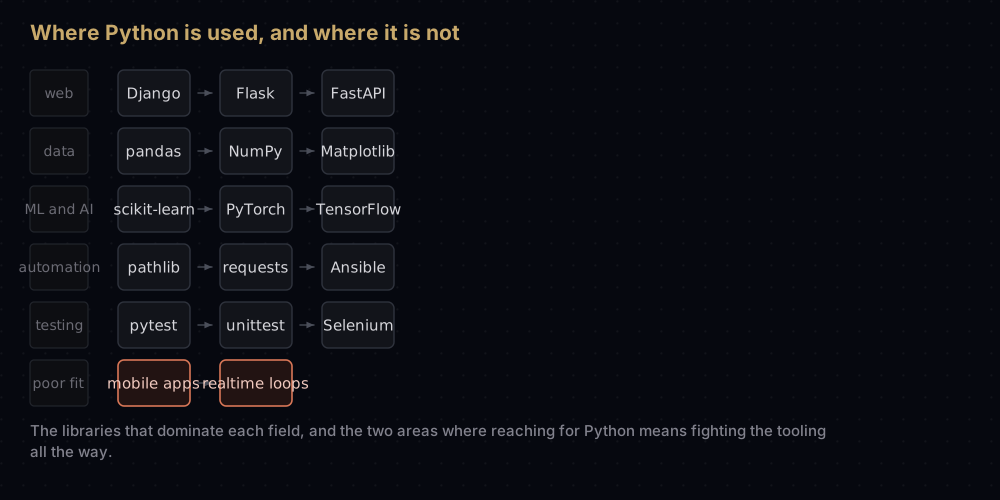
The language is general purpose, but the jobs it dominates are specific ones. Here is where it genuinely wins, with the libraries you would meet on day one of each.
Web backends
Python serves the server side: routing requests, talking to the database, rendering pages or returning JSON. Three frameworks divide the field.
Django is the batteries-included one, released in 2005 out of a newspaper's web team. It gives you an ORM that turns database rows into Python objects, an authentication system, a URL router, templates, and a generated admin interface that is genuinely useful on day one. Instagram's backend is the largest publicly documented Django deployment; Pinterest and Disqus were both built on it.
Flask is the opposite instinct: a small core that does routing and templating, with everything else your choice. It suits small services and APIs where Django's structure would be overhead.
FastAPI is the modern one. It is built on Python's async support for high-concurrency work, and it reads your type hints to validate incoming data and generate interactive API documentation for free: the clearest example anywhere of type hints paying for themselves.
Data analysis
This is where Python overtook the alternatives outright. NumPy provides an array type whose elements sit in one contiguous block of memory with the arithmetic compiled into C, so adding two arrays of a million numbers is one Python call whose loop runs at C speed, instead of a million interpreted steps. pandas builds the DataFrame on top of it: a table with named columns that you can filter, group, join and pivot, which is a spreadsheet with a real language attached. Matplotlib draws the charts, and Jupyter notebooks hold the code, the output and the commentary in one document, which is why nearly every published data analysis you see is a notebook.
Machine learning and AI
Every major machine-learning framework has a Python API, and for most researchers Python is the interface to the field. scikit-learn covers the classical toolkit (regression, decision trees, clustering, model evaluation) with one consistent interface. PyTorch, from Meta's AI research group, and TensorFlow, from Google, are the deep-learning frameworks behind the overwhelming majority of published research and production models, and PyTorch has become the default in research.
Notice what is really happening there: the numerical work runs in C++ and on GPU kernels, and Python describes what to compute. It is the control layer, not the engine. That division is the honest answer to "isn't Python slow for machine learning": the slow part is not the part Python runs.
Automation and scripting
This is what Guido built it for, and it is still the everyday case: rename four hundred files, pull a report from an API and email it, clean a CSV before it goes to a client, back up a folder on a schedule. The standard library alone handles paths, dates, JSON, CSV, zip archives, subprocesses and HTTP.
The same strength shows up as an extension language inside other software. Ansible, the infrastructure automation tool, is written in Python. The AWS command line tool is a Python program. Blender, QGIS and Autodesk Maya all expose Python for scripting, so artists and analysts automate their own work without leaving the application.
Testing
pytest is the standard test runner and one of the best in any language: a test is a plain function whose name starts with test_, and an assertion is a plain assert. unittest ships with Python itself. Browser automation through Selenium or Playwright is often driven from Python too, which is why QA engineering is a common way into the language.
Where Python is a poor fit
Being honest about this matters more than another list of wins.
Mobile apps. iOS and Android are built around Swift and Kotlin, and their toolchains, UI frameworks and app-store expectations assume it. Kivy and BeeWare exist and people ship with them, but you are swimming against the current for the entire project. Use the native tools, or Flutter or React Native.
CPU-bound work with a hard deadline. A tight numeric loop in pure Python is often tens of times slower than the equivalent C, because every operation goes through the interpreter and every integer is a full object. Game engine inner loops, high-frequency trading, video codecs and real-time audio are written in C, C++ or Rust for that reason. In Python the standard answer is to push the hot loop into a library that is already compiled (NumPy, or a C extension), and keep Python for the coordination.
Multi-core CPU work in one process. CPython has a global interpreter lock, so threads have historically not executed Python bytecode in parallel. Threads still help when you are waiting on the network or the disk; for CPU-bound parallelism you reach for multiprocessing or a compiled extension. Recent CPython releases have shipped an optional build without the lock, but it is new and not yet the default.
Small standalone programs. Shipping a Python program to someone who does not have Python means bundling an interpreter, which turns a hundred-line script into a package tens of megabytes wide. And on very small embedded hardware, full CPython does not fit at all; MicroPython is a separate, cut-down implementation for that.
Where to write Python
Your editor matters more than beginners expect. A good one catches a typo before you run the code, shows you what arguments a function takes, and lets you stop the program mid-flight and look at every variable.
VS Code with the Python extension is the recommendation for almost everyone. It is free, runs on every platform, and the official extension adds autocompletion and type checking through Pylance, a proper debugger with breakpoints, an integrated terminal, and support for opening Jupyter notebooks directly. One thing to know on day one: the interpreter is chosen per project from the command palette, and pointing it at your virtual environment is what makes imports resolve correctly.
PyCharm is the full IDE. It costs more in memory and startup time and gives you the strongest refactoring tools, the best debugger, and deep Django and database support. If you came from another JetBrains tool, or you are working in a large codebase, it earns its weight. There is a free tier.
Jupyter Notebook or JupyterLab is not a general editor and is not trying to be. Code lives in cells you run in any order, output and charts appear inline, and the result is a document. That is ideal for data work and for teaching, and poor for building an application: cells run out of order create hidden state that no one can reproduce.
Google Colab is Jupyter hosted by Google in your browser. Nothing to install, nothing to configure, a free GPU for small machine-learning experiments, and a link you can share. If you want to run the code in this post in the next sixty seconds without touching an installer, start here.
Thonny was built specifically for beginners. It bundles its own Python, so installation is one step, and its step debugger visualises the running program (the current line, the value of every variable, the stack of function calls), which makes the abstract parts of this post concrete. It is the best first week, and you will outgrow it.
IDLE ships with Python and needs no download. It is plain, but it works, and it beats having no editor at all.
And keep the REPL open beside whichever you choose. python3 -i script.py runs a file and then drops you into an interactive prompt with all its variables still alive, which is the fastest debugging loop in the language.
Practice
- Write a program that asks for a temperature in Celsius and prints it in Fahrenheit, rounded to one decimal place.
- Count how often each word appears in a sentence typed by the user, and print the three most common, using a dictionary and no imports.
- Read a text file and print only the lines containing a word given at the prompt, with their line numbers.
- Write a
Rectangleclass withwidth,height, anarea()method and a__repr__, then aSquaresubclass that takes one side. - Given a list of
(name, score)tuples, build a dictionary from name to score, then print the names sorted by score, highest first.
Summary
Python is one language with a small core: five basic types, four containers, two loops, functions, classes, and a standard library that already contains most of what you need. Everything in this post is that core, and it is enough to write real programs. What comes next is not more syntax. It is knowing which container to reach for, and why one solution to a problem takes a second while another takes an hour.
| Difficulty | Easy |
| Created by | Guido van Rossum — started December 1989, first release February 1991 |
| Named after | Monty Python's Flying Circus, not the snake |
| Current line | Python 3; Python 2 reached end of life on 1 January 2020 |
| Basic types | int, float, str, bool, None |
| Containers | list (ordered, mutable), tuple (ordered, immutable), set (unique, unordered), dict (key to value) |
| Control flow | if / elif / else, while, for, break, continue, loop else |
| Reusable code | def with defaults, *args, **kwargs, type hints, docstrings; classes with __init__, self, inheritance, dunder methods |
| Fast lookups | dict and set are O(1) on average; list membership is O(n) |
| Batteries | collections, heapq, bisect, itertools, math, json, csv, pathlib |
| Best at | Web backends, data analysis, machine learning, automation, testing, teaching |
| Poor fit for | Mobile apps, CPU-bound realtime code, multi-core work in one process, tiny embedded targets |
| Learn in | VS Code with the Python extension; Google Colab for zero setup; Thonny for week one |
| Next step | The rest of this series, which uses Python to teach data structures and algorithms |
The fastest way to keep going is to stop reading and write something small and useless: a dice game, a file renamer, a script that counts the words in your own notes. Then come back, because the rest of this series is built on exactly the code in this post: every algorithm is written in plain Python, every data structure is built out of the four containers above, and every complexity claim is counted rather than asserted.
Keep reading
- What Is DSA and Why It Matters — the case for the whole subject, in plain language, with no code required.
- Big O Notation — how to tell whether your program will survive a million rows, without running it.
- Arrays and Dynamic Arrays — what a Python list really is in memory, and why
appendis cheap andinsert(0, x)is not. - Bubble Sort in Python — the first algorithm to write yourself, and the cheapest place to learn where n² comes from.
- The Complete DSA Series — all fifty-two posts in reading order.