Every data structure in this series is built on top of one of two ideas: either the elements sit next to each other in memory, or they are scattered and joined by pointers. The array is the first idea, and it is the one you will use most. A Python list is an array, and almost everything surprising about how lists behave follows from that single fact.
Contiguous storage buys you one enormous privilege: you can jump straight to element 4,000,000 without touching the 3,999,999 before it. It also imposes one hard cost: a block of memory has a fixed size, so growing the list means finding a bigger block and copying everything into it. A dynamic array is the trick that makes that cost disappear on average without disappearing in the worst case.
Understanding that trick is what makes append versus insert(0, x) stop being trivia. One is effectively free. The other reads and writes every element in the list, every time you call it, and it is the single most common accidental way to turn a linear program into a quadratic one.
The idea
An array is a run of equally sized slots laid end to end in memory, starting at some address. That is the whole definition, and every property of arrays falls out of it.
Because the slots are the same size and there are no gaps, the machine can compute the location of any element with arithmetic instead of searching:
address of element i = base address + i * bytes per slotOne multiply, one add. That expression does not contain a loop, and it does not mention the length of the array, so reading items[0] and reading items[4_000_000] cost exactly the same. That is what O(1) indexing means, and it is the property that separates arrays from every pointer-based structure.
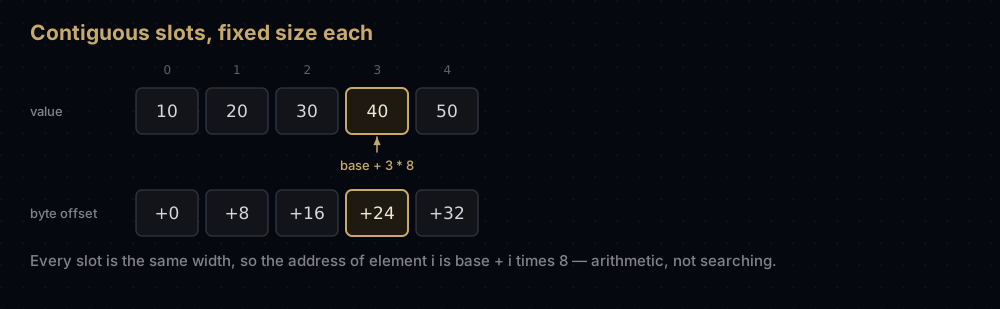
In CPython, a list's slots do not hold your objects. They hold pointers to your objects — eight bytes each on a 64-bit build — which is why a list can mix an integer, a string and another list without breaking the arithmetic. Every slot is the same size because every pointer is the same size.
BASE_ADDRESS = 0x1000  # a made-up start address, so the arithmetic is concrete
SLOT_BYTES = 8         # one object pointer on a 64-bit CPython build


def slot_address(index: int) -> str:
    """Where element `index` lives: one multiply, one add, no searching."""
    return hex(BASE_ADDRESS + index * SLOT_BYTES)


for index in (0, 1, 2, 999_999):
print(f"index {index:>7} lives at {slot_address(index)}")index 0 lives at 0x1000
index 1 lives at 0x1008
index 2 lives at 0x1010
index 999999 lives at 0x7a21f8The last line is the point. Reaching the millionth element took the same one multiplication as reaching the first.
The problem contiguity creates
Memory is handed out in blocks of a fixed size. If your array of five slots is followed immediately by something else, there is no room to make it six. Growing means allocating a new, larger block, copying every element across, and releasing the old one.
So a truly resizable array needs two numbers, not one:
- length — how many slots hold real elements.
- capacity — how many slots have been reserved.
Capacity is always at least length, and usually more. The gap between them is spare room, bought in advance so that most appends are a single write with no copying at all.
Watching it work
Take a buffer with capacity 4 holding four elements. It is full. Append a fifth.
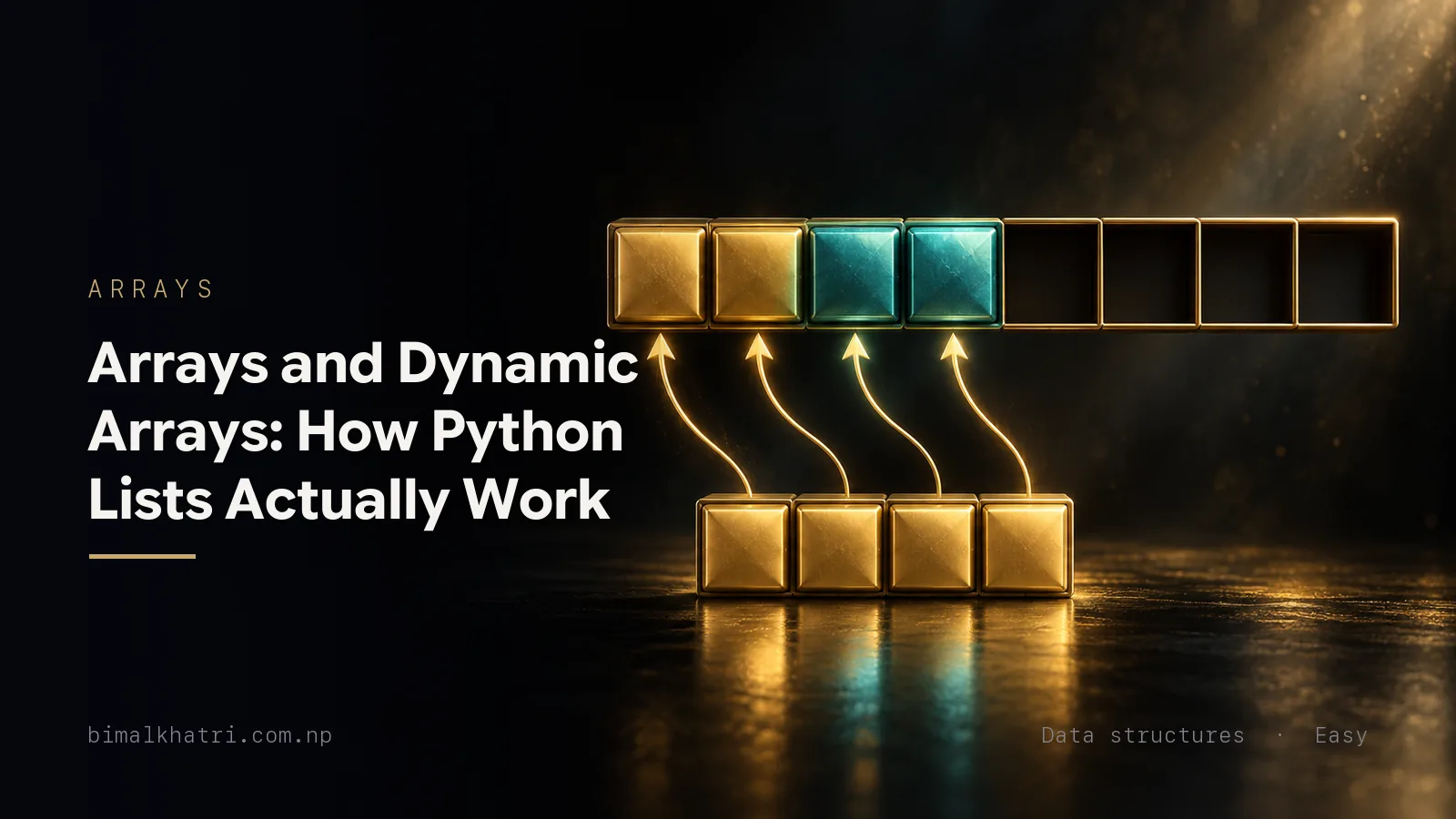
The array asks for a new buffer of capacity 8, copies the four existing elements into it, drops the old buffer, then writes the fifth element into slot 4. That one append cost five writes instead of one. The next three appends cost one write each, because the spare capacity is already there.
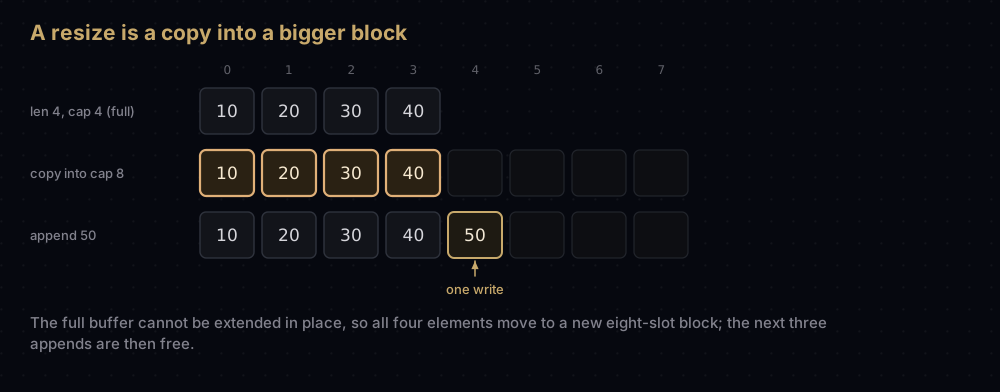
The size of the new buffer is the whole design decision. Grow by a constant amount and you resize constantly. Grow by a constant factor and resizes become exponentially rare. Textbook dynamic arrays double; the growth factor only has to be greater than 1 for the argument to work.
CPython does not double. You can watch its real growth pattern, because sys.getsizeof reports the full byte size of the list object, and subtracting the size of an empty list and dividing by eight recovers the reserved slot count:
import sys

EMPTY_LIST_BYTES = sys.getsizeof([])


def capacity_of(items: list) -> int:
    """Slots CPython has reserved, read back out of the object's byte size."""
    return (sys.getsizeof(items) - EMPTY_LIST_BYTES) // SLOT_BYTES


grown: list[int] = []
previous = 0
print("len  capacity")
for value in range(1, 70):
    grown.append(value)
    if capacity_of(grown) != previous:
        previous = capacity_of(grown)
print(f"{len(grown):>3} {previous:>8}")len capacity
1 4
5 8
9 16
17 24
25 32
33 40
41 52
53 64
65 76Only nine of those 69 appends had to allocate anything. The jumps start out looking like doubling and then flatten: 4, 8, 16, 24, 32, 40, 52, 64, 76. That is not an accident. list_resize in CPython's Objects/listobject.c computes the new capacity as:
new_allocated = ((size_t)newsize + (newsize >> 3) + 6) & ~(size_t)3;Read it as: the requested size, plus one eighth of it, plus six, rounded down to a multiple of four. Growth settles at a factor of 9/8 — about 12.5% headroom — with the + 6 doing the work for tiny lists where an eighth of nothing is nothing. Check it against the table: for a length of 65, that is 65 + 8 + 6 = 79, rounded down to 76. Exactly what the code printed.
Doubling would leave a large list half empty. A list holding 10 million pointers would sit on 20 million slots: 160 MB, half of it reserved and unused. CPython's rule leaves about an eighth spare instead, roughly 10 MB on the same list, and pays for it with more copying. Some of that copying never happens in practice: realloc can extend a block in place instead of moving it. Nothing in CPython relies on that, though: the over-allocation is there so the amortised argument holds even when realloc does move the block.
Note that this over-allocation only happens when a list grows into it. list(range(3)) knows its final length up front, so CPython reserves room for those three elements and no growth headroom on top.
The code
Here is a dynamic array built from scratch. The backing store is a real fixed-size C array of object pointers from ctypes: it supports exactly two operations, read slot i and write slot i, so nothing below is smuggling in a Python list to do the hard part.
import ctypes


class DynamicArray:
    """A resizable array built from a fixed-size buffer plus a growth rule.

    The buffer is a real fixed-size C array of object pointers. It supports
    exactly two operations, "read slot i" and "write slot i", so everything
    else - append, insert, pop - has to be built out of those two.
    """

    def __init__(self, growth: float = 2.0) -> None:
        self._length = 0
        self._capacity = 1
        self._buffer = self._new_buffer(self._capacity)
        self._growth = growth
        self.copies = 0  # elements physically moved by a resize
        self.shifts = 0  # elements physically moved by insert or pop

    @staticmethod
    def _new_buffer(capacity: int) -> ctypes.Array:
        """Raw storage for `capacity` pointers - the C array under a list."""
        return (capacity * ctypes.py_object)()

    def __len__(self) -> int:
        return self._length

    @property
    def capacity(self) -> int:
        """Reserved slots, including the spare ones nothing lives in yet."""
        return self._capacity

    def __getitem__(self, index: int) -> object:
        if not 0 <= index < self._length:
            raise IndexError("index out of range")
        return self._buffer[index]  # base + index * 8, whatever index is

    def append(self, value: object) -> None:
        if self._length == self._capacity:
            self._grow()
        self._buffer[self._length] = value
        self._length += 1

    def _grow(self) -> None:
        # max() keeps the growth rule honest for growth factors of 1.0.
        self._resize(max(int(self._capacity * self._growth), self._capacity + 1))

    def _resize(self, capacity: int) -> None:
        bigger = self._new_buffer(capacity)
        for index in range(self._length):
            bigger[index] = self._buffer[index]
        self.copies += self._length
        self._buffer = bigger
        self._capacity = capacity

    def insert(self, index: int, value: object) -> None:
        """Open a hole at `index` by moving everything after it one slot right."""
        if self._length == self._capacity:
            self._grow()
        for slot in range(self._length, index, -1):
            self._buffer[slot] = self._buffer[slot - 1]
            self.shifts += 1
        self._buffer[index] = value
        self._length += 1

    def pop(self, index: int = -1) -> object:
        """Remove and return one element, closing the gap it leaves behind."""
        if self._length == 0:
            raise IndexError("pop from empty array")
        if index < 0:
            index += self._length
        value = self._buffer[index]
        for slot in range(index, self._length - 1):
            self._buffer[slot] = self._buffer[slot + 1]
            self.shifts += 1
        self._length -= 1
        return value

    def __repr__(self) -> str:
        inside = ", ".join(repr(self._buffer[i]) for i in range(self._length))
        return f"DynamicArray([{inside}])"


numbers = DynamicArray()
for value in [10, 20, 30, 40, 50]:
    numbers.append(value)
    print(f"append {value}: len {len(numbers)}, capacity {numbers.capacity}")

print(numbers, "- elements copied by resizes so far:", numbers.copies)
numbers.insert(0, 5)
print("after insert(0, 5):", numbers, "- elements shifted:", numbers.shifts)
print("pop(0) returned", numbers.pop(0), "- elements shifted:", numbers.shifts)
print("pop() returned", numbers.pop(), "- elements shifted:", numbers.shifts)append 10: len 1, capacity 1
append 20: len 2, capacity 2
append 30: len 3, capacity 4
append 40: len 4, capacity 4
append 50: len 5, capacity 8
DynamicArray([10, 20, 30, 40, 50]) - elements copied by resizes so far: 7
after insert(0, 5): DynamicArray([5, 10, 20, 30, 40, 50]) - elements shifted: 5
pop(0) returned 5 - elements shifted: 10
pop() returned 50 - elements shifted: 10How the code maps to the idea
__getitem__ is the contiguity payoff. It bounds-checks, then hands the index straight to the buffer. There is no loop, so the cost does not depend on the index or on the length. Note that the check is 0 <= index < self._length, not self._capacity: the spare slots exist, but reading one would return whatever the buffer holds there, so length is the only honest boundary.
append is the growth rule in three lines. Full buffer means grow first; then one write and one increment. Trace the printed run against it. Capacity starts at 1, so appending 10 fits. Appending 20 finds length == capacity == 1, doubles to 2 and copies 1 element. Appending 30 doubles to 4 and copies 2. Appending 40 slots into the spare capacity for free. Appending 50 doubles to 8 and copies 4. Total elements copied: 1 + 2 + 4 = 7, which is exactly what the counter reported.
_resize is the expensive part, and it is a plain loop over the existing elements. It costs one write per live element: nothing clever is possible, because the new block is somewhere else in memory. This is the only place copies goes up.
insert shifts backwards, from the end towards the hole. That direction matters. Walking forwards would overwrite self._buffer[slot + 1] before it had been read, and you would smear the first element across the tail of the array. Inserting at index 0 in a list of five moves all five elements: the counter printed exactly 5.
pop shifts forwards, from the hole towards the end, for the mirror-image reason. Popping index 0 from a list of six moved five elements, taking the running total to 10. Popping from the end moved nothing at all: range(4, 4) is empty, so the loop body never runs. That single asymmetry is the most important performance fact about Python lists.
Edge cases fall out of the arithmetic. An empty array pops nothing because the explicit guard raises first. insert at an index equal to the length shifts nothing, because range(length, length, -1) is empty, so it degenerates into an append. No special cases needed.
Complexity
Indexing: O(1)
One multiply and one add, as established. Assigning items[i] = x is the same arithmetic followed by one write.
Appending: O(1) amortised, O(n) worst case
Any single append can be expensive: the one that triggers a resize copies every element. So the worst case for one append really is O(n). The useful claim is about the total.
Start with capacity 1 and double each time. Over n appends, the resizes happen when the length is 1, 2, 4, 8, and so on, up to the largest power of two below n. A resize at length k copies k elements, so the total copying is:
1 + 2 + 4 + 8 + ... + 2^m where 2^m < nThat geometric sum equals 2^(m+1) − 1, which is less than 2n. Add the n plain writes, one per append, and n appends cost fewer than 3n operations in total. Divide by n and each append costs a constant on average. That is what amortised O(1) means: not "always cheap", but "cheap in total, with the expensive steps rare enough to pay for themselves".
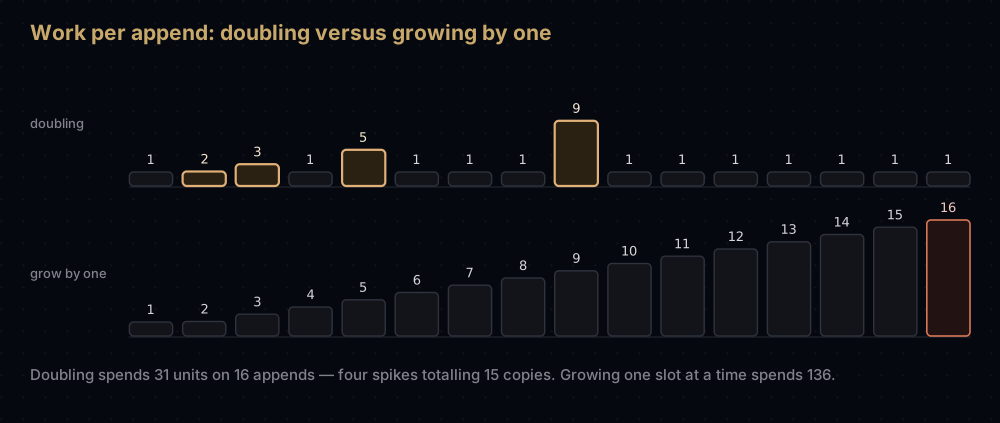
Growing by a constant amount destroys this. Growing by one slot means every single append resizes, copying 1, then 2, then 3 elements, and the total becomes 1 + 2 + … + (n − 1) = n(n − 1) / 2 — quadratic. Measure both:
def copies_for(count: int, growth: float) -> int:
    """Total element moves caused by resizes over `count` appends."""
    array = DynamicArray(growth=growth)
    for value in range(count):
        array.append(value)
    return array.copies


print(f"{'appends':>8}{'doubling':>10}{'per append':>12}{'grow by one':>13}")
for count in (10, 100, 1000, 2000):
    doubling = copies_for(count, 2.0)
    by_one = copies_for(count, 1.0)
print(f"{count:>8}{doubling:>10}{doubling / count:>12.2f}{by_one:>13}") appends doubling per append grow by one
10 15 1.50 45
100 127 1.27 4950
1000 1023 1.02 499500
2000 2047 1.02 1999000The doubling column never reaches two copies per append however large n gets, which is exactly the ceiling the sum gives. It is not pinned near one, though. The ratio is best just before a resize and worst just after one: 1,000 and 2,000 both sit at nearly twice their last resize length, which is why they read 1.02, while 1,025 appends — where the last one triggers the 1,024-element copy — still cost 2,047 copies, a full 2.00 per append. Under two either way, and bounded is the whole claim. The grow-by-one column is n(n − 1) / 2 to the digit: 2000 appends cost 1,999,000 copies.
For a general growth factor g greater than 1, the same sum caps the total copying at about n · g / (g − 1). At g = 2 that ceiling is 2n. At CPython's g = 9/8 it is 9n: several times more copying per element, in exchange for wasting at most an eighth of the memory instead of half.
Inserting or deleting anywhere but the end: O(n)
To insert at index i in a list of length n, every element from i onwards must move one slot right: n − i writes. To delete at index i, the elements after it move one slot left: n − i − 1 writes.
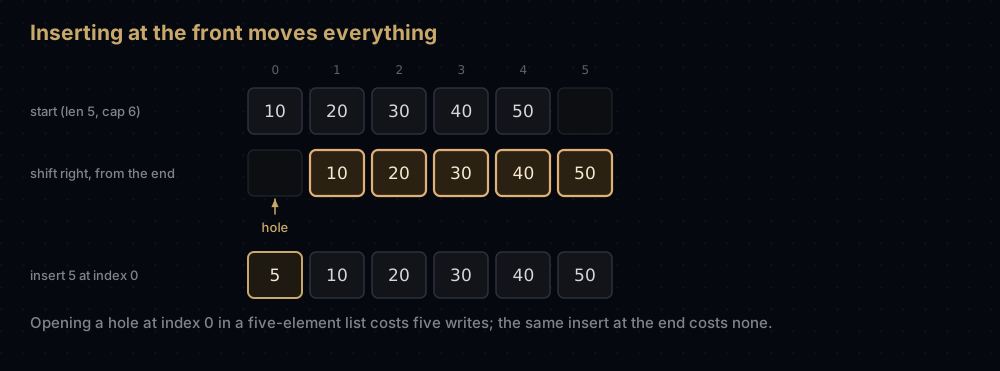
At the very end that is zero moves. At the very front it is all of them:
def elements_moved(length: int, index: int) -> int:
    """How many elements a list-based insert at `index` has to move."""
    return length - index


for index in (0, 250_000, 500_000, 999_999, 1_000_000):
print(f"insert at index {index:>7} moves {elements_moved(1_000_000, index):>7} elements")insert at index 0 moves 1000000 elements
insert at index 250000 moves 750000 elements
insert at index 500000 moves 500000 elements
insert at index 999999 moves 1 elements
insert at index 1000000 moves 0 elementsAveraged over a random position, an insert moves n/2 elements — still O(n). The consequence: a loop that drains a list with items.pop(0) moves (n − 1) + (n − 2) + … + 1 = n(n − 1) / 2 elements, which is O(n²). Draining a 100,000-element list from the front that way costs about five billion moves.
Searching: O(n) unsorted, O(log n) sorted
x in items and items.index(x) scan from the start and stop at the first match, so they are O(n). Contiguity does not help you find a value, only a position. If the list is sorted, bisect.bisect_left gets you to O(log n), and binary search only works at all because indexing is O(1), which is why you cannot binary search a linked list.
Slicing and copying: O(k)
items[a:b] builds a new list and copies b − a pointers into it, so it costs O(k) in the slice length and O(k) extra memory.
data = list(range(10))
print(data[2:6], "- a new 4-element list, 4 pointers copied")
print(len(data[:]), "- a full copy, one new slot per element")[2, 3, 4, 5] - a new 4-element list, 4 pointers copied
10 - a full copy, one new slot per elementitems[:], list(items) and copy.copy(items) are all full O(n) copies. Slicing inside a loop is a common accidental quadratic: for i in range(len(items)): process(items[i:]) copies an average of n/2 elements per iteration.
Space: O(n), with a constant factor worth knowing
A list of n elements holds n pointers, plus the over-allocation slack, plus the objects those pointers point at. Deleting elements always reduces the length, but CPython only reallocates the buffer downwards once the length falls below half the reserved slots, so a list can sit on noticeably more memory than its length suggests.
When to use it, and when not to
Use a list by default. Index by position, iterate, append, pop from the end: a list is the right answer for all of it, and it is the structure the rest of Python is optimised around.
Do not use a list as a queue. pop(0) and insert(0, x) are O(n). Use collections.deque, which is a doubly linked list of fixed-size blocks of 64 pointers, giving O(1) append, appendleft, pop and popleft. It gives up O(1) indexing in the middle to get it: some_deque[n // 2] walks the blocks.
Do not use a list for membership tests in a loop. x in items is O(n). Build a set once and the test becomes O(1) on average.
Do not use a list of Python integers or floats for numeric bulk data. Each element costs a pointer plus a separate heap object:
from array import array

COUNT = 1_000_000
list_bytes = COUNT * SLOT_BYTES + COUNT * sys.getsizeof(1)
array_bytes = COUNT * array("i").itemsize
print(f"1,000,000 distinct ints in a list:      {list_bytes / 1e6:>4.0f} MB")
print(f"1,000,000 distinct ints in array('i'):  {array_bytes / 1e6:>4.0f} MB")
print("one int object on its own:", sys.getsizeof(1), "bytes")1,000,000 distinct ints in a list: 36 MB
1,000,000 distinct ints in array('i'): 4 MB
one int object on its own: 28 bytesThe standard library's array module stores raw machine values inline (four bytes per 'i' element, no pointer, no object), so it is nine times smaller here and far friendlier to the CPU cache. The trade is that every element must be the same primitive type, and every read has to turn the raw bytes back into a Python object. For real numeric work, NumPy arrays are the same idea with vectorised operations on top.
Three shapes of the same structure, side by side:
| Fixed C array | array module | list | |
|---|---|---|---|
| Size | Fixed at creation | Grows, over-allocates | Grows, over-allocates |
| Element type | One, chosen at compile time | One, chosen at creation | Anything, mixed |
| Storage | Values inline | Values inline | Pointers to objects |
| Bytes per int | 4 or 8 | 4 or 8 | 8 + 28 for the object |
| Index | O(1) | O(1) | O(1) |
| Append | Not possible | Amortised O(1) | Amortised O(1) |
Do not use a list when you need constant-time insertion in the middle and you already hold a reference to the position. That is what a linked list is for, though in practice the pointer-chasing usually costs you more than the shifting saves, so measure before switching.
Where it shows up in the real world
Everywhere, under different names. Python's list, bytearray and array.array are dynamic arrays. So are Java's ArrayList, C++'s std::vector, Rust's Vec, JavaScript's dense arrays and Go's slices.
They differ only in the growth factor, and the differences are instructive. Java's ArrayList grows by 1.5x (oldCapacity + (oldCapacity >> 1)). libstdc++ and libc++ double std::vector; MSVC uses 1.5x. Go's slices double while small and then taper towards 1.25x. CPython, as measured above, uses 9/8 plus padding. Every one of them is a point on the same trade-off curve between wasted memory and copying work, and every one of them is greater than 1 because that is what the amortised argument requires.
Two places where the array's O(1) indexing is not just convenient but load-bearing:
- Binary search and everything built on it. Binary search needs to jump to the middle of the range in constant time; on a structure without that, halving the range is pointless.
- Hash tables. A hash table is an array of buckets plus a function that turns a key into an index. Python's
dictandsetboth sit on top of a contiguous array of slots, which is where theirO(1)average lookup comes from.
The over-allocation trick shows up outside memory too. Growing a file, a buffer, or a database page by a constant factor rather than a constant amount is the same argument with the same maths.
Common mistakes
Multiplying a list of lists. [[0] * 3] * 3 does not build three rows. It builds one row and stores three references to it:
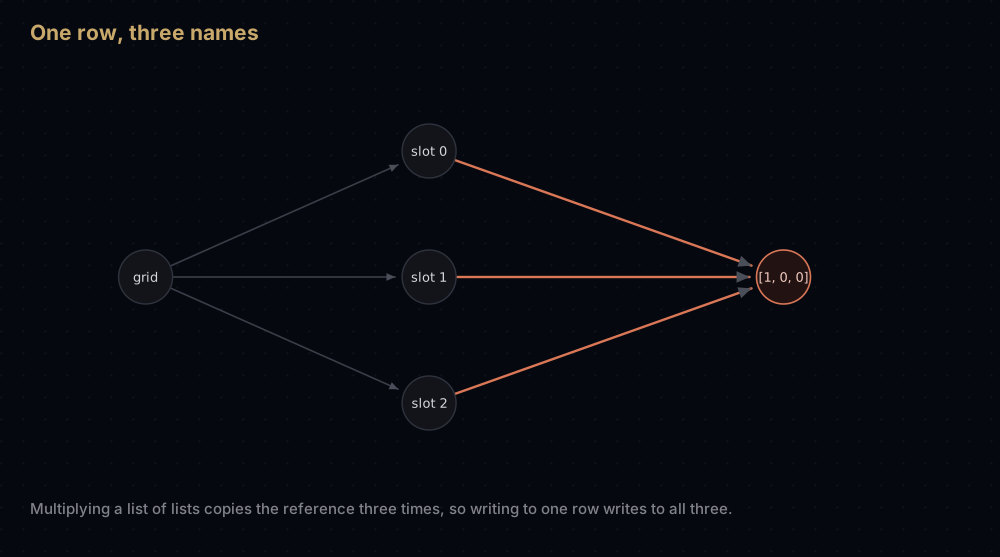
grid = [[0] * 3] * 3  # three references to ONE row object
grid[0][0] = 1
print(grid)
print([row is grid[0] for row in grid])

grid = [[0] * 3 for _ in range(3)]  # a fresh row each time round the loop
grid[0][0] = 1
print(grid)[[1, 0, 0], [1, 0, 0], [1, 0, 0]]
[True, True, True]
[[1, 0, 0], [0, 0, 0], [0, 0, 0]]The is check proves it: all three rows are the same object. The fix is a comprehension, which evaluates [0] * 3 freshly on every iteration. Note that [0] * 3 itself is perfectly safe: integers are immutable, so sharing them cannot bite you. The bug only appears when the repeated element is mutable.
Assuming a slice is a deep copy. rows[:] copies the pointers, not the objects they point at. The outer list is new; the inner lists are shared:
import copy

rows = [[1, 2], [3, 4]]
shallow = rows[:]
shallow[0].append(99)
print("original after editing the shallow copy:", rows)

deep = copy.deepcopy(rows)
deep[0].append(7)
print("original after editing the deep copy: ", rows)original after editing the shallow copy: [[1, 2, 99], [3, 4]]
original after editing the deep copy: [[1, 2, 99], [3, 4]]The first print shows the damage: appending to the copy's row changed the original. The second shows copy.deepcopy doing the right thing: the original is untouched by the deep copy's edit, and still carries the 99 from the first mistake.
Using pop(0) in a loop. The classic accidental quadratic. Reach for collections.deque and popleft(), or iterate forwards and never remove at all.
Removing items while iterating forwards. Deleting shifts every later element down by one, so the loop skips the element that slides into the vacated slot. Build a new list with a comprehension instead, or iterate over a copy.
Building a list with + in a loop. result = result + [item] allocates a whole new list every iteration, which is O(n²) overall. result.append(item) is amortised O(1). result += [item] is fine too — that one mutates in place.
Treating list.remove(x) as cheap. It scans to find the value, O(n), then shifts everything after it, another O(n).
Practice
- Add
__setitem__toDynamicArraysoarray[2] = 99works, with the same bounds check as__getitem__. - Add a
shrinkstep topop: when the length drops below a quarter of the capacity, halve the capacity. Explain why a quarter, and not a half, avoids repeated grow-shrink thrashing at the boundary. - Implement
extend(values)so it resizes at most once, by computing the required capacity before copying anything. - Count the total element moves for building a 10,000-item list with
insert(0, x)versusappend, and check the first against n(n − 1) / 2. - Write a function that removes every even number from a list of one million items, first with
removein a loop and then with a comprehension, and work out the operation count of each before you run them.
Summary
An array is a run of equal-sized slots in contiguous memory, which makes items[i] one multiplication and one addition regardless of i. A dynamic array adds spare capacity and a growth factor, and the geometric sum 1 + 2 + 4 + … below n stays under 2n, which is where amortised O(1) append comes from. Everything a Python list is good at and everything it is bad at is downstream of those two sentences.
The one thing worth memorising: cheap at the end, expensive at the front. If you find yourself working at the front of a list, you want a different structure.
| Difficulty | Easy |
| Index by position | O(1) — base + index * slot size, no loop |
| Append | O(1) amortised — resize copies total under 2n over n appends |
| Append, worst single call | O(n) — the one call that reallocates and copies |
| Insert or delete at the front | O(n) — every element shifts one slot |
| Insert or delete at the end | O(1) amortised — nothing shifts |
| Search, unsorted | O(n) — a linear scan |
| Search, sorted | O(log n) — bisect, only possible because indexing is O(1) |
| Slice of length k | O(k) time and O(k) space |
| Space | O(n) — n pointers plus over-allocation slack plus the objects |
| Memory layout | Contiguous slots; cache friendly to scan, though a list's objects live elsewhere |
| Data structure | Array / list |
| Use it when | You index by position, iterate, or append — the default choice |
| Avoid it when | You add or remove at the front, or need O(1) middle insertion |
| Real-world use | Python list, Java ArrayList, C++ std::vector, Rust Vec, Go slices |
| Python equivalent | list; array.array for packed numbers, collections.deque for both ends |
Keep reading
- Big O Notation — the full treatment of amortised analysis and the geometric sums used above.
- Linked Lists in Python — the opposite trade-off: O(1) insertion anywhere, no O(1) indexing at all.
- Queues and Deques in Python — how
collections.dequegets O(1) at both ends, and when to reach for it. - Hash Tables in Python — an array of buckets plus a hash function, and where O(1) lookup by key comes from.
- Binary Search in Python — the algorithm that exists because arrays index in constant time.