A stack is a pile of plates. You add to the top, you take from the top, and you never pull one out of the middle. That is the entire data structure: two operations and one rule. It is also, at this exact moment, holding the chain of function calls your program is inside, the list of edits your editor is prepared to undo, and the pages your browser's back button will take you to.
The rule has a name (last in, first out, or LIFO), and it sounds like a limitation. It is one. That limitation is exactly what buys the speed: because you only ever touch one end, every operation is a fixed amount of work no matter whether the stack holds three items or three million.
In Python you will rarely write a stack class, because a list already is one: append pushes, pop pops, [-1] peeks. The skill worth learning is not the implementation, it is recognising the shape of a problem that wants a stack. That shape is always the same: the next thing you need to deal with is the most recent thing you set aside.
The idea
A stack supports four operations, and no others:
- push(item) — put an item on top.
- pop() — remove the top item and return it.
- peek() — look at the top item without removing it.
- is_empty() — is there anything in there?
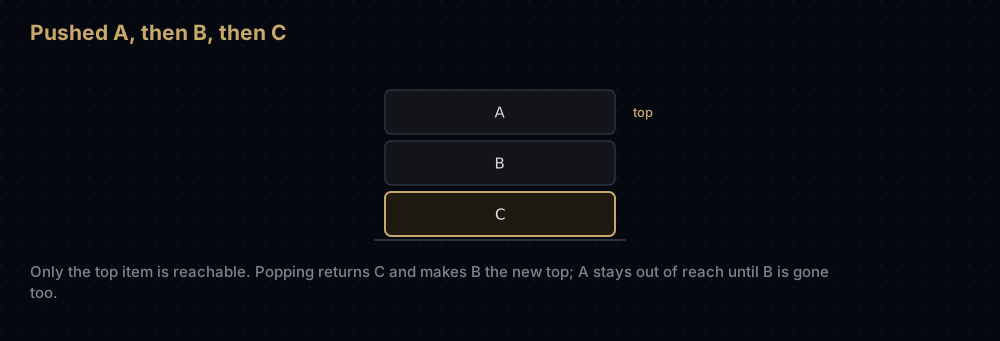
Notice what is missing. There is no "give me the third item", no "search for a value", no "insert in the middle". If the thing you want is at the bottom, you have to remove everything above it first, and once removed those items are gone unless you kept them somewhere. A stack is deliberately a keyhole view of its own contents: one item wide.
That restriction is the point. Because push and pop only ever touch one end, neither of them has to move, shift, re-index or search anything. The cost of a push does not depend on how many items are already stored.
The mirror image of a stack is a queue, which is first in, first out: the supermarket checkout, where the person who arrived first is served first. Stacks and queues take exactly the same items and differ only in which one they hand back, and that one difference changes the shape of every algorithm built on them. Breadth-first search is depth-first search with the stack swapped for a queue.
Watching it work
The clearest small problem that needs a stack is checking whether brackets are balanced: the check your editor runs to tell you a closing parenthesis is missing.
Counting will not do it. The string (] has one opener and one closer, and it is nonsense. The string ([)] has two of each, perfectly balanced by count, and it is still nonsense: the round brackets and the square brackets cross over instead of nesting. What makes a bracket string valid is that every closer matches the most recent opener that is still unclosed. "Most recent, still unfinished" is a stack, word for word.
So: read left to right. Push every opener. On every closer, pop — and check that what came off is the matching opener.
Take ([]{}). The stack starts empty.
- Read
(— an opener, push it. Stack:( - Read
[— push. Stack:([ - Read
]— a closer. Pop gives[, which is the partner of]. Good. Stack:( - Read
{— push. Stack:({ - Read
}— pop gives{, the right partner. Stack:( - Read
)— pop gives(, the right partner. Stack: empty.
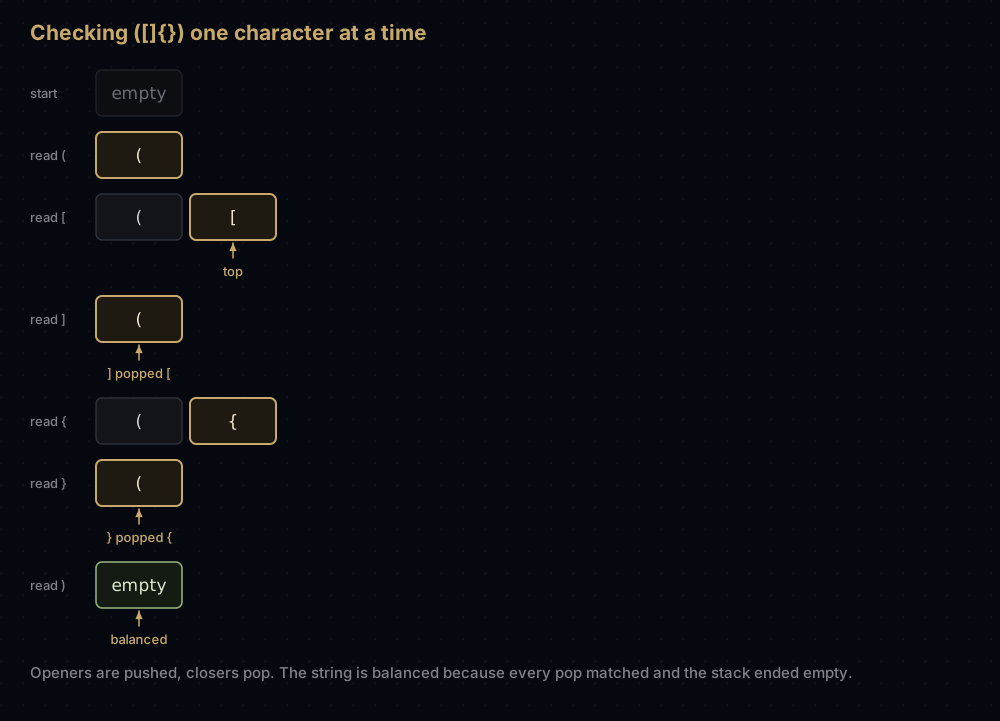
The string ends with an empty stack, so it is balanced. Both ways of failing are visible in that walkthrough:
- A closer arrives and the pop does not match, or there is nothing to pop at all.
([)]fails on the): the top of the stack is[, not(.))((fails immediately, because the very first closer meets an empty stack. - The string ends with items still on the stack.
(()never fails a comparison, but it finishes with one unmatched(left over, so it is unbalanced too. Forgetting this final check is the classic bug.
The code
Start with the version you would actually write at work. A Python list, used from the end, is a stack:
stack: list = []

stack.append("plate 1")   # push
stack.append("plate 2")
stack.append("plate 3")

print(stack)
print(stack[-1])          # peek: read the top without removing it
print(stack.pop())        # pop: remove the top and hand it back
print(stack)
print(len(stack) == 0) # is_empty['plate 1', 'plate 2', 'plate 3']
plate 3
plate 3
['plate 1', 'plate 2']
FalseThat is a complete, correct, fast stack. Everything below is about making the intent explicit rather than making it work.
A named class earns its place when you want the type to forbid the things a stack should not do (no indexing into the middle, no iteration, no insert), and when you want popping an empty stack to be a loud error rather than a mystery.
from typing import Generic, List, TypeVar

T = TypeVar("T")


class Stack(Generic[T]):
    """A last-in, first-out collection backed by a Python list.

    The end of the list is the top of the stack. That single choice is the
    whole design: appending at the end and popping from the end are the only
    list operations that never have to shift the other elements along.
    """

    def __init__(self) -> None:
        self._items: List[T] = []

    def push(self, item: T) -> None:
        """Put an item on top."""
        self._items.append(item)

    def pop(self) -> T:
        """Remove the top item and return it."""
        if not self._items:
            raise IndexError("pop from an empty stack")
        return self._items.pop()

    def peek(self) -> T:
        """Return the top item, leaving it on the stack."""
        if not self._items:
            raise IndexError("peek at an empty stack")
        return self._items[-1]

    def is_empty(self) -> bool:
        return not self._items

    def __len__(self) -> int:
        return len(self._items)


books: Stack = Stack()
for title in ["Dune", "Neuromancer", "Snow Crash"]:
    books.push(title)

print(len(books), books.peek())
print(books.pop(), books.pop())
print(books.is_empty(), len(books))

try:
    Stack().pop()
except IndexError as error:
print(f"IndexError: {error}")3 Snow Crash
Snow Crash Neuromancer
False 1
IndexError: pop from an empty stackNow the bracket checker, which is the walkthrough above with nothing added:
CLOSERS = {")": "(", "]": "[", "}": "{"}


def is_balanced(text: str) -> bool:
    """True if every bracket in `text` is closed by its own kind, in order."""
    stack: list = []

    for character in text:
        if character in "([{":
            stack.append(character)
        elif character in CLOSERS:
            # A closer is only valid against the most recent unclosed opener.
            if not stack or stack.pop() != CLOSERS[character]:
                return False

    # Anything still on the stack was opened and never closed.
    return not stack


for sample in ["([]{})", "a[0] = f(x)", "", "(]", "([)]", "(()", "))(("]:
print(f"{sample!r:14} {is_balanced(sample)}")'([]{})' True
'a[0] = f(x)' True
'' True
'(]' False
'([)]' False
'(()' False
'))((' FalsePrinting the stack after each character reproduces the walkthrough exactly:
def trace_brackets(text: str) -> None:
    """Print the stack after every character, which is the whole algorithm."""
    stack: list = []
    print(f"start     {''.join(stack) or 'empty'}")

    for character in text:
        if character in "([{":
            stack.append(character)
        else:
            stack.pop()
        print(f"read {character}    {''.join(stack) or 'empty'}")


trace_brackets("([]{})")start empty
read ( (
read [ ([
read ] (
read { ({
read } (
read ) emptyHow the code maps to the idea
The top of the stack is the end of the list. This is the only design decision in the whole class, and it is not arbitrary. A Python list keeps its items in one contiguous block of memory. Adding or removing at the end disturbs nothing else. Adding or removing at the front means every remaining item has to slide one slot: list.pop(0) on a list of a million items moves 999,999 of them.
That is the answer to the question people ask here: is a list really an acceptable stack, or is that a beginner shortcut? It is genuinely acceptable. A list is a first-class stack and a terrible queue, and it is the same fact that makes both true. If you need first-in-first-out, reach for collections.deque, which is built from blocks of 64 items chained together and gives you O(1) at both ends.
deque also works as a stack, and it has one trick a list does not, a size cap:
from collections import deque

recent = deque(maxlen=3)          # a stack that forgets anything older than 3

for action in ["type a", "type b", "type c", "type d"]:
    recent.append(action)

print(list(recent))
print(recent.pop(), len(recent))['type b', 'type c', 'type d']
type d 2When the deque is full, pushing a fourth item silently drops the oldest one at the far end. That is precisely what you want for a bounded undo history: keep the last 100 edits, forget the rest, no bookkeeping.
The empty guards are the only edge case a stack has. pop and peek are undefined on an empty stack, so you must decide what happens: raise, or return a sentinel like None. Raising is the better default: a None that means "the stack was empty" is indistinguishable from a None that someone genuinely pushed, and the bug surfaces three functions away from its cause. If you do want the soft version, make it an explicit second method, not a silent fallback.
is_empty returns not self._items, because an empty list is falsy. That is also why while stack: is the idiomatic loop condition. You will see it in every algorithm below.
One more thing that exists and is worth knowing: queue.LifoQueue in the standard library is a stack with locking built in, for handing items between threads. Do not reach for it in single-threaded code; the locks cost you and buy nothing.
Complexity
| Operation | Cost | Why |
|---|---|---|
push | O(1) amortised | writes one slot at the end; the block is only copied when it grows |
pop | O(1) amortised | reads the last slot and shortens the list |
peek | O(1) | a single index lookup |
is_empty | O(1) | a length comparison |
| find an item | O(n) | you must pop everything above it |
| Space | O(n) | one slot per item, plus a little unused slack |
The word doing the work there is amortised, and it is worth earning rather than asserting.
A Python list holds its items in one contiguous block, and that block has a fixed capacity. Most appends just write into a free slot: a couple of machine instructions, genuinely constant. But when the block is full, CPython allocates a larger one (about an eighth larger than the current size, plus a small constant) copies every existing item across, and frees the old block. That copy is O(n) work, and the bigger the list, the rarer it gets: a reallocation at size m copies m items but then leaves room for another m / 8 appends, which works out at eight copied items per append.
So add it all up. Growing a list from empty to n items triggers reallocations at sizes of roughly n / 1.125, then n / 1.125², and so on down to nothing. That sum is a geometric series, and it comes to about 8n item copies in total. Eight copies per append, on average, however large n gets. Eight is a constant, so amortised the cost is O(1), and unlike a genuinely constant operation, the occasional individual append really is slow. That distinction matters only if you have a hard real-time deadline; for everything else, treat push and pop as free.
Popping from the end never moves anything at all. CPython does shrink the block when a list drops below half full, which is another occasional copy paid for by the same argument.
For the algorithms in this post the analysis is then trivial, which is the whole appeal of a stack:
- Bracket matching is O(n) time. Each character causes at most one push and one pop, each O(1). Worst-case space is O(n), from a string like
((((((((that pushes every character and pops none. - Reverse Polish evaluation is O(n) in the number of tokens, for the same reason.
- Iterative depth-first search is O(V + E) — each edge pushes at most one vertex, so there are at most E + 1 pushes and exactly one pop per push, and each vertex reads its neighbour list once, the first time it is popped. Space is O(V) for the
seenset plus whatever the stack holds, and in this version the stack can hold a vertex once per incoming edge, so its worst case is O(E), not O(V).
When to use it, and when not to
Use a stack when the next item to handle is always the most recent one you deferred. Nested structure (brackets, tags, JSON, expression trees), reversal, backtracking, "undo the last thing", "return to where I was", and any recursive algorithm you want to run without recursion.
Do not use one when you need any of the following, and here is what to use instead:
- First in, first out — use
collections.dequewithpopleft. - The smallest or largest item, not the newest — use
heapq. - To look at, count or index arbitrary elements: use a plain list, or a
dictif you are looking things up by key. - Sorted order — a stack has no order but arrival order.
Be honest about the class, too. In Python, wrapping a list in a Stack class is usually ceremony. Name a list stack, use append and pop, and every reader will understand it instantly. The class is worth it in one situation: when the stack is part of an API other people call, and you want the type system to stop them from indexing into it.
And know when not to convert recursion into an explicit stack. Recursion is often the clearer code, and the call stack is free. Convert when you have a real depth problem — see below — or when you need to pause the traversal, save it, or resume it later, which a call stack cannot do.
Where it shows up in the real world
The call stack, and what "stack overflow" actually is
Every running program keeps a stack of call frames. When you call a function, the runtime pushes a frame holding that call's local variables, its arguments and the address to return to. When the function returns, its frame is popped and execution resumes exactly where it left off. That is why a function can call itself a hundred times and each copy keeps its own separate variables, a hundred separate frames.
A Python traceback is literally that stack, printed from the bottom up: the outermost call first, the frame that actually raised last. That is what the header "most recent call last" is telling you. The "call stack" panel in every debugger shows you the same frames.
def depth_of(levels: int) -> int:
    """Recurse `levels` deep. Every call needs its own frame on the stack."""
    if levels == 0:
        return 0
    return 1 + depth_of(levels - 1)


print(depth_of(100))

try:
    print(depth_of(10_000))
except RecursionError:
print("RecursionError: 10,000 nested calls need 10,000 frames at once")100
RecursionError: 10,000 nested calls need 10,000 frames at once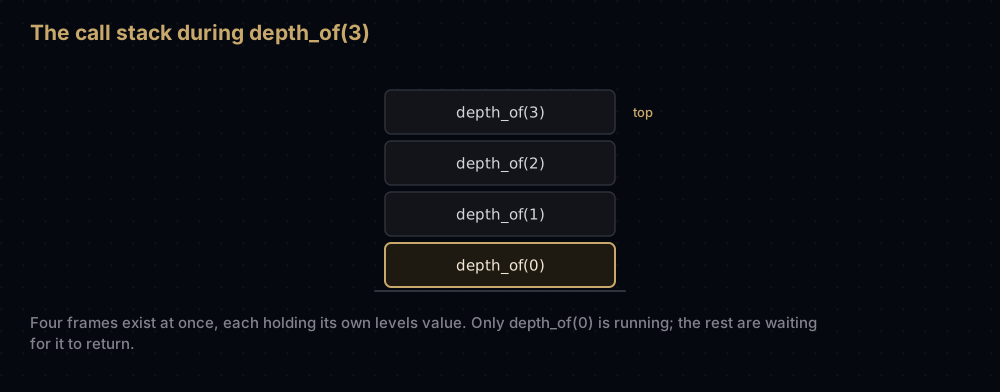
Call depth_of(3) and four frames pile up (depth_of(3), (2), (1), (0)) before a single one returns. Only when the innermost returns 0 do the others unwind, each adding 1 on the way down.
The frames have to live somewhere, and that somewhere is a fixed-size region of memory. Run off the end of it and the program dies: that is a stack overflow, and it is the origin of the website's name. CPython refuses to let you get that far: it counts frames and raises RecursionError at a limit of 1,000 by default, which is a deliberately safe fence well inside the real one. You can raise it with sys.setrecursionlimit, but doing so trades a clean Python exception for a hard interpreter crash if you overshoot the operating system's actual stack.
Undo and redo
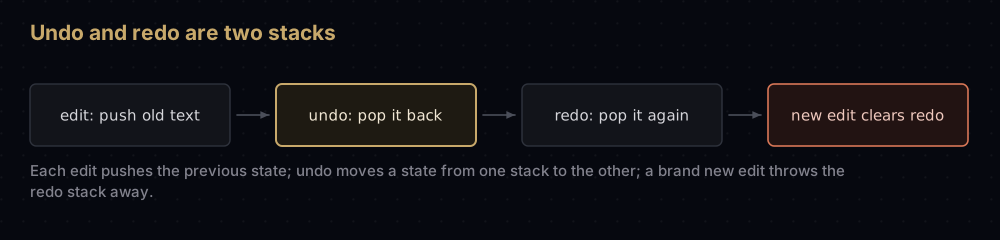
Two stacks, and that is the whole feature. Every edit pushes the previous state onto the undo stack. Ctrl+Z pops it, applies it, and pushes what it replaced onto the redo stack. Redo does the same in reverse.
class TextBuffer:
    """A one-line editor where every edit can be undone and redone."""

    def __init__(self) -> None:
        self.text = ""
        self._undo: list = []
        self._redo: list = []

    def write(self, characters: str) -> None:
        self._undo.append(self.text)   # remember the state before the edit
        self._redo.clear()             # a fresh edit invalidates the redo path
        self.text += characters

    def undo(self) -> None:
        if self._undo:
            self._redo.append(self.text)
            self.text = self._undo.pop()

    def redo(self) -> None:
        if self._redo:
            self._undo.append(self.text)
            self.text = self._redo.pop()


buffer = TextBuffer()
buffer.write("stacks ")
buffer.write("are simple")
print(repr(buffer.text))

buffer.undo()
print(repr(buffer.text))

buffer.redo()
print(repr(buffer.text))

buffer.undo()
buffer.write("are everywhere")
buffer.redo()                          # nothing to redo: the write cleared it
print(repr(buffer.text))'stacks are simple'
'stacks '
'stacks are simple'
'stacks are everywhere'The self._redo.clear() line is the one people leave out, and it is the one that makes the feature behave the way you expect. Undo three times, then type something new, and the three things you undid are no longer reachable: the history you were on has been abandoned. Your browser's back and forward buttons obey the same rule for the same reason: navigating somewhere new throws the forward entries away.
Reverse Polish notation and stack machines
In reverse Polish notation the operator comes after its operands, so 3 4 + 2 - means (3 + 4) - 2. There are no brackets and no precedence rules to remember, because the order of the tokens already says everything, which is exactly why HP's calculators, from the HP-35 to the HP-12C, made you type it that way.
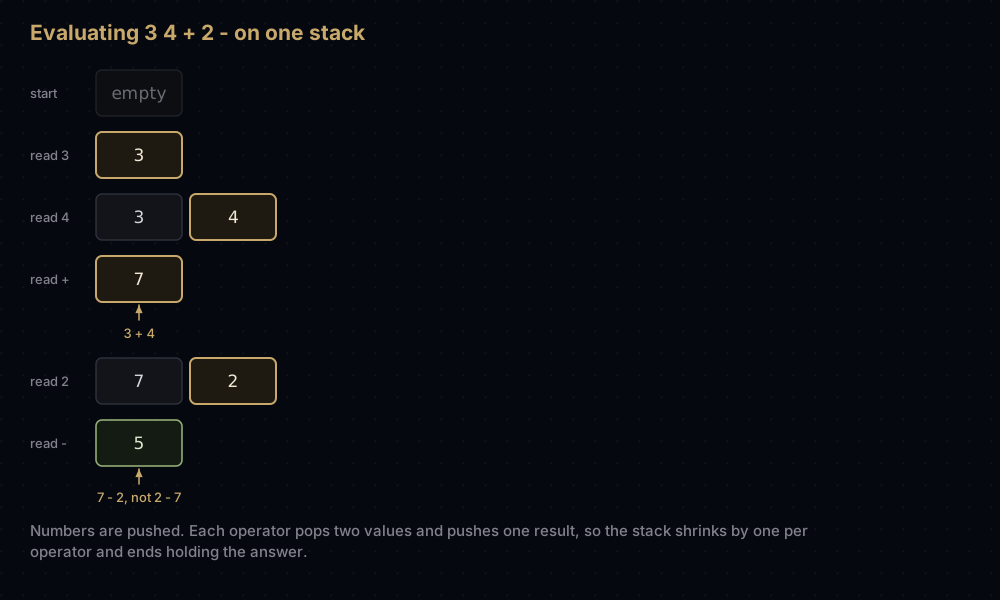
Evaluating it takes one stack and one rule: a number is pushed, an operator pops two values, combines them, and pushes the result.
import operator

OPERATORS = {
    "+": operator.add,
    "-": operator.sub,
    "*": operator.mul,
    "/": operator.truediv,
}


def evaluate_rpn(expression: str) -> float:
    """Evaluate a reverse Polish expression: '3 4 + 2 -' means (3 + 4) - 2."""
    stack: list = []

    for token in expression.split():
        if token in OPERATORS:
            if len(stack) < 2:
                raise ValueError(f"operator {token!r} is missing an operand")
            right = stack.pop()        # the first pop is the RIGHT operand
            left = stack.pop()
            stack.append(OPERATORS[token](left, right))
        else:
            stack.append(float(token))

    if len(stack) != 1:
        raise ValueError("expression did not reduce to a single value")
    return stack[0]


for expression in ["3 4 + 2 -", "5 1 2 + 4 * + 3 -", "1 2 /"]:
    print(f"{expression:18} = {evaluate_rpn(expression):g}")

try:
    evaluate_rpn("3 +")
except ValueError as error:
print(f"ValueError: {error}")3 4 + 2 - = 5
5 1 2 + 4 * + 3 - = 14
1 2 / = 0.5
ValueError: operator '+' is missing an operandWatch the stack for 3 4 + 2 - and the diagram above is reproduced exactly:
def trace_rpn(expression: str) -> None:
    """Print the operand stack after every token."""
    stack: list = []
    print("start     empty")

    for token in expression.split():
        if token in OPERATORS:
            right, left = stack.pop(), stack.pop()
            stack.append(OPERATORS[token](left, right))
        else:
            stack.append(float(token))
        print(f"read {token}    {' '.join(f'{value:g}' for value in stack)}")


trace_rpn("3 4 + 2 -")start empty
read 3 3
read 4 3 4
read + 7
read 2 7 2
read - 5This is not a calculator curiosity. It is how a large share of language runtimes execute code. CPython compiles your source into bytecode for a stack machine: LOAD_FAST pushes a local variable onto an evaluation stack, an arithmetic instruction pops its operands and pushes the result, and RETURN_VALUE pops the answer. The Java Virtual Machine, WebAssembly, PostScript and Forth all work the same way. Run import dis; dis.dis(f) on any function and you are reading pushes and pops.
Turning a recursive walk into an iterative one
Depth-first search on a graph is naturally recursive: visit a node, then visit each unvisited neighbour the same way. The recursion works because the call stack remembers where to come back to.
Take that stack out of the runtime and hold it yourself, and you get the same traversal without the recursion limit:
GRAPH = {
    "A": ["B", "C"],
    "B": ["D"],
    "C": ["D"],
    "D": ["E"],
    "E": [],
}


def dfs_recursive(graph: dict, start: str) -> list:
    """Depth-first order, using Python's own call stack to remember the work."""
    order: list = []
    seen = set()

    def visit(node: str) -> None:
        seen.add(node)
        order.append(node)
        for neighbour in graph[node]:
            if neighbour not in seen:
                visit(neighbour)

    visit(start)
    return order


def dfs_iterative(graph: dict, start: str, match_recursion: bool = True) -> list:
    """The same walk with an explicit stack instead of the call stack."""
    order: list = []
    seen = set()
    stack = [start]

    while stack:
        node = stack.pop()
        if node in seen:
            continue                   # it was pushed twice before being popped
        seen.add(node)
        order.append(node)

        neighbours = graph[node]
        if match_recursion:
            # The last neighbour pushed is the first popped, so push backwards
            # to visit them in the order recursion would.
            neighbours = list(reversed(neighbours))
        for neighbour in neighbours:
            if neighbour not in seen:
                stack.append(neighbour)

    return order


print(dfs_recursive(GRAPH, "A"))
print(dfs_iterative(GRAPH, "A"))
print(dfs_iterative(GRAPH, "A", match_recursion=False))['A', 'B', 'D', 'E', 'C']
['A', 'B', 'D', 'E', 'C']
['A', 'C', 'D', 'E', 'B']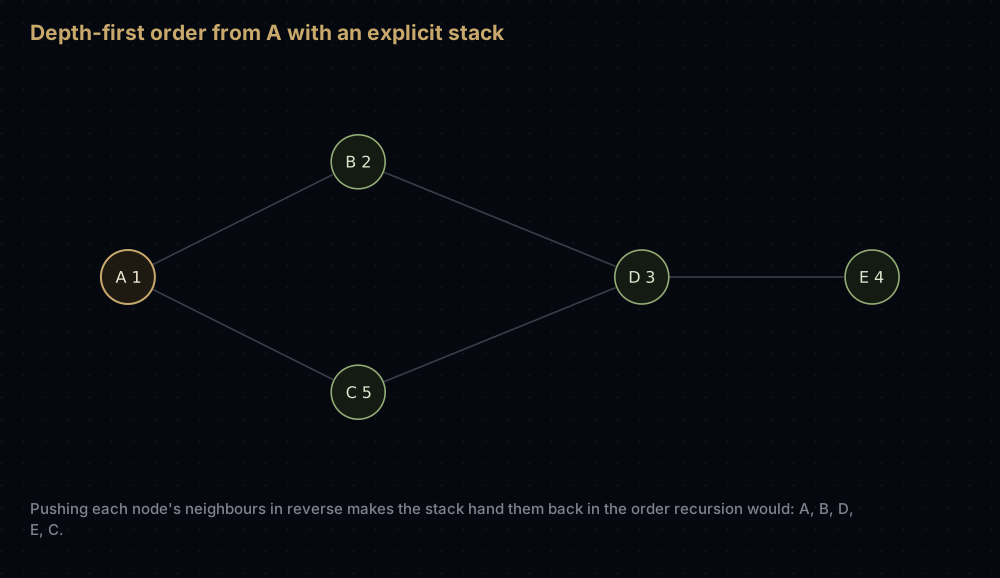
The third line is the detail everybody trips over. Push B then C, and C comes off first, because the stack hands back the last thing pushed, so the plain iterative version explores the neighbours right to left. Both orders are valid depth-first traversals, but only the reversed push order matches what the recursive function does, and that matters the moment you are comparing outputs or debugging against a reference implementation.
The payoff is depth. A chain of 10,001 nodes is a perfectly reasonable graph and a fatal recursion:
long_chain = {str(index): [str(index + 1)] for index in range(10_000)}
long_chain["10000"] = []

try:
    print(len(dfs_recursive(long_chain, "0")))
except RecursionError:
    print("RecursionError: 10,001 nested calls overflow Python's call stack")

print(len(dfs_iterative(long_chain, "0")))RecursionError: 10,001 nested calls overflow Python's call stack
10001Same algorithm, same result, and the iterative one keeps its frames on the heap where there is room. That is the standard reason to do this conversion in production Python.
Common mistakes
Popping without checking for empty. stack.pop() on an empty list raises IndexError, and in a loop that condition usually means your input was malformed, not that your code is wrong. Guard with if stack: or handle the exception where you can say something useful about it.
Treating index 0 as the top. stack.insert(0, item) and stack.pop(0) produce a correct stack and a quadratic program: each call shifts every other element by one slot. Use the end of the list, always.
Forgetting the final emptiness check. A bracket matcher that only validates closers happily accepts (((. The stack must be empty when the input runs out.
Getting the operand order backwards. In reverse Polish, the first value popped is the right-hand operand. Write left, right = stack.pop(), stack.pop() and addition still looks fine while subtraction and division quietly return wrong answers: the worst kind of bug.
Marking graph nodes as seen when you push rather than when you pop. Both approaches work if you are consistent, but mixing them means a node can be pushed twice and visited twice. The version above marks on pop and skips duplicates with if node in seen: continue, which is the safest default because a node may legitimately be pushed by several neighbours before its turn arrives.
Practice
- Reverse a string using nothing but push and pop.
- Build a
MinStackthat also reports its smallest element in O(1), by keeping a second stack of running minima alongside the first. - Extend
is_balancedso that brackets inside a quoted string are ignored, as an editor would. - Implement a first-in-first-out queue using two stacks, and explain why each item is pushed and popped at most twice, which is what makes both operations amortised O(1).
- Write a decoder for run-length strings like
3[ab], which expands toababab, handling nesting such as2[a3[b]], which expands toabbbabbb.
Summary
A stack is the smallest useful data structure: one rule, four operations, all of them constant time. Learn it by learning where it hides: the call frames behind your traceback, the two stacks behind Ctrl+Z, the operand stack inside CPython's bytecode loop, the pile of unclosed brackets your editor is tracking as you type. In Python the implementation is a list you named stack, and the real work is spotting that a problem is a "most recent unfinished thing first" problem in the first place.
| Difficulty | Easy |
| Push | O(1) amortised — writes one slot; the array is copied only when it grows |
| Pop | O(1) amortised — reads the last slot, moves nothing |
| Peek | O(1) — one index lookup at position -1 |
| Search | O(n) — you must pop everything above the item |
| Space | O(n) — one slot per item, plus about an eighth of unused slack |
| Ordering | LIFO — last in, first out; no other order is available |
| Data structure | Python list used from the end, or collections.deque |
| Use it when | The next thing to process is always the most recent thing deferred |
| Avoid it when | You need FIFO (deque), the smallest item (heapq), or random access |
| Real-world use | Call frames, undo/redo, expression evaluation, bracket matching, iterative DFS |
| Python equivalent | A plain list: append, pop, [-1]; queue.LifoQueue across threads |
Keep reading
- Queues and Deques in Python — the mirror image, and why a list is a bad queue but a fine stack.
- Arrays and Dynamic Arrays — where the amortised O(1) append comes from, in detail.
- Recursion and Backtracking — the call stack you get for free, and how to think in it.
- Depth-First Search — the traversal that the explicit stack above was built for.
- Big O Notation — the counting arguments used throughout this post, from first principles.